
The Adventure of PDF to Data Frame in R.
Organizations love PDFs, especially governmental bodies. To the masses, they are easy to read, with nice and clean formatting that is easy on the eyes. To the data scientist, they can be nightmares to upload. For example, take a look at this PDF:
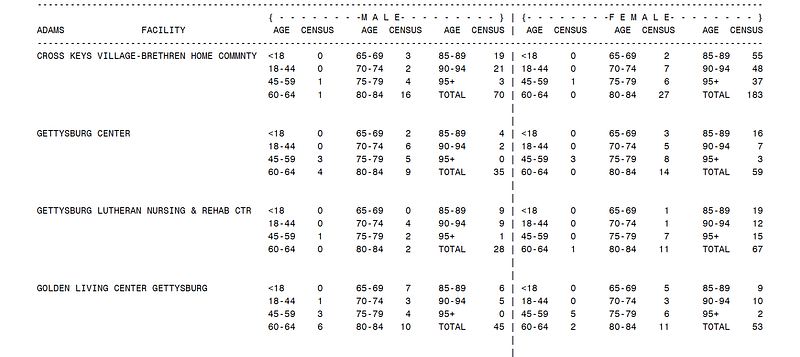
What a 105-page nightmare that would be! R reads PDFs as 1-line imports, but clearly this PDF is not designed with data scientists in mind.
Extracting this data for analysis and manipulation is going to be a maze of extractions, re-arrangements, and ultimately many extra-curricular relaxation techniques.
The good news is, I like doing this! So here I’m going to try to walk you through both an example and through my thoughts to help you with your own adventures. This technique will utilize R and several R packages, namely the Tidyverse package and Pdftools packages. For this example we are going to use a slightly easier PDF to practice on. This PDF contains 17 pages, with the top on every page looking like so (top), and the bottom looking like so (bottom).
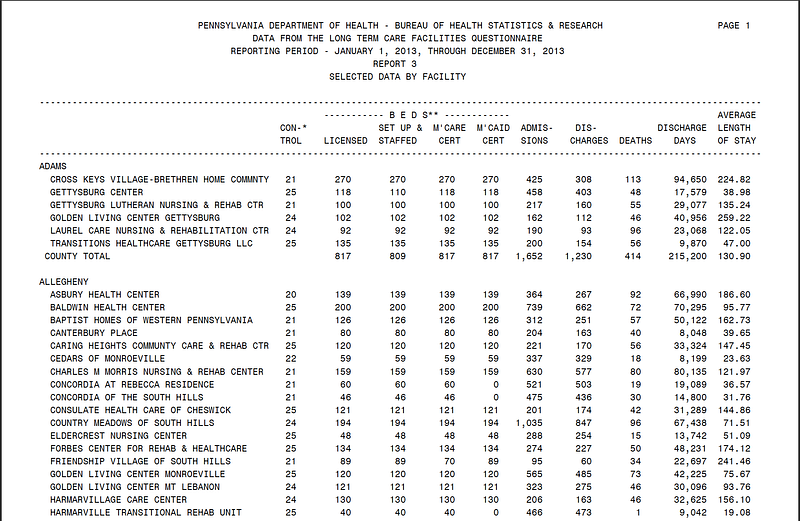
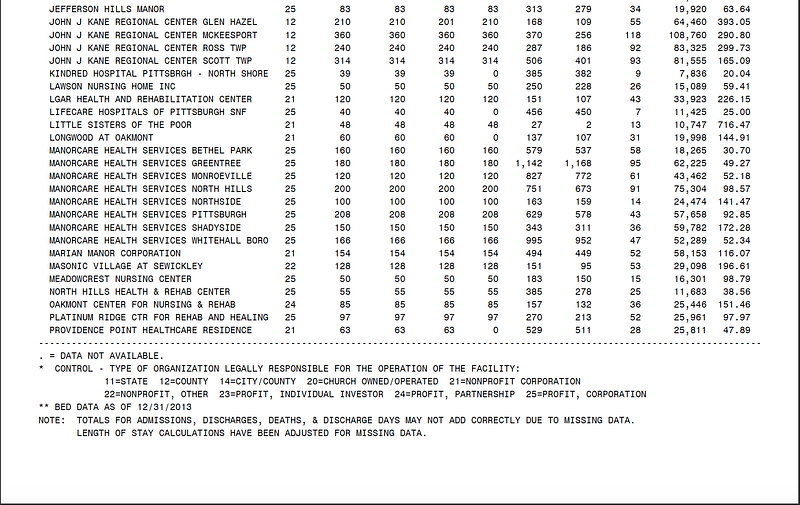
(I’m sure you can all guess what my latest project has been and what inspired this post).
Before we begin, let’s take a look at where we need to go.
Goal: We need to import the PDF into R and turn it into a data frame. However, before R knows what to turn into a data frame we need to construct a list of all entries with corresponding columns from the PDF.
To complicate matters further, to create the list with the appropriate columns, the entries in the list must be separated out by some metric. R will read each line of the PDF as a single entity, so part of the adventure will be explicitly separating out each component and telling R “Hey! This is a distinct thing”.
Yet, notice before we can even worry about that, we have to worry about all of the information we are not interested in. Above the “data-zone” (“Adam” being the first entry), is the PDF headers, and the PDF footers at the bottom of the page.
Prior to even worrying about the headers, and footers we have to tell R what how to read the PDF: that is, once its put into R, what represents a line vs a character vs a string, etc.
Let’s begin!
Step 1: Setting up work space and importing.
As mentioned, we will use the following packages:
library(tidyverse)
library(pdftools)
The command to import the PDF:
PDF_2013 <- pdf_text("~/Nursing Home 2013-2014.pdf")Let’s see what it gives us:
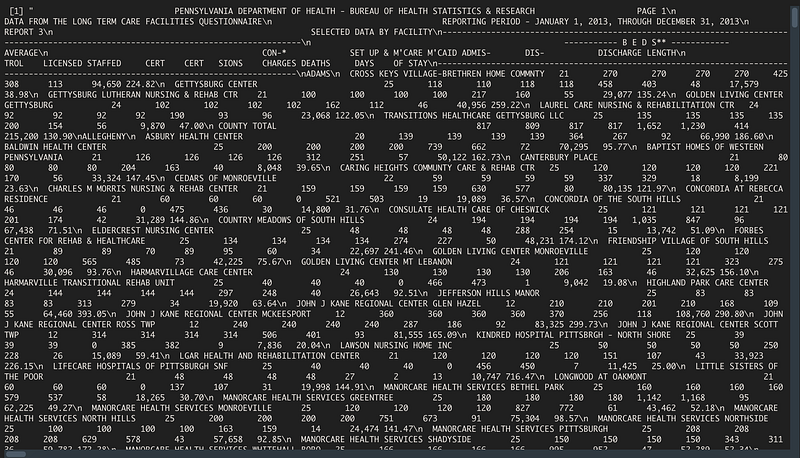
So here’s the first step: Tell R how to separate out the PDF. Thankfully, Pdftools has a helpful command:
str_split("\n")This tells R that each line can be separated by any “\n” present in the text. The full command then becomes:
PDF_2013 <- pdf_text("~/Documents/Real Covid/Data Sources/Nursing      Home 2013-2014.pdf") %>%
   str_split("\n")
Which produces:
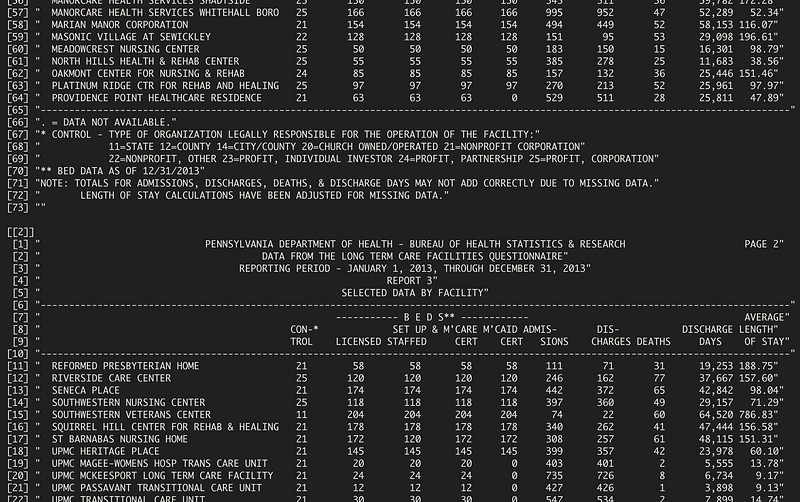
Few observations: we now have a list that is already separated out by page (thankfully), but there is still the headers and bottom of the pages to remove so that we only have data-generating text present.
Step 2: Data-Only Please!
Now, R has many useful and specific verbage and as such, many R programmers don’t like doing what I’m going to do next (for statements!) but, when working with lists of various lengths, sizes, and formats generated from one PDF, I’ve found them to be the easiest to deal with.
So the question becomes: we want to write something that will cycle through each page and remove the header and the bottom.
Thankfully, the top header is always lines 1–10, so we simply have to create something that iterates through, and removes lines 1–10, something like:
for(i in 1:17) { #sets the iteration to go through all 17 pages
   PDF_2013[[i]] <- PDF_2013[[i]][-1:-10]
  }
This will effectively remove the first 10 lines, leaving us with the bottom to deal with. The problem with the bottom, however is the last lines aren’t fixed: some end at line 60, others at 70, so iterating through and telling R which lines to remove in a fixed manner wont work. The one benefit though, is the footer is always 8 lines long.
So there has to be a way to tell R: “Hey, find out how many lines there are, and remove the last 8”. That looks something like this:
for(i in 17) {
   a <- length(PDF_2013[[i]] #finds length of the page
   b <- a-8 #finds number of line without footer
   PDF_2013[[i]] <- PDF_2013[[i]][-b:-a] #removes
  }
We can combine these two:
for(i in 17) {
   PDF_2013[[i]] <- PDF_2013[[i]][-1:-10]
   a <- length(PDF_2013[[i]]
   b <- a-8
   PDF_2013[[i]] <- PDF_2013[[i]][-b:-a]
  }
Which gives us:
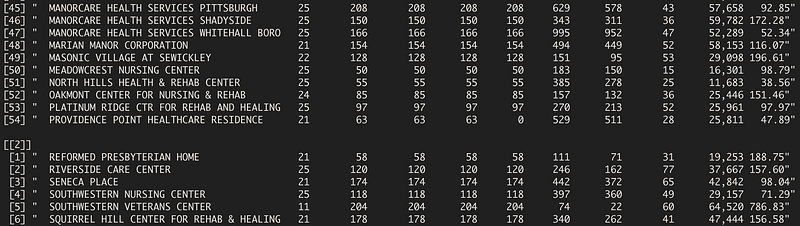
Nice! Now the only problems we face are: 1) Each “line” is read as a single character. That is: if we tried to take this directly into a data frame now, it would produce 1 column with all of these words per line in each row. Not very helpful.
The process of turning each line into individual strings for R to recognize as distinct entities becomes a little hairy, but let’s give it a go.
Step 3: Turn the one into many
The first problem is we have to distinctly separate out each line’s characters. In order to do this, we have to first mush them together (all of the “items” in a line) separated by a known value (say a space) so that we can later tell R: “Hey everything separated by a
Thankfully Pdftools helps us with:
str_squish()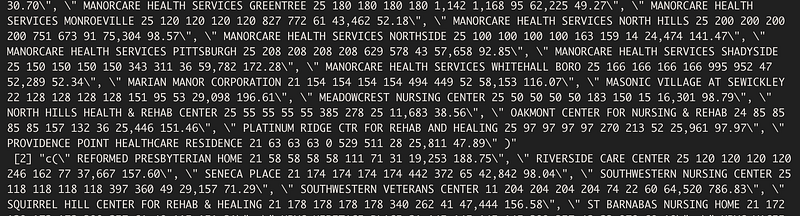
At first it looks like we are worse off! But notice, everything that used to be a line is separated by a “ , \” character. We can separate that out via:
strsplit(split= "\\,\\s\\\"")Which produces:
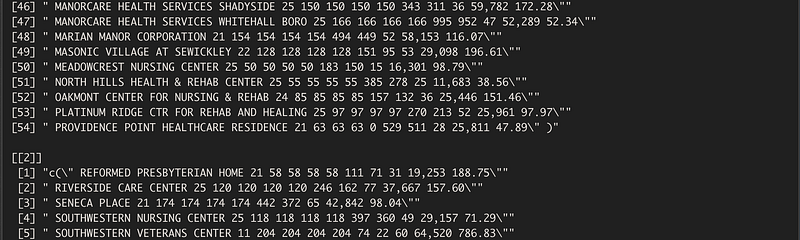
Perfect, now we just have a few things to tidy up before we are ready to tell R that each line represents a row in a data frame with each entry a unique column.
Firstly, let’s get rid of the “c(\” at the start of each page, and the extra “\” at the end of each line!
To get rid of the “c(\” we use the following code:
stringr::str_extract("(?<=c[:punct:]\\\").*")This tells stringr to extract everything that is preceeded by the “c(\”. We loop this through again:
for(i in 1:length(PDF_2013)) {
   PDF_2013[[i]][1] <- PDF_2013[[i]][1] %>%
    stringr::str_extract("(?<=c[:punct:]\\\").*")
}
Which produces:
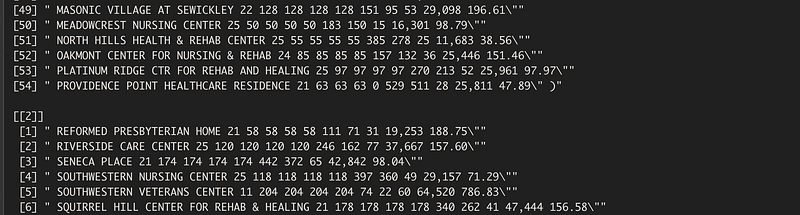
To get rid of the pesky \” at the end of the lines, we do the same. Except time time we have to switch up two things: 1) Tell R to extract everything prior to \” and 2) the loop has to iterate through each page and each line.
1 — To select for things prior to \” , we can use:
stringr::str_extract(".*(?=\")")2- To iterate through each row of each page, you just have to add another for statement:
for(i in 1:length(PDF_2013)) {
 for(j in 1:length(PDF_2013[[i]])) {
So we combine the two:
for(i in 1:length(PDF_2013)) {
  for(j in 1:length(PDF_2013[[i]])) {
    PDF_2013[[i]][j] <- PDF_2013[[i]][j] %>%
      stringr::str_extract(".*(?=\")")
    }
  }
And we get:
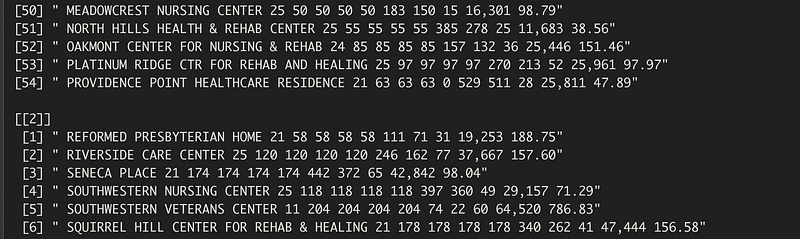
We are getting very close! Now we finally have lines that correspond to the PDF lines, with headers and footers removed, and extra characters removed. The problem remains, though, that R sees each line as one entity. So, if we where to do a count of things in page 2 line 1, we get:

Now, we have to start separating out each individual line into individual components. Thankfully though, the work we did earlier makes this easier because each “thing” in each line has been systematically separated out by a space.
The only issue is: not everything separated by a space is a new item! The names of the facilities should be counted as 1 entity, whereas each number -separated by a space- should be counted as 1 entity.
Step Four: Separate Names from Numbers
Separating the names from the numbers is a re-iteration of the process we did above.
First, we have to iterate a loop through each page and each line. Then we have to tell R: Everything that is a letter, put into a pile, and everything that is a number, put into a pile.
This looks something like this:
for(i in 1:length(PDF_2013)) {
  for(j in 1:length(PDF_2013)){
  PDF_2013[[i]][j] %>% str_extract(".*[:alpha:]+|\\&|\\-") %>%
    print()#extracts the words
  }
}
Note: some OR statements were include in the letter extractions due to some punctuation being in the facilities’ names.
This gives us:
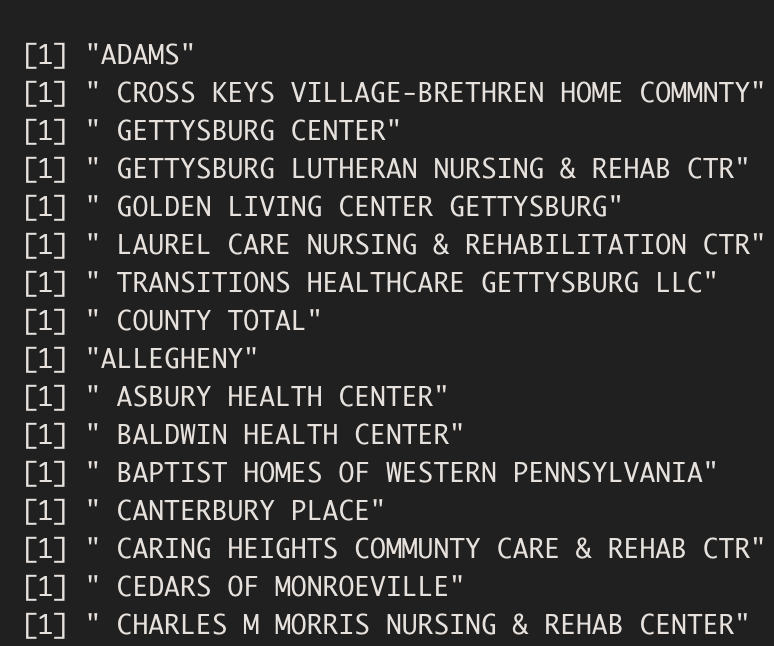
A nice list of all of the names of all of the facilities.
Now, if we can store this, then we can do the same process for the numbers. Then we can separate the numbers by space to make them into individual “columns”, combine the name back with the numbers. Then it will be ready to turn into a dataframe!
The process for storing the names into a data frame is pretty straightforward: for each iteration of the loop, we want the output to be put into a list, then turn that list into a data frame of column length 1.
names_ex = list()
for(i in 1:length(PDF_2013)) {
  words <- PDF_2013[[i]] %>% str_extract(".*[:alpha:]+|\\&|\\-")
  words_df <- data.frame(words) #turns into data frame for list
  names_ex[[i]] <- words_df
  NH_names <- dplyr::bind_rows(names_ex)
  }
print(NH_names)
This gives us:
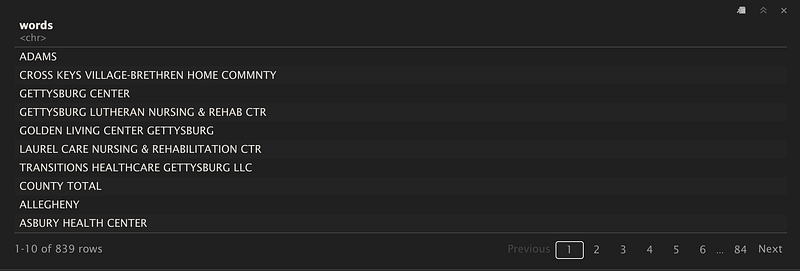
Nice! So we have a data frame now that has all of the names separated out. Let’s repeat the process with the numbers:
numbers_ex = list()
for(i in 1:length(PDF_2013[[i]])){
    numbers <- PDF_2013[[i]] %>% str_extract("[:digit:]+.*")
    numbers_df <- data.frame(numbers)
    numbers_ex[[i]] <- numbers_df
    NH_numbers <- dplyr::bind_rows(numbers_ex)
}
Uh oh, that produces an error!

Why? Well, remember those county name rows, such as “Adam” on page 1 row 1? Well, they don’t correspond with any numbers, so the first entry in the list of numbers is really i+1. This results in a mismatch between the arguments.
This can be overcome by being more specific: we are gong to tell R explicitly where to pull the numbers from AND where to put them:
numbers_ex = list()
k=1
for(i in 1:length(PDF_2013)) {
  for(j in 1:length(PDF_2013[[i]])){
    numbers <- PDF_2013[[i]][j] %>% str_extract("[:digit:]+.*")
    numbers_df <- data.frame(numbers)
    # need to figure out how to get a list of the numbers going!
    while(k <= 1000) {
    numbers_ex[[k]]<- numbers_df
    k <- k+1
    break
    }
  }
  NH_numbers <- dplyr::bind_rows(numbers_ex)
}
That gets us:
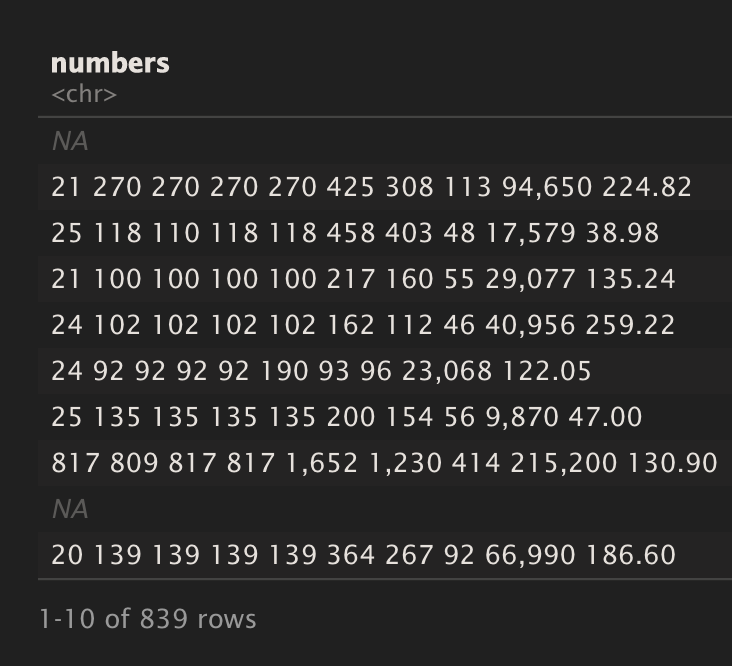
Nice!
We now have two data frames: one contains all of the names of the facilities, and the other contains all of the values associated with each row of the PDF.
The only thing left to do prior to combining them is separating out the numbers into distinct columns.
Separating out the numbers is straight forward:
NH_numbers %>%
  separate(numbers, c("A","B","C","D","E","F","G","H","I","J"), sep="\\s") -> NH_numbers
This gives us:
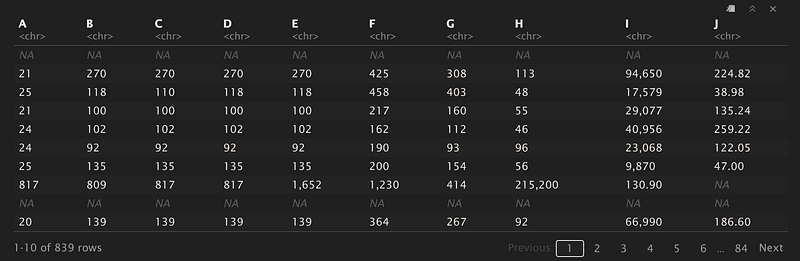
We can finally combine the two data frames!
DF1 <- cbind(NH_names, NH_numbers)Et voilà! We now have:
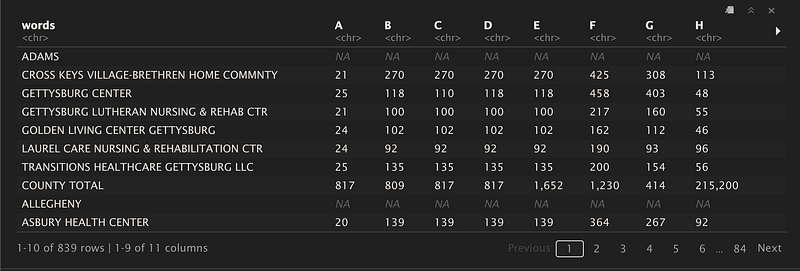
A fully fledged data frame from a PDF!
Now there is still some things to be done: remove the county name and perhaps put that into a column associated with which facilities were located in that county. Perhaps adding a column with the year this data was from, since there is a lot more years than just 2013 to look at.
But at least now there is one data frame with all of the information we need (and can play with) from a PDF!
I hope you enjoyed and this helped!


