
The 5 Most Useful Introspection Functions in Python
Functions to find out more about the type you’re using

Introspection is universal among many programming languages, and Python is no exception. In general, in the context of object-oriented languages, introspection is the ability of an object at runtime to find out the type, available attributes and methods, and other information necessary for performing additional operations with the object.
This piece is going to show you the most useful introspection functions that Python has to offer.
dir()
The first function is the dir() function. What it does is provide a list of attributes and methods that are available to the specified object of interest, which can be a declared variable or a function.
>>> a = [1, 2, 3]
>>> dir(a)
['__add__', '__class__', '__contains__', '__delattr__', '__delitem__', '__dir__', '__doc__', '__eq__', '__format__', '__ge__', '__getattribute__', '__getitem__', '__gt__', '__hash__', '__iadd__', '__imul__', '__init__', '__init_subclass__', '__iter__', '__le__', '__len__', '__lt__', '__mul__', '__ne__', '__new__', '__reduce__', '__reduce_ex__', '__repr__', '__reversed__', '__rmul__', '__setattr__', '__setitem__', '__sizeof__', '__str__', '__subclasshook__', 'append', 'clear', 'copy', 'count', 'extend', 'index', 'insert', 'pop', 'remove', 'reverse', 'sort']
As you may notice, the return value for the dir() function is actually a sorted list, which implies we can check the existence of a certain attribute or method to see if the object can perform that operation. An example is given below.
>>> b = [1, 2, 3]
>>> b_dir = dir(b)
>>> 'index' in b_dir
True
>>> 'pop' in b_dir
True
When the dir() function takes no arguments, it’ll return the names in the current scope, like below. So it can be useful to check what has been defined and used in your development.
>>> dir()
['__annotations__', '__builtins__', '__doc__', '__loader__', '__name__', '__package__', '__spec__', 'a', 'b', 'b_dir']
type()
Another commonly used introspection function is the type() function. As indicated by its name, this function returns the type of the object, which can be a primitive data type, an object, a class, or a module. Various examples are shown below.
>>> type(1.2)
<class 'float'>
>>> type([1, 2, 3])
<class 'list'>
>>> type((3, 'Three'))
<class 'tuple'>
>>> def do_something():
...     pass
...
>>> type(do_something)
<class 'function'>
>>> class Fruit:
...     pass
...
>>> type(Fruit)
<class 'type'>
>>> type(Fruit())
<class '__main__.Fruit'>
>>> import os
>>> type(os)
<class 'module'>
What do we do with these outputs or return values from the type() function? We can directly compare the return value with the type we want to check it against to by using == or is. Some examples are given below.
>>> type(1.2) == int
False
>>> type(1.2) == float
True
>>> type([1,2]) == list
True
>>> type((1,2)) is tuple
True
isinstance()
One introspection function that’s particularly useful in our development is the isinstance() function. Using this function, we can determine if a certain object is an instance of the specified class. A simple example is given below.
>>> isinstance([1,2], list)
True
>>> isinstance([1,2], tuple)
False
>>> isinstance((1,2), tuple)
True
Another thing to note is the isinstance() function can take a tuple for its second argument, like below. This is essentially separate or evaluations.
>>> isinstance(1, (int, float, tuple))
True
>>> isinstance(1, int) or isinstance(1, float) or isinstance(1, tuple)
True
A more practical use example is given below, which involves a custom class.
>>> class Fruit:
...     pass
...
>>> apple = Fruit()
>>> isinstance(apple, Fruit)
True
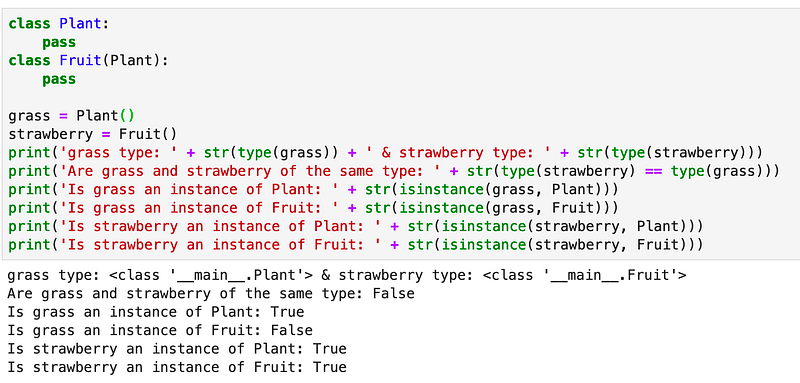
You may have noticed that both type() and isinstance() can be used to determine if an object is of a certain type. However, they’re not the same.
When we use type() to determine if an object is of a certain type, we’re doing a one-to-one comparison. Basically, we’re comparing the object’s type with the type we specified to see if they’re the same.
By contrast, isinstance() is a more flexible function — as it actually returns whether an object is an instance of a class or of a subclass thereof. In other words, it compares the object with a list of potentially relevant classes, which is kind of like a one-to-more comparison. The following figure shows you the relevant information.
hasattr()
Sometimes, before we access an object’s attribute, we may want to check if it has the attribute. We don’t want to see the following error.
>>> class Fruit:
...     pass
...
>>> Fruit().tasty
Traceback (most recent call last):
  File "<stdin>", line 1, in <module>
AttributeError: 'Fruit' object has no attribute 'tasty'
To prevent that from happening, we can check if the object has such an attribute before we access it by using the hasattr() function.
>>> class Fruit:
...     tasty = True
...
>>> fruit = Fruit()
>>> if hasattr(fruit, 'tasty'):
...     print('The fruit is tasty')
... else:
...     print('The fruit is not tasty')
...
The fruit is tasty
Notice it or not, but we can actually use the dir() function to achieve the same result.
If you recall, the dir() function returns the available attributes and methods to a given object, such that we can directly compare if an attribute is one of the returned list’s items. The updated code is shown below with the modified portion in bold.
>>> class Fruit:
...     tasty = True
...
>>> fruit = Fruit()
>>> if 'tasty' in dir(fruit):
...     print('The fruit is tasty')
... else:
...     print('The fruit is not tasty')
...
The fruit is tasty
id()
Last but not the least in terms of introspection in Python is the id() function, which returns the object’s memory address, and thus it’s unique among the existing objects. Below is a simple example of this function.
a = 2
b = 1
id(a)
140339209865072
id(b)
140339209865096
One common code example in Python is to swap two variables, which can be achieved simply by running the following code a, b = b, a. Let’s see what happens after the swap.
id(a)
140339209865096
id(b)
140339209865072
a, b
(1, 2)
As you can tell, these two variables have successfully been swapped, which is reflected by their memory addresses and values.
Conclusions
Introspection can be done very conveniently in Python.
Although there is much more to explore for interested users in terms of more advanced introspection methods in Python’s inspect module, the five functions discussed in this piece are the most common ones you can use in your Python projects.


