avatarRebecca Pendleton

Free AI web copilot to create summaries, insights and extended knowledge, download it at here

3019

Abstract

be invested into organisations that are actively committed to driving positive social and environmental change.</p><h1 id="0255">2. For seeing all your money & bills in one place: Emma</h1><p id="211b">For an article all about using multiple apps, there are times when you just want simplicity. That’s where <a href="https://emma-app.com/"><b>Emma</b></a><b> </b>comes in.</p><p id="9b46">Emma markets itself as ‘Your Best Financial Friend’. And it does feel like the app is looking out for you, just as a friend would. You can see all your bank accounts in one place, track your bills and subscriptions, and set up a budget all in one app.</p><figure id="cd50"><img src="https://cdn-images-1.readmedium.com/v2/resize:fit:800/1*WEeOE9HV_q-fsh_o-05kqg.jpeg"><figcaption>Emma is the financial advisor you always wanted, without the boring dinner party chat.</figcaption></figure><p id="2fb1"><b>How does it work?</b></p><ul><li>Select all the bank accounts you want to link to Emma in just a few taps (including pensions, savings and cryptocurrencies)</li><li>Emma recognises regular payments and bills and helps you to avoid wasteful subscriptions</li><li>Decide how much your want to spend on each budget category per month and Emma will let you know when you’re off track</li></ul><p id="5387">I find Emma useful because I actually have the full picture of all my accounts. Also, since I love subscriptions and tend to forget about them regularly, Emma reminds me to cancel ones I’m not getting value from.</p><p id="319e">Also, there is a fun quiz every week on random topics which enters you into a prize draw. Cute.</p><h1 id="8929">3. For avoiding arguments about money: Splitwise</h1><p id="2e64">If you and your partner end up taking turns to pay the restaurant bill or book flights but end up losing track of who owes the other, <a href="http://www.splitwise.com"><b>Splitwise</b></a> is a life-saver.</p><p id="a9d7">Likewise, if you’re on a group holiday, have housemates, or regularly go out with the same group of friends, you can all add your expenses to Splitwise and let the app do the work of figuring out who owes who.</p><p id="920c">My partner and I use Splitwise for everything, and I can attest that we never argue about who owes who!</p><figure id="9eef"><img src="https://cdn-images-1.readmedium.com/v2/resize:fit:800/1*kNpYJOYE-YzLZsKqX0gH0A.png"><figcaption>Stompy needs to pay up on Splitwise.</figcaption></figure><h1 id="d7a7">4. For saving for a new iPad or trip to the coast: Revolut</h1><p id="63c9"><a href="https://www.revolut.com/en-US"><b>Revolut</b></a><b> </b>doesn’t really need an introduction, but the digital bank has a whole host of great features above and beyond the classic money transfer and digital wallet functionality it’s known for.</p><figure id="e008"><img src="https://cdn-images-1.readmedium.com/v2/resize:fit:800/1*pEqmULwZTgm0e5VNDFGpBg.gif"><figcaption></figcaption></figure><p id="0ec6">One of these features is the ability to create <b>‘Vaults’, </b>where

Options

you can set a savings goal and easily transfer money or round up spare change to fund your next tech purchase or holiday.</p><p id="f6b2">Group vaults mean you and your mates can easily save for a group trip or gift for a pal.</p><p id="aac9">I have vaults for fun purchases I can’t justify buying outright (hello, new iPad Pro 2021), as well as upcoming trips. I also created a ‘Taxes’ vault to store half of my earnings from Medium so that I don’t get caught out at the end of the tax year. Future me is going to <i>love</i> present me.</p><h1 id="2dea">Special Mentions</h1><p id="fb3b">The above apps are the ones that I use the most, but some other money tools I have tried and really liked are:</p><ul><li><a href="https://www.youneedabudget.com/"><b>YNAB (You Need a Budget)</b> </a>— a great budgeting tool where you assign your paycheck to different categories up front. If you overspend in one area, you have to balance the budget by taking from another category.</li><li><a href="https://www.finimize.com/"><b>Finimize</b> </a>— finance n00bs like myself can attend free webinars from this financial blog app, which share trends and industry news in a way that makes a complex topic seem less intimidating.</li><li><b>Google Sheets</b> — I’ll be honest, the only reason I didn’t add this to the list is because it isn’t as mobile-centric as the others. But I do use Google Sheets to do future projections on savings that I can’t do via Emma.</li></ul><p id="af5c">And if all else fails, you can always just use a pen and paper and a calculator. Sometimes basic is better, you know?</p><p id="7052"><b><i>If you enjoyed reading this article, check out my other musings on productivity and personal psychology that have been featured in Forge and Index:</i></b></p><div id="d844" class="link-block"> <a href="https://index.medium.com/feeling-overwhelmed-you-need-a-mvd-minimum-viable-day-bf07b7b90eb"> <div> <div> <h2>Feeling Overwhelmed? You Need an MVD—That’s Minimum Viable Day</h2> <div><h3>undefined</h3></div> <div><p>undefined</p></div> </div> <div> <div style="background-image: url(https://miro.readmedium.com/v2/resize:fit:320/1*bJIRxsTjTgMUIvIqGYW-iA.jpeg)"></div> </div> </div> </a> </div><div id="6d2e" class="link-block"> <a href="https://forge.medium.com/the-daily-battle-for-brain-space-829eab4f64ed"> <div> <div> <h2>The Daily Battle for Brain Space</h2> <div><h3>How I’m fighting my critical inner resistance, one day at a time</h3></div> <div><p>forge.medium.com</p></div> </div> <div> <div style="background-image: url(https://miro.readmedium.com/v2/resize:fit:320/1*AE6TD6rNUvOGStO76nFdHA.jpeg)"></div> </div> </div> </a> </div></article></body>

The 4 Apps That Make Managing My Money Stress-Free (And Kinda Fun)

Tracking, saving and investing your hard-earned cash doesn’t need to be difficult or boring

This is how I imagine a Robo Investor to look. Image by Storytale.io

I don’t love numbers. I used to be a maths whiz at school, but as I’ve gotten older, my heart has turned to more creative interests such as languages, writing and psychology. Finance is not a big passion of mine.

What I do like though is technology. And productivity hacks. And maybe most of all, clothes shopping. Unfortunately, the last one requires me to be careful with my money. But through leveraging my interest in the first two areas, I’ve stumbled upon an excellent discovery:

There are tons of really good apps out there that mean I don’t need to waste valuable brain space worrying about what’s going on with my moolah.

So if, like me, the thought of having to look at your stocks and shares every few days to make tweaks to your portfolio fills you with a sense of boredom and dread, read on.

I’ve tried a ton of money management apps, and these are my 5 favourites:

1. For super-simple investing: A Robo-Investor like Wealthify

If you read ‘Robo-Investor’ and immediately visualised a kind of robot accountant wearing a suit — well, snap.

In fact, all ‘Robo-Investor’ means is that instead of having to deal with a team of financial advisors, your investment portfolio is driven by an algorithm and is managed digitally with minimal human interaction.

How does it work?

  1. Download Wealthify (or Nutmeg, or any other Robo-Investor app)
  2. Choose how much you want to invest per month
  3. Select your ‘risk level’
  4. Connect your bank account

And boom — the app invests your money into a stocks and shares portfolio which is updated every day based on economic trends. You can see how your money is growing monthly via the app dashboard. Simple.
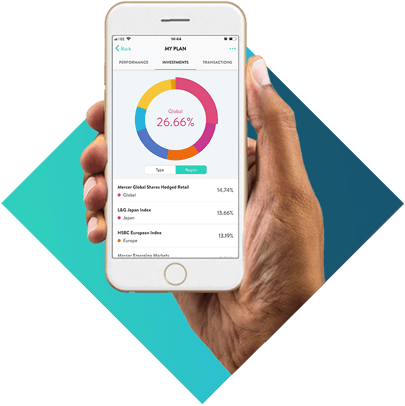
The Wealthify app shows where your money is being invested and how your portfolio is performing.

Regarding risk level: I chose ‘Confident’ first (which is in the middle) but later set up a plan with an ‘Ambitious’ setting. Both have been performing really well (ca. 12% growth). Huzzah!

And finally, you can also choose ‘Ethical Investing’ if you want your money to be invested into organisations that are actively committed to driving positive social and environmental change.

2. For seeing all your money & bills in one place: Emma

For an article all about using multiple apps, there are times when you just want simplicity. That’s where Emma comes in.

Emma markets itself as ‘Your Best Financial Friend’. And it does feel like the app is looking out for you, just as a friend would. You can see all your bank accounts in one place, track your bills and subscriptions, and set up a budget all in one app.

Emma is the financial advisor you always wanted, without the boring dinner party chat.

How does it work?

  • Select all the bank accounts you want to link to Emma in just a few taps (including pensions, savings and cryptocurrencies)
  • Emma recognises regular payments and bills and helps you to avoid wasteful subscriptions
  • Decide how much your want to spend on each budget category per month and Emma will let you know when you’re off track

I find Emma useful because I actually have the full picture of all my accounts. Also, since I love subscriptions and tend to forget about them regularly, Emma reminds me to cancel ones I’m not getting value from.

Also, there is a fun quiz every week on random topics which enters you into a prize draw. Cute.

3. For avoiding arguments about money: Splitwise

If you and your partner end up taking turns to pay the restaurant bill or book flights but end up losing track of who owes the other, Splitwise is a life-saver.

Likewise, if you’re on a group holiday, have housemates, or regularly go out with the same group of friends, you can all add your expenses to Splitwise and let the app do the work of figuring out who owes who.

My partner and I use Splitwise for everything, and I can attest that we never argue about who owes who!
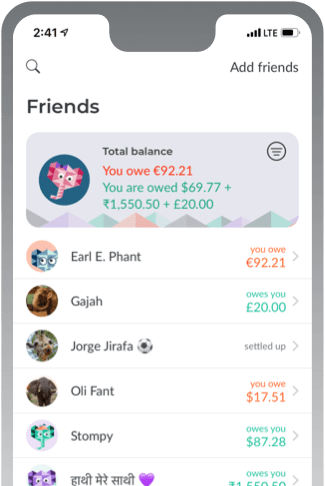
Stompy needs to pay up on Splitwise.

4. For saving for a new iPad or trip to the coast: Revolut

Revolut doesn’t really need an introduction, but the digital bank has a whole host of great features above and beyond the classic money transfer and digital wallet functionality it’s known for.
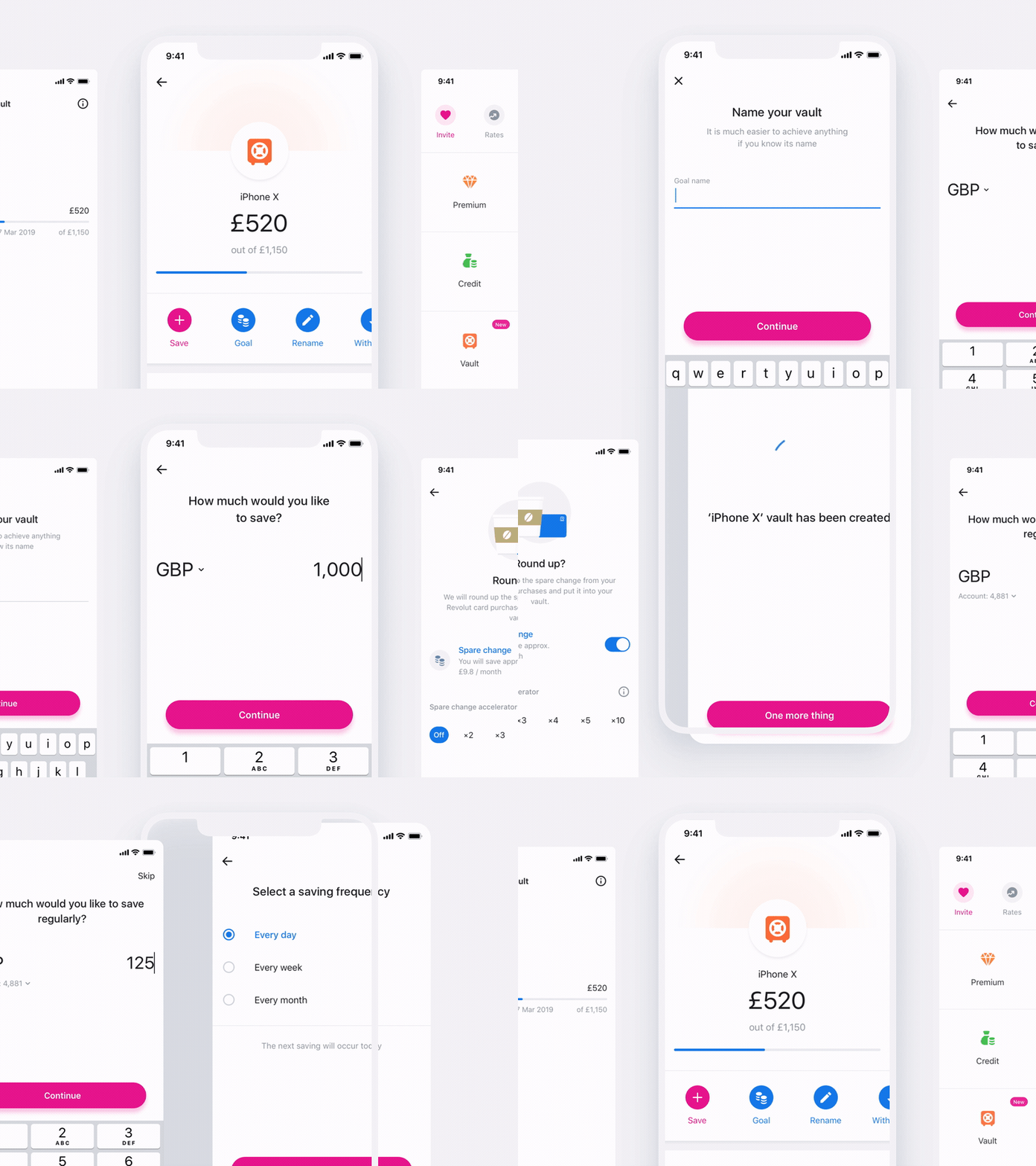
One of these features is the ability to create ‘Vaults’, where you can set a savings goal and easily transfer money or round up spare change to fund your next tech purchase or holiday.

Group vaults mean you and your mates can easily save for a group trip or gift for a pal.

I have vaults for fun purchases I can’t justify buying outright (hello, new iPad Pro 2021), as well as upcoming trips. I also created a ‘Taxes’ vault to store half of my earnings from Medium so that I don’t get caught out at the end of the tax year. Future me is going to love present me.

Special Mentions

The above apps are the ones that I use the most, but some other money tools I have tried and really liked are:

  • YNAB (You Need a Budget) — a great budgeting tool where you assign your paycheck to different categories up front. If you overspend in one area, you have to balance the budget by taking from another category.
  • Finimize — finance n00bs like myself can attend free webinars from this financial blog app, which share trends and industry news in a way that makes a complex topic seem less intimidating.
  • Google Sheets — I’ll be honest, the only reason I didn’t add this to the list is because it isn’t as mobile-centric as the others. But I do use Google Sheets to do future projections on savings that I can’t do via Emma.

And if all else fails, you can always just use a pen and paper and a calculator. Sometimes basic is better, you know?

If you enjoyed reading this article, check out my other musings on productivity and personal psychology that have been featured in Forge and Index:

Money
Personal Finance
Productivity
Tech
Investing
Recommended from ReadMedium