The 3 ChatGPT Prompts Everyone’s Ignoring (But Shouldn’t)
Don’t be like everyone
We’ve all heard it a hundred times: ChatGPT is the future!
An AI-powered oracle that can answer your questions, engage in deep discussions, and even offer emotional support. It’s the Swiss Army knife of digital interactions.
But let’s cut the BS for a second. If it’s so amazing, why are we all asking it the same old questions? “What’s the weather like?” “How do I make spaghetti bolognese?” Really? That’s the best we can do?
Not anymore!
In this article, I’m going to reveal 3 prompts that everyone is ignoring but absolutely shouldn’t. Trust me, if you thought you knew ChatGPT, buckle up because you’re about to be schooled in the art of AI prompting.
1. The Mother Prompt
If I could only use 1 prompt for the rest of my life, this would be it. It’s the prompt designed to help you with literally anything.
The prompt itself is a bit complex but the usage is not. You only need to paste it into ChatGPT and follow any further instructions.
Here’s how it works:
- Give ChatGPT a task.
- ChatGPT assumes expert roles for the given task.
- ChatGPT asks further questions to perform a task to the best of its abilities.
- ChatGPT returns a response.

2. Few Shot Prompt
This one is not really a prompt, but rather a prompt template. And it’s the best way I know to force ChatGPT to follow a certain style or specific format.
You should always try to use this prompt when you’re trying to do a specific task, and you know what the response should look like (at least kind of).
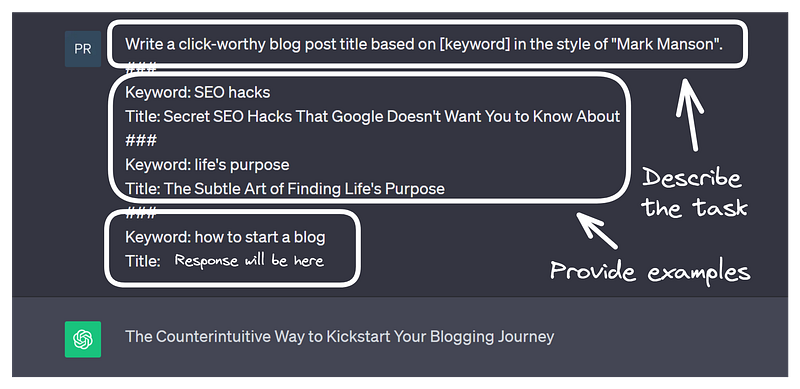
Here’s the example prompt following the structure.
Write a click-worthy blog post title based on [keyword] in the style of “Mark Manson”. ### Keyword: SEO hacks Title: Secret SEO Hacks That Google Doesn’t Want You to Know About ### Keyword: life’s purpose Title: The Subtle Art of Finding Life’s Purpose ### Keyword: how to start a blog Title:
As you can see, the prompt has multiple parts:
- Specify what’s the task.
- Provide a set (at least 2) of examples to guide the style and format of the response.
- The last example will be left blank and ChatGPT will fill in the response (without all the extra fluff).
3. The Meta Prompt
I still see a lot of people struggling to understand how ChatGPT can help them.
They barely scratch the surface, asking pointless questions, and not really leveraging this technology to its full potential.
But all of that can be easily fixed with the following prompt.
Here’s what the prompt does:
- It asks you about your occupation and professional life.
- It suggests how you can use ChatGPT to help you.
- It also gives you prompt examples to try out.
Here’s the prompt itself:
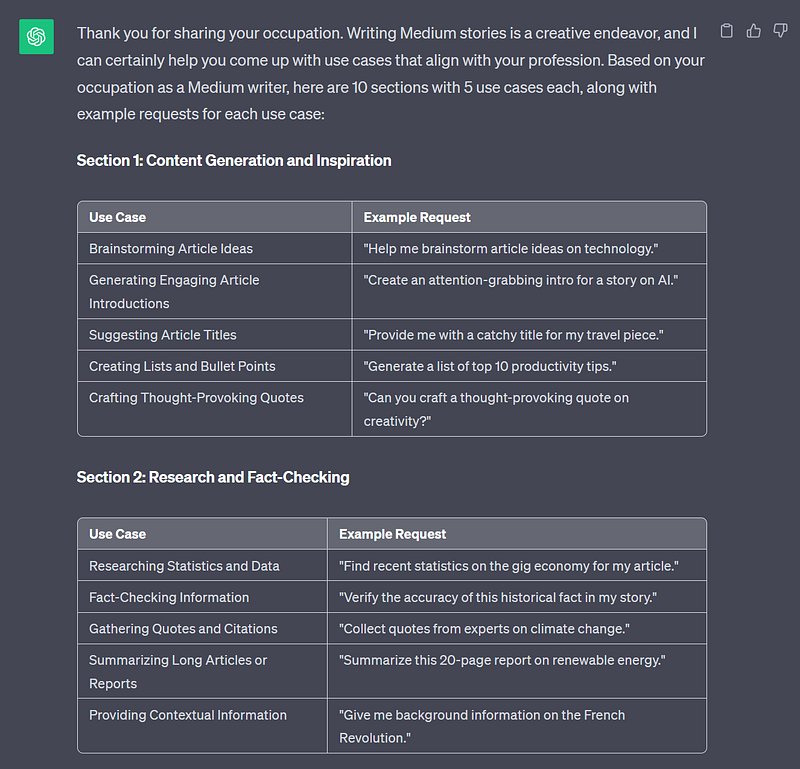
Create a curated list of use cases for ChatGPT, each thoughtfully designed to align with my occupation.This list will serve as my personalized guide, enabling me to leverage ChatGPT’s capabilities in various aspects of my occupation. Organize this list into 10 distinct sections sorted by their relevance to my occupation. In each section, construct a table with columns for “Use Case” and “Example Request”. Each section will contain 5 use cases examples. The “Example Request” will be written in the form of a direct request to ChatGPT. Begin by asking me about my occupation, and based on it fill in the interests, goals, challenges I’m facing. It’s imperative that you follow the request for 10 sections and 5 use case examples in each section.
And here’s the example response you can get. Just note that the screenshot is cut and doesn’t contain all the suggestions I received.
Final Thoughts
We often see ChatGPT as a tool to answer questions or generate text, but it can be so much more.
As you navigate the world of AI, don’t just focus on the conventional prompts. Instead, dig deeper, ask more profound questions, and explore the uncharted territories of your mind.
The 3 prompts I shared with you today will put you on the right path, but to go even further, you’ll have to pause, think, and experiment in your own AI conversations.
But if you don’t feel like thinking and would rather use a set of predesigned prompts, there’s always an option to use my ChatGPT prompt bundle.

This story is published on Generative AI. Connect with us on LinkedIn to get the latest AI stories and insights right in your feed. Let’s shape the future of AI together!