
That Our Writing May Fly Higher
Editing apps that can make your writing shine.
My writing experience on Medium is less than two months old. Therefore, this piece is not a Medium writing tutorial. Let’s leave that for the expats. Like many new writers on Medium and elsewhere, the concerns of whether or not our writings meets the cut is always an upsetting issue. Thanks to some ingenious folks who have come to the rescue of non- English majors like most of us here.
The impostor syndrome is always tapping at your shoulders and nagging at you. “Are you really sure that you are equal to this task?” You are then lured into a comparison trap with several of your favorite writers and authors. You forget that many of them have been perfecting their trades before you ever read your first letter of the alphabet.
There is no guarantee that your writing will ever be half as good as those of your favorite storytellers on Medium and elsewhere. One thing you can be sure of is that as you continue to read and write without forgetting your own voice, you will greatly improve with time.
To prod you on towards your goals, there are many useful and easy online writing tools within your reach. Any one or combination of these are must haves if your writing is to rise up to enviable heights. The darling app for the writing community is Grammarly. There are several other useful ones, but I am not writing reviews on any of these apps. I don’t even know enough English language to be able to do that. That is a business for the English professors here and elsewhere.
My journey with Medium did not start with a “wheez bang”, but I am gunning for the long run. I’ll see you when we get there.
As a post-grad, non-native English speaker new to Medium, I discovered writing apps that help my writing immensely. I was desperate to learn some tricks that will help me become an excellent writer in English and on Medium.
What am I doing to tell my stories better?
- Reading, lots of it. You already know that because I’m almost sure you are doing the same. I read books, books and yet more books especially those relating to subjects of interest to me and from authors I strongly admire and will love to write like.
- Following and reading stories from the Medium experts and veterans. Don’t count on most of your Medium darlings to clap or wave back at you though. No malice here, just remember that most people are out only for building their own tribes.
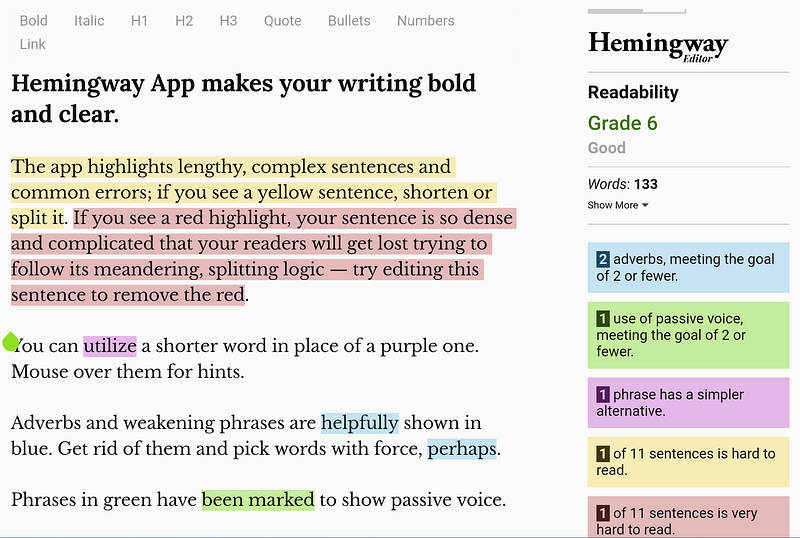
- Using web based writing editors like Hemingway app among others.
- Following the simple path. I aim at writing in simple style so even grade level 5 or 6 students could easily understand my writings. Write and write and write. Write some more. Again? Yes. Unfortunately, my nemesis is I’ll rather read than write.
First time out with Hemingway app
Some of the writing apps could be classed as Formula 1 racing cars of the writing world. Others are akin to your tried and trusted Toyota Corolla. If you are just starting out like me, why will you shell out from your "not yet there" Medium earnings to purchase an F1 writing editor when you can have a Corolla for free to do the same job at almost the same or better quality? I am not sure where Hemingway app falls in the F1 to Toyota Corolla continuum.
Your writing will certainly get better as you use this app.
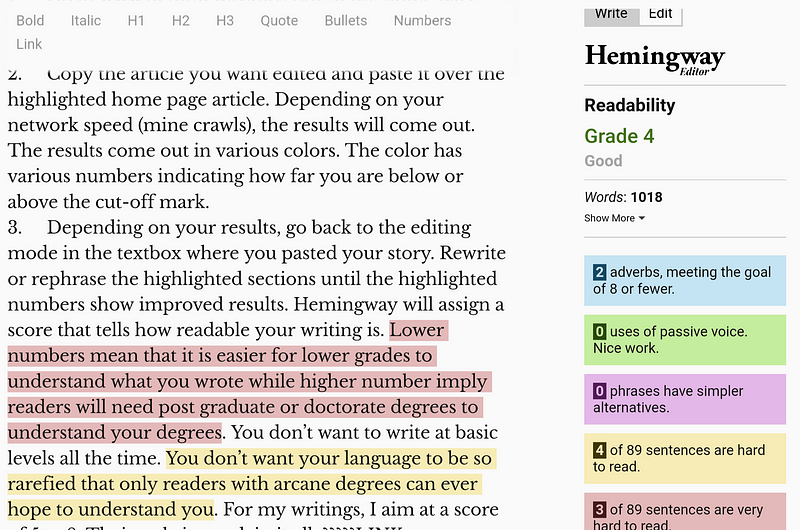
Before using the Hemingway app, the readability score was 6. After editing with the app, the score came down to 4 (better) as shown in the screenshot above.
Here’s how I use old and faithful Hemingway app.
- Go to Hemingway app home page, you will see a screen demo of what a typical editing session is like on the app.
- Copy the article you want edited and paste it over the highlighted home page article. Depending on your network speed (mine crawls), the results will come out. The results are highlighted in various colors. These colored results also have various numbers indicating how far you are below or above the cut-off mark.
- Depending on your results, toggle back to the editing mode in the homepage textbox where you pasted your story. Rewrite or rephrase the highlighted sections until the numbers indicate better readability. Hemingway will assign a score that tells how readable your writing is. Lower numbers mean that it is easier for lower grades to comprehend your writing. Higher numbers imply readers will need post graduate or doctorate degrees to understand your degrees. You don’t want to perpetually write at basic levels. You don’t want your language to be so rarefied that only readers with arcane degrees can ever hope to understand you. For my writings, I aim at a score of 5 to 8. Their website explain more.
- I used the tool on the first draft of this article and here is the score. What you’re reading is the final edited copy plus more tweaking on my Medium Android app.
- The other free online writing apps I use are Title Case Converter and Duplichecker. The first one ensures your title is properly formatted while the second helps you to ward off plagiarism from your work. As a new writer, you will find all these tools invaluable additions to your writing kit.
While we are still at it, I want to say thank you to those wonderful editors and publications that accepted our stories even while we were yet unsure of ourselves. No, I am not insinuating that any publication and editors must lower their standards to let all kinds of writing fish through their nets. But, we will always remember with gratitude all those who stoop to carry us on their shoulders so that we, the upcoming writers may see further to write better.
Writing editor apps are capable of transforming any writing into shining limelight. Even though we aspire to better work as writers, always remember that, perfection is oftentimes the enemy of done. So, don’t forget to click the publish button more often.
Now let’s go and write and write and write some more. And let’s do it together.
DISCLOSURE: I’m not in any way affiliated to any of the developers of these writing apps.


