avatarRajesh Budhiraja

Free AI web copilot to create summaries, insights and extended knowledge, download it at here

1666

Abstract

<span class="hljs-punctuation">:</span> <span class="hljs-punctuation">{</span> <span class="hljs-attr">"alert"</span><span class="hljs-punctuation">:</span> <span class="hljs-punctuation">{</span> <span class="hljs-attr">"title"</span><span class="hljs-punctuation">:</span> <span class="hljs-string">"Title"</span><span class="hljs-punctuation">,</span> <span class="hljs-attr">"subtitle"</span><span class="hljs-punctuation">:</span> <span class="hljs-string">"Subtitle"</span><span class="hljs-punctuation">,</span> <span class="hljs-attr">"body"</span><span class="hljs-punctuation">:</span> <span class="hljs-string">"Body"</span><span class="hljs-punctuation">,</span> <span class="hljs-punctuation">}</span> <span class="hljs-punctuation">}</span> <span class="hljs-punctuation">}</span></pre></div><figure id="8730"><img src="https://cdn-images-1.readmedium.com/v2/resize:fit:800/1*jz7dxi9Wh9pinouzqj5xEw.png"><figcaption></figcaption></figure><p id="7ea7">Here, the Simulator Target Bundle refers to the <code>Bundle Identifier</code> of the app. <code>aps</code> defines the contents of the notification.</p><p id="31a9">if you drag apns file to the simulator you should see the notification.</p><p id="44e1">Although this works perfectly you might encounter a use case where you want to send push notifications through a script for testing purposes. In that case, we can do it via the terminal.</p><p id="d2bc">For this, we need to find the device ID for the simulator.</p><figure id="1384"><img src="https://cdn-images-1.readmedium.com/v2/resize:fit:800/1*uu4cxCPqr0gnZFGwnbW7HA.png"><figcaption>

Options

</figcaption></figure><p id="c41e">e.g. device ID for iPhone 14 Pro Max is <b><i>A1374369–6BD5–4E2B-A1C2–103ED22E3F88.</i></b></p><div id="f3ff"><pre>xcrun simctl push deviceID bundleID file</pre></div><p id="3a9d">We know that,</p><p id="c420">bundleID = com.budhiraja.NotificationTest file = ~/Desktop/notification.apns</p><div id="18e8"><pre>xcrun simctl push A1374369-6BD5-4E2B-A1C2-103ED22E3F88 com.budhiraja.NotificationTest ~/Desktop/notification.apns</pre></div><p id="9325">since we are passing the target bundle ID directly we can skip the <b><i>Simulator Target Bundle</i></b> from apns file in this case.</p><div id="9bc9"><pre><span class="hljs-punctuation">{</span> <span class="hljs-attr">"aps"</span><span class="hljs-punctuation">:</span> <span class="hljs-punctuation">{</span> <span class="hljs-attr">"alert"</span><span class="hljs-punctuation">:</span> <span class="hljs-punctuation">{</span> <span class="hljs-attr">"title"</span><span class="hljs-punctuation">:</span> <span class="hljs-string">"Push Notification"</span><span class="hljs-punctuation">,</span> <span class="hljs-attr">"subtitle"</span><span class="hljs-punctuation">:</span> <span class="hljs-string">"Test Push Notifications"</span><span class="hljs-punctuation">,</span> <span class="hljs-attr">"body"</span><span class="hljs-punctuation">:</span> <span class="hljs-string">"Testing Push Notifications on iOS Simulator"</span><span class="hljs-punctuation">,</span> <span class="hljs-punctuation">}</span> <span class="hljs-punctuation">}</span> <span class="hljs-punctuation">}</span></pre></div></article></body>

Testing push notifications On the simulator — iOS

From XCode 11.4 onwards we can test push notifications in the simulator as well. Before proceeding with this ensure that the project is set up and notification permissions are given. For reference:

There are two ways by which we can send push notifications:

  1. By simply dragging the APNS file on our simulator
  2. By using terminal

We will go through both one by one.

APNS file

Irrespective of how we are sending push notifications we need to create one file with .apns extension. For reference:

{
    "Simulator Target Bundle": "com.budhiraja.NotificationTest",
    "aps": {
        "alert": {
            "title": "Title",
            "subtitle": "Subtitle",
            "body": "Body",
        }
    }
}
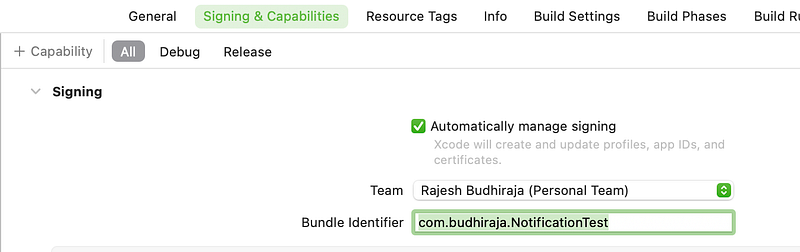
Here, the Simulator Target Bundle refers to the Bundle Identifier of the app. aps defines the contents of the notification.

if you drag apns file to the simulator you should see the notification.

Although this works perfectly you might encounter a use case where you want to send push notifications through a script for testing purposes. In that case, we can do it via the terminal.

For this, we need to find the device ID for the simulator.
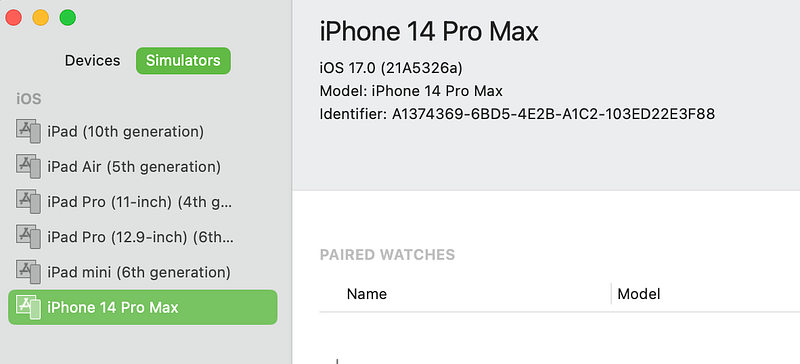
e.g. device ID for iPhone 14 Pro Max is A1374369–6BD5–4E2B-A1C2–103ED22E3F88.

xcrun simctl push deviceID bundleID file

We know that,

bundleID = com.budhiraja.NotificationTest file = ~/Desktop/notification.apns

xcrun simctl push A1374369-6BD5-4E2B-A1C2-103ED22E3F88 com.budhiraja.NotificationTest ~/Desktop/notification.apns

since we are passing the target bundle ID directly we can skip the Simulator Target Bundle from apns file in this case.

{
    "aps": {
        "alert": {
            "title": "Push Notification",
            "subtitle": "Test Push Notifications",
            "body": "Testing Push Notifications on iOS Simulator",
        }
    }
}
iOS App Development
Push Notification
iOS Development
Swift
iOS
Recommended from ReadMedium