avatarRahul Kumar

Free AI web copilot to create summaries, insights and extended knowledge, download it at here

2655

Abstract

Installing utilities*** \e[<span class="hljs-number">0</span>m” sudo apt-get update sudo apt-get install unzip git-all pkg-config zip g++ zlib1g-dev sudo apt-get install build-essential gfortran libatlas-base-dev sudo apt-get install libamd2<span class="hljs-number">.3</span><span class="hljs-number">.1</span> libblas3gf libc6 libgcc1 libgfortran3 liblapack3gf libumfpack5<span class="hljs-number">.4</span><span class="hljs-number">.0</span> libstdc++<span class="hljs-number">6</span> build-essential libatlas-sse2-dev</pre></div><div id="71b4"><pre>################################################################################

Fetch Swig and Python deps.

################################################################################ echo -e “\e[<span class="hljs-number">36</span>mInstalling python deps \e[<span class="hljs-number">0</span>m” sudo apt-get install swig sudo apt-get install build-essential python-dev python-pip checkinstall sudo apt-get install libreadline-gplv2-dev libncursesw5-dev libssl-dev
libsqlite3-dev tk-dev libgdbm-dev libc6-dev libbz2-dev sudo apt-get install gfortran libatlas-base-dev</pre></div><div id="2695"><pre>################################################################################

We need Numpy, scipy, matplotlib etc

################################################################################ echo -e “\e[<span class="hljs-number">36</span>mInstalling Numpy \e[<span class="hljs-number">0</span>m” sudo apt-get install python-numpy sudo pip install numpy — upgrade sudo pip install scipy sudo pip install matplotlib sudo pip install -U scikit-learn sudo pip install pandas sudo pip install — upgrade gensim sudo pip install wikipedia</pre></div><div id="0b76"><pre>################################################################################

Finally Tensorflow

################################################################################</pre></div><div id="0656"><pre><span class="hljs-attribute">echo</span> -e “\e[<span class="hljs-number">36</span>mInstalling Tesnorflow \e[<span class="hljs-number">0</span>m”</pre></div><div id="ac18"><pre><span class="hljs-built_in">export</span> <span class="hljs-attribute">TF_BINARY_URL</span>=https://storage.googleapis.com/tensorflow/linux/cpu/tensorflow-0.11.0-cp27-none-linux_x86_64.whl</pre></div><div id="fd93"><pre><span class="hljs-attribute">sudo</span> pip install — upgrade <span class="hljs-variable">$TF_BINARY_URL</span></pre></div><div id="c18d"><pre>############################################</pre></div><p id="deab">I tried installing Tensorflow using <a href="https://www.tensorflow.org/versio

Options

ns/r0.11/get_started/os_setup.html#pip-installation">pip</a> and <a href="https://www.tensorflow.org/versions/r0.11/get_started/os_setup.html#anaconda-installation">Anaconda</a>. Both of them are working fine in my case.</p><figure id="e005"><img src="https://cdn-images-1.readmedium.com/v2/resize:fit:800/1*Pr7CwvkK9xw2ggyLNMUxmg.png"><figcaption>Training Tensorflow model on Windows 10 and monitoring progress using Tensorboard.</figcaption></figure><p id="c3cb">The best part is, no VM or Docker is required. Google claims to officially provide windows support in coming updates but this approach will he helpful until its officially available.</p><p id="0d3c">And windows bash will be using all your cores, so <b>100% CPU allocation</b> is possible using Windows bash.</p><figure id="5d01"><img src="https://cdn-images-1.readmedium.com/v2/resize:fit:800/1*qz3OSkqXI8LkksqM8COOlA.png"><figcaption>4 core CPU utilization while training process.</figcaption></figure><p id="65dc">Enjoy……</p><p id="ac3a">Thanks, Rahul Kumar www.hellorahulk.com</p><figure id="7bdb"><img src="https://cdn-images-1.readmedium.com/v2/resize:fit:800/1*nJFIzb8sUMESNT02dVKwkg.png"><figcaption></figcaption></figure> <figure id="6110"> <div> <div> <img class="ratio" src="http://placehold.it/16x9"> <iframe class="" src="https://cdn.embedly.com/widgets/media.html?src=https%3A%2F%2Fupscri.be%2Feef5b4%3Fas_embed%3Dtrue&amp;url=https%3A%2F%2Fupscri.be%2Feef5b4%2F&amp;image=https%3A%2F%2Fupscri.be%2Fmedia%2Fform.jpg&amp;key=d04bfffea46d4aeda930ec88cc64b87c&amp;type=text%2Fhtml&amp;schema=upscri" allowfullscreen="" frameborder="0" height="400" width="800"> </div> </div> </figure></iframe></div></div></figure><h2 id="5429">We’re a team of bot creatives and AI scientists with one common goal:</h2><p id="e051" type="7">blowing business objectives out of the water with bots and cognitive solutions</p><figure id="bae8"><img src="https://cdn-images-1.readmedium.com/v2/resize:fit:800/1*filKtc1H4v_94ecDxj3VDA.png"><figcaption></figcaption></figure><figure id="6671"><img src="https://cdn-images-1.readmedium.com/v2/resize:fit:800/1*wW49XUTI9_FCXy8Q9ML9Mg.png"><figcaption></figcaption></figure><figure id="0ac8"><img src="https://cdn-images-1.readmedium.com/v2/resize:fit:800/1*QDUacsrPqoj29Pz9ffSlJg.png"><figcaption></figcaption></figure><figure id="e568"><img src="https://cdn-images-1.readmedium.com/v2/resize:fit:800/1*YfANetnnkGbiJ0fvzIxyMQ.gif"><figcaption>Did you like the article? Click ❤ to recommend it to other Medium readers!</figcaption></figure></article></body>

Tensorflow for Windows

Steps to install Tensorflow on Windows 10 machine.

Step 1: Get Windows 10 with the Anniversary Update.

Step 2: To install Bash shell on your Windows 10 PC, follow link below:

Once the bash is ready.

Step 3: Open cmd, type bash.

Step 4: You are into the Linux version, now install the python dependencies using pip or apt-get.

I have compiles some of the dep below:

############################################
#!/bin/bash
#
# This script will hopefully save you a lot of time setting up Linux 
# to be ready to run Python service.
#
# Tested using the following environment:
# — Running vanilla Ubuntu Trusty 14.04 LTS.
#
# @author Rahul Kumar
#
# Excessive commenting has been included below for clarity :-)
# Save this script to /home/yourUserName, chmod +x setupPython.sh, + run
# using ./setupPython.sh
################################################################################
# Install utils.
################################################################################
echo -e “\e[36m***Installing utilities*** \e[0m”
sudo apt-get update
sudo apt-get install unzip git-all pkg-config zip g++ zlib1g-dev
sudo apt-get install build-essential gfortran libatlas-base-dev 
sudo apt-get install libamd2.3.1 libblas3gf libc6 libgcc1 libgfortran3 liblapack3gf libumfpack5.4.0 libstdc++6 build-essential libatlas-sse2-dev
################################################################################
# Fetch Swig and Python deps.
################################################################################
echo -e “\e[36m***Installing python deps*** \e[0m”
sudo apt-get install swig
sudo apt-get install build-essential python-dev python-pip checkinstall
sudo apt-get install libreadline-gplv2-dev libncursesw5-dev libssl-dev \
libsqlite3-dev tk-dev libgdbm-dev libc6-dev libbz2-dev
sudo apt-get install gfortran libatlas-base-dev
################################################################################
# We need Numpy, scipy, matplotlib etc
################################################################################
echo -e “\e[36m***Installing Numpy*** \e[0m”
sudo apt-get install python-numpy
sudo pip install numpy — upgrade
sudo pip install scipy
sudo pip install matplotlib
sudo pip install -U scikit-learn
sudo pip install pandas
sudo pip install — upgrade gensim
sudo pip install wikipedia
################################################################################
# Finally Tensorflow
################################################################################
echo -e “\e[36m***Installing Tesnorflow*** \e[0m”
export TF_BINARY_URL=https://storage.googleapis.com/tensorflow/linux/cpu/tensorflow-0.11.0-cp27-none-linux_x86_64.whl
sudo pip install — upgrade $TF_BINARY_URL
############################################

I tried installing Tensorflow using pip and Anaconda. Both of them are working fine in my case.
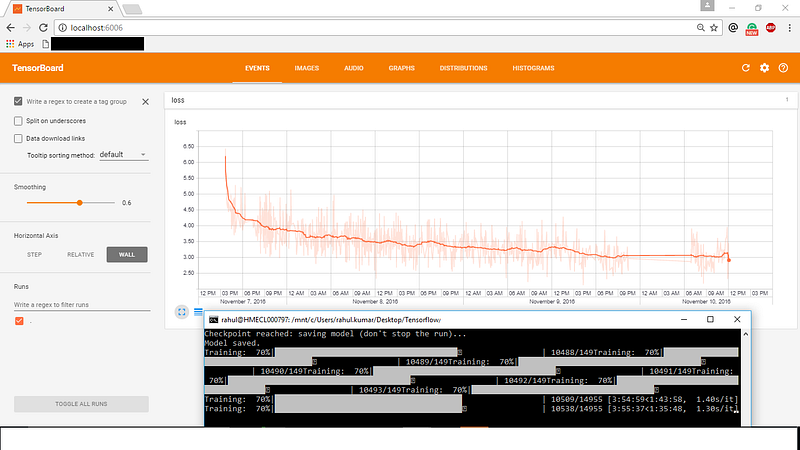
Training Tensorflow model on Windows 10 and monitoring progress using Tensorboard.

The best part is, no VM or Docker is required. Google claims to officially provide windows support in coming updates but this approach will he helpful until its officially available.

And windows bash will be using all your cores, so 100% CPU allocation is possible using Windows bash.
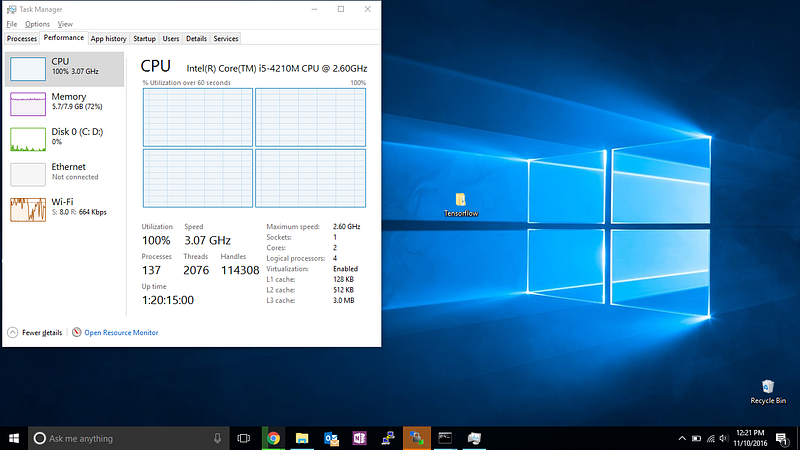
4 core CPU utilization while training process.

Enjoy……

Thanks, Rahul Kumar www.hellorahulk.com

We’re a team of bot creatives and AI scientists with one common goal:

blowing business objectives out of the water with bots and cognitive solutions

Did you like the article? Click ❤ to recommend it to other Medium readers!
Ubuntu
TensorFlow
Windows10
Python
Cognitive
Recommended from ReadMedium