avatarFuji Nguyen

Free AI web copilot to create summaries, insights and extended knowledge, download it at here

2522

Abstract

instantaneous, dynamic listing of employees. I can effortlessly sort this list by various criteria like name, email, Employee Number, or Position Title. The pagination feature here ensures smooth navigation through large datasets, making it highly user-friendly.</p><figure id="3567"><img src="https://cdn-images-1.readmedium.com/v2/resize:fit:800/1*w7Rs6un-CbQQl3VfSf77WQ.png"><figcaption>Employee Listing</figcaption></figure><h2 id="936f">Showing Drill Down to Employee Details</h2><p id="0001">When clicking on an employee row, a detailed modal instantly appears. This modal provides a comprehensive view of the employee’s profile, including contact information such as Name, Title, Phone, and Birthday, all without leaving the page.</p><figure id="6bfd"><img src="https://cdn-images-1.readmedium.com/v2/resize:fit:800/1*trfn_PM76QqNh8632yis3w.png"><figcaption>Employee Details in Modal Popup</figcaption></figure><h1 id="b769">Part 2 — Position Listing</h1><p id="e431">Let’s shift the focus to the Position Listing feature. But first, pay attenton to a key security aspect. Accessing this section requires a login. It’s essential for maintaining confidentiality and control within your organization. The login accounts are listed on the Home page.</p><figure id="2bf4"><img src="https://cdn-images-1.readmedium.com/v2/resize:fit:800/1*1rQjwR18U4sRwl7aeb7srQ.png"><figcaption>Login accounts on the Home page</figcaption></figure><h2 id="b4dd">Demonstrating the Login Process</h2><p id="57d2">Click on the Position menu and notice the prompt for user credentials. This application ensures that only authorized personnel, specifically those in the HR Admin or Manager roles, can view and manage position-related information. Let’s log in with an HR Admin account (ashtyn1, Pa$$word123).</p><figure id="097f"><img src="https://cdn-images-1.readmedium.com/v2/resize:fit:800/1*JQl9C2cMVrEJ9x1HuC716g.png"><figcaption>User Login Link</figcaption></figure><figure id="b75c"><img src="https://cdn-images-1.readmedium.com/v2/resize:fit:800/1*HRkHgfFXuoXbCQq5XdYirw.png"><figcaption>Login integration with Duende IdentityServer</figcaption></figure><h2 id="002f">Logged in and Accessing Position Search Feature</h2><p id="a424">Once logged in, I gain full access to the Position Search feature. Here, users in HR Admins and Managers roles (Role Based Access Control, aka RBAC) can seamlessly search, sort, and paginate through positions, as well as perform crucial CRUD operations.</p><h2 id="28b7">Demonstrating Position Sear

Options

ch, Sort, and Pagination</h2><p id="2d1d">Like with employees, I can search for positions, sort the results, and navigate through pages. The responsiveness and ease of use remain consistent, providing an efficient user experience.</p><figure id="2473"><img src="https://cdn-images-1.readmedium.com/v2/resize:fit:800/1*LlLwZSHnej4R-f_oztsjDQ.png"><figcaption>Position Listing</figcaption></figure><h2 id="277b">Showcasing CRUD Operations for Position</h2><p id="ed85">Let’s create a new position. Click on Add button. Input the necessary details and save. The position is now part of our searchable database. Similarly, updating or deleting existing positions is just as intuitive and straightforward.</p><figure id="c367"><img src="https://cdn-images-1.readmedium.com/v2/resize:fit:800/1*xWeFsJ8rzADNu2SAtcrJcQ.png"><figcaption>Position Detail Form</figcaption></figure><h1 id="797b">Links to Online Demo</h1><p id="5be2"><b>Angular Client:</b> Dive into the dynamic world of Talent Management with our Angular Client and Web API. Experience hands-on management with our Angular 17 and Bootstrap 5-powered Angular Client at <a href="https://workcontrolgit.github.io/TalentManagement-Client-Angular">https://workcontrolgit.github.io/TalentManagement-Client-Angular</a>, offering a user-friendly and interactive platform.</p><p id="29c0"><b>NetCore Web API: </b>For backend insights, explore our comprehensive Web API at <a href="https://talentmanagementwebapi.azurewebsites.net/swagger/index.html">https://talentmanagementwebapi.azurewebsites.net/swagger/index.html</a>. Hosted on Azure with detailed Swagger documentation, it simplifies the understanding of server-side operations. These integrated tools provide a complete view of the Talent Management system, showcasing the seamless synergy between front-end and back-end technologies.</p><h1 id="cf5e">Summary</h1><p id="7465">If you’re eager to get hands-on, I have great news! The source code for this Talent Management SPA is available for download on GitHub. You can clone and run the application on your local host, explore its features in detail, and even use it as a starting point for your projects.</p><ol><li>Angular source code h<a href="https://github.com/workcontrolgit/TalentManagement-Client-Angular">ttps://github.com/workcontrolgit/TalentManagement-Client-Angular</a></li><li>NET Core WebAPI source code <a href="https://github.com/workcontrolgit/TalentManagementApi">https://github.com/workcontrolgit/TalentManagementApi</a></li></ol></article></body>

Angular 17 & NET Core 8: Talent Management SPA Online Demo

Appendix B

Introduction

This is Appendix B in our comprehensive series “Building a Talent Management SPA with Angular 17 and NET Core 8”. In this appendix, we showcase the sophisticated capabilities of this application, with a particular focus on features. For a broader view of the series and to access other parts, you can refer back to the series’ table of contents, where each segment is meticulously organized to guide you through every stage of building a robust Talent Management SPA.

Content

Welcome to the demonstration of the Talent Management Single Page Application, developed using Angular 17 and .NET Core 8. I’m excited to showcase the sophisticated capabilities of this application, with a particular focus on Employee and Position management features. Check out the YouTube video below for more details.

Part 1 — Employee Listing feature

First, let’s delve into the Employee menu. This screen under this menu allows you to search for employees, as well as sort and paginate through your entire workforce. This functionality facilitates easy access and efficient management of employee records.

Demonstrating Employee Search, Sort, and Pagination

As I type in a Search box, notice the instantaneous, dynamic listing of employees. I can effortlessly sort this list by various criteria like name, email, Employee Number, or Position Title. The pagination feature here ensures smooth navigation through large datasets, making it highly user-friendly.
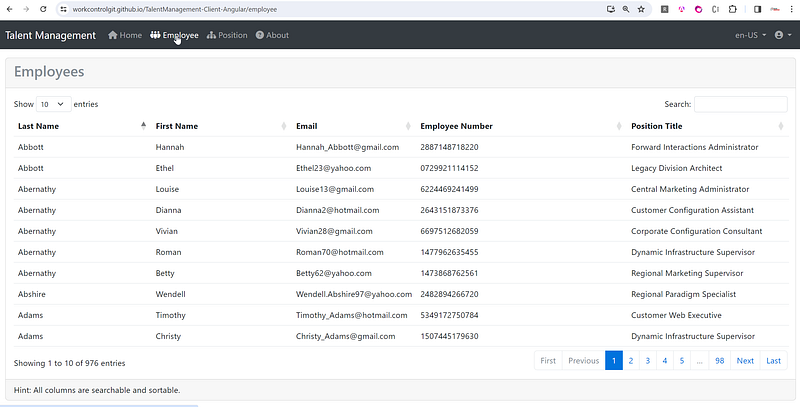
Employee Listing

Showing Drill Down to Employee Details

When clicking on an employee row, a detailed modal instantly appears. This modal provides a comprehensive view of the employee’s profile, including contact information such as Name, Title, Phone, and Birthday, all without leaving the page.
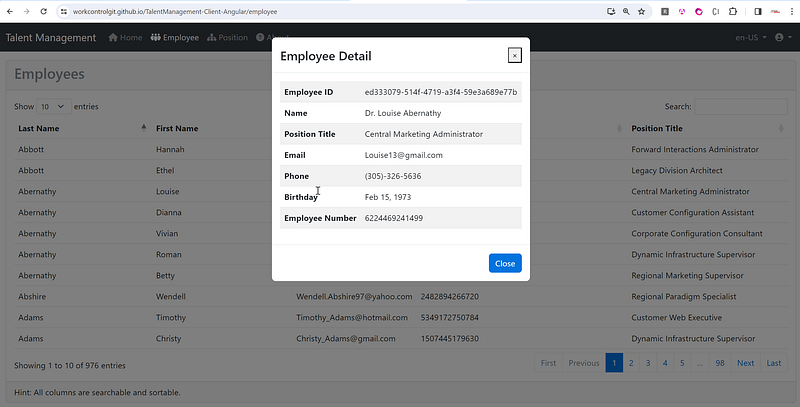
Employee Details in Modal Popup

Part 2 — Position Listing

Let’s shift the focus to the Position Listing feature. But first, pay attenton to a key security aspect. Accessing this section requires a login. It’s essential for maintaining confidentiality and control within your organization. The login accounts are listed on the Home page.
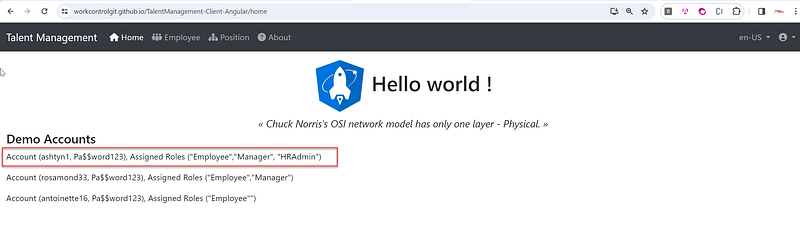
Login accounts on the Home page

Demonstrating the Login Process

Click on the Position menu and notice the prompt for user credentials. This application ensures that only authorized personnel, specifically those in the HR Admin or Manager roles, can view and manage position-related information. Let’s log in with an HR Admin account (ashtyn1, Pa$$word123).
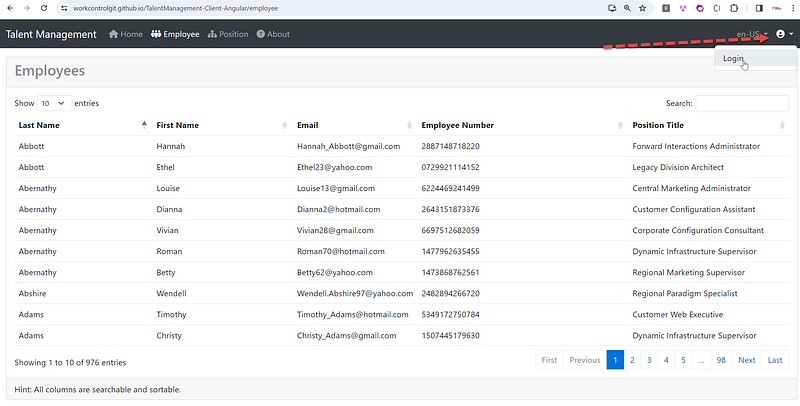
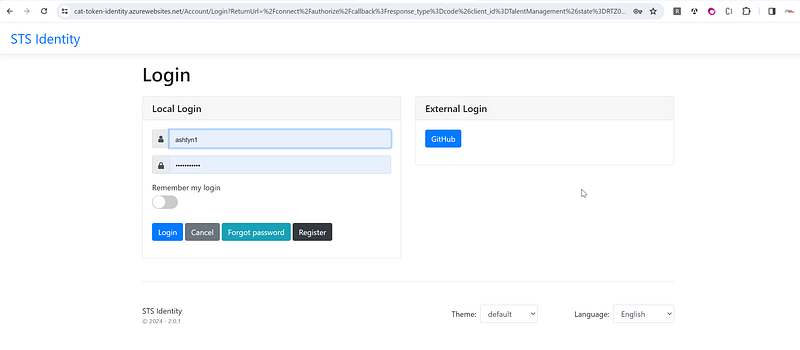
User Login Link
Login integration with Duende IdentityServer

Logged in and Accessing Position Search Feature

Once logged in, I gain full access to the Position Search feature. Here, users in HR Admins and Managers roles (Role Based Access Control, aka RBAC) can seamlessly search, sort, and paginate through positions, as well as perform crucial CRUD operations.

Demonstrating Position Search, Sort, and Pagination

Like with employees, I can search for positions, sort the results, and navigate through pages. The responsiveness and ease of use remain consistent, providing an efficient user experience.
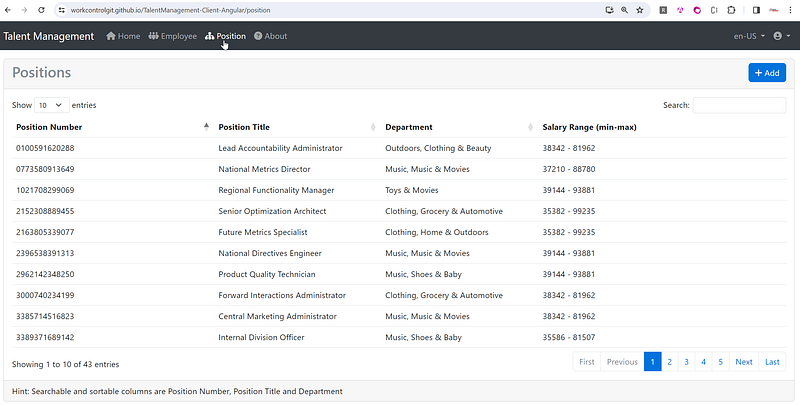
Position Listing

Showcasing CRUD Operations for Position

Let’s create a new position. Click on Add button. Input the necessary details and save. The position is now part of our searchable database. Similarly, updating or deleting existing positions is just as intuitive and straightforward.
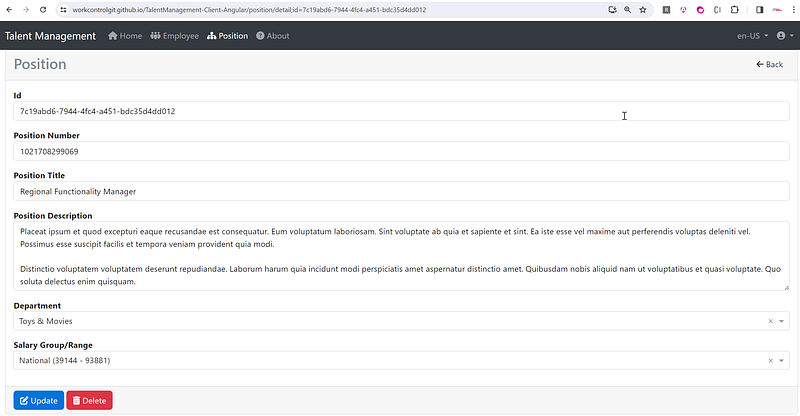
Position Detail Form

Links to Online Demo

Angular Client: Dive into the dynamic world of Talent Management with our Angular Client and Web API. Experience hands-on management with our Angular 17 and Bootstrap 5-powered Angular Client at https://workcontrolgit.github.io/TalentManagement-Client-Angular, offering a user-friendly and interactive platform.

NetCore Web API: For backend insights, explore our comprehensive Web API at https://talentmanagementwebapi.azurewebsites.net/swagger/index.html. Hosted on Azure with detailed Swagger documentation, it simplifies the understanding of server-side operations. These integrated tools provide a complete view of the Talent Management system, showcasing the seamless synergy between front-end and back-end technologies.

Summary

If you’re eager to get hands-on, I have great news! The source code for this Talent Management SPA is available for download on GitHub. You can clone and run the application on your local host, explore its features in detail, and even use it as a starting point for your projects.

  1. Angular source code https://github.com/workcontrolgit/TalentManagement-Client-Angular
  2. NET Core WebAPI source code https://github.com/workcontrolgit/TalentManagementApi
Programming
Angular
Net Core
Demo
Recommended from ReadMedium