Tailwind UI’s A Scam Part 2, Let’s Rewrite A Template!
As I said in the previous article, Failwind makes you write garbage bloated HTML, with accessibility and usability failings galore, relying on scripting for things that shouldn’t be scripted. None of the lies about how “great” it is hold even a shred of truth, and thus any time money changes hands for something built with it, it’s a scam.
I used TailwindUI’s “Salient” paid template as an example of this, showing some bloated code sections and what any sane/rational developer likely would/should have done instead.
But let’s really dig in and do a complete rewrite, just to compare how far — and close — they were to doing things “right.”
Live Demo:
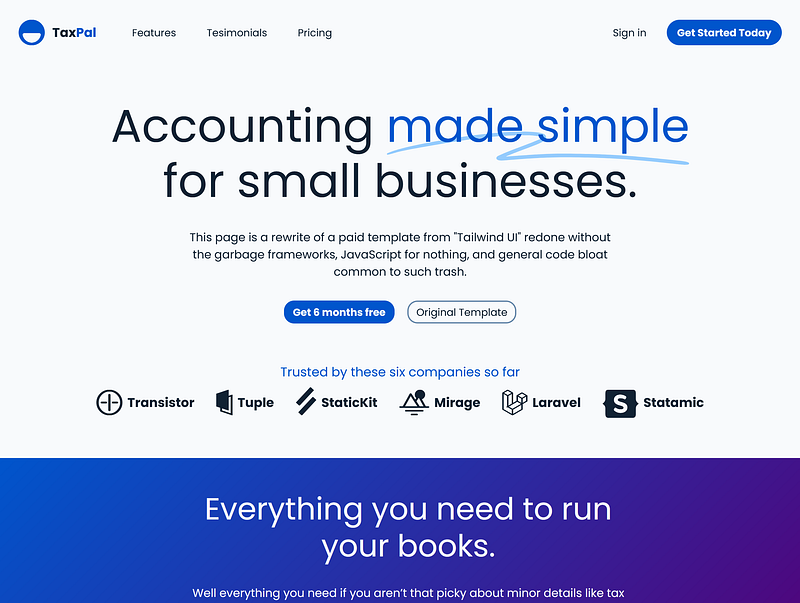
This is my rewrite of the page:
As with all my examples the directory: https://cutcodedown.com/for_others/medium_articles/failwindUI/resalient/resalientFontIcons/
Is wide open for easy access to the gooey bits and pieces, and I dropped a .rar in there of the whole shebang.
Differences
This isn’t meant to be a 1:1 as I tried to improve accessibility and usability, and even then there’s still a lot of garbage present I would not even suggest people do on websites in the first place.
I used Poppins off of Google fonts because it’s a far more legible face than… whatever the blazes they used.
For those about to kvetch about the paranoid whackjob nonsense about Google fonts, go suck an egg! No, it does not “set a cookie” and oh noes, they get your IP address when requesting a file. The horrors… NOT. As if Google Analytics, Adsense, and a bunch of other crap all across the web doesn’t do far worse. But no, let’s have the EU’s ignorant regulatory fools and courts go after a site for getting the IP address when someone requests a file. That’s how the flipping Internet works assholes! I’m starting to understand why the Brits wanted to GTFO of the EU.
For colouration I ran the blue a hair darker so that it passes AAA normal with room to spare. I then tossed the bloated wasteful inaccessible artsy-fartsy bandwidth wasting backgrounds for linear gradients.
Because logo’s should have text for images off graceful degradation, I deleted the company names from the logo SVG before importing them into a webfont. This gives greater control of colour should be want to add a day/night toggle later on. Which I would do if this wasn’t a drive-by recode!
I moved all presentational images out of the markup. Most of the logo’s and icons are now in a simple webfont. Any competent developer should familiarize themselves with doing this as it saves bandwidth (woff2 is brutally efficent), gives a degree of colour control (again day/night might be handy later), consumes far less code than crapping them in the markup where they have zero business in the first place, and of course better embraces caching since external files are more likely to cache than internal.
The opening banner has a smaller padding so it doesn’t automatically try to consume an entire screen worth. I hate when people do that with “banners” resulting in a half dozen words and jack huffing else on the display. That is NOT good design or UX. The padding is set to shrink within clamped limits, so that smaller screens get smaller padding based off both axis.
I added non-scripted modals for the login and register, which end up smaller than the scripting they were wasting on it and lack the accessibility issues “scripting only” solutions bring to the table.
The various modals got animations, and the “select and image” garbage (That I would not do on a page like this) was swapped to use checkboxes and radio input as their triggers instead of JavaScript.
To that end, the rewrite doesn’t rely on a single blasted line of JS to work! You could add a script if you worry about the :target modal behavior, but if that “filling up the history” is a thing for actual end users, there’s something WRONG with your content! It’s the type of problem only us developers in testing would/should really have any sort of issue with. Real end users will likely never butt heads with it.
Statistics And File Sizes
Their original page was a massive — not counting lazy loads — 1.47 megabytes in 40 files. Handshaking alone could have resulted in anywhere from 6.4 to well over 30 seconds unless you’ve got a blazing fast connection with low ping to their hosting. But let’s compare:
Original Page    Files    Actual Size   Gzipped
  First Load       40        1040k        718k
  Code Only        15         485k        155k
  HTML              1          87k         15k
Rewrite Files Actual Size Gzipped
First Load 11 304k 282k
Code Only 3 36k 11k
HTML 1 16k 5kAnd this is why I keep saying that the garbage vomited up by Failwind, Bootcrap, and their kin are harder to work with, harder to develop, and how every claim of virtue attributed to them is 100% bunko. Look at those code only numbers, and keep in mind too their markup and CSS is minified, mine isn’t. It’s actually why I consider minification a semi-pointless “last resort” when it comes to HTML and CSS. I can understand it with larger JavaScript libraries, but if you “need” it for your markup or stylesheet, there’s something horrifyingly and terrifyingly wrong with both.
Horrifyingly and terrifyingly wrong like the halfwitted idiocy that are frameworks and their ilk.
My code — HTML, CSS, JS — combined (well, there is no JS) without minification is less than half the code they vomited up just for their HTML. Even if we omitted the 24k of SVG crapped into their code and included the font I replaced most of them with, it’s still two-thirds or less the code.
And which is cleaner/easier to work with? Their original:
<div class="mt-36 lg:mt-44">
  <p class="font-display text-base text-slate-900">Trusted by these six companies so far</p>
  <ul class="mt-8 flex items-center justify-center gap-x-8 sm:flex-col sm:gap-x-0 sm:gap-y-10 xl:flex-row xl:gap-x-12 xl:gap-y-0">
    <li>
      <ul class="flex flex-col items-center gap-y-8 sm:flex-row sm:gap-x-12 sm:gap-y-0">
        <li class="flex">
          <span style="box-sizing:border-box;display:inline-block;overflow:hidden;width:158px;height:48px;background:none;opacity:1;border:0;margin:0;padding:0;position:relative">
            <img alt="Transistor" src="data:image/gif;base64,R0lGODlhAQABAIAAAAAAAP///yH5BAEAAAAALAAAAAABAAEAAAIBRAA7" decoding="async" data-nimg="fixed" style="position:absolute;top:0;left:0;bottom:0;right:0;box-sizing:border-box;padding:0;border:none;margin:auto;display:block;width:0;height:0;min-width:100%;max-width:100%;min-height:100%;max-height:100%" />
            <noscript>
              <img alt="Transistor" src="/_next/static/media/transistor.7274e6c3.svg" decoding="async" data-nimg="fixed" style="position:absolute;top:0;left:0;bottom:0;right:0;box-sizing:border-box;padding:0;border:none;margin:auto;display:block;width:0;height:0;min-width:100%;max-width:100%;min-height:100%;max-height:100%" loading="lazy" />
            </noscript>
          </span>
        </li>
        <li class="flex">
          <span style="box-sizing:border-box;display:inline-block;overflow:hidden;width:105px;height:48px;background:none;opacity:1;border:0;margin:0;padding:0;position:relative">
            <img alt="Tuple" src="data:image/gif;base64,R0lGODlhAQABAIAAAAAAAP///yH5BAEAAAAALAAAAAABAAEAAAIBRAA7" decoding="async" data-nimg="fixed" style="position:absolute;top:0;left:0;bottom:0;right:0;box-sizing:border-box;padding:0;border:none;margin:auto;display:block;width:0;height:0;min-width:100%;max-width:100%;min-height:100%;max-height:100%" />
            <noscript>
              <img alt="Tuple" src="/_next/static/media/tuple.74eb0ae0.svg" decoding="async" data-nimg="fixed" style="position:absolute;top:0;left:0;bottom:0;right:0;box-sizing:border-box;padding:0;border:none;margin:auto;display:block;width:0;height:0;min-width:100%;max-width:100%;min-height:100%;max-height:100%" loading="lazy" />
            </noscript>
          </span>
        </li>
        <li class="flex">
          <span style="box-sizing:border-box;display:inline-block;overflow:hidden;width:127px;height:48px;background:none;opacity:1;border:0;margin:0;padding:0;position:relative">
            <img alt="StaticKit" src="data:image/gif;base64,R0lGODlhAQABAIAAAAAAAP///yH5BAEAAAAALAAAAAABAAEAAAIBRAA7" decoding="async" data-nimg="fixed" style="position:absolute;top:0;left:0;bottom:0;right:0;box-sizing:border-box;padding:0;border:none;margin:auto;display:block;width:0;height:0;min-width:100%;max-width:100%;min-height:100%;max-height:100%" />
            <noscript>
              <img alt="StaticKit" src="/_next/static/media/statickit.d7937794.svg" decoding="async" data-nimg="fixed" style="position:absolute;top:0;left:0;bottom:0;right:0;box-sizing:border-box;padding:0;border:none;margin:auto;display:block;width:0;height:0;min-width:100%;max-width:100%;min-height:100%;max-height:100%" loading="lazy" />
            </noscript>
          </span>
        </li>
      </ul>
    </li>
    <li>
      <ul class="flex flex-col items-center gap-y-8 sm:flex-row sm:gap-x-12 sm:gap-y-0">
        <li class="flex">
          <span style="box-sizing:border-box;display:inline-block;overflow:hidden;width:138px;height:48px;background:none;opacity:1;border:0;margin:0;padding:0;position:relative">
            <img alt="Mirage" src="data:image/gif;base64,R0lGODlhAQABAIAAAAAAAP///yH5BAEAAAAALAAAAAABAAEAAAIBRAA7" decoding="async" data-nimg="fixed" style="position:absolute;top:0;left:0;bottom:0;right:0;box-sizing:border-box;padding:0;border:none;margin:auto;display:block;width:0;height:0;min-width:100%;max-width:100%;min-height:100%;max-height:100%" />
            <noscript>
              <img alt="Mirage" src="/_next/static/media/mirage.18d2ec4e.svg" decoding="async" data-nimg="fixed" style="position:absolute;top:0;left:0;bottom:0;right:0;box-sizing:border-box;padding:0;border:none;margin:auto;display:block;width:0;height:0;min-width:100%;max-width:100%;min-height:100%;max-height:100%" loading="lazy" />
            </noscript>
          </span>
        </li>
        <li class="flex">
          <span style="box-sizing:border-box;display:inline-block;overflow:hidden;width:136px;height:48px;background:none;opacity:1;border:0;margin:0;padding:0;position:relative">
            <img alt="Laravel" src="data:image/gif;base64,R0lGODlhAQABAIAAAAAAAP///yH5BAEAAAAALAAAAAABAAEAAAIBRAA7" decoding="async" data-nimg="fixed" style="position:absolute;top:0;left:0;bottom:0;right:0;box-sizing:border-box;padding:0;border:none;margin:auto;display:block;width:0;height:0;min-width:100%;max-width:100%;min-height:100%;max-height:100%" />
            <noscript>
              <img alt="Laravel" src="/_next/static/media/laravel.7deed17e.svg" decoding="async" data-nimg="fixed" style="position:absolute;top:0;left:0;bottom:0;right:0;box-sizing:border-box;padding:0;border:none;margin:auto;display:block;width:0;height:0;min-width:100%;max-width:100%;min-height:100%;max-height:100%" loading="lazy" />
            </noscript>
          </span>
        </li>
        <li class="flex">
          <span style="box-sizing:border-box;display:inline-block;overflow:hidden;width:147px;height:48px;background:none;opacity:1;border:0;margin:0;padding:0;position:relative">
            <img alt="Statamic" src="data:image/gif;base64,R0lGODlhAQABAIAAAAAAAP///yH5BAEAAAAALAAAAAABAAEAAAIBRAA7" decoding="async" data-nimg="fixed" style="position:absolute;top:0;left:0;bottom:0;right:0;box-sizing:border-box;padding:0;border:none;margin:auto;display:block;width:0;height:0;min-width:100%;max-width:100%;min-height:100%;max-height:100%" />
            <noscript>
              <img alt="Statamic" src="/_next/static/media/statamic.6da5ebfb.svg" decoding="async" data-nimg="fixed" style="position:absolute;top:0;left:0;bottom:0;right:0;box-sizing:border-box;padding:0;border:none;margin:auto;display:block;width:0;height:0;min-width:100%;max-width:100%;min-height:100%;max-height:100%" loading="lazy" />
            </noscript>
          </span>
        </li>
      </ul>
    </li>
  </ul>
</div>
</div>
Or this rewrite?
<section id="companies">
  <h2>Trusted by these six companies so far</h2>
  <ul>
    <li class="icon_transistor">Transistor</li>
    <li class="icon_tuple">Tuple</li>
    <li class="icon_staticKit">StaticKit</li>
    <li class="icon_mirage">Mirage</li>
    <li class="icon_laravel">Laravel</li>
    <li class="icon_statamic">Statamic</li>
  </ul>
<!-- #companies --></section>
Because that’s how mind numbingly gormless their way of doing things is. Hell the mere fact they seem to think they needed NOSCRIPT with a second copy of the image in there is proof enough these clowns have little to no business working with web technologies.
Let’s Talk About The Rewrite Markup
First off we have document head and its metadata
<!DOCTYPE html><html lang="en"><head> <meta charset="utf-8">
<meta
name="viewport"
content="width=device-width,initial-scale=1"
>
<meta
name="keywords"
content="accounting,bookkeeping,software,payroll,VAT,inventory,reporting,contacts"
>I put the doctype through head on a single line as a reminder that these tags must appear in this order and one should never insert anything else between them.
The charset meta needs to be first before any content-bearing elements, so it should be the first tag after . To support this I put all my meta together at the start.
Out viewport meta tells mobile browser we know what we’re doing, so do not apply their styling over ours. If you lack this a number of things — font size, screen width, and so forth — are either overridden by mobile browsers, or we’re just flat out lied to about them.
A keywords meta should be 7 or 8 single words or proper names that exist inside your document BODY as CDATA. (character data). Preferably as a whole totaling 96 characters or less. It’s called keywords. Not keyphrases, not keysentences, not keywordjumble, but keyWORDS!!! Vary from this pattern, and it will be ignored or even get you penalized in search. In fact the myth that it’s ignored stems from people ignoring these rules, to the point even Google seems to have forgotten how it works, or that they still support it.
Now we do our LINK tags.
 <link rel="preconnect" href="https://fonts.googleapis.com">
 <link rel="preconnect" href="https://fonts.gstatic.com" crossorigin>
 <link
  href="https://fonts.googleapis.com/css2?family=Poppins:ital,wght@0,400;0,700;1,400;1,700&display=swap"
  rel="stylesheet"
  media="screen,print"
 >
 <link rel="stylesheet" href="template/resalient.fontIcons.screen.css" media="screen">
 <link rel="icon" href="favicon.svg" type="image/svg+xml">
 <link rel="mask-icon" href="favicon.mask.svg" color="#08A">
 <link rel="shortcut icon" href="favicon.ico">
Preconnect in theory helps load our Google webfont faster. I use the official way of loading it because they will back-reference the referrer and send you a smaller version of the font containing just the characters used on your site. This is someplace they utterly cocked up as they were loading their Google fonts manually from the stylesheet, resulting in a fatter and less efficient load. And I bet you they suckered themselves into thinking that was “Faster” somehow.
The font I load for both screen and print. Again if you see a stylesheet <link> lacking media attribute or set to media=”all” (same thing) you are in all likelihood looking at developer ignorance, incompetence, and ineptitude. It’s the same reason pissing presentational classes into the markup saying what things look like for screen is utter and total nonsense.
Thus the screen stylesheet has media=”screen” so we’re not sending screen layout to print, aural, braille, or theoretically search. Though search often looks at screen trying to find “content cloaking” or other abuse!
It also is named something meaningful such as “template.variant.media.css” — in our case “resalient.fontIcons.screen.css”. That way we know what the stylesheet is for instead of some dumbass uselessly vague rubbish like “style47.css” or such. It’s always so stupid when people have files like “style.css” not telling you WHAT media the style is for, and being utterly redundant since what the blazes do you think that middle “s” in “CSS” stands for? It’s as stupid as people who write “Copyright ©”. No shit Sherlock!
Page title and close the header to open the body:
<title>TaxPal</title></head><body>Again the closing of head and opening of body are on the same line as a reminder not to paste stuff between them.
A good title tag should be formatted as:
[pageTitle - ] siteTitleFor maximum usability. For those of you not familiar with the formatting, [] means “optional”, in this case omit the page title on the home page. Varying from this pattern is usability garbage. It is not a place to blindly stuff keywords, no matter how many black-hat SEO fraudsters claim otherwise.
Remember the words of Matt Cutts:
Write for the user, not the search engine.
Finally we get to the actual page content. I have an outer DIV#top wrapper:
<div id="top">This acts as a landing should we want to add a “back to top” link later, and as a faux-body so that we can code around the double scroll-bar effect on modal dialogs. Thus our primary modals (sign-in and register) will be siblings after #top.
    <header>
      <h1><a href="/" class="icon_logo">Tax<span>Pal</span></a></h1>
      <a href="#mainMenu" class="openMainMenu" hidden></a>
      <nav id="mainMenu">
        <a href="#" class="modalClose" hidden></a>
        <ul>
          <li hidden><a href="#" class="modalClose">Exit Menu</a></li>
          <li><a href="#features">Features</a></li>
          <li><a href="#testimonials">Tesimonials</a></li>
          <li><a href="#pricing">Pricing</a></li>
          <li class="alternate featured"><a href="#getStarted">Get Started Today</a></li>
          <li class="alternate"><a href="#signIn">Sign in</a></li>
        </ul>
      </nav>
    </header>
The page header requires no classes, we’ll access it as “#top > header” in the stylesheet. H1 is unique and doesn’t need a class either. The .icon_ classes will be used for the font-icons much like font-awesome, but the way I do it we don’t need any extra elements in the markup. Two or three of the icons may not use these classes as they will be applied differently.
The first anchor .openMainMenu is hidden so non-screen user-agents ignore it. We set such anchors to visible where/as needed. In this case the first anchor will have our hamburger icon placed into it.
nav#mainMenu is our outer wrapper for the menu. There are extra elements in here — like the anchors — for the purpose of making it behave as a modal dialog when the screen is shrunk. The first .modalClose anchor inside it will be placed full-screen beneath the modal so clicking outside the menu closes it.
NAV is not an excuse to not use UL for menus. Anyone telling you that is talking out their arse. The first anchor is there to have an obvious menu close. In production I would consider placing an extra DIV and anchor there to make it identical to the other modals, but this is quite effective as-is. The “alternate” class implies there may be something different about those links (like being on the right) without saying explicitly what that appearance is. Same for the .featured class.
The actual page content starts with a MAIN tag thus:
<main> <section class="banner">
<h2>
Accounting <span>made simple</span> for small businesses.
</h2>
<p>
This page is a rewrite of a paid template from "Tailwind UI" redone without the garbage frameworks, JavaScript for nothing, and general code bloat common to such trash.
</p>
<ul class="actions">
<li class="featured"><a href="#register">Get 6 months free</a></li>
<li><a href="https://salient.tailwindui.com/">Original Template</a></li>
</ul>
<!-- .banner --></section>The banner section gets a H2 marking the start of a subsection of the H1 before it. That’s where most people cock-up taking bad black-hat SEO bullshit to heart, abusing the entire purpose of H1. Their original used a H1 here and one has to ask, is everything on the page REALLY a subsection of that text? 99% of the time the answer is no which is why using a H1 there for “SEO” or for “it’s the largest text” is utter shite.
The “actions” get a UL for being a list of choices, the featured class indicating one of them is different, otherwise nothing to write home about there.
Next we have the #companies section
      <section id="companies">
        <h2>Trusted by these six companies so far</h2>
        <ul>
          <li class="icon_transistor">Transistor</li>
          <li class="icon_tuple">Tuple</li>
          <li class="icon_staticKit">StaticKit</li>
          <li class="icon_mirage">Mirage</li>
          <li class="icon_laravel">Laravel</li>
          <li class="icon_statamic">Statamic</li>
        </ul>
      <!-- #companies --></section>
Classes to say what icons to apply, otherwise this is a ridiculously simple section.
The #features area is a bit more complex due to the use of radio INPUT instead of JavaScript, but like many sections it has its own header and isn’t too hard to understand.
      <div>
<section id="features"> <header>
<h2>Everything you need to run your books.</h2>
<p>
Well everything you need if you aren’t that picky about minor details like tax compliance.
</p>
</header> <input hidden id="radio_1_Payroll" name="imgRadioFeatures" type="radio" checked>
<input hidden id="radio_1_Expenses" name="imgRadioFeatures" type="radio">
<input hidden id="radio_1_Vat" name="imgRadioFeatures" type="radio">
<input hidden id="radio_1_Reporting" name="imgRadioFeatures" type="radio"> <div>
<article>
<h3>Payroll</h3>
<p>
Keep track of everyone's salaries and whether or not they've been paid. Direct deposit not supported.
</p>
<label for="radio_1_Payroll"></label>
</article><article>
<h3>Claim Expenses</h3>
<p>
All of your receipts organized into one place, as long as you don't mind typing in the data by hand.
</p>
<label for="radio_1_Expenses"></label>
</article><article>
<h3>VAT Handling</h3>
<p>
We only sell our software to companies who don't deal with VAT at all, so technically we do all the VAT stuff they need.
</p>
<label for="radio_1_Vat"></label>
</article><article>
<h3>Reporting</h3>
<p>
Easily export your data into an Excel spreadsheet where you can do whatever the hell you want with it.
</p>
<label for="radio_1_Reporting"></label>
</article>
</div> <aside>
<img loading="lazy" src="images/features/payroll.webp" alt="Payroll">
<img loading="lazy" src="images/features/claims.webp" alt="Claim Expenses">
<img loading="lazy" src="images/features/vat.webp" alt="VAT Handling">
<img loading="lazy" src="images/features/reporting.webp" alt="Reporting">
</aside><!-- #features --></section>
</div>The outer DIV is there for the full width background. As I unified the backgrounds of these we don’t need any fancy classes. Either there’s a DIV wrapping these SECTION or there isn’t.
The header is pretty obvious, describing the content that follows with a H2 and P. The INPUT after them have to be before both the selection sections and the images so we can select them via nth-child. The DIV around the article allows us a styling hook and we don’t really need a class there either since there’s no reason for a section like this to have other DIV. Each article (subsection) gets a LABEL we will absolute position over it, triggering the associated INPUT.
Finally the images themselves go into an ASIDE. That is not because I want them “off to one side”, as that’s not what aside is flipping for if we’re going to have semantic markup! A literary aside is sub-content related to the main but where things still make sense without them. That perfectly describes these images as they’re basically optional content. That’s what aside is for.
And why the majority of people out there crapping in ASIDE for side-bars have utterly failed to grasp semantic markup or even what the word “aside” means. Unless of course you want a tag as pointlessly presentational as CENTER or FONT.
And YES, I realize that sometime last year the W3C (or more specifically the whatWG) for zero fathomable or sensible reason made HEADER invalid inside ARTICLE. So now articles can’t have their own headers and footers? What type of dipshit crack-addict moron came up with that? Congratulations W3C, you just made it so there’s no legitimate reason to use ARTICLE instead of SECTION.
When their “living document” idiocy has provided ZERO blasted way of saying what version of HTML 5 is in use, so that yesterday’s valid HTML 5 can be invalid today, and today’s HTML 5 can be invalid tomorrow without changing anything in my documents? Yeah, W3C validation can just sod right off. They’ve made it as useless as CSS validation was back in 2003!
The next section, #everydayTasks is near identical to #features, so I’m not going to bother copying its code here.
The “get started” section:
  <div>
     <section id="getStarted" class="headerless">
       <h2>Get started today</h2>
       <p>
         It’s time to take control of your books. Buy our software so you can feel like you’re doing something productive.
       </p>
       <ul class="actions">
         <li><a href="#register">Get 6 months free</a></li>
       </ul>
     <!-- #getStarted --></section>
   </div>
Isn’t anything fancy either, apart from a class to say that the section doesn’t have a HEADER inside it, as it wouldn’t make much sense compared to other sections. I put the ul.actions in there even though there’s one element, for future expansion and/or uniformity of markup construction between the different sections.
The testimonials area:
<section id="testimonials"> <header>
<h2>Loved by businesses worldwide.</h2>
<p>
Our software is so simple that people can’t help but fall in love with it. Simplicity is easy when you just skip tons of mission-critical features.
</p>
</header> <blockquote>
<p>
TaxPal is so easy to use I can’t help but wonder if it’s really doing the things the government expects me to do.
</p>
<footer>
<img loading="lazy" src="images/testimonials/sherylBerge.webp" alt="Sheryl Berge">
Sheryl Berge<br>
<span>CEO at Lynch LLC</span>
</footer>
</blockquote><blockquote>
<!-- etc. etc. -->Has a header describing the whole thing, and blockquotes since that’s what these are. That the original didn’t even use the blockquote tag? Classic. Rather than CITE I used footer since it’s “extra information” about the quote. Alt text is included since ALT isn’t optional, and there’s nothing special about the “position’ text so a simple span with no class is likely adequate.
The pricing section should seem familiar by now:
<div>
<section id="pricing"><header>
<h2><span>Simple pricing,</span> for everyone.</h2>
<p>
It doesn’t matter what size your business is, our software won’t work well for you.
</p>
</header> <article>
<h3><span>$9</span> Starter</h3>
<p>
Good for anyone who is self-employed and just getting started.
</p>
<a href="#register" class="action">Get Started</a>
<ul>
<li>Send 10 quotes and invoices</li>
<li>Connect up to 2 bank accounts</li>
<li>Track up to 15 expenses per month</li>
<li>Manual payroll support</li>
<li>Export up to 3 reports</li>
</ul>
</article> <article class="featured">
<h3><span>$15</span> Small Business</h3>
<p>
Perfect for small / medium sized businesses.
</p>
<a href="#register" class="action">Get Started</a>
<ul>
<li>Send 25 quotes and invoices</li>
<li>Connect up to 5 bank accounts</li>
<li>Track up to 50 expenses per month</li>
<li>Automated payroll support</li>
<li>Export up to 12 reports</li>
<li>Bulk reconcile transactions</li>
<li>Track in multiple currencies</li>
</ul>
</article> <article>
<h3><span>$39</span> Enterprise</h3>
<p>
For even the biggest enterpise companies.
</p>
<a href="#register" class="action">Get Started</a>
<ul>
<li>Send unlimited quotes and invoices</li>
<li>Connect up to 15 bank accounts</li>
<li>Track up to 200 expenses per month</li>
<li>Automated payroll support</li>
<li>Export up to 25 reports, including TPS</li>
</ul>
</article> <!-- #pricing --></section>
</div>Standard HEADER+H2+P, ARTICLE starting with H3 describing the content, a SPAN inside the H3 to hook the price for styling, an “action” link, and then a list of information about the item being sold.
The FAQ is even simpler.
<section id="faq"> <header>
<h2>Frequently asked questions</h2>
<p>
If you can’t find what you’re looking for, email our support team and if you’re lucky someone will get back to you.
</p>
</header> <article>
<h3>Does TaxPal handle VAT?</h3>
<p>Well no, but if you move your company offshore you can probably ignore it.</p>
</article><article>
<h3>Can I pay for my subscription via purchase order?</h3>
<p>Absolutely, we are happy to take your money in all forms.</p>
</article><article>
<!-- etc. etc. -->Header, articles, headings, paragraphs, YAWN!
Finally we can close MAIN, add the footer, and after the footer close DIV#top.
</main> <footer>
<h2 class="icon_logo">Tax<span>Pal</span></h2>
<ul class="onPageLinks">
<li><a href="#features">Features</a></li>
<li><a href="#testimonials">Tesimonials</a></li>
<li><a href="#pricing">Pricing</a></li>
</ul>
<p>
© 2022 TaxPal. All rights reserved.
</p>
<ul class="socialLinks">
<li>
<a href="#" class="icon_twitter">
<span>Twitter</span>
</a>
</li><li>
<a href="#" class="icon_github">
<span>Github</span>
</a>
</li>
</ul>
</footer><!-- #top --></div>The footer being relatively simple. The span inside the socialMenu lets us turn the “screen style irrelevant” text into tooltips for screen, instead of just hiding them outright.
After #top we have our two modals. Both being forms they’re near identical code-wise so we’ll just look at the sign-in one.
  <form action="#" class="modal" id="signIn" method="post">
    <a href="#" class="modalClose" hidden></a>
    <div>
      <header>
        <a href="#" class="modalClose icon_logo" hidden>Tax<span>Pal</span></a>
        <h2>Sign in to your account</h2>
        <p>
          Don't have an account? <a href="#register">Sign up for a free trial.</a>
        </p>
      </header>
      <fieldset>
        <label>
          E-Mail Address<br>
          <input name="email" type="email" required><br>
        </label><label>
          Password<br>
          <input name="pass" type="password" required><br>
        </label>
      </fieldset>
      <footer>
        <button>Sign In</button>
      </footer>
    </div>
  <!-- #signIn.modal --></form>
They’re forms, so bloody make them forms for non-scripted behavior. You want to enhance them with scripting fine, but don’t muck up the ability for users to do important things like signing in or registering with a scripting-only solution! Especially if you’re going to dip into the tainted flavor-aid of “single page application” wankery on pages that don’t warrant it!
As with the main menu modals get an outer anchor so clicking outside the content area closes the modal. A DIV is used to contain the content, and being there’s no reason for it to have sibling DIV it doesn’t need a flipping class!
The Anchor inside the header is used to make the site name/logo and a closing “X”. There’s a lot of places in this you can click to close, but I like to include a visual queue for people who are… less adventurous.
Every form that has user editable / selectable content/values should have at least one fieldset wrapping the input/label pairs. I put the input inside the label so we don’t have to waste a bunch of code on id=”” and for=””.
The footer inside the form is for your submit/reset buttons and any hidden input. Makes styling easier, and it’s nice to have a uniform place to stick stuff like that.
And that in a nutshell is the markup. As this post is getting a bit long, I’ll stop here and make the much longer and complex CSS breakdown a separate article.
Which will probably take longer to create than the code did. Hell, this article took three times longer to write in terms of actual man-hours than it did for me to write the code.


