avatarTeri Radichel

Free AI web copilot to create summaries, insights and extended knowledge, download it at here

3937

Abstract

One cloud team we could only add 7 tags so a great deal of time when into noodling over what the tags should be. According to this documentation, the limit is now 50 so it’s not so much of an issue.</p><div id="1655" class="link-block"> <a href="https://awscli.amazonaws.com/v2/documentation/api/2.0.33/reference/ssm/add-tags-to-resource.html"> <div> <div> <h2>add-tags-to-resource - AWS CLI 2.0.33 Command Reference</h2> <div><h3>undefined</h3></div> <div><p>undefined</p></div> </div> <div> <div style="background-image: url(https://miro.readmedium.com/v2/resize:fit:320/0*DeNHpe4WYExJgT-c)"></div> </div> </div> </a> </div><h2 id="387b">Why Tag?</h2><p id="3516">Many organization will use a system to track all the applications in their environment. Each application has an ID or name. I can use these tags to find all the resources that support a particular application, excluding resources that do not support tags.</p><p id="d990">There are many other use cases for tags, including cost allocation, and tagging resources in the case of a security incident. You can also use tags in IAM policies to allow or deny principals form modifying a resource.</p><div id="4f08" class="link-block"> <a href="https://docs.aws.amazon.com/tag-editor/latest/userguide/tagging.html"> <div> <div> <h2>Tagging your AWS resources</h2> <div><h3>Tags are key and value pairs that act as metadata for organizing your AWS resources. With most AWS resources, you have…</h3></div> <div><p>docs.aws.amazon.com</p></div> </div> <div> <div style="background-image: url(https://miro.readmedium.com/v2/resize:fit:320/0*F30B52yD01dYARvT)"></div> </div> </div> </a> </div><h2 id="fe11">Caveat 1: Not all resources support tags</h2><p id="b663">However, in some cases resources do not support tags. You can find out which services and resources support tags using this guide.</p><div id="2707" class="link-block"> <a href="https://docs.aws.amazon.com/ARG/latest/userguide/supported-resources.html#supported-resources-tagging-console"> <div> <div> <h2>Resource types you can use with AWS Resource Groups and Tag Editor</h2> <div><h3>You can use the AWS Management Console or the AWS CLI to create resource groups and then interact with the member…</h3></div> <div><p>docs.aws.amazon.com</p></div> </div> <div> <div style="background-image: url(https://miro.readmedium.com/v2/resize:fit:320/)"></div> </div> </div> </a> </div><h2 id="7b0f">Caveat 2: Counting on people to add correct tags is error prone</h2><p id="2521">From personal experience, they are easy to misconfigure if you don’t have a completely automated and locked down deployment pipeline, some uses cases are better supported by putting resources that need to be tracked separately into separate accounts.</p><p id="7efa">For example, when I was on the original Capital One cloud team, developers were required to put the application id from the application tracking system on their resources otherwise they might be blocked from deploying them. The problem was that Capital One had a lot of different lines of business and some were acquisitions. People didn’t always know what the application ID was supposed to be or how to get one for a new application.</p><p id="4728">Another problem was the that the process of adding a tag with contact information for each resource deployed was dependent on developers doing the right thing. In some cases, the developers didn’t know they wer

Options

e supposed to tag resources a certain way. Sometimes they were simply in a hurry or didn’t bother. And in fact, those tags were kind of useless if an attacker wanted to abuse them because there was no integrity checking. In general, it was simply a pain for everyone involved.</p><h2 id="d431">How to address tagging caveats</h2><p id="a3dc">At the next organization where I went to work as a Cloud Architect and later Director of SAAS Engineering and then Director of Security Research, I did things a big differently.</p><p id="fc6f">First, I created a Sandbox where developers and QA folks could go and test out just about anything. They could click around and try out new services — within reason.</p><p id="3a9a">Next, I architected a development environment that was fully automated, but designed to be easy to use. Developers had to deploy every single resource in an automated fashion — but most of the heavy lifting was done for them. For the most part, developers dropped code into containers they controlled. They didn’t have to create all the infrastructure for their applications. They could focus on writing code.</p><p id="d015">Every resource that got deployed was tagged with a user identifier that came from Active Directory. That could include cost allocation information if you bill the resources created by a particular person to their own department. All tags were added automatically. Developers never had to figure out what tags to add or remember what was required. It was all done automatically for them for any resource they deployed.</p><p id="4731">If you want to use tags to track who deployed what, make it easy but creating a deployment pipeline that is flexible enough to let developers do what they need to do — but automated enough that their job is easy and helps prevent mistakes.</p><p id="2e0c">If you need to track resources for which you cannot add tags, your best bet is to move resources that need to be tracked together into a separate account. You can also avoid the reliance on correct automation or human behavior to ensure you can track resources. If you group all the things that need to be allocated to a particular cost center into a separate account then the accounting department can easily get a single bill and allocate the correct total to the correct account.</p><p id="27c7">Follow for updates.</p><p id="4a3a">Teri Radichel | <i>© <a href="https://2ndsightlab.com/?source=post_page---------------------------">2nd Sight Lab</a> 2023</i></p><div id="8b5f"><pre><span class="hljs-section">About Teri Radichel:

⭐️ Author: Cybersecurity Books
⭐️ Presentations: Presentations by Teri Radichel
⭐️ Recognition: SANS Award, AWS Security Hero, IANS Faculty
⭐️ Certifications: SANS ~ GSE 240
⭐️ Education: BA Business, Master of Software Engineering, Master of Infosec
⭐️ Company: Penetration Tests, Assessments, Phone Consulting ~ 2nd Sight Lab</pre></div><div id="caae"><pre><span class="hljs-section">Need Help With Cybersecurity, Cloud, or Application Security?
~~~~~~~~~~~~~~~~~~~~~~~~~~~~~~~~~~~~~~~~~~~~~~~~~~~~~~~~~~~~~</span>
🔒 Request a penetration test or security assessment
🔒 Schedule a consulting call
🔒 Cybersecurity Speaker for Presentation</pre></div><div id="5a42"><pre>Follow <span class="hljs-keyword">for</span> more stories like <span class="hljs-keyword">this</span>:

❤️ Sign Up my Medium Email List ❤️ Twitter: <span class="hljs-meta">@teriradichel</span> ❤️ LinkedIn: https:<span class="hljs-comment">//www.linkedin.com/in/teriradichel</span> ❤️ Mastodon: <span class="hljs-meta">@teriradichel</span><span class="hljs-meta">@infosec</span>.exchange ❤️ Facebook: 2nd Sight Lab ❤️ YouTube: @2ndsightlab</pre></div><figure id="faf5"><img src="https://cdn-images-1.readmedium.com/v2/resize:fit:800/0*H9Ew1KCl-29nZiPR.jpeg"><figcaption></figcaption></figure></article></body>

Tags on AWS for Governance, Security, and Cost Allocation

ACM.237 Leveraging tags to support AWS operations and cost tracking — benefits and caveats

~~~~~~~~~~~~~~~~~~~~~~~~~~~~~~~~~~~~~~~~~~~~~~~~~~~~~~~

⚙️ Check out my series on Automating Cybersecurity Metrics | Code.

🔒 Related Stories: AWS Security | Cloud Governance

💻 Free Content on Jobs in Cybersecurity | ✉️ Sign up for the Email List

~~~~~~~~~~~~~~~~~~~~~~~~~~~~~~~~~~~~~~~~~~~~~~~~~~~~~~~

This is part of my sub series on creating a static website on AWS hosted in an S3 bucket.

In my last post I deployed a Route 53 DNS Hosted Zone.

As promised, this post explains why I added the tags.

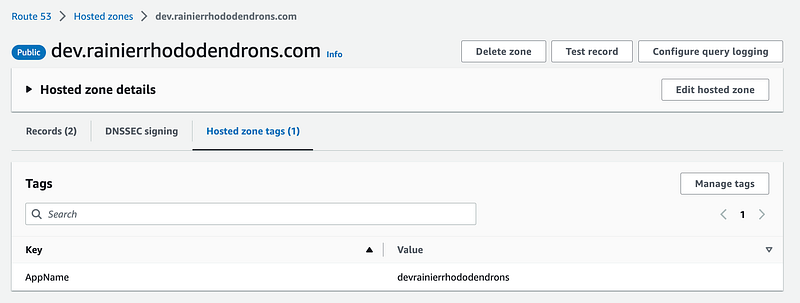
I adding tags to my two resources in this template as follows. I’m using the name “AppName” setting the value to the App Name I defined for the static website I’m deploying.


Unfortunately, AWS has not enforced standard deployment formats for tags across service teams. Therefore, you’ll have to check the CloudFormation documentation for each resource and apply tags according to each specific resource. These variances make it hard to enforce consistency across resource templates.

You can find all the resources by tags using the AWS CLI.

You can also view the tags in the AWS console.
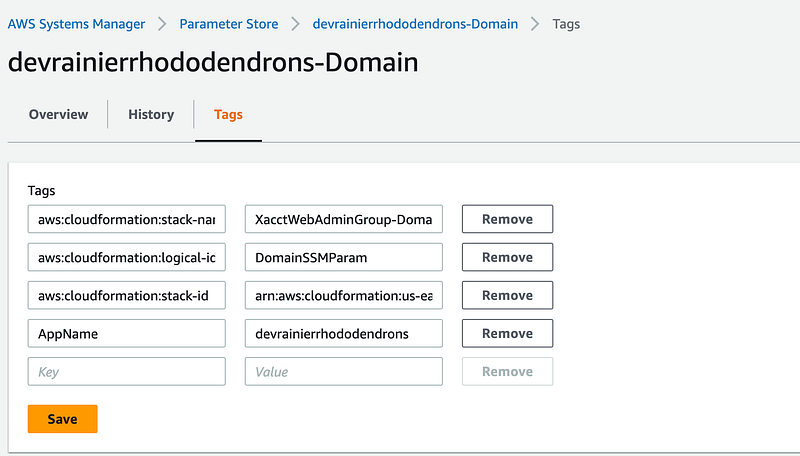
For SSM, AWS has automatically added some tags, along with the one I created:
Limits used to be an issue. On the original Capital One cloud team we could only add 7 tags so a great deal of time when into noodling over what the tags should be. According to this documentation, the limit is now 50 so it’s not so much of an issue.

Why Tag?

Many organization will use a system to track all the applications in their environment. Each application has an ID or name. I can use these tags to find all the resources that support a particular application, excluding resources that do not support tags.

There are many other use cases for tags, including cost allocation, and tagging resources in the case of a security incident. You can also use tags in IAM policies to allow or deny principals form modifying a resource.

Caveat 1: Not all resources support tags

However, in some cases resources do not support tags. You can find out which services and resources support tags using this guide.

Caveat 2: Counting on people to add correct tags is error prone

From personal experience, they are easy to misconfigure if you don’t have a completely automated and locked down deployment pipeline, some uses cases are better supported by putting resources that need to be tracked separately into separate accounts.

For example, when I was on the original Capital One cloud team, developers were required to put the application id from the application tracking system on their resources otherwise they might be blocked from deploying them. The problem was that Capital One had a lot of different lines of business and some were acquisitions. People didn’t always know what the application ID was supposed to be or how to get one for a new application.

Another problem was the that the process of adding a tag with contact information for each resource deployed was dependent on developers doing the right thing. In some cases, the developers didn’t know they were supposed to tag resources a certain way. Sometimes they were simply in a hurry or didn’t bother. And in fact, those tags were kind of useless if an attacker wanted to abuse them because there was no integrity checking. In general, it was simply a pain for everyone involved.

How to address tagging caveats

At the next organization where I went to work as a Cloud Architect and later Director of SAAS Engineering and then Director of Security Research, I did things a big differently.

First, I created a Sandbox where developers and QA folks could go and test out just about anything. They could click around and try out new services — within reason.

Next, I architected a development environment that was fully automated, but designed to be easy to use. Developers had to deploy every single resource in an automated fashion — but most of the heavy lifting was done for them. For the most part, developers dropped code into containers they controlled. They didn’t have to create all the infrastructure for their applications. They could focus on writing code.

Every resource that got deployed was tagged with a user identifier that came from Active Directory. That could include cost allocation information if you bill the resources created by a particular person to their own department. All tags were added automatically. Developers never had to figure out what tags to add or remember what was required. It was all done automatically for them for any resource they deployed.

If you want to use tags to track who deployed what, make it easy but creating a deployment pipeline that is flexible enough to let developers do what they need to do — but automated enough that their job is easy and helps prevent mistakes.

If you need to track resources for which you cannot add tags, your best bet is to move resources that need to be tracked together into a separate account. You can also avoid the reliance on correct automation or human behavior to ensure you can track resources. If you group all the things that need to be allocated to a particular cost center into a separate account then the accounting department can easily get a single bill and allocate the correct total to the correct account.

Follow for updates.

Teri Radichel | © 2nd Sight Lab 2023

About Teri Radichel:
~~~~~~~~~~~~~~~~~~~~
⭐️ Author: Cybersecurity Books
⭐️ Presentations: Presentations by Teri Radichel
⭐️ Recognition: SANS Award, AWS Security Hero, IANS Faculty
⭐️ Certifications: SANS ~ GSE 240
⭐️ Education: BA Business, Master of Software Engineering, Master of Infosec
⭐️ Company: Penetration Tests, Assessments, Phone Consulting ~ 2nd Sight Lab
Need Help With Cybersecurity, Cloud, or Application Security?
~~~~~~~~~~~~~~~~~~~~~~~~~~~~~~~~~~~~~~~~~~~~~~~~~~~~~~~~~~~~~
🔒 Request a penetration test or security assessment
🔒 Schedule a consulting call
🔒 Cybersecurity Speaker for Presentation
Follow for more stories like this:
~~~~~~~~~~~~~~~~~~~~~~~~~~~~~~~~~~~~~~~~~~~~~~~~~~~~~~~~~~~~~ 
❤️ Sign Up my Medium Email List
❤️ Twitter: @teriradichel
❤️ LinkedIn: https://www.linkedin.com/in/teriradichel
❤️ Mastodon: @teriradichel@infosec.exchange
❤️ Facebook: 2nd Sight Lab
❤️ YouTube: @2ndsightlab

Tags
AWS
Cloud
Governance
Cost Control
Recommended from ReadMedium