
System Design Interview: Yelp or Nearby Proximity Service
Don’t forget to get your copy of Designing Data Intensive Applications, the single most important book to read for system design interview prep! Udacity | Coursera | Pluralsight.
Check out ByteByteGo’s popular System Design Interview Course
Consider signing-up for paid Medium account to access our curated content for system design resources.

If you are interviewing, consider buying our number#1 course for Java Multithreading Interviews.
Yelp or Nearby are proximity servers that let you discover restaurants, theaters, shopping malls and other attractions or events in your vicinity. Such applications also allow you to view or add comments, photos and reviews for these events and places. Let’s discuss how such a proximity server is designed.
Get a leg up on your competition with the Grokking the Advanced System Design Interview course and land that dream job! Don’t waste hours on Leetcode. Learn patterns with the course Grokking the Coding Interview: Patterns for Coding Questions. Or, if you prefer video-based courses check out Udacity.
Requirements Of The System
We will design a basic proximity server that can store information for different events and places and allow users to search for them. When the user performs a search, the service will return a list of places near them.
Functional Requirements
- Users can create an account. They can login and logout of the account.
- Users can search all the places and events happening within a given radius of their location.
- Users can add new places and edit the information, including images and description, of the existing places in the database.
- Users can add feedback and ratings for the places in the app’s database.

Non-functional Requirements
- System should be highly available.
- Search should return a list of places with minimum latency.
- The application will be read-heavy and should be able to support a high number of search requests. The system should be able to handle a load of up to 200 search requests each second.
- The system should be able to scale to around 400 million places. It should also accommodate a substantial growth in the number of places each year.
Check out the course Coderust: Hacking the Coding Interview for Facebook and Google coding interviews.
What Does The System Store?
Before designing the database schema, we need to plan on what the system will store. The proximity server can support different features. Each feature will correspond to a set of data that the system will store for it.
Land a higher salary with Grokking Comp Negotiation in Tech.
User Profile Data
Since users can create an account, our proximity server will manage profile data for each of the subscribed users. User profile will carry some basic data, including:
- User ID
- Name
- Mobile number
- POI Profile
For each POI (point of interest) entry in the database, the system will manage some key information, including:
- Place ID
- Name
- Category
- GPS Location (latitude and longitude)
- Photo link
- Description
- Place Review and Rating

Since users can add reviews and ratings for the different places, a separate table can be maintained to store reviews and ratings for places. At the minimum, each entry in the table will store the following data:
- Review ID
- User ID
- Place ID (to identify which place the review is for)
- Review
- Rating
- Photos
Each of the POI entries in the database will have one or more photos. Users can also upload photos with the reviews they add for POIs. The system will maintain a separate table for photos for POIs and reviews. Each photo will be identified with a unique Photo ID and will point to a Review ID or Place ID. The photo itself can be stored in a blob storage, such as Amazon S3, and the metadata information, along with the path link can be stored in the Photo Table in the application database. The Photo Table will include the following data:
- Photo ID
- Review ID / Place ID
- User ID
- Path Link
If you are preparing for tech interviews at FANGs, you may want to check out the course Grokking the System Design Interview by Educative.
Database Design — Managing Geospatial Data
Each of the datasets, including POIs, users and reviews, will have a large number of entries. We have already assumed that our system will be cataloging 400 million places. Furthermore, this massive database will be read-heavy. Users will more often be querying the system for points of interest in their proximity than adding or updating places.
For high availability, reliability, and facilitating high read throughput, we can replicate the POI entries across multiple servers. For datasets like user profiles, you might not need to replicate it since it does not need to be highly available.
Now, there are multiple ways in which you can store the data. The key consideration is that upon querying the database, the system should give a real-time experience when extracting and delivering the POIs within a specific radius from the user’s location.

The Naïve Solution — RDBMS Storage
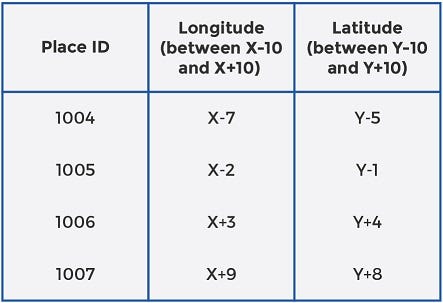
The simplest solution is to store the datasets along with their parameters in a relational database (RDBMS), such as MySQL. MySQL stores information in the form of tables. For POIs, for example, each POI will have a separate row and the data for that particular POI will be stored in separate columns. The two columns that are of maximum interest to us are, longitude and latitude for each POI. Together, these two columns identify the geospatial location of the POI.
To extract POIs that are within a certain distance from the user location (X, Y), we will have to make a range query in the database where, say, longitude is between X-10 and X+10 and latitude is between Y-10 and Y+10. The table below shows how the query returns POIs for a simple MySQL database.
Check out the course Coderust: Hacking the Coding Interview for Facebook and Google coding interviews.
The Problem With RDBMS Approach
With this approach, the system will have to scan the POI table and pick only those entries that fulfill both criteria (latitude is within range and longitude is also within range). The POI table, even for a single city, can get quite large. Scanning the entire table and checking if it meets both criteria can be very time-consuming and expensive.
What we need, is a way to shorten the table to optimize indexing, so search performance upon a user query is more efficient. Let’s come up with a better solution.
2D Grids
You can take the entire world map as a two-dimensional space divided into millions of small squares of fixed sizes. The purpose of dividing the space into small squares is to catalogue the POIs in each grid space separately. This gives you multiple lists of places, with each list storing the POIs that lie within the 2-D (latitude and longitude) range of the grid square it belongs to.
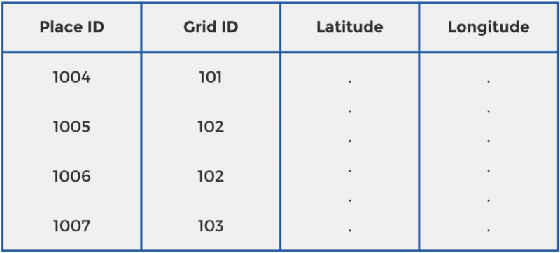
The benefit of this approach in comparison to the naïve solution discussed above is obvious. Instead of having a long table of POIs to scan each time the system needs to return proximity places, the system will only pick and check the POIs belonging to the grids that are relevant. Each grid square will be uniquely identified by a Grid ID. A Grid ID is a unique code that identifies a grid on the world map. For each Grid ID, the starting and ending points on the X-axis (Xa and Xb) and the starting and ending points on the Y-axis (Ya and Yb) will also be stored in the database.
Now, each POI will also store a Grid ID in the database, in addition to the latitude and longitude, as shown below:
If you are preparing for tech interviews at FANGs, you may want to check out the course Grokking the System Design Interview by Educative.
An Example:
If the size for the grid squares is equal to the query radius, the system will only need to look up the POIs in the user’s square and the 8 squares that are adjacent to the Grid ID where the user is located. Look at the picture below to better understand the proximity places for user A, assuming a search radius of 10km.
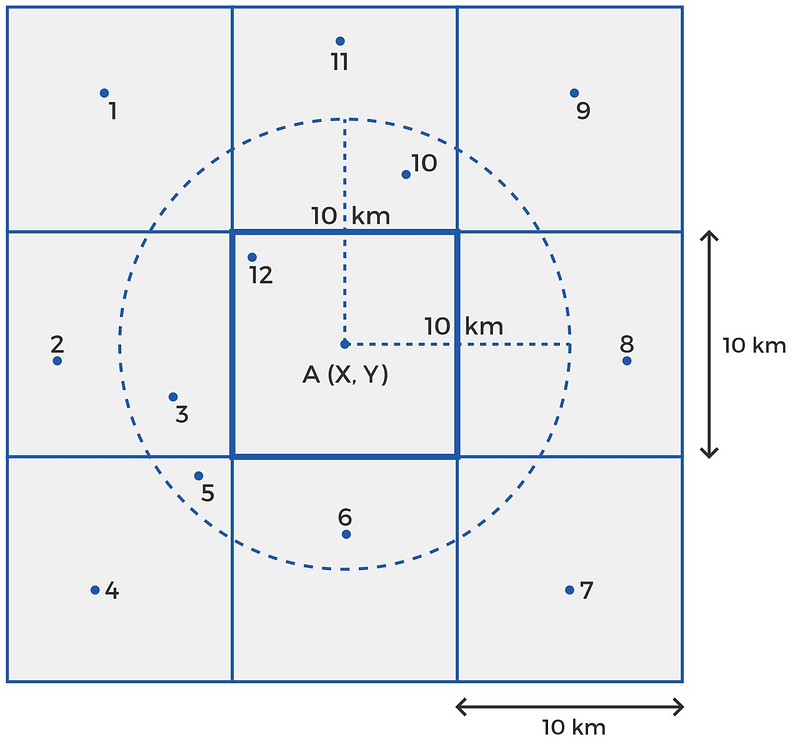
If user A at a location (X, Y) queries the system for POIs in his proximity, the system will only pick the POIs that lie in A’s grid and the 8 squares that are adjacent to A’s Grid ID. Suppose places 1 through 12 lie in these 9 grids. Next, the system will check if the longitude lies within X -10 km and X+10 km and latitude lies within Y -10 km and Y+10 km. Points 3, 5, 6,10, and 12 fulfill the criteria and are returned to the user.
What Is The Benefit?
This approach saves time and resources since the system will only be scanning the POIs belonging to 9 Grid IDs. The application’s response time after a query has been made will be much less with this approach than it was with the initial solution. To further save time, we can maintain hash tables in memory. The ‘key’ for each hash table is a unique Grid ID, and the ‘value’ is the list of Place IDs in that grid.

The Problem With 2D Grid Approach
POIs aren’t uniformly distributed among places. Important cities such as London or New York will have lots of POIs in each grid square, while sparsely populated areas like coastal regions will have very few POIs in each grid square. This means that the system will run slow for regions that are densely populated with POIs. This problem arises from a fixed grid size.
If we can find a way to dynamically adjust the grid size according to the number of POIs in the region, the system will run equally fast for different regions of the world. We’ll discuss this dynamic sizing in the next section.
Check out the course Coderust: Hacking the Coding Interview for Facebook and Google coding interviews.
Geo-hashing
The concept that Yelp and other proximity servers actually use is called geo-hashing. In the first level, the world is split into, say, 32 grids of a standardized size. If we have a base-32 grid, we’ll have the world divided into 32 large areas, identified by a string of length 1 (one of the 26 characters or numbers). Each of these level-1 cells will be quite large; you can expect an area of 5000 * 5000 square km each.
Telescoping, or zooming-in into each of these level-1 cells will further create a set of 32 cells. This is level-2 geo-hashing. Each of level-2 cells will be identified by a string of length 2, where the first character identifies the level-1 cell it belongs to and the second character identifies its location inside the particular level-1 cell, say, s.
Since each 5000 * 5000 square km level-1 cell is broken into an 8 x 4 grid for level-2 geohashing, the vertical dimension of each level -2 cell is 5000/8 = 625 km, while the horizontal dimension is 5000/4 = 1250 km. So, level-2 geo-hashing will create cells that are 1250 * 625 square km each. Further zooming-in into, say, cell sk, as shown in the diagram below, you’ll have geohash level-3 cells, each of 156.25 * 156.25 square km each. This is because each 1250 * 625 square km cell is divided into a 4 x 8 grid, setting the vertical dimension of each level-3 cell at 625/4 = 156.25 km and horizontal dimension at 1250/8 = 156.25 km.
Zooming in further, by adding one character to the grid address every time it is split to the next level. Until, we will approach a point where each small area is identified by a unique address — something like sk90hyv7u.
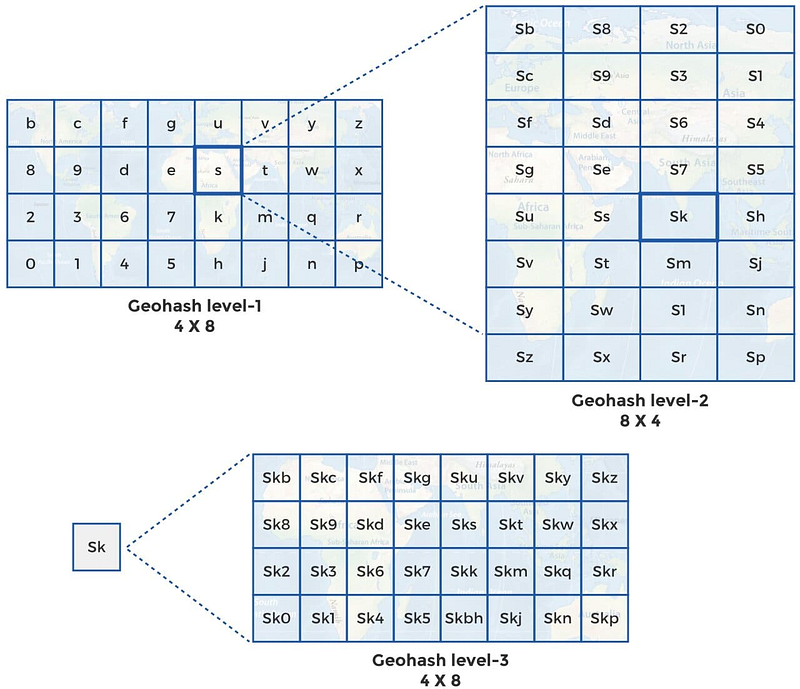
As the geohash levels progress, the cell area will decrease and precision will increase.
If you are preparing for tech interviews at FANGs, you may want to check out the course Grokking the System Design Interview by Educative.

How many levels will we use?
We can configure the system to zoom to higher levels for the densely populated regions and maintain a lower geo-hashing level for sparsely populated regions. Let’s say, we don’t want more than 100 POIs in each grid. We apply an algorithm that continues splitting the grids into further 32 cells at each level until there are at most 100 POIs in each cell. Areas like London will be split more times (higher geo-hashing levels) and this will be evident by the longer string of characters that identifies the cells. Areas like coastal regions will be split only a few times (lower levels of geohashing).
How Do We Employ Geohashing in Our Proximity Server?
First, we find the geohash for the user’s location. Next, we use this geohash to pick the POIs located within the geohash grid. If the user’s grid itself has enough POIs, we return the list to the user. If the geohash grid does not contain the desired number of POIs, we expand the grid by taking away the last character from it. Suppose the user is in grid skf6g90f.
If there aren’t enough POIs in this grid, we expand its size by picking the POIs in skf6g90. We continue expanding the area until we either approach the desired number of POIs or the maximum radius is achieved (checked by the latitude and longitude of the POIs from the user’s location).
Sharding Database
We will want to split the database into multiple databases since a single database server cannot possibly have the capacity to store the entire index for all the POIs in the world. It will also reduce latency when scanning the database. Since we are interested in the POIs that are in close proximity to different users, the obvious solution would be to split databases based on regions.
Having different database servers for regions like North America, Europe, and Asia, will substantially shorten the list of POI indexes to query. Smaller tables will decrease latency and allow faster responses for the users.
Based on the business model, the above approach to shard database may or may not be the best one. One problem with region-based sharding is that the server for a region that is more popular can become overloaded with requests in comparison to servers of regions that aren’t as popular.

A different approach is to use hashing or consistent hashing to allocate servers for each new Place ID that becomes a part of the database. Each new POI’s Place ID will be put through a hash function which will map the Place ID onto the server that will hold its data.
With this approach, the system will need to query all the servers for proximity places and the response from each of the servers will be put together by an aggregation server before being delivered to the user. For our proximity server design, let’s assume we shard database using consistent hashing on Place ID.
Final System Diagram
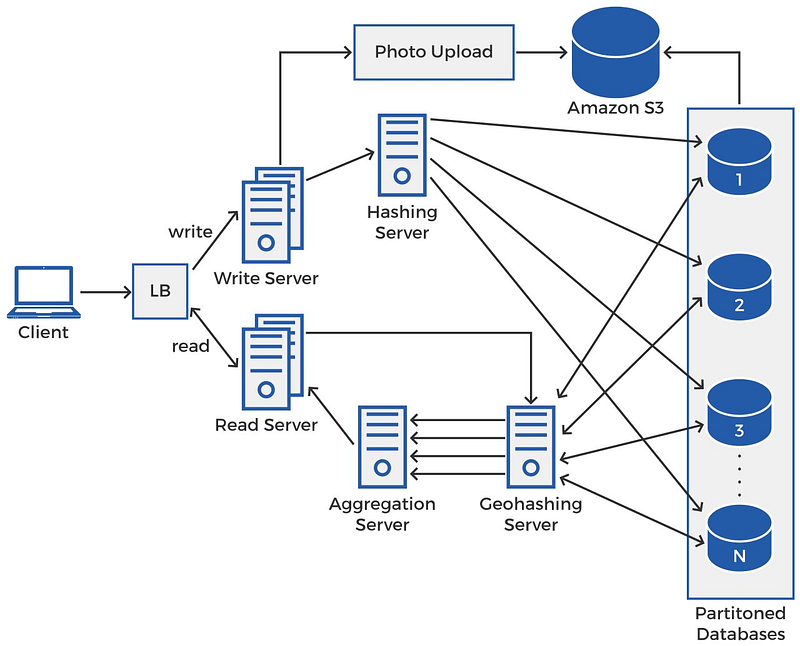
When the client makes a request, it could be a read request or a write request. The load balancer will direct it to one of the suitable and available servers. There will be more read servers than write servers since the application is read-heavy.
Check out the course Coderust: Hacking the Coding Interview for Facebook and Google coding interviews.
Write Operation
The write server will pass on the new POI’s data to the hashing server which will map the Place ID onto one of the partitioned databases using a hashing function. If there is a photo with the data, the write server will pass it on to the photo upload server that uploads the photo to an external cloud database, such as Amazon S3 and the path link is stored in the database with the rest of the information for the POI.
Read Operation
The read server will pass on the user’s query to the geo-hashing server. The geo-hashing server will query each of the partitioned databases using the algorithm discussed earlier in the blog. Each of the sharded databases respond with a set of places that lie in proximity of the user’s location. The geo-hashing server forwards the multiple lists of proximity places to the aggregate server. The aggregate server sorts and aggregates these results before returning them to the user.

Top Youtube Videos On Designing NearBy, Yelp Or Similar Proximity Server
- System Design Interview — Design Yelp Geospatial Geohash by Success in Tech
- Yelp system design | amazon interview question Yelp software architecture by Tech Dummies Narendra L
- System Design — Yelp, Tripadvisor, Foursquare, Nearby Places Architecture | Geospatial Data by Udit Agarwal
- Google Maps Algorithm: Designing a location based database by Gaurav Sen
- System Design Meetup 2020-Nov-28: Yelp / geospatial sharding by dimakorolev
Conclusion
In this blog we discussed how to design a basic proximity server similar to Yelp. The key element of the system is to design a database that can efficiently store geospatial data and allow the application to access it fast enough to give users a real-time search experience.


If you enjoyed the article, kindly support us and consider following. Thank you :)
Your Comprehensive Interview Kit for Big Tech Jobs
0. Grokking the Machine Learning Interview This course helps you build that skill, and goes over some of the most popularly asked interview problems at big tech companies.
1. Grokking the System Design Interview Learn how to prepare for system design interviews and practice common system design interview questions.
2. Grokking Dynamic Programming Patterns for Coding Interviews Faster preparation for coding interviews.
3. Grokking the Advanced System Design Interview Learn system design through architectural review of real systems.
4. Grokking the Coding Interview: Patterns for Coding Questions Faster preparation for coding interviews.
5. Grokking the Object Oriented Design Interview Learn how to prepare for object oriented design interviews and practice common object oriented design interview questions
6. Machine Learning System Design


