
System Design Interview: How to Design BookMyShow, Fandango (or similar movie ticketing application)
Don’t forget to get your copy of Designing Data Intensive Applications, the single most important book to read for system design interview prep! Udacity | Coursera | Pluralsight.
Check out ByteByteGo’s popular System Design Interview Course
Consider signing-up for paid Medium account to access our curated content for system design resources.

If you are interviewing, consider buying our number#1 course for Java Multithreading Interviews.
A movie ticket booking application such as BookMyShow facilitates users to browse through movies and live events, watch trailers, check seat availability and purchase a ticket. Let’s discuss how to design a similar online ticketing system.
Requirements Of The System
A basic ticket booking application should be able to meet the following requirements:
Get a leg up on your competition with the Grokking the Advanced System Design Interview course and land that dream job! Don’t waste hours on Leetcode. Learn patterns with the course Grokking the Coding Interview: Patterns for Coding Questions. Or, if you prefer video-based courses check out Udacity.
Functional Requirements
- The users should be able to select among a list of cities to display a list of movies showing in the area.
- When the user selects a movie, the system displays a list of different cinemas where the movie is airing, with their showtimes.
- The user can also make searches based on movie name, genre, and release date etc.
- The system also displays movie descriptions and trailers.
- The user should be able to select a show at a particular cinema and book a ticket.
- The system displays seat availability and users can choose preferred seats.
- After booking a ticket, the system will allow payment within a predefined time.
- The system sends SMS or Email notifications for bookings, payments, and cancellations.
- The system must make sure that no two customers can book the same seat.
If you are preparing for tech interviews at FANGs, you may want to check out the course Grokking the System Design Interview by Educative.
Non Functional Requirements
- The system should be scalable to a growing user base.
- It should be highly available.
- Minimum latency should be involved. The users should enjoy a seamless experience.
- Financial transactions must be secure.

High Level Design
The high level design of a basic movie ticket booking system looks like this:
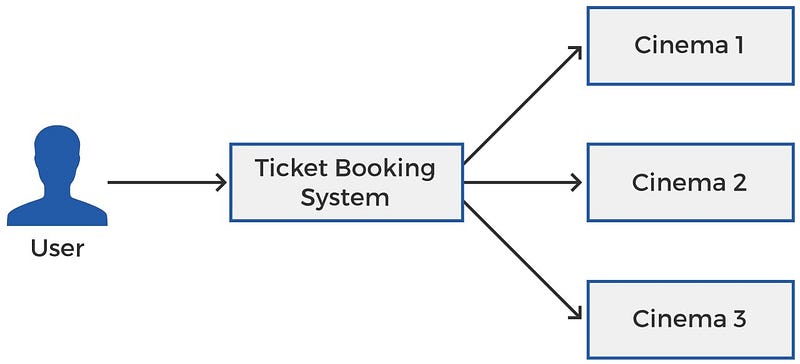
The user connects to the ticket booking system and the ticket booking system is connected to the systems of all the affiliated cinemas. The ticket booking system allows users to make bookings at any of the affiliated cinemas.
How Ticket Booking System Connects To The Cinema’s System
Now optimizing the design further, let’s add a load balancer to connect the user to the ticket booking system. Let’s also zoom into the ‘Cinema’ block to see how the ticket booking system connects to the cinema’s system. There are two ways for your ticket booking system to connect to the cinema’s system:
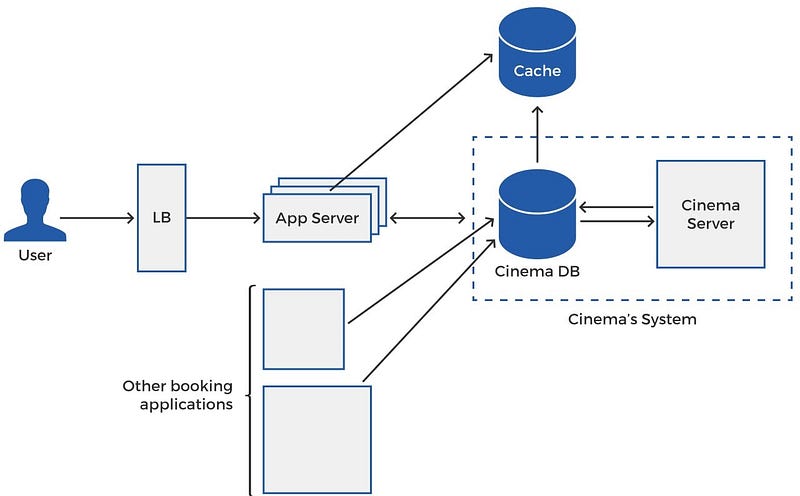
Option 1: Connect To Cinema’s Database
Check out the course Coderust: Hacking the Coding Interview for Facebook and Google coding interviews.
The user connects to a load balancer to communicate with the application server. Since we have a scalable and highly available movie ticket booking application, we will serve the users’ requests using distributed app servers. Scaling the app servers horizontally allows the system to handle multiple parallel requests to make sure that the availability is not compromised even when the load is high.
Upon the user’s prompt, the app server communicates with the cached data to check for shows etc. The cached data is regularly synched with the cinema’s database for up-to-date information. If the information isn’t available in the cache, the app server fetches it directly from the cinema’s database. The cinema’s database is linked with the cinema’s server, so the cinema can keep track of the bookings and payments.

You can see in the diagram that alongside our Ticket Booking System, other booking applications also connect to the same database. Furthermore, our Ticket Booking System will not only connect to a single cinema’s database. It will connect to multiple databases for all the affiliate cinemas.
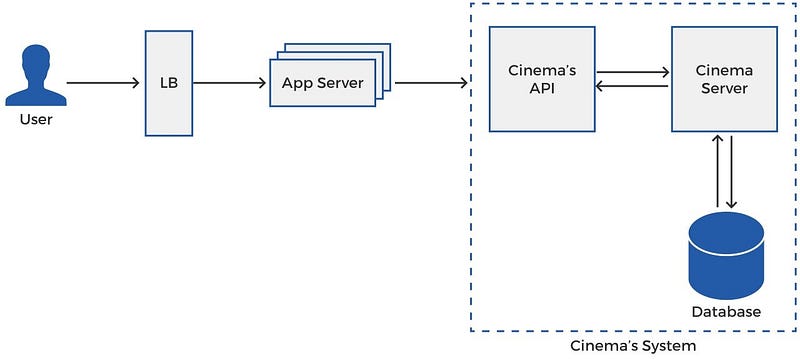
Option 2: Connect To Cinema’s API
Instead of directly connecting to the cinema’s database, an alternative approach is for the ticket booking system to connect to the cinema’s API. The cinema’s API connects with the cinema’s backend server to send the available seats information to the ticket booking system’s server and handle reservation requests.
So an alternative design for a ticket booking application is the one shown in the diagram below:
If you are preparing for tech interviews at FANGs, you may want to check out the course Grokking the System Design Interview by Educative.
Multiple Requests For A Seat
There may be cases where multiple ticket booking applications attempt to book a seat for a show. The cinema’s server will use a locking mechanism to reserve and lock the seat for a few minutes for the user connecting from a ticket booking application on a first come first serve basis. If a booking is not made by the user for, let’s say, 5 minutes, the cinema’s server unlocks the seat for all ticket booking apps.

Step-By-Step Ticket Booking Workflow
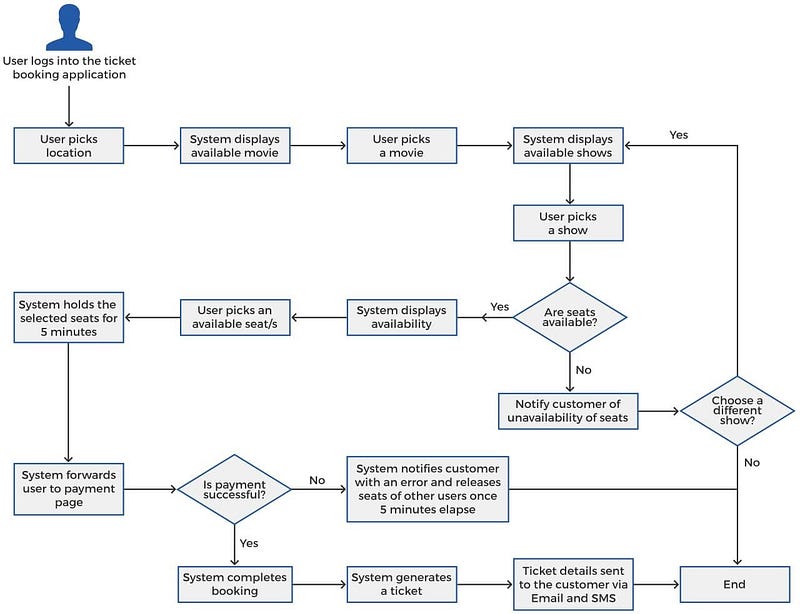
Here’s how the workflow of the ticket booking system looks like:
- The user visits the ticket booking application.
- The user chooses the location. Alternatively, GPS can be used to identify the user’s location if they’re connected to the system from a mobile phone. If they’re using a laptop, the ISP that they’re connected to can identify their location.
- Once the location is selected/identified, the movies available in theatres in that location will be displayed as a list.
- When the user picks a movie, all the available shows for the movie, with different timings and different theatres are displayed. This information is fetched from the cached database of the ticket booking application.
- The user picks a show, depending on their preferred showtime and preferred theatre.
- Next, the system fetches the seat information from the cinema’s API and displays it to the user, often in the form of a map. The map will display a collection of available and occupied seats, where the user can only select from the available seats.
- Once the user picks a seat (or seats), our ticket booking application will lock the seat temporarily for a predefined interval, let’s say, 5 minutes. This makes sure no other user, from the same application or a different one cannot pick the same seat during this time. If the user does not book the ticket for the locked seats within the timeframe, the system releases the seat to other users. A booking is marked complete by the system once the payment is made.
- Once the user selects a seat, they will be moved to the payment page, which informs them of the price, payment options and other details. We use a third party payment solution to handle the payment part for us.
- Once the payment is carried out successfully, the app server notifies the cinema. The cinema creates a unique ticket ID and sends it to the application server. This completes a booking.
- The ticket booking application creates a ticket with the ticket ID and all the details of the ticket, including the theatre, movie, seat number, hall number, timings etc., and sends a copy to the user via Email, SMS or both.
Check out the course Coderust: Hacking the Coding Interview for Facebook and Google coding interviews.
Activity Diagram
The above workflow is easier to understand with the activity diagram below:
Low Level Design
Now that you have a fair idea of how the system works, let’s see how the low level design looks like.

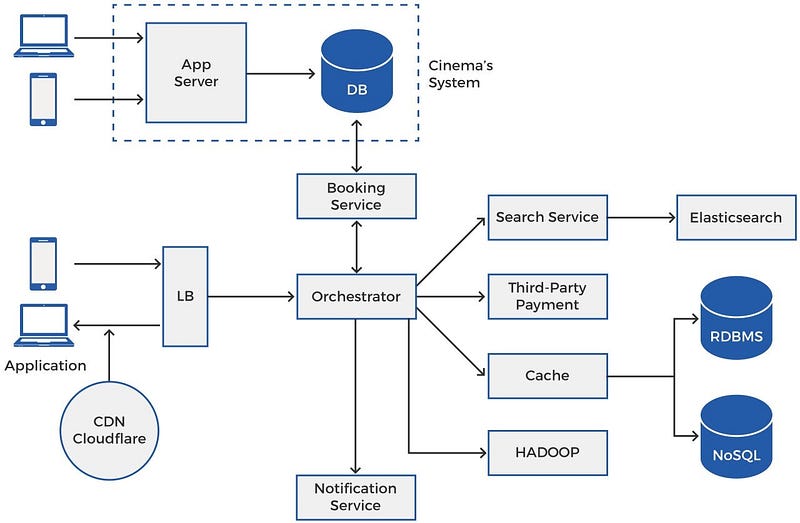
Let’s build our ticket booking application on a microservice architecture. Breaking the operation into microservices creates a fault tolerant system since failure of one of the microservices does not impact the other microservices. With this form of architecture, it’s also easier to introduce new features to the system without any adverse modifications in the rest of the system. For example, if we want the system to manage live events, we can add the suitable microservices, without any major disturbance to other services.
If you are preparing for tech interviews at FANGs, you may want to check out the course Grokking the System Design Interview by Educative.
Design Components
Application
The users may visit and use our ticket booking application through their mobile phone or desktop. This is the first component that the user’s request will hit when they visit the system through a computer.
Load Balancer
From the application, the user’s request will be forwarded to the load balancer. The function of a load balancer is to distribute load on the horizontally scaled application servers. Depending on your requirements, you can distribute load among the cluster of app servers using consistent hashing, round robin, least connection, or any other technique.
- CDN
To eliminate delay in fetching videos and images for the customers, the system can use CDN Cloudflare to cache heavier content, including images, videos, and APIs on proxy servers located close to the user’s geographical location.
- Orchestrator
Think of the orchestrator as the center point of the application server. A request to the ticket booking application through the mobile or web app is forwarded by the load balancer to the orchestrator. The orchestrator will call the appropriate microservices to handle the request and respond to the user. The orchestrator fetches movie information from the cache to display it to the user. When the user wants to book seats for a show, the orchestrator requests the booking service to fetch seat information from the cinema and relays it to the user. It also communicates the user’s selection to the booking service which forwards it to the cinema for securing a booking.

Check out the course Coderust: Hacking the Coding Interview for Facebook and Google coding interviews.
- Booking Service
Booking service is the microservice of your ticket booking system that communicates with the cinema’s database or API. Keep in mind, that the booking service will be connected to all affiliate cinema’s servers. When a user picks a seat, the booking service communicates it to the cinema’s server to lock that seat. The booking service receives a response from the cinema’s API and sends the response back to the orchestrator. The orchestrator will then forward the request to the payment service, which in this case is a third party payment service.
- Search Service
The search service continuously copies all the movie data into Elasticsearch. Elasticsearch is the most popular search engine used for serving search APIs for applications. It allows users to make searches based on movie names, genres, release data and more. Elasticsearch can directly serve customer searches from the frontend and is, for the same reason, connected to the load balancer. The connection is not shown in the diagram above to avoid clutter.
Third Party Payment
To make the system simpler, we can use a third party payment solution. First, the orchestrator requests the notification service to communicate with the cinema’s server to lock a seat for the user, Next, it receives a response back from the cinema that the seat has been locked for the user. At this stage, the orchestrator forwards the user’s request to the third party payment solution. Different kinds of payments may be supported, including credit card, debit card and internet banking. Once the payment is successfully completed, the orchestrator receives a response. The orchestrator will forward it to the booking service to notify the cinema’s API that the ticket has been booked.
- Notification Service
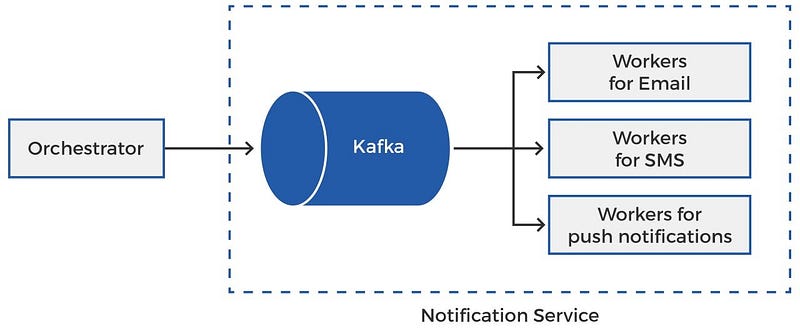
Once the payment is complete and the ticket has been booked for the user, the orchestrator will send the message to the notification service. The purpose of the notification service is to send SMS, Email, and push notifications to the users, as the name implies.
This is how our notification service looks like:
If you are preparing for tech interviews at FANGs, you may want to check out the course Grokking the System Design Interview by Educative.
Since notifications involve calls to third-party APIs, such as Email or SMS servers, latencies can be involved. This is why we need to execute the tasks of the notification service asynchronously. This is the reason why we need a messaging queue to hold messages in a queue and pass them on to any of the relevant asynchronous workers connected to the queue as soon as they are available; i.e. an Email notification is passed to an available worker for Email, and so on.

The messaging queue picks up the messages from the orchestrator. The notifications are held in the queue and forwarded on a first-come-first serve basis, or any other principle, to the available workers. Any messaging queue may be used for the purpose, but we have used Kafka. RabbitMQ is also a good choice. Python celery can be used for the workers.
- Cache
Information related to the city, movies, shows, and cinemas, that the user selects when they open the ticket booking application is stored by our ticket booking application through caching. Every time the user picks a city, the orchestrator pulls the list of movies from the cache to display it to the user. Once a movie is selected, the list of shows and description can also be served through the cache. In case the information is not available in the cache, it will be pulled from the database of the ticket booking system (RDBMS and NoSQL, discussed later). However, in most cases, the data is directly available from the cache and delivered to the user with minimum delay.
While the user picks a city, a movie within the city, and a particular show for a movie, all the requests can be served from the cache. However, once the user picks a show and is ready to select a seat, the orchestrator forwards the request to the booking service to fetch the most recent seat information from the cinema’s database.
Land a higher salary with Grokking Comp Negotiation in Tech.
Redis is a good option for storing cached information, since it is distributed and supports read-heavy data. The cached data is regularly synced with the cinema’s database through the orchestrator.
- Database (RDBMS and NoSQL)
The system regularly creates a backup of the cached data in permanent storage. Typically, the permanent storage is a combination of RDBMS and NoSQL databases. Different kinds of data are stored in different databases to help serve the purpose in the best possible manner.

In the case of a ticket booking application, we have multiple cities, where each city has multiple cinema’s and every cinema has multiple screens. Every screen has multiple seats. To store relational information such as these, RDBMS, such as MySQL, is a good choice. Since the database will be read-heavy, we can shard it based on location.
For movie information, such as description, trailers, comments and reviews, RDBMS is not the ideal choice. Heavier, non-relational data such as this can be stored in a NoSQL database, like Cassandra.
Check out the course Coderust: Hacking the Coding Interview for Facebook and Google coding interviews.
- HADOOP
Analytics and improvement is an integral part of most systems. Hadoop is a common platform used for storing and processing large volumes of data for analytical purposes. The orchestrator regularly dumps all the events and information into Hadoop. We can use it to run queries on the data and understand features like user behavior, movie performance, cinema performance, etc. The same analytics can also be used to power ML based recommendation systems to facilitate users.

Top YouTube Videos On Designing Movie Ticket Booking Application
- BOOKMYSHOW System Design, FANDANGO System Design | Software architecture for online ticket booking by Tech Dummies Narendra L
- Bookmyshow system design: focussing on seat booking feature by Sunny Gupta
- System Design BookMyShow | System Design Fandango | System Design Movie Ticket Booking by The Tech Granth
- BookMyShow/MovieTicketBooking — Low Level Design | Coding Interview Series | The Code Mate by The Code Mate
- CS Interview Questions: System Design, Designing TicketMaster byJustin Barnett

Conclusion
So this is how a basic movie ticket booking application is designed. There can be several optimizations to the design based on the actual use case.

If you enjoyed the article, kindly support us and consider following. Thank you :)
Your Comprehensive Interview Kit for Big Tech Jobs
0. Grokking the Machine Learning Interview This course helps you build that skill, and goes over some of the most popularly asked interview problems at big tech companies.
1. Grokking the System Design Interview Learn how to prepare for system design interviews and practice common system design interview questions.
2. Grokking Dynamic Programming Patterns for Coding Interviews Faster preparation for coding interviews.
3. Grokking the Advanced System Design Interview Learn system design through architectural review of real systems.
4. Grokking the Coding Interview: Patterns for Coding Questions Faster preparation for coding interviews.
5. Grokking the Object Oriented Design Interview Learn how to prepare for object oriented design interviews and practice common object oriented design interview questions
6. Machine Learning System Design


