
Sync Your Obsidian Vault For Free With iCloud By All Means, But Don’t Stop There
A short review of the new app I’m using to keep my precious files safely backed up

I have an uneasy relationship with iCloud — we smile and nod at each other, but there’s some creeping distrust behind that pleasant façade. It’s often slower than it should be to load changes between devices, and on rare occasions I’ve seen files duplicated — or vanish — for no apparent reason.
This is why I don’t rely on iCloud alone to keep my vault safe. Currently I’m also using BackBlaze to backup my entire hard drive, and ChronoSync Express (1-month free trial offer below) to mirror my iCloud vault to Dropbox.
Obsidian vault backup options
Obsidian users have a fair number of options for backing up notes, including —
- Obsidian Sync at $10 a month or $96 US per year — the most reliable choice
- iCloud — free but slooow, with potential sync issues
- GitHub — free, great for version control, but requires technical know-how
- Other cloud or sync services — free, if you’re already paying for them
- Hard backups onto external drives — free, but only as secure as the health and location of your drive
I’ve tried out all of them except for number one, because I’m not yet ready to drop money for something I can do — adequately enough — for free. There’s no question that Obsidian Sync is the best option for reliability and version control. But knowing my brain, even if I were an Obsidian Sync subscriber I’d still want another backup under my belt!
4 Reasons to Sync Your Vault With iCloud
You’re content enough with what free is offering Yup, this is me.
You want to access your vault on iOS devices Sadly, iCloud is a must if you want to use Obsidian on your iPad or iPhone.
You don’t mind slow iOS start up times Yes, iCloud-only backup works, but I’ve found it horribly slow to update on iOS. I mainly use Obsidian on my Mac, so this isn’t too much of a big deal.
This is (a portion of) the screen I see when opening Obsidian on my iPhone, for anywhere from 30 seconds to 5 minutes before it actually opens, depending on how many files have been created or updated on other devices:

One way of speeding it up could to keep the iPhone app open while working on my Mac.
You want to be able to restore recently deleted files iCloud might not let you view the contents of text files online (more’s the pity), but it can help you to restore files that may have been accidentally deleted. Dropbox can do the same thing, as can BackBlaze and most other Cloud backup services.
No, Sync Is NOT the Same as Backup!
Whatever sync solution you choose, be sure to also consider version control. Without the latter, you don’t have a true backup of your work.
My combined backup and sync solution looks like this:
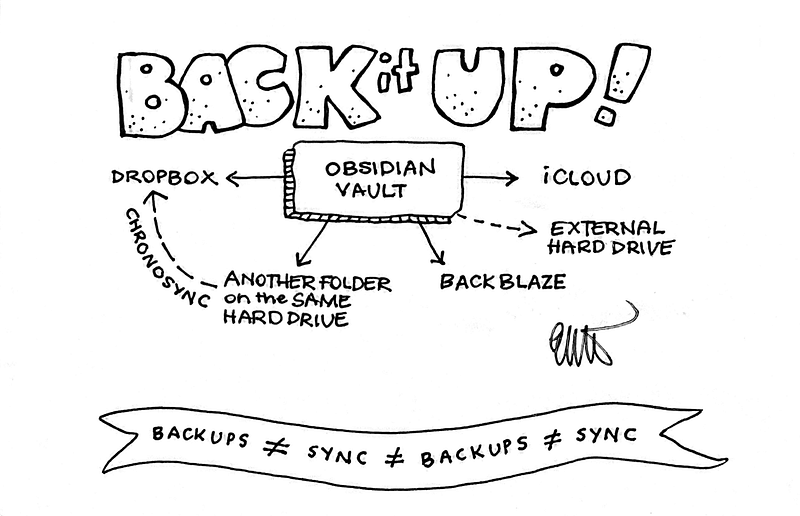
Why ChronoSync Express? Why not SyncThing?
I tried multiple times to get SyncThing to work, but no luck. It downloaded but wouldn’t open. I’ve heard plenty of people recommend it so if it works for you, that’s great. ChronoSync Express (CSE) is a pared down version of the fuller-featured ChronoSync utility, which looks impressive, but I don’t currently need the additional features. As a Setapp subscriber it makes sense for me to use a solution I already have access to, and CSE does the job very nicely.
CSE’s setup process was easy to understand — I was up and running in less than two minutes. Now whatever changes I make to my iCloud vault are automatically mirrored to the backup folder I’ve designated. This folder can live anywhere, including remotely; I just happen to have chosen Dropbox. Both versions live on my hard drive, so BackBlaze is making an additional copy, just so I can sleep better at night!
Bidirectional backups are also an option, which means that in theory I could access my vault in Dropbox-only apps and have iCloud reflect the changes. Honestly though, I’m not that kind of brave just yet! There’ll be less chance of something going wrong (including human error) if I mirror my home base (the iCloud vault folder), and keep the Dropbox location in the background as an untouched backup.
Things I like about CSE:
- Quick and easy to set up
- Scheduled backup times
- Unobtrusive; stays out of your way
- Gives you the choice between one-way or bi-directional syncing between the source and your backup location
- Costs me no extra as I’m already a happy Setapp subscriber
One note about backing up an Obsidian vault with ChronoSync Express: you will need to change one setting in the Options section. Go to the Special File/Folder Handling tab, and deselect the Ignore invisibles box.
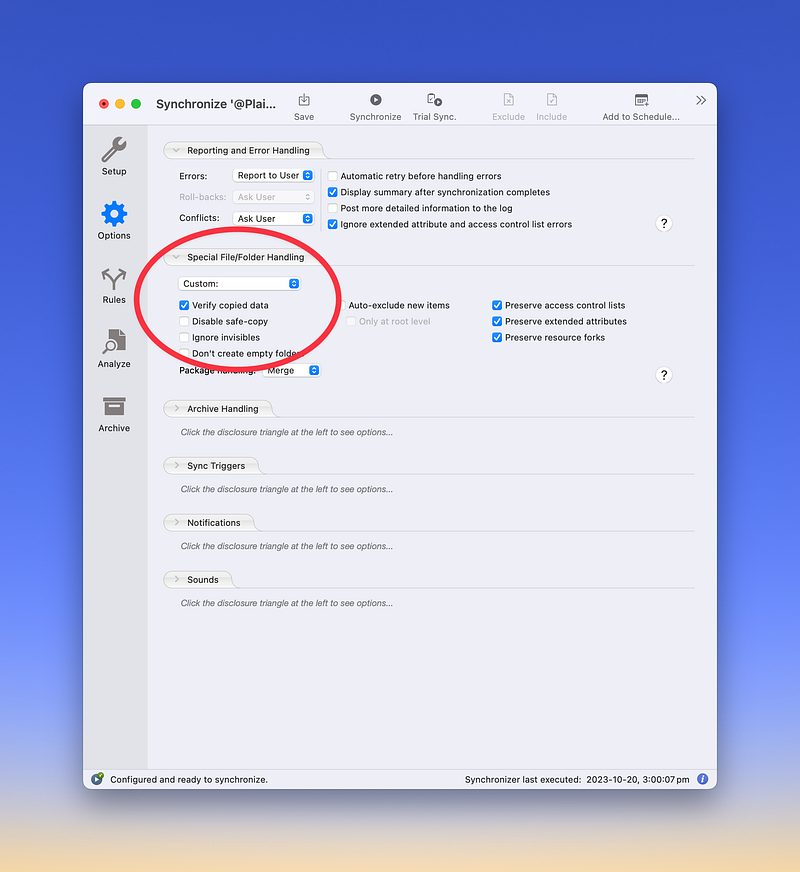
Here’s why. Obsidian stores important documents in an invisible .obsidian folder, right there in your vault. You can reveal it in the Finder by pressing command + shift + period, but don’t change anything in those files unless you are 100% sure you know what the consequences will be.
ChronoSync Express is US$24.99, but it’s also included in my Setapp subscription so I pay no extra.
There are many more reasons than CSE to give Setapp a go; I’ve written several articles on the topic that you may like to check out. Click on this link and enter the code ELLANE for a 1-month free Setapp trial, instead of the usual 7 days.
This is an affiliate link and I will receive a commission if you choose to subscribe after clicking on it. I was a satisfied paying Setapp subscriber for years before receiving any sort of reward for referrals, and I only promote products that I use and love.


