
SwiftUI: NavigationStack
Learn the new Apple Navigation System and how to use it programmatically

With the release of iOS 16 and Swift 4, Apple gave a big boost to the capabilities of the navigation system of our apps. They introduced a totally different approach. In this story I’ll show you the basics and some advanced features:
- Basic Navigation
- Passing Objects to Destination Views
- Passing Objects to Destination Views — Advanced
- Navigation Path
- Programmatic Navigation
- Generic Programmatic Navigation
Basic Navigation
Until iOS 15 the Navigation in SwiftUI was something like this:
Now, with iOS 16 Apple introduced a new kind of view: the NavigationStack. On its basic usage it’s almost identical to the previous one, just change the name of the view and everything will work fine as well:
Pretty easy transaction isn’t it?
Passing Objects to Destination Views
In a normal application is common to pass an object to another view, the object itself could be of any kind, or the object could be inside a list. In order to perform this kind of task SwiftUI gives us a brand new modifier: navigationDestination(for: destination:).
This modifier takes two parameters: an object type conforming to the Hashable protocol and a view. Basically we are saying to the view: “hey I’m gonna pass you an object of this type… use it to create a detail view!”.
In order to use this modifier, a specified initializer of the NavigationLink is needed: NavigationLink(_ title: value:) .
Let’s see an example:
The value “This is the Detail” (being a string) is caught by the navigationDestination and passed to the view.
Please note that the navigationDestination modifier must be applied to a view inside the NavigationStack and not on the navStack itself. Otherwise it will not work.
This allow us to pass different kind of types adding more and more navigationDestinations :
Passing Objects to Destination Views — Advanced
Adding navigationDestinations just under the NavigationLink is not really a best practice. Image the case of a List where scores of rows are created with the same type of destination.
In this scenario a better solution would be to extract the navigationDestinations outside the container view:
Or, implemented with a List:
Very elegant solution.
What if we have to pass the same type of object to different destination views? It’s a very uncommon scenario I know, but you will never know. If you try to add different navigationDestinations with the same type of object the compiler will use only the first one.
The solution I use is to wrap the object inside another object: an enum with associated type will suffice:
Please note that the object must conform to the Hashable protocol.
With our new wrapper, the view will be:
Navigation Path
With iOS 16 we can finally take full control of the navigation history and path in our applications using an array of objects.
Let’s build first a simple list of GDR characters with a detail view:
Please note al line 21 that I’ve used a different initializer for the NavigationLink , the one that allows to create content for the view so you can create any type of tappable view.
Now let’s track the chosen path with a little modification to our code:
Let’s add a @State variable to keep all the Characters selected by the user. Please note that this var is bonded in the NavigationStack itself using a different init.
Every time the user selects a row of our list, a Character item will be added to the array itself.
Programmatic Navigation
The cool thing is that with this mechanism we can finally push or pop the views programmatically! This was impossible before.
Let’s try it adding a button that selects a random element from the Characters array:
…allow me the force unwrap please…😁
And this is the result:
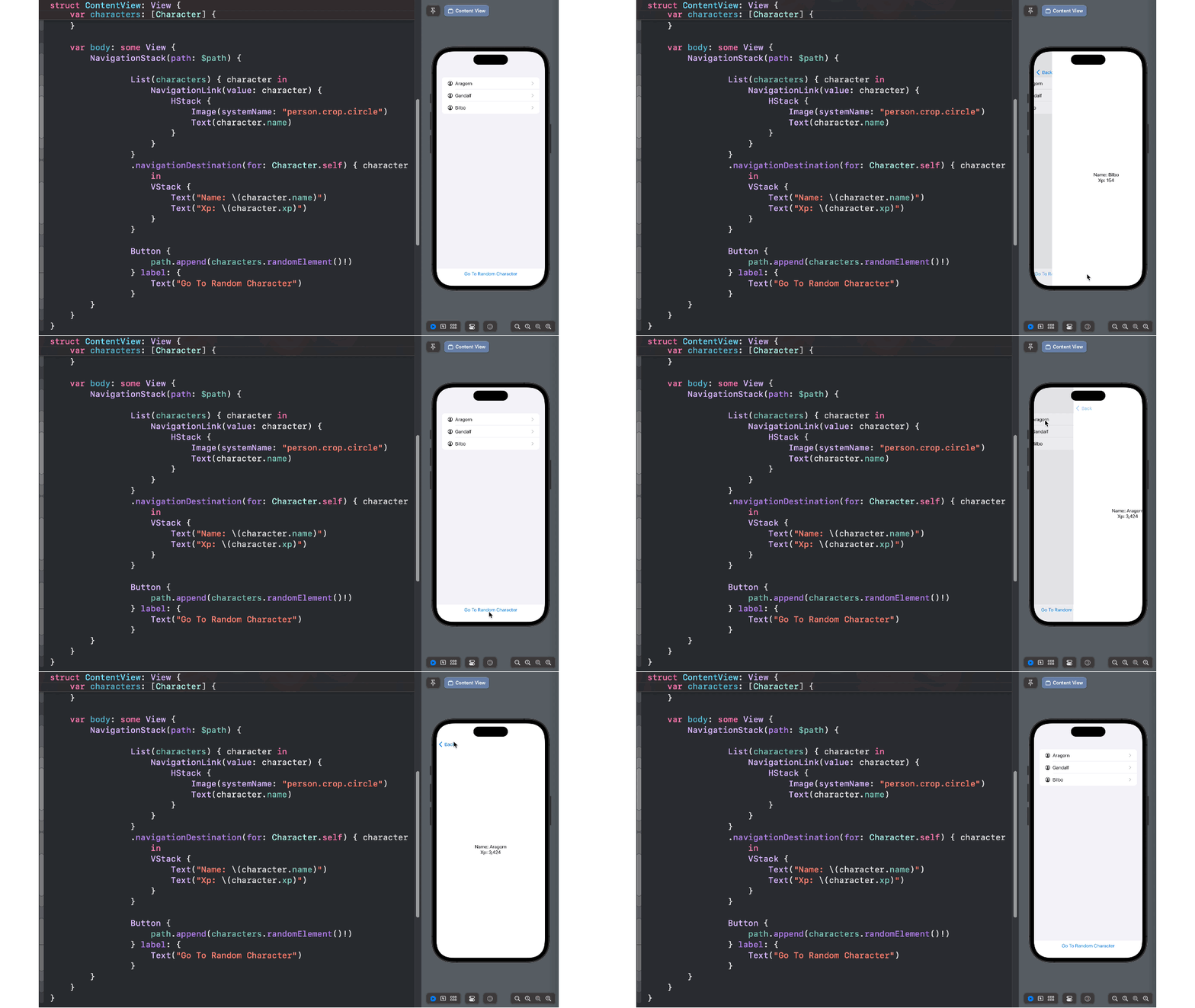
The path can be configured as pleased adding more and more items. Let’s try to add 3 characters in one shot changing our button like this:
Once the button is tapped, the path is modified and all the 3 views are pushed simultaneously but only the last one will be visible. If you pop back you will unwind all the path view by view. Super cool!
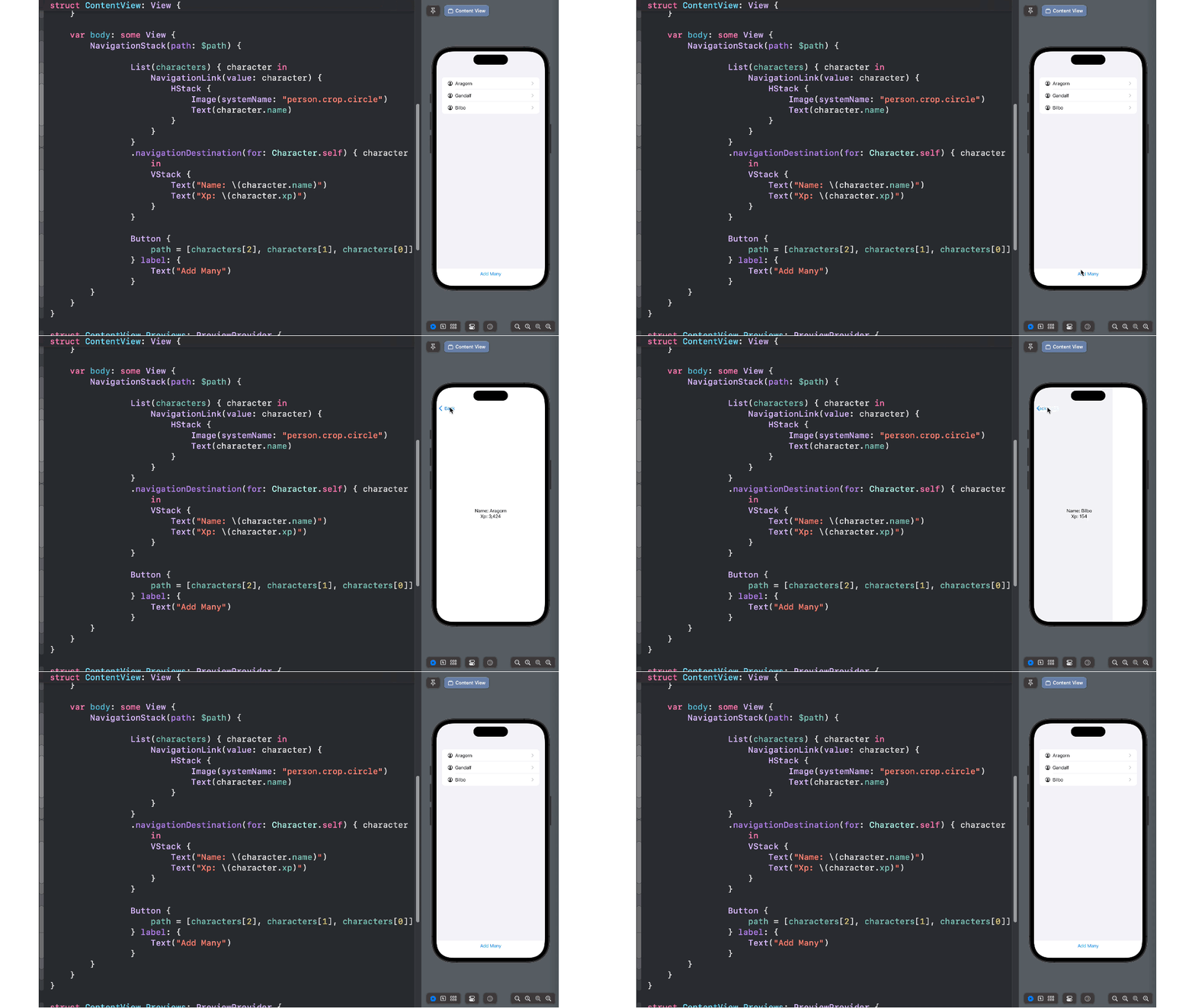
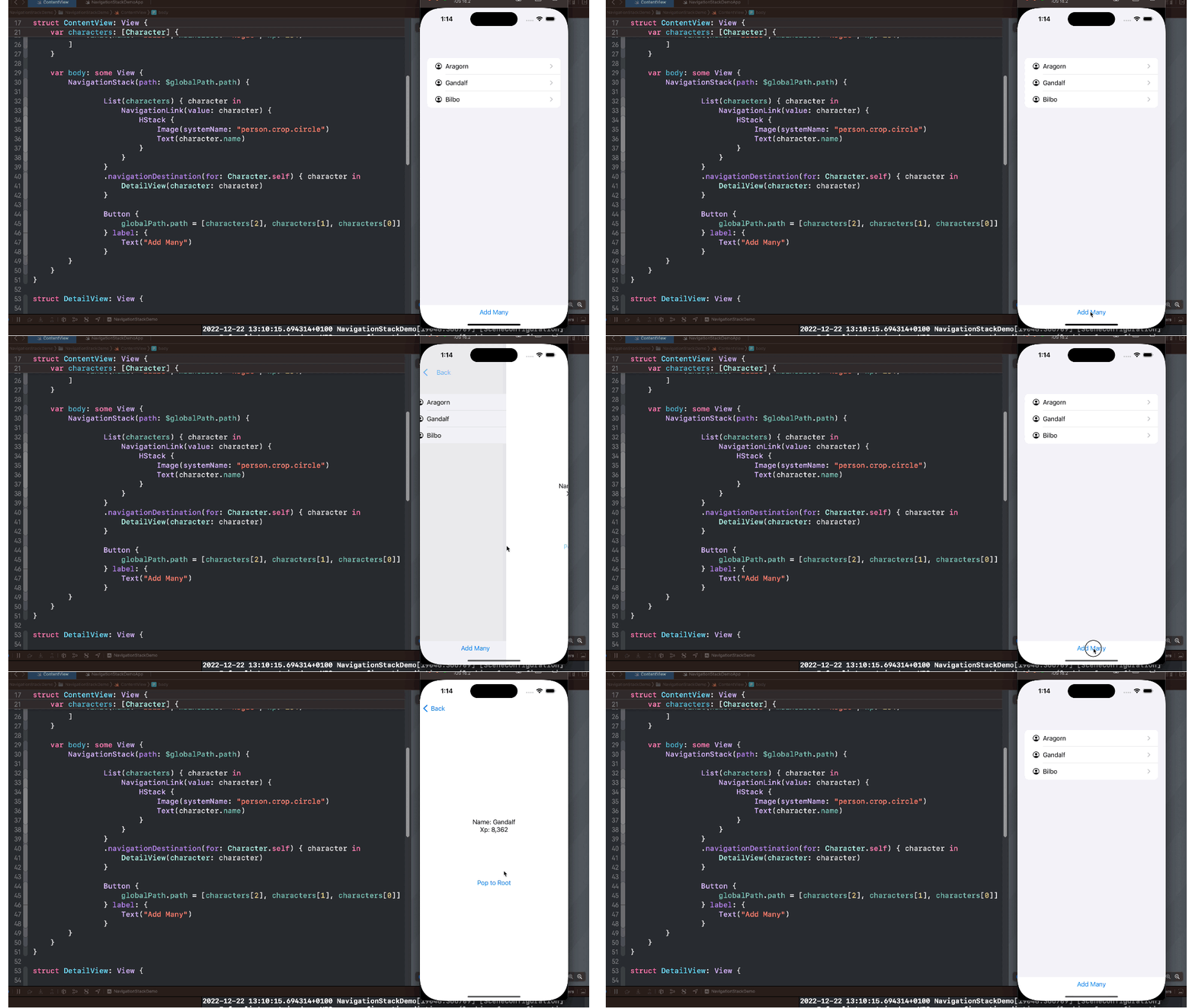
Since we have total control of the navigation we can also pop back as pleased if we can have access to the path globally in the app.
In order to do so, we need to create an ObservableObject as EnvironmentObject that will keep count of the path. Let’s do it in our main app file:
The GlobalPath class holds an array of Characters.
Now let’s create a button that wil be able to bring us back to the root view. Let’s refactor our detail view like this:
Please note at line 14 that I have removed all the elements in the array. The path in the NavigationStack updates and the view is popped back! Just like magic!
Generic Programmatic Navigation
In real life Apps the navigation is something more complex… you push a Character type, then an Int, then a MagicItem type and so on… as you can see the path variable was a simple array of one single type. So what can we do to achieve this result? Add as many pathes as the type of objects we have? Of course not! Apple gave us the solution to this problem with a peculiar type, the NavigationPath :
This is simple a list of type erased objects, a generic one to be used everywhere.
Edit:
I’ve added a full example with a NavigationStack example for the sake of clarity:
Anyway I suggest you to use always a NavigationStack in order to get ready since the beginning for anything…
That’s all folk!
I hope you liked this article, if you did please clap it.
I also remember you my brand new Swift Newsletter: SevenSwiftDays:
If you are interested in learning more, a lot more about views in SwiftUI, I strongly suggest to take a look at this great interactive book:
Support me and subscribe if you like 👍
Enjoy your coding!


