

SwiftUI and How NOT to Initialize Bindable Objects
Or just one of those times when init() is not your friend
If you’re like me, the days following an Apple World Wide Developer Conference are usually followed by the creation of many, many, many sample and demo programs, written in an attempt to understand and test the plethora of concepts, code, and libraries released by Apple just days before.
In fact, I sometimes feel a bit like a python trying to swallow an elephant.
Regardless, what can you do but take a deep breath and dive in?
The Unexpected
So you write code and more code, pause occasionally to bang your head against the nearest flat surface. You erase everything, start over, and write more code.
Then you hit an unexpected behavior. You stop and think, “Is it me… or did I just find a bug?”
We are, after all, testing beta code and bugs can often be found in abundance. No one is immune, not even Apple.
In this case, however, I realized that what I’d found wasn’t a bug — but it could easily become one. (Later I determined it was a bug, and one worse than I’d initially thought as the real problem is in Apple’s implementation of NavigationButton.)
Regardless, this is still a great example of how to properly use SwiftUI’s BindableObject as a view model, so let’s dive in.
NOTE: As of Xcode Beta 5 BindableObject was replaced by ObservableObject, ObservedObject, and Published.
While the “object’s data has changed” mechanism has been updated, the premature initialization issue described below remains.
BindableObjects
Let’s start with BindableObject, which according to Apple’s documentation is “An object that serves as a view’s model.” (Literally, that’s all the documentation says at this point in time.)
Long story short, Apple has recognized the Massive View Controller problem, and is encouraging (by encouraging I pretty much mean requiring) developers to use models and view models.
Here’s an implementation, boiled down for this discussion.
Our InitListViewModel is a BindableObject. BindableObjects are required to have a didChange variable that’s a Combine Subject. This is usually a PassthroughSubject and we’ll get to why that is a bit later on.
Boil all of that down, and the didChange publisher is simply specifying a way for the model to notify the View that its data has changed. When that change in state happens, the View automatically regenerates and redisplays any views affected by the updated data.
In this case, InitListViewModel data is a simple array of strings.
When the ViewModel initializes, it calls our load method to get our data. Normally this would be an API call, but for the purposes of this demo we’ll just emulate a network API call using a DispatchQueue.main.asyncAfter block.
Note that at the end of the block we do a self.didChange.send(self), which is when our magic notification trigger occurs and our view is told to update.
The View
Our view is exceedingly straightforward.
Our InitListView contains a single @ObjectBinding variable that contains our BindableObject ViewModel. This object is passed to the View on initialization.
The body of our View returns a very simple List object that’s observing the list variable on our viewModel. Our list is built using the initial empty array and then, after two seconds, is automatically rebuilt when our didChange notification is sent.
Run this code with InitListView as root and you’ll see an empty list, followed by a short list of names a few seconds later.
Now for the Bug
To better see our bug we need to be able to go back and forth to our InitListView, so let’s make a new screen that launches our old one:
We have a NavigationButton that launches our InitListView, contained within a NavigationView. Note that the ViewModel is created and passed as a parameter to the View.
Now switch our project’s root view to InitMenuView and rerun it. Quickly tap the List Sample button and you should see what you saw before.
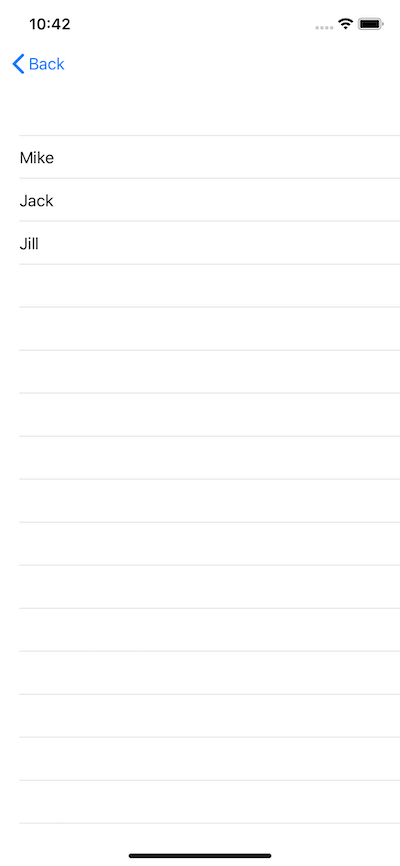
An empty list, then an update showing our old friends Mike, Jack, and Jill.
Now, tap the back button, and then tap the List Sample button again.
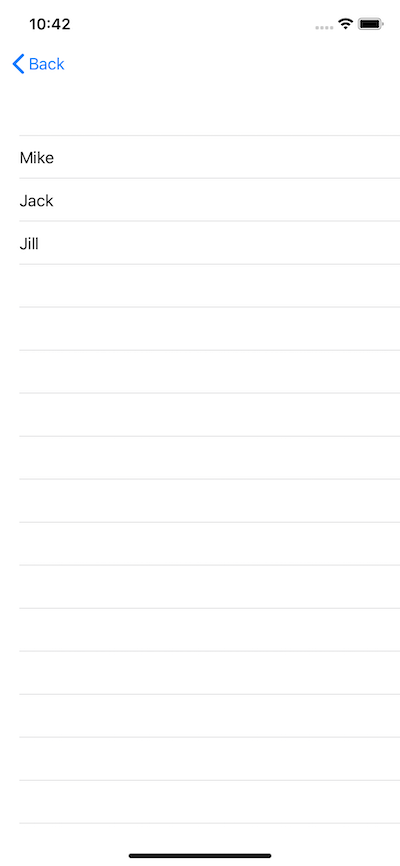
Our data shows immediately.
What just happened?
WTF? (What the Frack)
When I first saw this, my initial reaction was that my InitListViewModel wasn’t being released for some reason and that I had a bug.
I spent some time trying to figure out how to release the view model. No joy.
I spent some more time trying to figure out how to recreate and/or reassign my ViewModel to my View’s object binding parameter. No joy.
Then I noticed something else. Rerun the app… and then wait a couple of seconds before tapping the button for the first time. Do so, and you won’t see an empty screen, but a screen full of data.
And that’s when the light began to dawn.
The Method Behind the Madness
If you stop to think about it, it’s pretty clear what’s going on. Almost every view in SwiftUI is a struct. Structs must be initialized when created.
When we initialize InitListView our InitListViewModel is also created and passed as a parameter to the View.
Which means its init method is called at that point in time.
And which in turn calls our load method. Our “API” call is made at that time, and returned two seconds later.
But when does this occur?
In our InitMenuView NavigationButton, when we specified our destination.
NavigationButton(destination: InitListView(model: InitListViewModel()) )InitListViewModel is initialized at that point in time.
Ramifications
This has some pretty massive ramifications. Make a home screen with a dozen navigation buttons, with a dozen destinations, and every one will be initialized on launch.
Make a disclosable List View with a hundred list items, scroll through it, and every destination will be initialized.
Fortunately, there is a solution, although at this time it’s just a partial one.
Lifecycle Management
SwiftUI provides a set of View modifiers that are called during the View’s lifecycle, and one of those is onAppear.
Let’s refactor our code. We’ll keep everything in the ViewModel the same, but remove the init function.
And we’ll add an onAppear modifier to our main list, with a closure that calls our ViewModel’s load function directly.
This is similar to how we manage events in UIKit, where we often call or configure our view model from viewDidLoad.
Run the new code, wait a few seconds, then tap List Sample. You’ll see our expected empty screen, then our data screen. Success!
Right?
Another Problem
Well, we fixed our first problem, but now we have another one.
Tap the back button, then tap List Sample again and you’ll see our loaded data… and now we have an even more insidious problem.
And one which, I’ll admit, has yet to lend itself to a solution as I’ve yet to find a good way to “reset” the ViewModel. The NavigationButton destination just sits there with an initialized view that it apparently plans on keeping forever.
Yes, you could write some code to empty the array, but that does nothing as it simply assumes the view state hasn’t changed. Attempt to empty the array and call self.didChange.send(self) before the view is presented and you’ll get an application crash. (Another bug?)
Much sadness.
Completion Handler
I could have chalked up the first “bug” as not being a bug at all. It’s simply in the nature of how Swift works.
The second problem however, leads me to believe that it’s a bug after all.
How to fix it?
An easy solution (for Apple), would be to change the nature of navigation buttons and the like. Each problem stems from the fact that the view struct is initialized prematurely.
As such, if I were writing this API, I’d introduce a variant of NavigationButton that takes a factory closure as its destination parameter and that closure would return a new View and a new ViewModel each and every time it’s invoked.
Problem solved. Every time you press the button you get a new, factory fresh instance of your view. More to the point, you’re not prematurely initializing dozens, hundreds, or thousands of the silly things. (Can you imagine this in a list?)
Now, there might be times you’d actually want to maintain the state of the given screen, and for that you could keep the existing method signature. It’s how, after all, Tab Views can and could maintain the state of each individual Tab View.
The initialization problem is, by the way, why we usually want to use a PassthroughSubject in our code. We don’t want any view updates until we’re ready for them.
Regardless, the bottom line here is that you need to be very aware of what code you put into the initialization functions of your SwiftUI Views and ViewModels, as that code can and will be called, and often when you least expect it.
Edits
- It was noted in the comments that, as a rule, View constructors should not have side effects. This doesn’t fix our
NavigationButtonbug, but does point to the fact that ouronAppearsolution appears to be the correct one. - An earlier version used a
@Statevariable instead of an@ObjectBindingvariable inside the View, but all this does is push the initialization from within the View to outside of the View, with fundamentally the same result. - Xcode 11 Beta 2 just dropped and demonstrates the same issues.
- As of Xcode 11 Beta 3, NavigationButton is deprecated and has been replaced with NavigationLink. NavigationLink appears to work the same as NavigationButton, with the same basic behaviors (including the View Initialization Issues).
So what do you think? On point? Disagree? Am I missing something?
As always, let me know in the comments below.
Seriously. Medium has changed their promotion and payout algorithms, so clapping and leaving comments makes a HUGE difference. Thanks!
Until next time.


