Summary
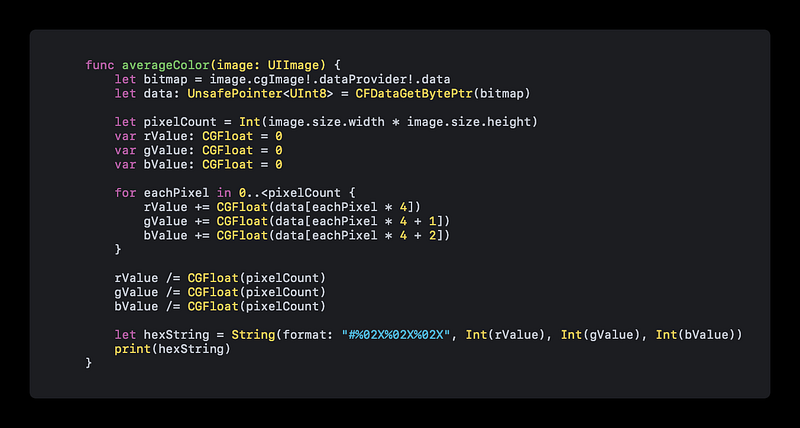
The web content describes a Swift function that calculates the average color of a UIImage by averaging the RGBA values of its pixels.
Abstract
The article provides a technical explanation on how to compute the average color of any image using Swift programming. It details a function that processes an UIImage by iterating over each pixel, summing the red, green, and blue values, and then dividing these sums by the total number of pixels to obtain the average color. The function is tailored for images in the RGBA format, where each pixel is represented by 4 bytes. The average color is then represented as a hex string and outputted to the console. The author encourages readers to share the article if they find it helpful and offers a link for those who wish to support the author monetarily. Additionally, the author invites readers to follow them on Twitter for more content.
Opinions
- The author assumes the reader is familiar with Swift programming and UIImage processing.
- There is an implicit suggestion that the average color calculation is a useful tool for developers working with images in iOS applications.
- The author shows appreciation for community engagement by encouraging readers to share the article and by providing a social media link for further interaction.
- The article implies that the function provided is a standard or preferred method for calculating average color due to its simplicity and direct approach.
- By offering a direct support link (BuyMeATaco), the author indicates a preference for receiving support in the form of donations, indicating a possible reliance on community funding for their work.