

String Matching: Surpass Excel VLOOKUP with Python & NLP
Build a String Matching App for all the Excel lovers (and haters)
Summary
Do you wanna match two sets of strings similar but not equal? Excel VLOOKUP won’t help you with that, but fear not, I got you covered! In this article, using Python and NLP, I will explain how to create and use your own string matching web application.
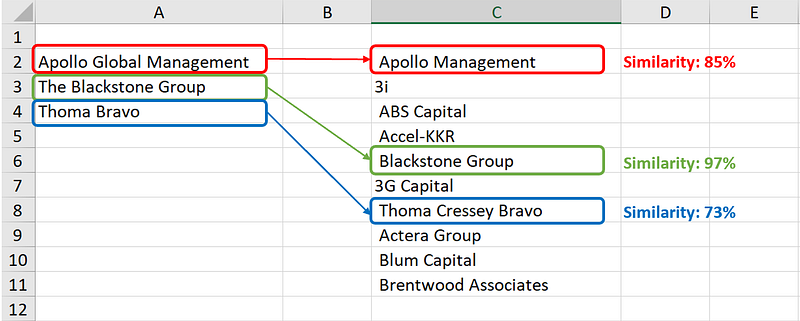
Matching different registries together, populated by several people and from various sources, ain’t easy. You find thousands of strings (like names and addresses), similar but not identical, like “Apple Inc”, “Apple Group”, “Apple Company”. And the worst part is that your trusted companion Excel fails you right there:

Through this tutorial, I will explain a straightforward but effective String Matching technique by applying Natural Language Processing, which you can test right away with my Strings Matcher App (link below).
I will present some useful Python code that can be easily applied in other similar cases (just copy, paste, run) and walk through every line of code with comments so that you can replicate this example (link to the full code below).
In particular, I will go through:
- Setup: import packages and read data.
- NLP model with scikit-learn.
- Build the app with flask and HTML.
- Deploy the app on Heroku
Setup
First of all, I need to import the following libraries:
## for data
import pandas as pd
import numpy as np
## for nlp
from sklearn import feature_extraction, metrics## for deployment
import flask
import os
import ioRegarding the data, I created two sets of public companies' names which I’ll use to test the model. You can find those in 2 Excel files available on the GitHub repo (link on top), under the “settings” folder.

The set of names on the left is shorter than the one on the right, so we’re going to look for possible matches of the left list in the right one. The latter contains, among others, strings similar to the ones in the former. Moreover, note that the strings on the right side are not clean as they contain whitespace, symbols and punctuation marks (because that’s what happens in reality!).
I’ll read the files into 2 separated pandas dataframes.
dtf_left = pd.read_excel("test_left.xlsx")
dtf_right = pd.read_excel("test_right.xlsx")
Let’s get started, shall we?
Model
I’ll start by explaining the strategy. As I previously stated, this model is going to use NLP techniques and not common string matching procedures, such as regex methods and fuzzy searching which compares two words on a single-character level with the Levenshtein distance. Here, we are going to transform strings into vectors and calculate the cosine similarity between them. To put it another way, fuzzy matching can be very useful when you associate strings that can have been misspelled (like “apple” and “aple”), but here we want to match strings based on word vectors similarity (like “apple inc.” and “the apple group”).

For each word in the first list (dtf_left), we’ll search for a match in the whole larger set (dtf_right). Therefore, we are comparing 1 string to a list of N strings (240 in this case).
a = dtf_left.iloc[:,0].tolist()[0]    #string
lst_b = dtf_right.iloc[:,0].tolist()  #list of strings
First, we shall vectorize all the strings by creating a Bag-of-Words matrix, which extracts the vocabulary from the corpus and counts how many times the words appear in each string:
vectorizer = feature_extraction.text.CountVectorizer()
X = vectorizer.fit_transform([a]+lst_b).toarray()
That produces a sparse matrix of shape: (1 + length of the list) x (total number of unique words). In this case, 241 x 329.
Then, we calculate the cosine similarity, a measure based on the angle between two non-zero vectors, which equals the inner product of the same vectors normalized to both have length 1:
lst_vectors = [vec for vec in X]
cosine_sim = metrics.pairwise.cosine_similarity(lst_vectors)
The pairwise cosine similarity returns a symmetric matrix of shape: (1 + length of the list) x (1 + length of the list). In this case, 241 x 241. However, we just need the similarity scores of the input string and the list. In other words, we want the first row of the matrix (or column, since it’s symmetric) excluding the diagonal (the similarity of the input string with itself is 1).

scores = cosine_sim[0][1:]Now, we need to decide a threshold for considering a match valid. Based on my experience, I recommend starting with a threshold of 0.7 as a rule of thumb.
threshold = 0.7match_scores = scores[scores >= threshold]
match_idxs = [i for i in np.where(scores >= threshold)[0]]
match_strings = [lst_b[i] for i in match_idxs]Finally, to complete the matching, we might want to choose the number of results to return. For example, one might need the best match only, while another might want the top 3 matches.
top = 2dtf_match = pd.DataFrame(match_scores, columns=[a],
index=match_strings)
dtf_match = dtf_match[~dtf_match.index.duplicated(keep='first')
].sort_values(a, ascending=False).head(top)That returns a 1 column dataframe with as many rows as the number of matches. For instance, setting a = “Thoma Bravo” we get this:

It means that, in the larger list, the company Thoma Bravo appears twice, once spelled as “Thoma Bravo” (exact match) and once as “Thoma Cressey Bravo” (the match is not exact but there is a high similarity score).
Easy right? Let’s write a function to apply this pipeline to the whole smaller list of strings (dtf_left), like a proper VLOOKUP. First of all, we put the code we wrote so far into a single function:
def utils_string_matching(a, lst_b, threshold=None, top=None):
vectorizer = feature_extraction.text.CountVectorizer()
X = vectorizer.fit_transform([a]+lst_b).toarray()
lst_vectors = [vec for vec in X]
cosine_sim = metrics.pairwise.cosine_similarity(lst_vectors)
scores = cosine_sim[0][1:]
match_scores = scores if threshold is None else scores[
scores >= threshold]
match_idxs = range(len(match_scores)) if threshold is None else
[i for i in np.where(scores >= threshold)[0]]
match_strings = [lst_b[i] for i in match_idxs]
dtf_match = pd.DataFrame(match_scores, columns=[a],
                         index=match_strings)
dtf_match = dtf_match[~dtf_match.index.duplicated(keep='first')
                 ].sort_values(a, ascending=False).head(top)
return dtf_matchThen, we code our VLOOKUP:
def vlookup(lst_left, lst_right, threshold=0.7, top=2):
    try:
        dtf_matches = pd.DataFrame(columns=['string',
                      'match','similarity'])
        for string in lst_left:
            dtf_match = utils_string_matching(string, lst_right,
                        threshold, top)
            dtf_match = dtf_match.reset_index().rename(columns=
                        {'index':'match', string:'similarity'})
            dtf_match["string"] = string
            dtf_matches = dtf_matches.append(dtf_match,
                          ignore_index=True, sort=False)
        return dtf_matches[['string','match','similarity']]
except Exception as e:
print("--- got error ---")
print(e)Using the two sample datasets I made, that function returns the following:

App
I decided to put this string matching strategy into a web application and make it available to anyone, especially our non-coders colleagues (link to the App on top).
Let’s start with the front-end and some good old HTML. Here I’ll go through the main points of the web development, but you can find the full code on GitHub (link on top).
Considering that this front-end will be used to get inputs from the user, the whole index.html file shall be essentially a <form> tag, which is used to create forms for user input. Inside the tag, we need to specify that, when the form is submitted, the client sends a POST request to the server (basically it transfers the data to the flask app).
<form method="post" enctype="multipart/form-data">
...
</form>
All the following HTML code will go inside the form.
I want to allow users to upload their Excel files, so I’ll utilize a <input> tag (an input field where the user can enter data) of type “file” and class “file-upload”. The tag shall be followed by some jQuery code which performs the action of uploading a file for the “file-upload” class.
<input type="file" name="dtf_lookup" id="input-file-now" class="file-upload" required value={{request.form.dtf_lookup}}><script>
$(".file-upload").file_upload();
</script>
Please, note that I included value={{request.form.dtf_lookup}} which allows the link between the HTML front-end and the flask back-end.
The string matching model requires a threshold between 0 and 1, so a slider will do the job or, in HTML terms, a <input> tag with type “range”. I’m going to add an oninput event as well to show the number selected within the slider.
<input type="range" min="0" max="1" step="0.1" value="0.7" oninput="RangeValue.innerText=this.value" class="custom-range form-control" name="threshold" required value={{request.form.threshold}}><label id="RangeValue">0.7</label>
Then, users can decide the max number of matches to return, so a simple text input will be enough. This time I won’t make it a required parameter, so the front-end usage shall be more fluid. In fact, the minimum action required from users is to upload their Excel files and if the “top” input is not provided, the server will use 1 as a default value.
<input type="text" name="top" class="form-control" placeholder="1" value={{request.form.top}}>
After that, we just need the button to submit the form and send the data to Python:
<button type="submit" class="btn btn-primary" id="btnMatch"> Match</button>
What happens when the user pushes the “Match” button? Let’s move on to the back-end to find out. Data are sent to the server which applies the functions seen before for string matching and returns the output dataframe in the form of an Excel file. Hence, I’ll start by writing the function to transform a pandas dataframe into a physical Excel file:
def write_excel(dtf):
   bytes_file = io.BytesIO()
   excel_writer = pd.ExcelWriter(bytes_file)
   dtf.to_excel(excel_writer, sheet_name='Sheet1', na_rep='',
                index=False)
   excel_writer.save()
   bytes_file.seek(0)
   return bytes_file
At this point, we have everything: front-end, NLP functions, excel writer. We can create the flask application:
app = flask.Flask(__name__)The main function of the App will be triggered both when the page is loaded and when the “Match” button is clicked. When the application starts, flask has just to render the web page so users can fill the form (GET request). On the other end, when they submit it (POST request), flask gets the inputs and must return an Excel file.
@app.route("/", methods=['GET','POST'])
def index():
  if flask.request.method == 'POST':
    dtf_lookup = pd.read_excel(flask.request.files["dtf_lookup"])
    dtf_match = pd.read_excel(flask.request.files["dtf_match"])
    threshold = float(flask.request.form["threshold"])
    top = 1 if flask.request.form["top"].strip() == "" else
           int(flask.request.form["top"])
## match here ... to have dtf_matches
xlsx_out = write_excel(dtf_matches)
return flask.send_file(xlsx_out,
attachment_filename='StringsMatcher.xlsx',
as_attachment=True)
else:
return flask.render_template("index.html")(Full code of the application on GitHub, link on top)
Deploy
Finally, I’m going to deploy the App on Heroku, a cloud platform as a service that allows deploying a PoC app with just a free account. You can link a Github repo and deploy one of the branches.

Heroku requires 2 files: the requirements.txt, which you can create from the terminal
pip freeze > requirements.txtand the Procfile (with no extension), containing the command that shall be executed after the deployment
web gunicorn flask_app:app --preload --workers 1 --timeout 120Heroku will run it and there you go:

Conclusion
This article has been a tutorial to explain how to build a web app that performs VLOOKUP better than Excel by applying NLP techniques to string matching. Now that you know how it works, you can develop your own app and improve the string matching or simply play with mine.
I hope you enjoyed it! Feel free to contact me for questions and feedback or just to share your interesting projects.
👉 Let’s Connect 👈
This article is part of the series App Development with Python, see also:


