avatarPrakash Joshi Pax

Free AI web copilot to create summaries, insights and extended knowledge, download it at here

1777

Abstract

m/">focusmate</a>. So whenever, I have a new session, it reminds me 2 minutes before my session. You can also configure it to remind at different times depending on your need.</p><h2 id="2e48">Join a Meeting with one click</h2><p id="82ad">You don’t have to go to your inbox to find the meeting link at the last minute of the meeting. You can rely on superpowered to help you join meeting with one click. You can set it to alert you just before the meeting starts.</p><p id="f4ec">A popup will appear with a direct link to join the meeting. You can join the meeting with one click if you use google meet, Microsoft teams, zoom and WebX, and some other supported services.</p><h2 id="27b7">Meeting Countdown</h2><figure id="9975"><img src="https://cdn-images-1.readmedium.com/v2/resize:fit:800/1*AuhOBKIfOwDas0ZyyxquUA.png"><figcaption></figcaption></figure><p id="357a">This allows you to see the time you have left for the next meeting if it hasn’t started yet. Also, it allows you to see how much time is left in the meeting. This sits just above your system tray which makes it easy to get info about your meetings.</p><p id="1884">For me, it helps me to stay on track with my task. And seeing the time ticking allows me to work better.</p><h2 id="0a14">Calendar in your Taskbar</h2><p id="4f21">This is the best feature I love about superpowered. You don’t have to go to your browser and open the calendar app and see what’s in the calendar. You can see your calendar from your taskbar. Just use the global hotkey.</p><figure id="f7d4"><img src="https://cdn-images-1.readmedium.com/v2/resize:fit:800/1*a-rXUbcEbrnntrDJ88NhJw.png"><figcaption></figcaption></figure><p id="43c6">And your calendar will show like this:</p><figure id="7ef5"><img src="https://cdn-images-1.readm

Options

edium.com/v2/resize:fit:800/1*nAk-UXSyKl_ZCU_JyOPGrA.png"><figcaption></figcaption></figure><h2 id="be75">Scheduling link</h2><p id="55ae">It also has a scheduling feature you can share with others to book meetings. While it is not as advanced as other calendar booking software, it can become handy.</p><p id="1703">Here’s an example of what the scheduling link will look like:</p><figure id="e15c"><img src="https://cdn-images-1.readmedium.com/v2/resize:fit:800/1*XxsN-k35ZT5m_3dUYtpmCQ.png"><figcaption></figcaption></figure><p id="7aa0">It will pick free slots from your calendar and allow others to book a meeting. Cool right? And all these features are for free. You can buy the premium which costs $10/month which I don’t think you will need anyway.</p><figure id="1619"><img src="https://cdn-images-1.readmedium.com/v2/resize:fit:800/1*P0p37is6EtNRMyhVzuUUBQ.png"><figcaption></figcaption></figure><p id="4425">The free version has all the features. The only perk of being a premium user is that you <b>remove the superpowered branding</b> from your e-mail workflows. If the superpowered branding bothers you, you can consider supporting the app with the premium version.</p><h2 id="401e">Integration</h2><p id="80cc">Superpowered only supports google calendar and outlook at the moment.</p><p id="c2b4">The slack integration allows you to add a slack workspace. You can quickly see the messages and reply to them without opening slack in a browser window.</p><h2 id="e5b3">Other features</h2><p id="c1ce">There are other features as well such as Todos, Notepad, email workflows, etc. I don’t use them because I don’t use superpowered for meetings but for time blocking instead. And this app has helped me immensely to stay on time and do the work.</p></article></body>

Superpowered: A Calendar Companion App That Will 10x Your Productivity

Take back charge of your calendar
Have you ever been late to your meetings? Or have you tried the time-blocking method but didn’t keep up? The Superpowered app is here for your rescue.

Superpowered is a simple yet powerful calendar companion app that sits in your tray. It shows your calendar, notifies you about the meetings, allows you to take notes, send booking links, and much more.

In this article, I’ll show you important features of the superpowered app and how I’m using it in my life to stay more productive and manage my time.

The superpowered app is helpful for anyone who uses a time-blocking method, or anyone who has to go through a lot of meetings in a day.

Superpowered will help your calendar to work for you and not against you.

Calendar Notification That Works
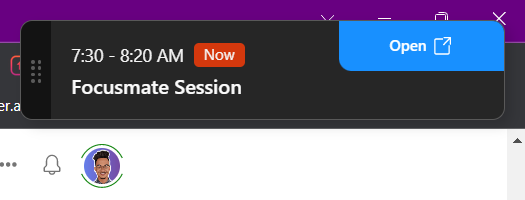
This is such a lifesaver. You have a meeting or something that’s scheduled on the calendar. And then you completely forget that you have scheduled a meeting or something else.

With the notification feature, you will never have to worry about being late for the meeting or forgetting about it.

I use this app along with focusmate. So whenever, I have a new session, it reminds me 2 minutes before my session. You can also configure it to remind at different times depending on your need.

Join a Meeting with one click

You don’t have to go to your inbox to find the meeting link at the last minute of the meeting. You can rely on superpowered to help you join meeting with one click. You can set it to alert you just before the meeting starts.

A popup will appear with a direct link to join the meeting. You can join the meeting with one click if you use google meet, Microsoft teams, zoom and WebX, and some other supported services.

Meeting Countdown
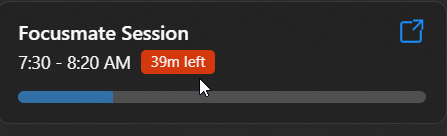
This allows you to see the time you have left for the next meeting if it hasn’t started yet. Also, it allows you to see how much time is left in the meeting. This sits just above your system tray which makes it easy to get info about your meetings.

For me, it helps me to stay on track with my task. And seeing the time ticking allows me to work better.

Calendar in your Taskbar

This is the best feature I love about superpowered. You don’t have to go to your browser and open the calendar app and see what’s in the calendar. You can see your calendar from your taskbar. Just use the global hotkey.
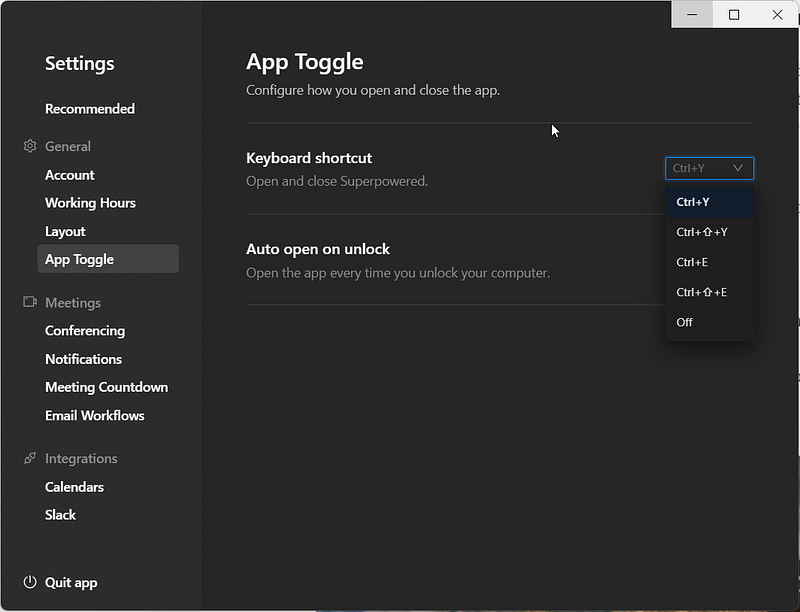
And your calendar will show like this:

Scheduling link

It also has a scheduling feature you can share with others to book meetings. While it is not as advanced as other calendar booking software, it can become handy.

Here’s an example of what the scheduling link will look like:
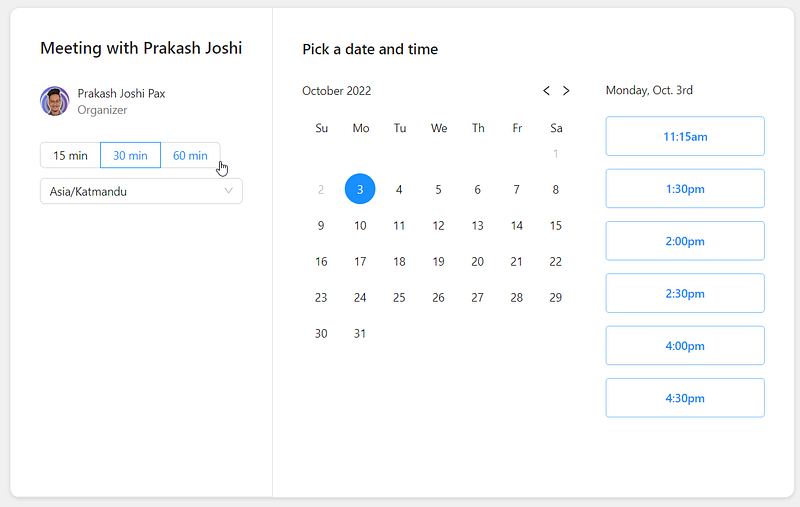
It will pick free slots from your calendar and allow others to book a meeting. Cool right? And all these features are for free. You can buy the premium which costs $10/month which I don’t think you will need anyway.
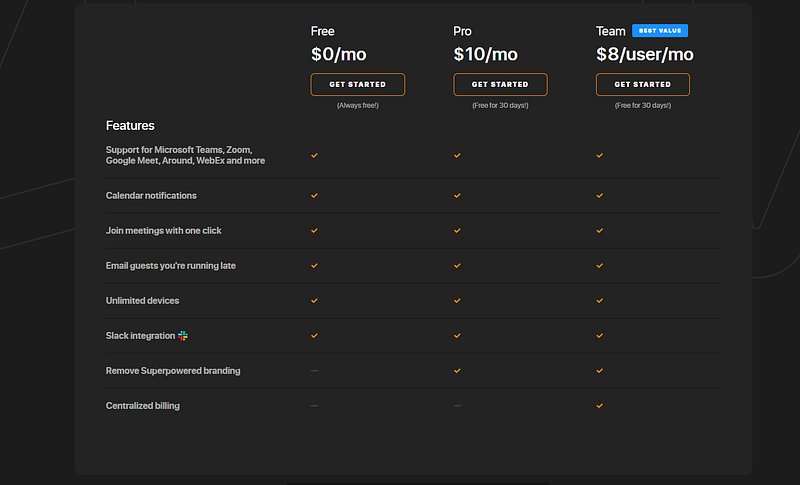
The free version has all the features. The only perk of being a premium user is that you remove the superpowered branding from your e-mail workflows. If the superpowered branding bothers you, you can consider supporting the app with the premium version.

Integration

Superpowered only supports google calendar and outlook at the moment.

The slack integration allows you to add a slack workspace. You can quickly see the messages and reply to them without opening slack in a browser window.

Other features

There are other features as well such as Todos, Notepad, email workflows, etc. I don’t use them because I don’t use superpowered for meetings but for time blocking instead. And this app has helped me immensely to stay on time and do the work.

Apps
Productivity
Calendar
Productivity Tools
Productivity Apps
Recommended from ReadMedium