
Supercharge your microservices with Spring Native
A Beginners Guide to Spring Native and the benefits it can bring to the table for your Spring-based microservices, from faster startup times to reduced image sizes.
Introduction
Spring Native is a project by the Spring Foundation that utilises GraalVM Native Images to significantly improve the performance of Spring based container images. These improvements can be seen in a number of areas such as image size, start-up times and container resource usage when running.
To get started with Spring Native it is pretty simple and mostly consists of adding some new dependencies to your Maven or Gradle project with a little bit of configuration.
Ok but… what are GraalVM Native Images?
GraalVM is a JDK that is designed for high performance while also consuming less resources than applications compiled with a more traditional JDK. GraalVM can be used to run Java applications in two ways, using the Graal just-in-time (JIT) compiler or using an ahead-of-time (AOT) compiled native executable.
An interesting point to highlight here is that GraalVM can not only run all other Java Virtual Machine (JVM) based languages such as Kotlin; but it can also run many other languages such as JavaScript, Python and Ruby using the Truffle Language framework. Using Truffle, GraalVM gains polyglot capabilities! This means one application built using GraalVM can be written in multiple programming languages that can work interoperably using the same memory space and communicating with each other as one application.
Native Images are built using the AOT compiler which compiles your Java code into a standalone native executable. The executable contains all of the Java bytecode that is created during the build of the native image, this includes all classes, dependencies and any required JDK classes. The Native Image executable is built specific to the intended host operating system and does not require a JVM to run.
Implementation
To test out Spring Native I took the To-Do project from my previous article on creating a REST API in Spring Boot and created a new Maven profile that can be used to build our Native Image. I chose to use a Maven profile as opposed to creating a duplicate project to show how little difference there is compared to a normal Spring Boot project. The project can be found on GitHub on the link below if you want to follow along or test the build process out yourself.
The first thing we need to do is make sure our Spring Boot project is pointing to the correct parent version in the POM file.
Next we need to add the Spring Native dependency and the Spring AOT Maven Plugin. We also need to add some configuration to the Spring Boot Maven plugin which should already be present in existing Spring Boot projects but add it in if it’s not already there.
The configuration of the Spring Boot Plugin tells the plugin to build a container image using tiny image and sets the Java version to 11 which is the minimum supported version for GraalVM. The last thing we are doing is arguably the most important, this is setting the BP_NATIVE_IMAGE variable to true, which instructs the plugin to create the native image.
The last thing we need to add to our POM file is the required repository for the Spring Native dependency and the plugin repository for the plugins.
Once added you should be able to build your Native Image using the following Maven goal:
As I mentioned above, for my project I created a Maven profile to be able to switch between default Spring Boot and Spring Native builds. I done this with the below configuration added to my POM file. It creates two Maven profiles, one for vanilla Spring Boot which is active by default and another for Spring Native which is activated by setting the variable “native” to true when running your Maven goal e.g
Comparison vs vanilla Spring Boot
Now that we have our native images built we can test and compare them against a normal Spring Boot based image.
The first comparison I will make is the difference between the build times of my two Maven profiles. For the timings here I first ran the build for each profile to download any required dependencies so that I wasn’t just counting increased download times. Once I had all dependencies downloaded I ran each profile three times to an average value, I also got average values for the memory usage and start-up times.
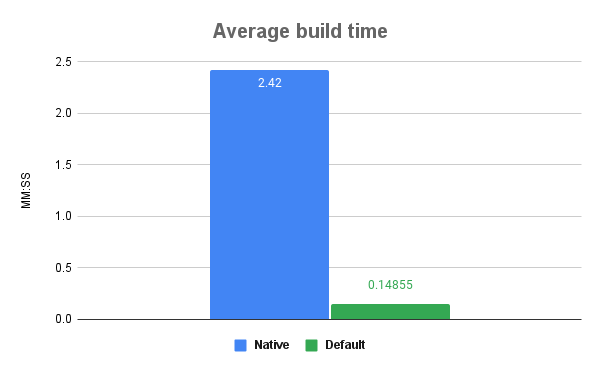
As can be seen the build time for the Spring Native profile is much longer than the vanilla Spring Boot and this is only for my very small project that only contains eight classes, however as you will see in the subsequent measurements this increased build time is made up for.
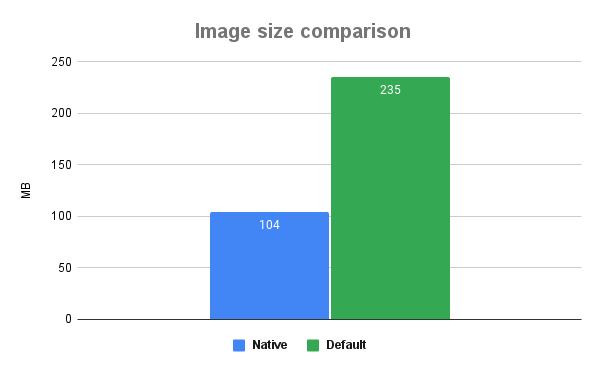
In the above chart we can see that the Native Image is less than half the size of the vanilla image which will save you space in your image repositories especially if you are running larger cloud applications with multiple services.
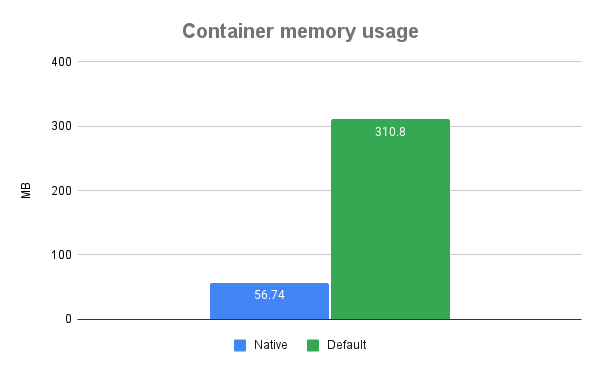
Again in the above chart we can see that the Native Image uses a fraction of the memory used by the vanilla Spring Boot image. The above figures show an almost 82% reduction in memory usage, in my books that is very impressive!
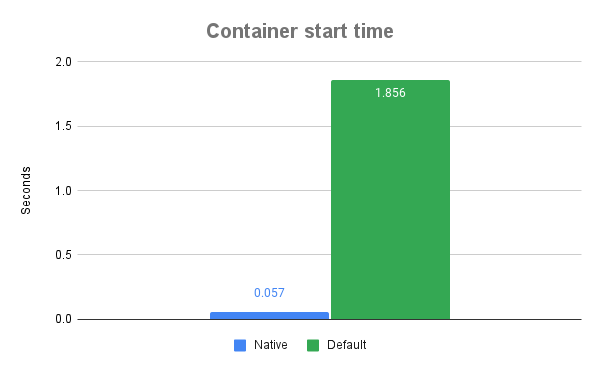
In the last chart comparing the start up times of our two images there is no surprise that the Native Image again easily beats the vanilla image with close to a 97% reduction in the start up time, and this is only with my very small project that does not contain many classes or beans that need to be loaded at start up.
Wrapping up
Although Spring Native is still only in Beta it is already showing some massive benefits when compare to a normal Spring Boot deployment once you are ok with the increased build time. With the reduced resource footprint using Spring Native for your Spring Boot projects can seriously improve your cloud deployment experience by reducing your costs for image storage and memory usage while the “instant” start up times can allow you to consider other options for your cloud deployment such as scaling to zero for some services that recieve intermittent traffic.
If you are not able to use Beta releases in your projects for whatever reason I would definitely suggest putting a task in your backlog to keep track of the Spring Native project so you can add it once it is officially released.
If you enjoyed the this article consider subscribing for updates on my future work and if you are not already a member on Medium you can join using my membership link.
Resources
[1] Spring, “Spring Native documentation”, VMware. Available: https://docs.spring.io/spring-native/docs/current/reference/htmlsingle/
[2] GraalVM, “Introduction to GraalVM”, Oracle, Available: https://www.graalvm.org/22.2/docs/introduction/
[3] GraalVM, “Native Image Basics”, Oracle, Available: https://www.graalvm.org/22.2/reference-manual/native-image/basics/
[4] GraalVM, “Interoperability with Truffle Languages”, Oracle, Available: https://www.graalvm.org/22.2/reference-manual/java-on-truffle/interoperability/


