avatarLola Rosario

Free AI web copilot to create summaries, insights and extended knowledge, download it at here

1149

Abstract

th a personalized URL, or embed on your website</li><li><a href="https://www.amazon.com/How-Create-Sell-Digital-Products-ebook/dp/B085PR1657">Amazon</a> — works with Kindle for publishing/selling</li><li><a href="https://support.google.com/books/partner/checklist/4489282?hl=en">Google Play </a>— the support page notes you must be located in a country supported for “seller sign-ups”</li><li>Your Website — check out Author Marketing Experts, <a href="https://www.amarketingexpert.com/2021/12/21/how-to-sell-more-books-in-2022-new-years-planning-goals/">tips to sell books in 2022</a></li></ul><h2 id="cb50">The Selection</h2><p id="d39f">Once again I was overwhelmed and wanted to find the most user-friendly, inexpensive platform. In a world where not much is free, I was determined to snag a low-fee alternative.</p><p id="05d8">Enter <a href="https://payhip.com/">Payhip</a>.</p><p id="4575">The e-commerce solution has a straightforward setup and allows you to sell directly from their site (without the need for having your website do so). Here’s a snapshot of features:</p><ol><li>Free to set up, host & sell</li><li>5% commission fee (w

Options

ith a Basic Account)</li><li>Allows payment via Paypal & Stripe (note these charge separate fees)</li><li>The dashboard shows sales, recent transactions & views</li><li>Marketing tools with coupons & discounts to offer on social media</li><li>Blog post section</li></ol><p id="1a25">What I especially like about Payhip is its dashboard’s comprehensive information. Logging in takes me directly to see my products, sales this month, buyers’ email addresses, recent transactions.</p><p id="7d02">There’s even a <b>share product</b> button, giving me a quick shot at posting to my Twitter (a Facebook connect is also available, for folks with that social media account). Another way to share is via the <i>copy link</i> in the same area.</p><figure id="60fc"><img src="https://cdn-images-1.readmedium.com/v2/resize:fit:800/1*cOi6F_yH1BEp7mlQEHKJsw.png"><figcaption>Image: Author’s Payhip Dashboard</figcaption></figure><p id="0376">Though I’m still working on marketing the eBook, am optimistic about the potential to build a passive income stream. And for now, am smiling to have generated a bit of cash in the interim.</p></article></body>

E-COMMERCE

Successfully Sell Your Digital Products With Payhip

Let the dollars and smiles find you

Image: Andrea Picquadio on Pexels

Earlier this month I created my first eBook. It was (and remains) a big deal for me — a goal sitting in my head for over a year. Yeah, that’s what procrastination looks like.

Using Canva as the design stage, I still needed to figure out where to sell my product. No surprise, there are a bunch of options to choose from. To list a few:

  • Sellfy — their free option only allows the sale of print-on-demand & physical products; to sell digital products, the starter kit costs $19/month
  • Gumroad— sell products with a personalized URL, or embed on your website
  • Amazon — works with Kindle for publishing/selling
  • Google Play — the support page notes you must be located in a country supported for “seller sign-ups”
  • Your Website — check out Author Marketing Experts, tips to sell books in 2022

The Selection

Once again I was overwhelmed and wanted to find the most user-friendly, inexpensive platform. In a world where not much is free, I was determined to snag a low-fee alternative.

Enter Payhip.

The e-commerce solution has a straightforward setup and allows you to sell directly from their site (without the need for having your website do so). Here’s a snapshot of features:

  1. Free to set up, host & sell
  2. 5% commission fee (with a Basic Account)
  3. Allows payment via Paypal & Stripe (note these charge separate fees)
  4. The dashboard shows sales, recent transactions & views
  5. Marketing tools with coupons & discounts to offer on social media
  6. Blog post section

What I especially like about Payhip is its dashboard’s comprehensive information. Logging in takes me directly to see my products, sales this month, buyers’ email addresses, recent transactions.

There’s even a share product button, giving me a quick shot at posting to my Twitter (a Facebook connect is also available, for folks with that social media account). Another way to share is via the copy link in the same area.
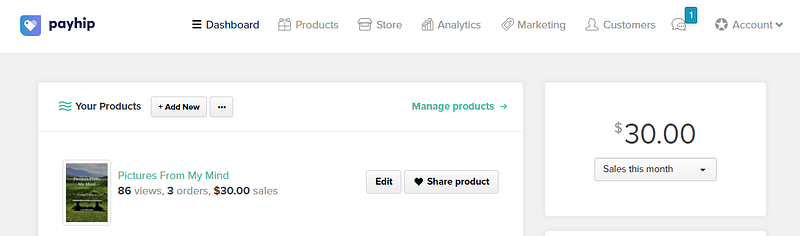
Image: Author’s Payhip Dashboard

Though I’m still working on marketing the eBook, am optimistic about the potential to build a passive income stream. And for now, am smiling to have generated a bit of cash in the interim.

Ecommerce
Marketing
Sell Digital Products
Money
Tips
Recommended from ReadMedium