avatarAndyCheung0211

Free AI web copilot to create summaries, insights and extended knowledge, download it at here

1987

Abstract

need an input box for user to type their text, chat_input can do this.</p><div id="52d0"><pre>prompt = st.chat_input(placeholder = <span class="hljs-string">"Input here"</span>) <span class="hljs-keyword">if</span> prompt: st.markdown(<span class="hljs-string">f"Echo is working: <span class="hljs-subst">{prompt}</span>"</span>)</pre></div><p id="b536">placeholder is used to show text when the chat input is empty. and if user enter something, if prompt will be true and echo user input.</p><figure id="1785"><img src="https://cdn-images-1.readmedium.com/v2/resize:fit:800/1*aBMtUCseitOpyY5jevm9-Q.png"><figcaption></figcaption></figure><h1 id="e490">Put it together</h1><div id="239c"><pre><span class="hljs-comment"># to use st.chat_message() and st.chat_input()</span> <span class="hljs-comment"># require streamlit Version 1.24.0</span> <span class="hljs-comment"># pip install streamlit --upgrade</span>

<span class="hljs-keyword">import</span> streamlit <span class="hljs-keyword">as</span> st

st.title(<span class="hljs-string">"Streamlit Conversation App"</span>)

<span class="hljs-comment"># this should have two containers (one for user and one for assistant)</span> <span class="hljs-comment"># and a input box for user</span>

<span class="hljs-comment"># initialize the session state</span> <span class="hljs-keyword">if</span> <span class="hljs-string">"messages"</span> <span class="hljs-keyword">not</span> <span class="hljs-keyword">in</span> st.session_state: st.session_state.messages = []

<span class="hljs-comment"># iterate through the messages in the session state</span> <span class="hljs-comment"># and display them in the chat message container</span> <span class="hljs-comment"># message["role"] is used because we need to identify user and bot</span> <span class="hljs-keyword">for</span> message <span class="hljs-keyword">in</span> st.session_state.messages: <span class="hljs-keyword">with</span> st.chat_message(message[<span class="hljs-

Options

string">"role"</span>]): st.markdown(message[<span class="hljs-string">"content"</span>])

<span class="hljs-comment"># check if user made a chat input </span> prompt = st.chat_input(<span class="hljs-string">"What is up?"</span>) <span class="hljs-keyword">if</span> prompt: <span class="hljs-comment"># Display user message in chat message container</span> st.chat_message(<span class="hljs-string">"user"</span>).markdown(prompt) <span class="hljs-comment"># add message to history</span> st.session_state.messages.append({<span class="hljs-string">"role"</span>: <span class="hljs-string">"user"</span>, <span class="hljs-string">"content"</span>: prompt})

response = <span class="hljs-string">f"Echo: <span class="hljs-subst">{prompt}</span>"</span>
<span class="hljs-keyword">with</span> st.chat_message(<span class="hljs-string">"assistant"</span>):
    st.markdown(response)

<span class="hljs-comment"># add the echo message to chat history</span>
st.session_state.messages.append({<span class="hljs-string">"role"</span>:<span class="hljs-string">"assistant"</span>,<span class="hljs-string">"content"</span>:response})</pre></div><h1 id="1a33">Deployment</h1><p id="13d5">I wrote about how to deploy Streamlit app using Streamlit community cloud, you can refer to it.</p><p id="c76a"><a href="https://readmedium.com/deploy-your-app-using-streamlit-community-cloud-3b73642bcf04">https://readmedium.com/deploy-your-app-using-streamlit-community-cloud-3b73642bcf04</a></p><p id="a1de"><a href="https://conversational-app-8pu9yhofkei.streamlit.app/">https://conversational-app-8pu9yhofkei.streamlit.app/</a></p><h2 id="5758">reference</h2><ul><li><a href="https://docs.streamlit.io/library/changelog">https://docs.streamlit.io/library/changelog</a></li><li><a href="https://docs.streamlit.io/library/api-reference/chat/st.chat_message">https://docs.streamlit.io/library/api-reference/chat/st.chat_message</a></li></ul></article></body>

Streamlit 1.24.0 makes easiest conversational app ever

On June 27, 2023 Streamlit releasing 1.24.0 which introduce st.chat_message and st.chat_input let us build conversational app easier than ever. See more in https://docs.streamlit.io/library/changelog

Code Example

lets jump straight into coding part, first we build a Echo bot that takes user input and echo it back, this app should have two parts, just like the picture below:

  • chatting history which shows user and the bot chatting record using st.chat_message
  • area that takes user text input using st.chat_input
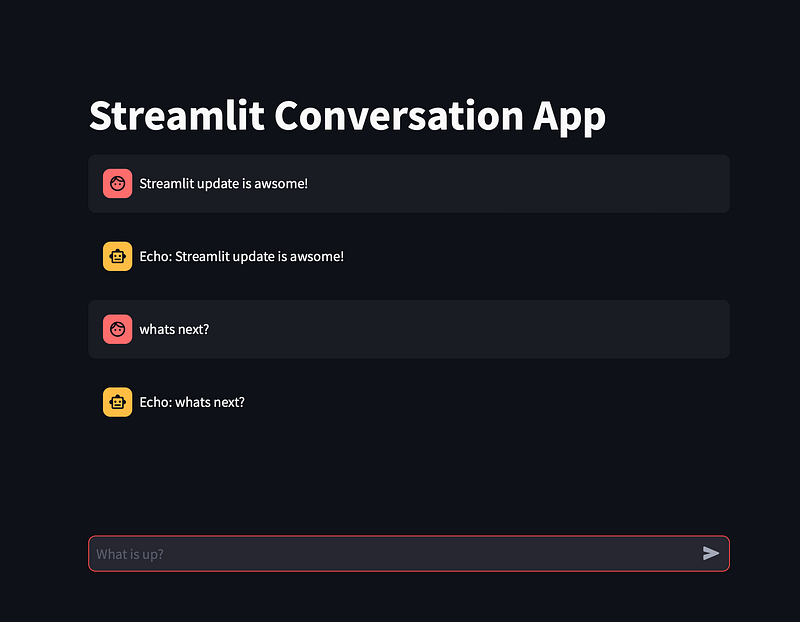
example app built using streamlit

st.chat_message

import streamlit as st

# title of the app
st.title("Streamlit new chat elements")

with st.chat_message("user"):
    st.write("Hello 👋")

with st.chat_message("assistant"):
    st.write("Hello 👋 I'm assistant")
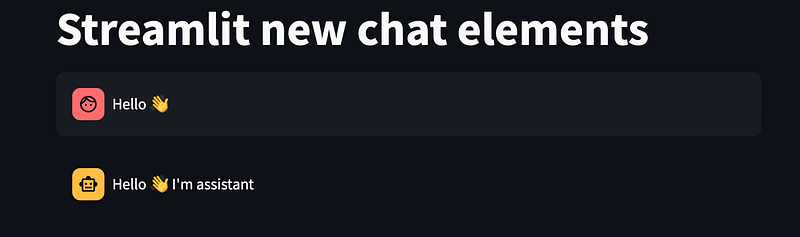
st.chat_message(name, *, avatar=None) require one argument name, which can be (“user”, “assistant”, or str)

st.chat_input

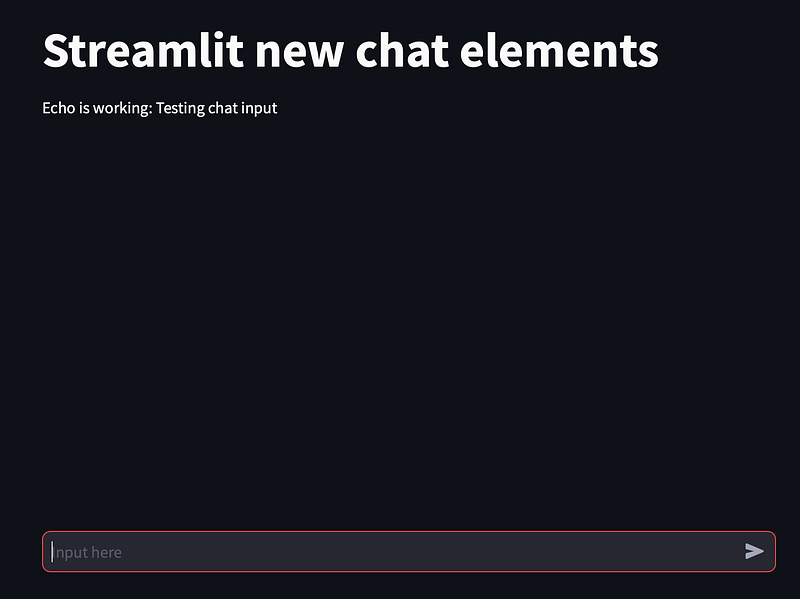
Now we need an input box for user to type their text, chat_input can do this.

prompt = st.chat_input(placeholder = "Input here")
if prompt:
    st.markdown(f"Echo is working: {prompt}")

placeholder is used to show text when the chat input is empty. and if user enter something, if prompt will be true and echo user input.
Put it together

# to use st.chat_message() and st.chat_input()
# require streamlit Version 1.24.0
# pip install streamlit --upgrade

import streamlit as st

st.title("Streamlit Conversation App")

# this should have two containers (one for user and one for assistant)
# and a input box for user

# initialize the session state
if "messages" not in st.session_state:
    st.session_state.messages = []

# iterate through the messages in the session state
# and display them in the chat message container
# message["role"] is used because we need to identify user and bot
for message in st.session_state.messages:
    with st.chat_message(message["role"]):
        st.markdown(message["content"])


# check if user made a chat input 
prompt = st.chat_input("What is up?")
if prompt:
    # Display user message in chat message container
    st.chat_message("user").markdown(prompt)
    # add message to history
    st.session_state.messages.append({"role": "user", "content": prompt})

    response = f"Echo: {prompt}"
    with st.chat_message("assistant"):
        st.markdown(response)

    # add the echo message to chat history
    st.session_state.messages.append({"role":"assistant","content":response})

Deployment

I wrote about how to deploy Streamlit app using Streamlit community cloud, you can refer to it.

https://readmedium.com/deploy-your-app-using-streamlit-community-cloud-3b73642bcf04

https://conversational-app-8pu9yhofkei.streamlit.app/

reference

Streamlit
Chatbots
Python
Recommended from ReadMedium