
Streamlining Code Quality and Collaboration: Integrating ESLint, Prettier, Husky, and Lint-staged for Effortless Development (NextJS)

In the fast-paced world of software development, maintaining consistent code quality and fostering smooth collaboration among team members are crucial for project success. The combination of ESLint, Prettier, Husky, and Lint-staged forms a powerful toolkit that automates code linting, formatting, and pre-commit checks. This topic explores how integrating these tools can transform your development workflow, boost productivity, and ensure codebase consistency in Next JS.
Requirement
Before we go so far, let’s prepare some software we need
Software
- NodeJS (https://nodejs.org/en)
- Visual Studio Code (https://code.visualstudio.com/download)
Account
- Cloud-based Git repository account (Github/Gitlab)
1. Setup Project
Just type and run in your terminal
npx create-next-app@latest
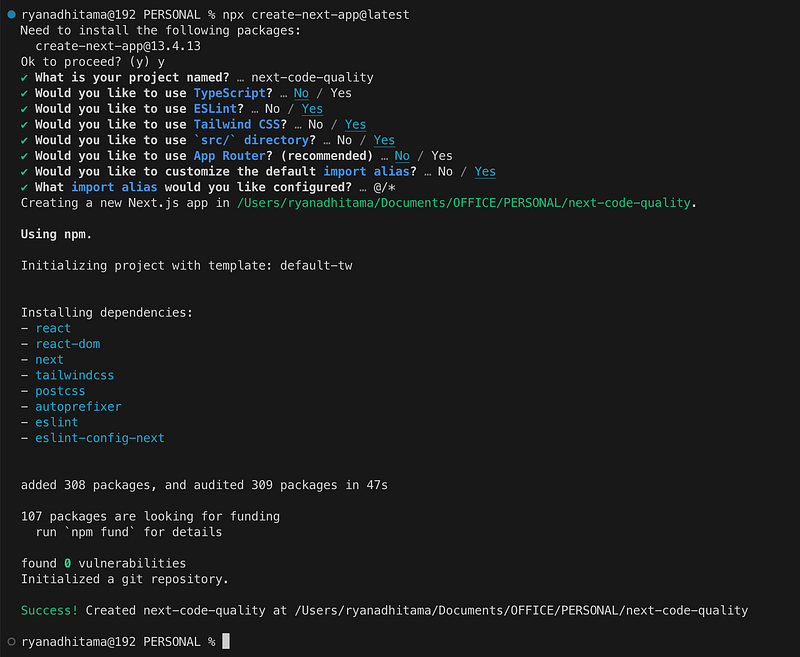
Don’t forget push your code into your online code repository (Github/Gitlab)
2. Install Dependencies
npm i husky lint-staged prettier - save-dev
Dependency :
- husky : Modern native Git hooks made easy
- lint-staged : The concept of lint-staged is to run configured linter tasks (or other tasks) on files that are staged in git. lint-staged will always pass a list of all staged files to the task, and ignoring any files should be configured in the task itself.
- prettier : Prettier is an opinionated code formatter. It enforces a consistent style by parsing your code and re-printing it with its own rules that take the maximum line length into account, wrapping code when necessary.
3. Create Husky Pre-Commit
First, you need to add scripts (Git hooks) into package.json and run this in terminal.
"scripts": {
    ...
    "prepare": "husky install"
},
npm run prepare
Second, create pre-commit command
npx husky add .husky/pre-commit "npx lint-staged"It will create a file at .husky/pre-commit.
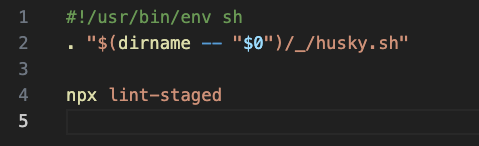
4. Create lint-staged scripts
Update your package.json
"lint-staged": {
    "*.{js,jsx}": "eslint --fix",
    "*.{js,jsx,css,md}": "prettier --write"
}
5. Test Commit
Make small change, like change file extension from _app.js into _app.jsx. Then, commit your change into online repository.
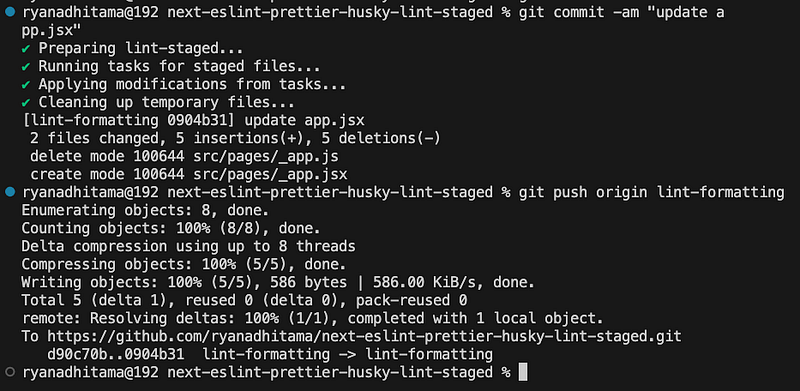
If after create commit your terminal print lint-staged checklist, congrats!! your setup is already success.
Full source code :
https://github.com/ryanadhitama/next-eslint-prettier-husky-lint-staged/pull/1/files
Conclusion
Summarize the benefits of integrating ESLint, Prettier, Husky, and Lint-staged into the development workflow. Emphasize how this integration improves code quality, fosters collaboration, and enhances productivity in software development projects. Encourage developers to adopt this toolset to elevate their coding practices and optimize their development experience.
Let’s connect via : https://www.linkedin.com/in/ryanadhitama/
In Plain English
Thank you for being a part of our community! Before you go:
- Be sure to clap and follow the writer! 👏
- You can find even more content at PlainEnglish.io 🚀
- Sign up for our free weekly newsletter. 🗞️
- Follow us on Twitter, LinkedIn, YouTube, and Discord.


