avatarEmanuel Trandafir

Free AI web copilot to create summaries, insights and extended knowledge, download it at here

4955

Abstract

Generating The Tests</h2><p id="8d2f">It is very simple to generate a DynamicTest: we only need to specify a name and a runnable code with an assertion. In our case, it can look like this:</p><div id="cadd"><pre><span class="hljs-keyword">private</span> DynamicTest <span class="hljs-title function_">createTest</span><span class="hljs-params">(<span class="hljs-type">int</span> height, <span class="hljs-type">int</span> weight, <span class="hljs-type">int</span> expectedBmi)</span> { <span class="hljs-type">String</span> <span class="hljs-variable">testName</span> <span class="hljs-operator">=</span> MessageFormat.format(<span class="hljs-string">"WHEN height={0} and weight={0} THEN bmi={2}"</span>, height, weight, expectedBmi); <span class="hljs-keyword">return</span> DynamicTest.dynamicTest(testName, () -> assertThat(BmiCalculator.calculateBmi(Weight.ofPounds(weight), Height.ofInches(height))) .isCloseTo(valueOf(expectedBmi), withPercentage(<span class="hljs-number">5d</span>))); }</pre></div><p id="cb02"><i>PS: Because the website where I found the grid with all the values is doing some approximations, I have added a short marge of error of 5% in the assertion.</i></p><p id="a018">Now, let’s map the parsed test data to DyanmicTest objects:</p><div id="f1cc"><pre>expectedBmiByWeightAndHeight.entrySet().stream() .map(testArgs -> createTest( testArgs.getKey().getFirst(), testArgs.getKey().getSecond(), testArgs.getValue()));</pre></div><h2 id="2ce9">Running The DynamicTests</h2><p id="54bc">To run the dynamically-generated tests, we need to create a method that returns either a <i>List </i>or a <i>Stream </i>of <i>DyanmicTest </i>and annotate it with <i>@TestFactory:</i></p><div id="17d3"><pre><span class="hljs-meta">@TestFactory</span> Stream<DynamicTest> <span class="hljs-title function_">calculateBmi</span><span class="hljs-params">()</span> <span class="hljs-keyword">throws</span> IOException { <span class="hljs-type">var</span> <span class="hljs-variable">testData1</span> <span class="hljs-operator">=</span> generateTests(<span class="hljs-string">"src//test//resources//bmi_data.txt"</span>); <span class="hljs-type">var</span> <span class="hljs-variable">testData2</span> <span class="hljs-operator">=</span> generateTests(<span class="hljs-string">"src//test//resources//bmi_data_2.txt"</span>); <span class="hljs-keyword">return</span> Stream.concat(testData1, testData2); }</pre></div><p id="0b05">If we run it, it should generate a test for each combination of weight and height for each of the two tables. This will be 18182, so we’ll expect a total of 684 tests to be generated and executed:</p><figure id="5934"><img src="https://cdn-images-1.readmedium.com/v2/resize:fit:800/1*UGcOPFqFYsyphLdw0IYBQg.png"><figcaption></figcaption></figure><h2 id="9ca1">Full Source Code</h2><p id="d401">Here is the full test code for generating and running the dynamic tests. As we can see, most of the code is just parsing the test data from our file, after that, <a href="https://readmedium.com/5-courses-to-learn-junit-and-mockito-in-2019-best-of-lot-f217d8b93688">JUnit </a>is doing everything else for us:</p><div id="5219"><pre><span class="hljs-keyword">public</span> <span class="hljs-keyword">class</span> <span class="hljs-title class_">DynamicTests</span> {

<span class="hljs-meta">@TestFactory</span> <span class="hljs-type">Stream</span><<span class="hljs-type">DynamicTest</span>> calculateBmi() <span class="hljs-keyword">throws</span> <span class="hljs-type">IOException</span> { <span class="hljs-keyword">var</span> testData1 <span class="hljs-operator">=</span> generateTests(<span class="hljs-string">"src//test//resources//bmi_data.txt"</span>); <span class="hljs-keyword">var</span> testData2 <span class="hljs-operator">=</span> generateTests(<span class="hljs-string">"src//test//resources//bmi_data_2.txt"</span>); <span class="hljs-keyword">return</span> <span class="hljs-type">Stream</span>.concat(testData1, testData2); }

<span class="hljs-keyword">private</span> <span class="hljs-type">Stream</span><<span class="hljs-type">DynamicTest</span>> generateTests(<span class="hljs-type">String</span> testDataFile) <span class="hljs-keyword">throws</span> <span class="hljs-type">IOException</span> { <span class="hljs-type">List</span><<span class="hljs-type">String</span>> allLines <span class="hljs-operator">=</span> <span class="hljs-type">Files</span>.readAllLines(<span class="hljs-type">Paths</span>.get(testDataFile));

  <span class="hljs-type">String</span> lineWithExpectedBmi <span class="hljs-operator">=</span> allLines.get(<span class="hljs-number">0</span>);
  <span class="hljs-type">List</span>&lt;<span class="hljs-type">String</span>&gt; lineWithHeightAndWeights <span class="hljs-operator">=</span> allLine

Options

s.stream().skip(1l).toList();

  <span class="hljs-type">List</span>&lt;<span class="hljs-type">Integer</span>&gt; expectedBmiValues <span class="hljs-operator">=</span> <span class="hljs-type">Stream</span>.of(lineWithExpectedBmi.split(<span class="hljs-string">"<span class="hljs-subst">\t</span>"</span>))
        .skip(<span class="hljs-number">1</span>)
        .map(Integer::parseInt)
        .toList();

  <span class="hljs-type">List</span>&lt;<span class="hljs-type">List</span>&lt;<span class="hljs-type">Pair</span>&lt;<span class="hljs-type">Integer</span>, <span class="hljs-type">Integer</span>&gt;&gt;&gt; weightsByHeight <span class="hljs-operator">=</span> lineWithHeightAndWeights.stream()
        .map(this::splitAndParse)
        .map(testValues -&gt; testValues.stream().skip(1l).map(weight -&gt; <span class="hljs-type">Pair</span>.of(testValues.get(<span class="hljs-number">0</span>), weight)).toList())
        .toList();

  <span class="hljs-type">Map</span>&lt;<span class="hljs-type">Pair</span>&lt;<span class="hljs-type">Integer</span>, <span class="hljs-type">Integer</span>&gt;, <span class="hljs-type">Integer</span>&gt; expectedBmiByWeightAndHeight <span class="hljs-operator">=</span> weightsByHeight.stream()
        .flatMap(line -&gt; <span class="hljs-built_in">zip</span>(line.stream(), expectedBmiValues.stream()))
        .collect(<span class="hljs-type">Collectors</span>.toMap(Pair::getFirst, Pair::getSecond));

  <span class="hljs-keyword">return</span> expectedBmiByWeightAndHeight.entrySet().stream()
        .map(testArgs -&gt; createTest(
              testArgs.getKey().getFirst(),
              testArgs.getKey().getSecond(),
              testArgs.getValue()));

}

<span class="hljs-keyword">private</span> <span class="hljs-type">DynamicTest</span> createTest(int height, int weight, int expectedBmi) { <span class="hljs-type">String</span> testName <span class="hljs-operator">=</span> <span class="hljs-type">MessageFormat</span>.format(<span class="hljs-string">"WHEN height={0} and weight={0} THEN bmi={2}"</span>, height, weight, expectedBmi); <span class="hljs-keyword">return</span> <span class="hljs-type">DynamicTest</span>.dynamicTest(testName, () -> assertThat(<span class="hljs-type">BmiCalculator</span>.calculateBmi(<span class="hljs-type">Weight</span>.ofPounds(weight), <span class="hljs-type">Height</span>.ofInches(height))) .isCloseTo(valueOf(expectedBmi), withPercentage(5d))); }

<span class="hljs-keyword">private</span> <span class="hljs-type">List</span><<span class="hljs-type">Integer</span>> splitAndParse(<span class="hljs-type">String</span> testLine) { <span class="hljs-keyword">return</span> stream(testLine.split(<span class="hljs-string">"<span class="hljs-subst">\t</span>"</span>)) .map(Integer::parseInt) .toList(); }

<span class="hljs-keyword">static</span> <span class="hljs-operator"><</span><span class="hljs-type">A</span>, <span class="hljs-type">B</span><span class="hljs-operator">></span> <span class="hljs-type">Stream</span><<span class="hljs-type">Pair</span><<span class="hljs-type">A</span>, <span class="hljs-type">B</span>>> <span class="hljs-built_in">zip</span>(<span class="hljs-type">Stream</span><<span class="hljs-type">A</span>> <span class="hljs-keyword">as</span>, <span class="hljs-type">Stream</span><<span class="hljs-type">B</span>> bs) { <span class="hljs-type">Iterator</span><<span class="hljs-type">A</span>> i <span class="hljs-operator">=</span> <span class="hljs-keyword">as</span>.iterator(); <span class="hljs-keyword">return</span> bs.filter(x -> i.hasNext()).map(b -> <span class="hljs-type">Pair</span>.of(i.next(), b)); } }</pre></div><figure id="4eb9"><img src="https://cdn-images-1.readmedium.com/v2/resize:fit:800/0*PSNyiZblx5aIp_gf"><figcaption>Photo by <a href="https://unsplash.com/@afgprogrammer?utm_source=medium&amp;utm_medium=referral">Mohammad Rahmani</a> on <a href="https://unsplash.com?utm_source=medium&amp;utm_medium=referral">Unsplash</a></figcaption></figure><h1 id="5008">Thank You!</h1><p id="4283">Thanks for reading the article and please let me know what you think! Any feedback is welcome.</p><p id="ab2e">If you want to read more about clean code, design, unit testing, functional programming, and many others, make sure to check out <a href="https://readmedium.com/start-here-6d2b065a626">my other articles</a>. Do you like the content? Consider <a href="https://medium.com/@emanueltrandafir">following or subscribing</a> to the email list.</p><p id="1b81">Finally, if you consider becoming a Medium member and supporting my blog, here’s my <a href="https://medium.com/@emanueltrandafir/membership">referral</a>.</p><p id="0b9a">Happy Coding!</p></article></body>

Streamline Your Testing Workflow with JUnit 5 Dynamic Tests

Let’s discuss JUnit5’s @TestFactory and use the new feature to dynamically generate and run many unit tests.

image generated on imgflip.com

Overview

Let’s assume we have a file with specifications about how our application should behave: many input and expected output values. This can be, for example, data exported from another system or an old application that we are refactoring or migrating. Moreover, these specifications should be easy to understand and the business team can potentially validate them.

If the data comes in a CSV format, we can use JUnit5’s out-of-the-box features: @ParameterizedTest and @CsvValue. If you want to dive deeper into the subject, I have written an article exploring various usages of this feature: Unleash The True Potential Of JUnit5 And B.D.D. Though, if the file has a different format or the data has a different structure, our only option will be the @TestFactory.

The Test Data

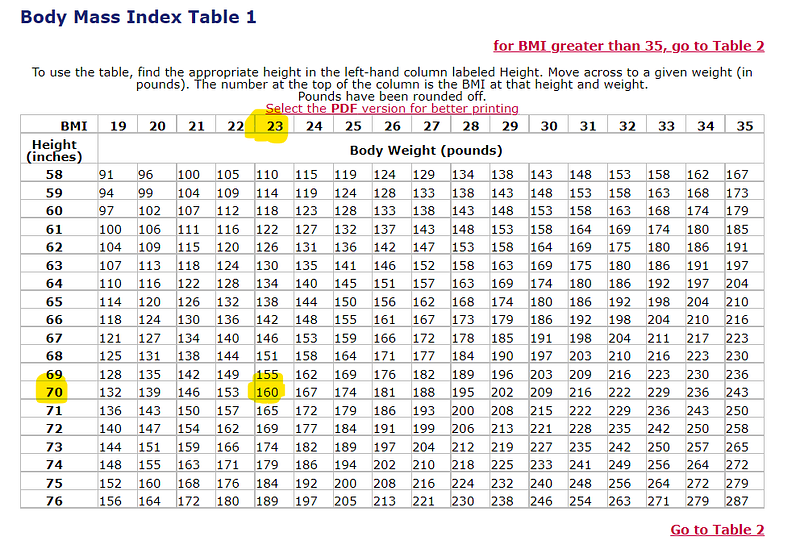
For this article, we’ll use the grid from this website to validate the BmiCalculator application we wrote last week. Reading through the test data, we can see that, for example, for an individual with a height of 70 inches and a weight of 160 pounds, we’ll expect a BMI of 23:
Parse The Test Data

Parsing the data will be different from one project to another. Therefore, this section is not as important, but still, I will quickly walk through the steps I followed.

Firstly, we need to read and parse this file. Therefore, I have added the two tables from the website to my scr/test/resources directory.
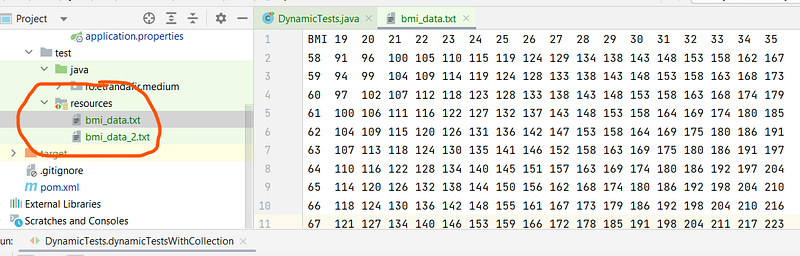
Now, let’s read the file: the first row will contain the expected BMI values and the rows that follow will start with the height followed by many columns containing values for the weight:

List<String> allLines = Files.readAllLines(Paths.get(testDataFile));

String lineWithExpectedBmi = allLines.get(0);
List<String> lineWithHeightAndWeights = allLines.stream().skip(1l).toList();

Of course, we’ll have to split the string by tabs, and parse the strings to integer values. Moreover, for the heights and weights, we can group them together into pair objects:

List<Integer> expectedBmiValues = Stream.of(lineWithExpectedBmi.split("\t"))
      .skip(1)
      .map(Integer::parseInt)
      .toList();

List<List<Pair<Integer, Integer>>> weightsByHeight = lineWithHeightAndWeights.stream()
      .map(this::splitAndParse)
      .map(testValues -> testValues.stream().skip(1l).map(weight -> Pair.of(testValues.get(0), weight)).toList())
      .toList();

After that, we can create our test data by zipping the two lists together. As a result, we’ll create a map with the Weight-Height pair as the key and the expected BMI as the value:

Map<Pair<Integer, Integer>, Integer> expectedBmiByWeightAndHeight = weightsByHeight.stream()
      .flatMap(line -> zip(line.stream(), expectedBmiValues.stream()))
      .collect(Collectors.toMap(Pair::getFirst, Pair::getSecond));

Generating The Tests

It is very simple to generate a DynamicTest: we only need to specify a name and a runnable code with an assertion. In our case, it can look like this:

private DynamicTest createTest(int height, int weight, int expectedBmi) {
   String testName = MessageFormat.format("WHEN height={0} and weight={0} THEN bmi={2}",
         height, weight, expectedBmi);
   return DynamicTest.dynamicTest(testName,
         () -> assertThat(BmiCalculator.calculateBmi(Weight.ofPounds(weight), Height.ofInches(height)))
               .isCloseTo(valueOf(expectedBmi), withPercentage(5d)));
}

PS: Because the website where I found the grid with all the values is doing some approximations, I have added a short marge of error of 5% in the assertion.

Now, let’s map the parsed test data to DyanmicTest objects:

expectedBmiByWeightAndHeight.entrySet().stream()
      .map(testArgs -> createTest(
            testArgs.getKey().getFirst(),
            testArgs.getKey().getSecond(),
            testArgs.getValue()));

Running The DynamicTests

To run the dynamically-generated tests, we need to create a method that returns either a List or a Stream of DyanmicTest and annotate it with @TestFactory:

@TestFactory
Stream<DynamicTest> calculateBmi() throws IOException {
   var testData1 = generateTests("src//test//resources//bmi_data.txt");
   var testData2 = generateTests("src//test//resources//bmi_data_2.txt");
   return Stream.concat(testData1, testData2);
}

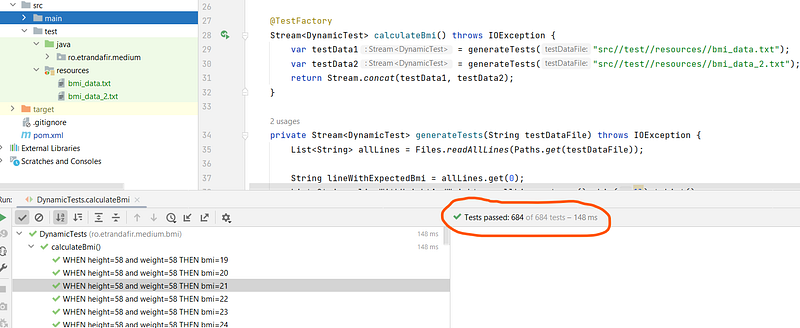
If we run it, it should generate a test for each combination of weight and height for each of the two tables. This will be 18*18*2, so we’ll expect a total of 684 tests to be generated and executed:
Full Source Code

Here is the full test code for generating and running the dynamic tests. As we can see, most of the code is just parsing the test data from our file, after that, JUnit is doing everything else for us:

public class DynamicTests {

   @TestFactory
   Stream<DynamicTest> calculateBmi() throws IOException {
      var testData1 = generateTests("src//test//resources//bmi_data.txt");
      var testData2 = generateTests("src//test//resources//bmi_data_2.txt");
      return Stream.concat(testData1, testData2);
   }

   private Stream<DynamicTest> generateTests(String testDataFile) throws IOException {
      List<String> allLines = Files.readAllLines(Paths.get(testDataFile));

      String lineWithExpectedBmi = allLines.get(0);
      List<String> lineWithHeightAndWeights = allLines.stream().skip(1l).toList();

      List<Integer> expectedBmiValues = Stream.of(lineWithExpectedBmi.split("\t"))
            .skip(1)
            .map(Integer::parseInt)
            .toList();

      List<List<Pair<Integer, Integer>>> weightsByHeight = lineWithHeightAndWeights.stream()
            .map(this::splitAndParse)
            .map(testValues -> testValues.stream().skip(1l).map(weight -> Pair.of(testValues.get(0), weight)).toList())
            .toList();

      Map<Pair<Integer, Integer>, Integer> expectedBmiByWeightAndHeight = weightsByHeight.stream()
            .flatMap(line -> zip(line.stream(), expectedBmiValues.stream()))
            .collect(Collectors.toMap(Pair::getFirst, Pair::getSecond));

      return expectedBmiByWeightAndHeight.entrySet().stream()
            .map(testArgs -> createTest(
                  testArgs.getKey().getFirst(),
                  testArgs.getKey().getSecond(),
                  testArgs.getValue()));
   }

   private DynamicTest createTest(int height, int weight, int expectedBmi) {
      String testName = MessageFormat.format("WHEN height={0} and weight={0} THEN bmi={2}",
            height, weight, expectedBmi);
      return DynamicTest.dynamicTest(testName,
            () -> assertThat(BmiCalculator.calculateBmi(Weight.ofPounds(weight), Height.ofInches(height)))
                  .isCloseTo(valueOf(expectedBmi), withPercentage(5d)));
   }


   private List<Integer> splitAndParse(String testLine) {
      return stream(testLine.split("\t"))
            .map(Integer::parseInt)
            .toList();
   }

   static <A, B> Stream<Pair<A, B>> zip(Stream<A> as, Stream<B> bs) {
      Iterator<A> i = as.iterator();
      return bs.filter(x -> i.hasNext()).map(b -> Pair.of(i.next(), b));
   }
}

Photo by Mohammad Rahmani on Unsplash

Thank You!

Thanks for reading the article and please let me know what you think! Any feedback is welcome.

If you want to read more about clean code, design, unit testing, functional programming, and many others, make sure to check out my other articles. Do you like the content? Consider following or subscribing to the email list.

Finally, if you consider becoming a Medium member and supporting my blog, here’s my referral.

Happy Coding!

Java
Junit
Software Testing
Spring Boot
Programming
Recommended from ReadMedium