
Streaming Model inference using Flask and Kafka
Kafka made easy with Flask
What is Kafka?
Apache Kafka is a highly fault-tolerant event streaming platform. In event streaming the data is captured in real-time and from different even sources, it can be your web analytics data, data from a thermostat or even a database. Along with data capturing there are a horde of resources provide along with Kafka to manipulate and process the data and dividing resources efficiently by prioritising different highly critical processes and moderately impactful process. That’s Kafka and event streaming in short. To learn more about Kafka check out this video.
How will Kafka benefit/help by streaming model inferences?
Most of the Deep Learning models are deployed via Flask over REST API calls. Later, to deploy it using a server; developers use servers like gunicorn and uvicorn with different numbers of workers and threads. This is all fine till you are doing only inference where you have only one model and it doesn't take that much time to provide the inference. But, if there are outputs from combinations of different models or even if there are multiple steps after inference it's better to have a stream processing pipeline.
For example, the user wants to summarise a whole book and wants and email and also a notification on the platform once the process is done, if you would stick to the approach of REST APIs, first you would need to process the inference request, then send an email and then pass it via a notification controller to send the notification. If you are smart enough you would say I can use something like ray to run the email and notification part in parallel. Yes, you can, but are you sure that ray is fault-tolerant? So in problems like this one can use the power of Kafka.
As shown in the diagram below, you can have a REST API call to pass the data for the inference; then the flask server will put the data into a queue/topic and the inference consumer will keep on picking up the data from that topic. The consumer will do the inference and then send the required data to the Email Producer and the Notification Producer and those producers will again put that information and data into two different topics the Email topic and the Notification topic. Now the Email consumer and Notification consumer will take the information from their respective topic/queue and do the required processing and send an email and a notification respectively. To keep the info intact and avoid loss in information you can have different replication factors and to make the pipeline more flexible and robust you can have Consumer groups and several topic partitions.
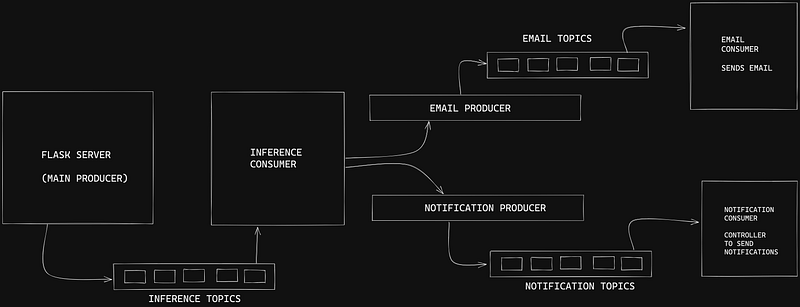
In this blog, we won’t go through the consumer groups and topic partitions we will just go through a simple Kafka Consumer and Producer approach in python via flask.
To download and set up Kafka by following the steps on this page
Install the required libraries
pip install kafka-python flask flask_corsCreating a Kafka Topic
kafka-topics --create --zookeeper localhost:2181 --replication-factor 1 --partitions 1 --topic <topic_name>- Creating Inference Topic
kafka-topics --create --zookeeper localhost:2181 --replication-factor 1 --partitions 1 --topic INFERENCE- Creating Email Topic
kafka-topics --create --zookeeper localhost:2181 --replication-factor 1 --partitions 1 --topic EMAIL- Creating Notification Topic
kafka-topics --create --zookeeper localhost:2181 --replication-factor 1 --partitions 1 --topic NOTIFICATIONCreating a Flask server
- Create an
app.pyfile and add the following
# app.py

from flask import Flask, request, jsonify
import json
from flask_cors import CORS
from kafka import KafkaConsumer, KafkaProducer
app = Flask(__name__)TOPIC_NAME = "INFERENCE"
KAFKA_SERVER = "localhost:9092"
producer = KafkaProducer(
bootstrap_servers = KAFKA_SERVER,
api_version = (0, 11, 15)
)
@app.route('/kafka/pushToConsumers', methods=['POST'])
def kafkaProducer():
req = request.get_json()
json_payload = json.dumps(req)
json_payload = str.encode(json_payload)
# push data into INFERENCE TOPIC
producer.send(TOPIC_NAME, json_payload)
producer.flush()
print("Sent to consumer")
return jsonify({
"message": "You will receive an email in a short while with the plot",
"status": "Pass"})
if __name__ == "__main__":
app.run(debug=True, port = 5000)Note Kafka only stores data in form of bytes. So whatever data you have image, text, audio, etc. it should be first converted into bytes and then passed on to the producer.
Kafka Inference Consumer
- Create an
inference_consumer.pyfile and add the following
# inference_consumer.py

from kafka import KafkaConsumer, KafkaProducer
import os
import json
import uuid
from concurrent.futures import ThreadPoolExecutor

TOPIC_NAME = "INFERENCE"

KAFKA_SERVER = "localhost:9092"

NOTIFICATION_TOPIC = "NOTIFICATION"
EMAIL_TOPIC = "EMAIL"

consumer = KafkaConsumer(
    TOPIC_NAME,
    # to deserialize kafka.producer.object into dict
    value_deserializer=lambda m: json.loads(m.decode('utf-8')),
)

producer = KafkaProducer(
    bootstrap_servers = KAFKA_SERVER,
    api_version = (0, 11, 15)
)

def inferencProcessFunction(data):
	. . . . .
	. . . . .
	. . . . .
	# process steps
	. . . . .
	. . . . .

	notification_data = {...}
	email_data = {...}
  producer.send(NOTIFICATION_TOPIC, notification_data)
	producer.flush()
	producer.send(EMAIL_TOPIC, email_data)
	producer.flush()

for inf in consumer:

	inf_data = inf.value

        inferencProcessFunction(inf_data)
Kafka Email Consumer
- Create an
email_consumer.pyfile and add the following
# email_consumer.pyfrom kafka import KafkaConsumer, KafkaProducer
import os
import json
import uuid
from concurrent.futures import ThreadPoolExecutorTOPIC_NAME = "EMAIL"consumer = KafkaConsumer(
TOPIC_NAME,
# to deserialize kafka.producer.object into dict
value_deserializer=lambda m: json.loads(m.decode('utf-8')),
)def sendEmail(data): . . . . . . . . . . . . . . . # process steps . . . . . . . . . .
for email in consumer:

	email_data = email.value

	sendEmail(email_data)
Kafka Notification Consumer
- Create a
notification_consumer.pyfile and add the following
# notification_consumer.pyfrom kafka import KafkaConsumer, KafkaProducer
import os
import json
import uuid
from concurrent.futures import ThreadPoolExecutorTOPIC_NAME = "NOTIFICATION"consumer = KafkaConsumer(
TOPIC_NAME,
# to deserialize kafka.producer.object into dict
value_deserializer=lambda m: json.loads(m.decode('utf-8')),
)def sendNotification(data): . . . . . . . . . . . . . . . # process steps . . . . . . . . . .
for notification in consumer:

	notification_data = email.value

	sendNotification(notification_data)
How to run consumer processes in parallel without consumer groups?
To run the consumer processes in parallel without consumer groups you can wrap the consumer for loop with a ThreadPoolExecutor like below
with ThreadPoolExecutor(4) as tpool:

	for email in consumer:

		email_data = email.value

		future = tpool.submit(sendEmail, email_data)
How to run this pipeline?
Here, we will have three different consumers and one server to serve the REST calls. So you would need to open four terminal windows and run the following commands to run each script
- Starting the server with
flask
# folder where app.py file is
python app.py- Or, starting the server with
gunicorn
# install gunicorn
pip install gunicorn
# folder where app.py file is
gunicorn -k gthread -w 2 -t 40000 --threads 3 -b:5000 app:app- Starting Inference consumer (new terminal window)
# folder where inference_consumer.py file is
python inference_consumer.py- Starting Email consumer (new terminal window)
# folder where email_consumer.py file is
python email_consumer.py- Starting Notification consumer (new terminal window)
# folder where notification_consumer.py file is
python notification_consumer.py
Now, you can try sending a request to your server and you will receive a response with status and your inference will be queued in and you will shortly receive an email and notification based on your process steps.
In Summary
In this blog, we saw the benefits of using an event streaming system instead of the traditional API calls and waiting for a response. We also went through and hands-on example structure of how can one using Kafka with their Deep Learning inference models to stream inference and other post-processing steps and can make the process flexible, robust and easier by dividing work among different consumers. Hope you had fun reading it and can use this structure for some of your implementations.


