
Stream “New from your network” on Medium
How to easily see stories from people you are following and what mute and dismiss mean
How to easily see stories from people and publications you are following
If you have been writing and/or reading on Medium for two years or more, you may be aware that there used to be a link titled “New from your network” on your homepage.
It was on the right under the Avatars (pictures) of writers who you were following, and then it moved to underneath the top “Featured” section. Now it has disappeared.
You may now see a message asking if you want to connect your Medium account to Twitter, above “Recommended topics.” Click on “Maybe Later” to remove the message about Twitter, if you want to.
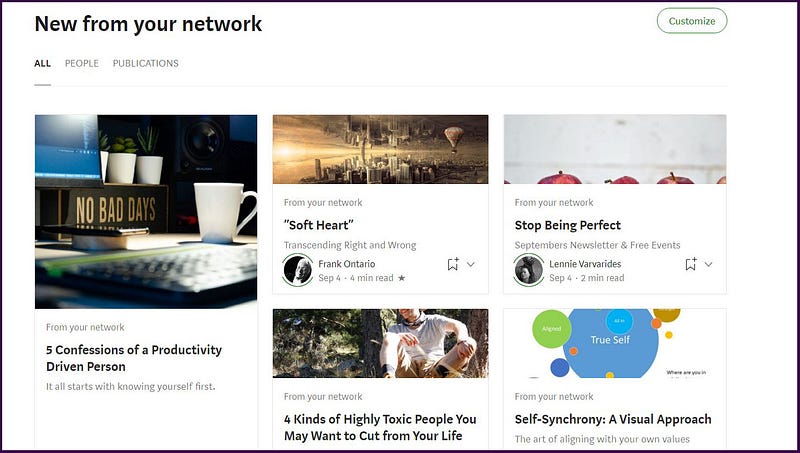
Anyhow, in the old days, one could actually click on “New from your network.” This would take the person to a “stream” or a newsfeed of stories written by people (writers) they were following or to a “stream” or a newsfeed of stories in Publications that they were following, or to both.
Being a “quadruple Virgo” (4 planets in Virgo) I was gleeful to see story titles galore in a grid display, under my “New from your network” section.
Then ~~ one day in late 2019 or early 2020, the link disappeared~and woe was me!
I have read some articles in cyberspace where people complained that these “streams” weren’t updated frequently enough, or that the function had something else dreadfully wrong with it. But I thought that this way of finding stories, that I wanted to read, was terrific. And I still do!
Now I don’t know about anyone else, but only 7 Avatars in my scroll-bar at the top left of my Medium homepage, of the people and publications that I am following, is not enough. Yes, it is not enough for me even if I can keep scrolling through to the right.
I would rather see the actual story titles of people and Publications that I follow, and easily view them in a grid or a tiled arrangement, and not have to click on an Avatar to then view story titles!
Also, the stories whose titles appear on one’s homepage include those which Medium’s computer “algorithm” wants you to read.
So alongside them you will see titles with:
“Based on your reading history” or
“Popular on Medium” or
“Because you follow [ name of a Topic that you are following ]”
But I want to easily see many titles of the writers and publications whom I am following!
Imagine my delight when I stumbled across an article on Medium in which the writer put a link to his “New from your network” pages, and it dawned upon me that we can still access this “old” part of Medium, via the following standard URL (web-address), when logged into Medium.
https://medium.com/stream/network .
Why do I like this?
I love to see the story titles and images of the writers whom I am following, in a pleasing looking grid arrangement, with never ending scroll. 😆
You get to see the story titles of a lot more people or publications that you are following ( in an aesthetic display) than you see on the current homepage.
It is quite soothing to aimlessly, no, wait, sorry, purposefully, scroll down the screen ~~ looking for an awesome story to leap out, beckoning to me to read.
Well, honestly going to your “stream” and scrolling through/down it, is a really useful action, in order to look out for stories from your most favorite writers (or Publications), or just to see what is being written by the people you are following or what is being published by the Publications you are following.
You can bookmark your “New from your network” for easy access, e.g. I have bookmarked my stream for People whom I’m following.
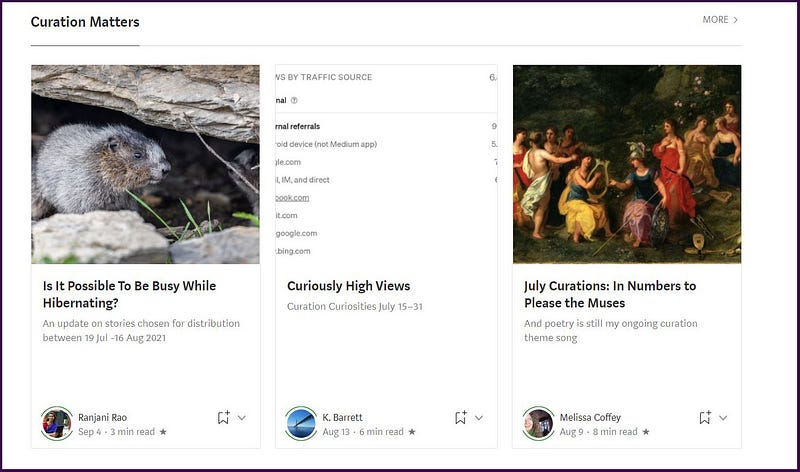
If you go to your stream for Publications you’re following, you will see 3 story titles (with their header images) for each Publication. But hey, that’s not to cry over, because you just click on “MORE” if you want to see more stories in that Publication!
I like looking at my stream for Publications that I’m following, from time to time, because then I see my own Publications (which I’m following) in the stream, and that gives me a buzz. Haha, it doesn’t take much to please me. Chocolates would also do it.
And if you like “nuggets” (gold nuggets, not chicken nuggets), here are a few, related to your “streams.”
- When looking at story titles in your Publications stream, if you have clapped for a story and it appears in this “stream”, you can click on the V i.e. the little downward pointing arrow next to the writer’s name, and click on “Undo applause”. You may rarely or never want to do that, but it’s nice for data oriented and function-loving people like me to know about this option!
- You can hover your mouse over the Avatar of the writer and click on “Following” if you want to follow her or him.
- If you are already following a writer, you can hover your mouse over the Avatar of the writer and click on the green “Following” link to turn off following that person.
- You can click on the little “ribbon” icon to add a story to one of your Lists.
I am not sure how often these “streams” are updated. They may just refresh once a day, or maybe they refresh or update “now and then” when you visit a stream page several times over one day.
Also I haven’t got around to asking Medium if they can reinstate the link to “New from your network.”
Maybe, if people reading this article, want the link to “New from your network” on the Medium homepages, they can email Medium and ask them to reinstate it ! Write to: yourfriends@medium to support the cause.
Of course, new people won’t know about this “stream” function because it’s not currently used or promoted by Medium, for who knows what reason.
Maybe you would like to use it while the going is good, i.e. while it is still available.
Mute and Dismiss Stories on Medium
Guess what? The stories that are popular on Medium don’t tickle my fancy.
If I see any story titles in this category that I don’t like, I mute the Publication OR I mute the author by clicking on the 3 little dots alongside the little ribbon icon underneath the story title and extract.
Muting a Publication means all stories from that Publication won’t appear in my newsfeed in future. Muting an author means all stories from that author won’t appear in my newsfeed in future.
If you choose to “DISMISS” a story, that simply removes the story title from your newsfeed on your homepage, but doesn’t stop other story titles from other stories by the writer or publication appearing in your newsfeed.
And now I’m heading off to my streams for some refreshing reads and to look at some recipes, with the hope that the recipes will prompt me to get away from my computer, to try out some cooking myself.
Thanks for reading! I love historical things too, so I’m sharing a story about the changes to the Medium homepage, for those who are interested. 😄
Last but certainly not least, I love writing technical stuff and sharing my learned knowledge.
So, if you’re looking for guidance about working with Medium, you may like to head over to a page of my “library” on Medium (link below), which lists very useful articles that I’ve written about working with Medium!


