
Stop Using print() Every Time In Python — Use pprint() Instead
# Mini Hack to Make Your Python Programming Less Painful

Let’s say I have a messy nested data structure.
x = [
  {'apple': [1,2,3], 'orange':[4,5,6]},
  {'pear': [7,8,9], 'pineapple':[10,11,12]},
  {'durian':[13,14,15], 'banana':[16,17,18]}
]
^ here’s a list of dictionaries containing smaller lists inside.
If we print(x), we get:

Imagine if we had more data. The output would become even more unreadable!
Enter our benevolent saviour pprint()
pprint is built-in, so we don’t need to install anything.
from pprint import pprint

pprint(x)
- one simple
from pprint import pprintline is needed - it makes our messy data more human-readable
- it doesn’t require us to manually make it human-readable
Can’t we just write a for loop instead?
Let’s say we have a even more messy data structure.
x = {
  'name':'tom',
  'dad': {'name': 'jerry',
          'dad':{'name':'greg'},
          'mom':{'name':'susie'}
          },
  'mom': {'name': 'mary'},
  'wife': {'name': 'susan'},
  'son': {'name': 'tim',
          'dad':{'name':'tom'},
          'mom':{'name':'susan'},
          'wife':{'name':'cassie'},
          'daughter': {'name':'lala',
                        'husband': 'bobo'
                        }
          }
}
Here we have some screwed up family tree as an example with multiple multiple levels of nesting.
We have 2 options to visualize this:
- we manually write a recursive function to print out everything
- we use
pprint
from pprint import pprint

pprint(x)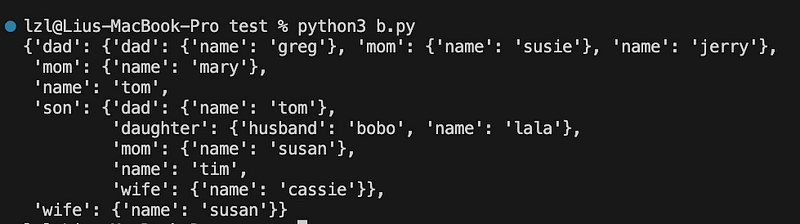
Here, pprint automatically formats our messy as hell data structure with zero effort needed from our part.
Note — if you wish to challenge yourself and write a recursive function to do this, by all means. When I have 100 other things to care about, I’ll take pprint in a heartbeat!
pprint() but with more indent
Sometimes we want more indent to make things neater. We can do this by adding the indent keyword inside pprint
from pprint import pprint

pprint(x, indent=4)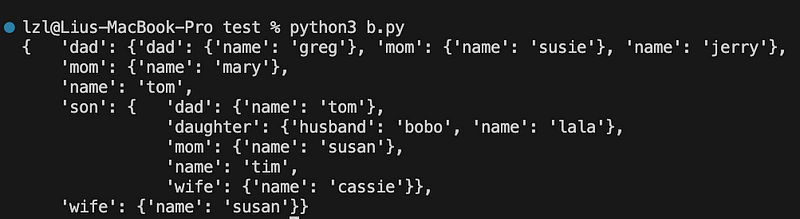
^ neater I guess? this is up to your preference
pprint() but with a max width
Sometimes even with pprint, our output still looks messy as hell. In these cases, we can set a max width inside the pprint function — every line printed will not exceed this max width.
from pprint import pprint

pprint(x, indent=4, width=30)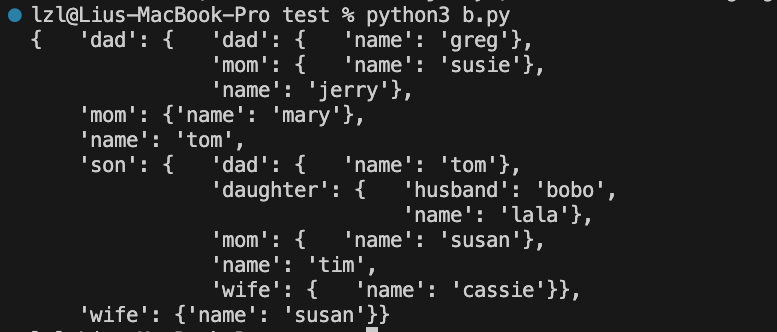
^ slightly neater!
Conclusion
I’ve done this the manual way (without pprint) too many times, and can safely say that I wish I knew about pprint much earlier in my Python journey.
Hope this was helpful to you in some way!
Some Final words
If this story was helpful and you wish to show a little support, you could:
- Clap 50 times for this story (this really, really helps me out)
- Sign up for a Medium membership using my link ($5/month to read unlimited Medium stories)
- Leave a comment telling me what you think!
My Ebooks: https://zlliu.co/ebooks
My LinkedIn: https://www.linkedin.com/in/zlliu/


