
Step-by-Step Guide to Deploying ReactJS on AWS EC2 Instance
What Is React?
React is a framework that employs Webpack to automatically compile React, JSX, and ES6 code while handling CSS file prefixes. React is a JavaScript-based UI development library. Although React is a library rather than a language, it is widely used in web development. The library first appeared in May 2013 and is now one of the most commonly used front-end libraries for web development.
React offers extensions for entire application architectural support, such as Flux and React Native, beyond mere UI.
Why React?
React’s popularity today has eclipsed that of all other front-end development frameworks. Here is why:
- Easy creation of dynamic applications: React makes it easier to create dynamic web applications because it requires less coding and offers more functionality, as opposed to JavaScript, where coding often gets complex very quickly.
- Improved performance: React uses Virtual DOM, thereby creating web applications faster. Virtual DOM compares the components’ previous states and updates only the items in the Real DOM that were changed, instead of updating all of the components again, as conventional web applications do.
- Reusable components: Components are the building blocks of any React application, and a single app usually consists of multiple components. These components have their logic and controls, and they can be reused throughout the application, which in turn dramatically reduces the application’s development time.
- Unidirectional data flow: React follows a unidirectional data flow. This means that developers often nest child components within parent components when designing a React app. Since the data flows in a single direction, it becomes easier to debug errors and know where a problem occurs in an application at the moment in question.
- Small learning curve: React is easy to learn, mostly combining BASIC HTML and JavaScript concepts with some beneficial additions. Still, as is the case with other tools and frameworks, you have to spend some time to get a proper understanding of React’s library.
- It can be used for the development of both web and mobile apps: We already know that React is used for the development of web applications, but that’s not all it can do. There is a framework called React Native, derived from React itself, that is hugely popular and is used for creating beautiful mobile applications. So, in reality, React can be used for making both web and mobile applications.
- Dedicated tools for easy debugging: Facebook has released a Chrome extension that can be used to debug React applications. This makes the process of debugging React web applications faster and easier.
The above reasons more than justify the popularity of the React library and why it is being adopted by a large number of organizations and businesses. Now let’s familiarize ourselves with React’s features.
Source: Internet
The Significance of AWS EC2
Amazon Elastic Compute Cloud (EC2) is a scalable and flexible cloud computing service provided by Amazon Web Services (AWS). It allows users, including DevOps engineers like yourself, to run virtual servers in the cloud. EC2 instances offer a wide range of configurations to meet various computing needs, making it a pivotal choice for deploying and managing applications.
Prerequisites for Deploying ReactJS on AWS EC2
Before diving into the deployment process, ensure you have the following prerequisites in place:
- An AWS account with EC2 access.
- Basic knowledge of ReactJS and its application structure.
Step 1: Launching an EC2 Instance
- Log in to the AWS Management Console.
- Navigate to the EC2 Dashboard.
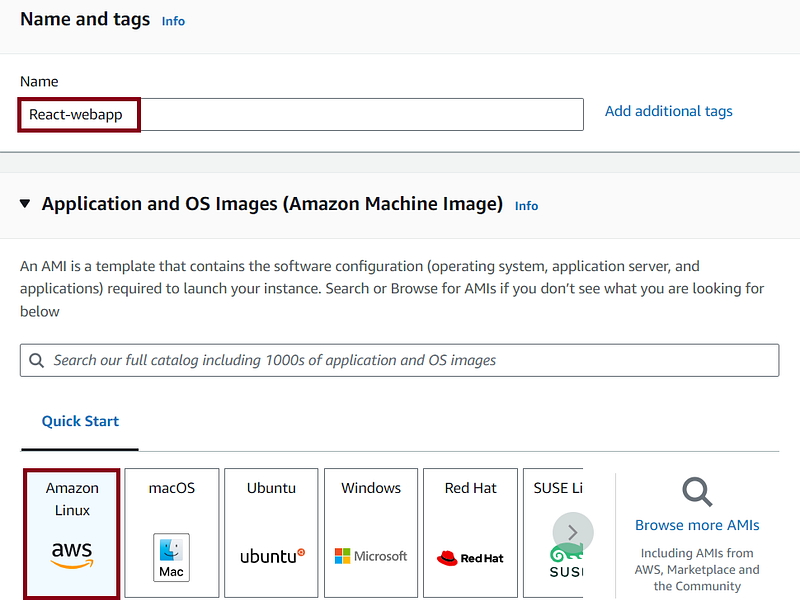
- Click on “Launch Instance” and choose an Amazon Machine Image (AMI) with your preferred OS.
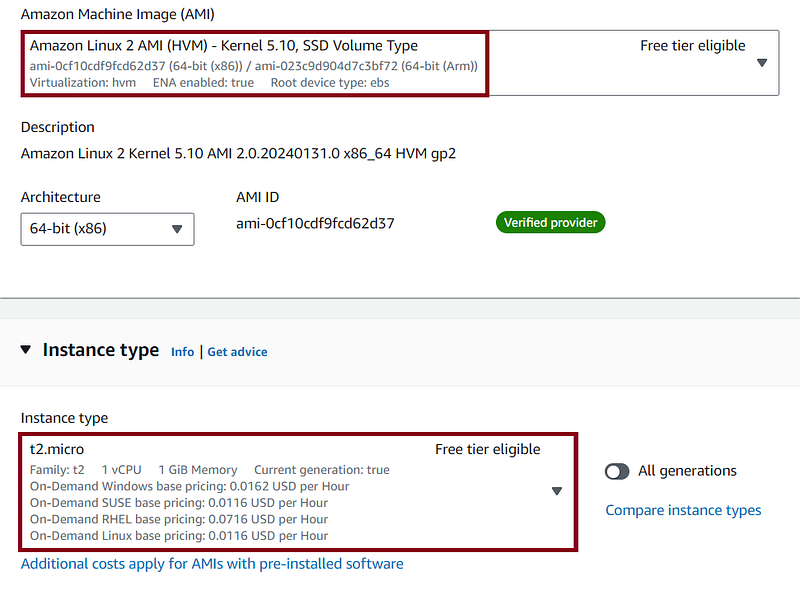
. Select an instance type, configure instance details, add storage, and configure security groups. In our case, we will select t2.micro to remain in the AWS free tier.
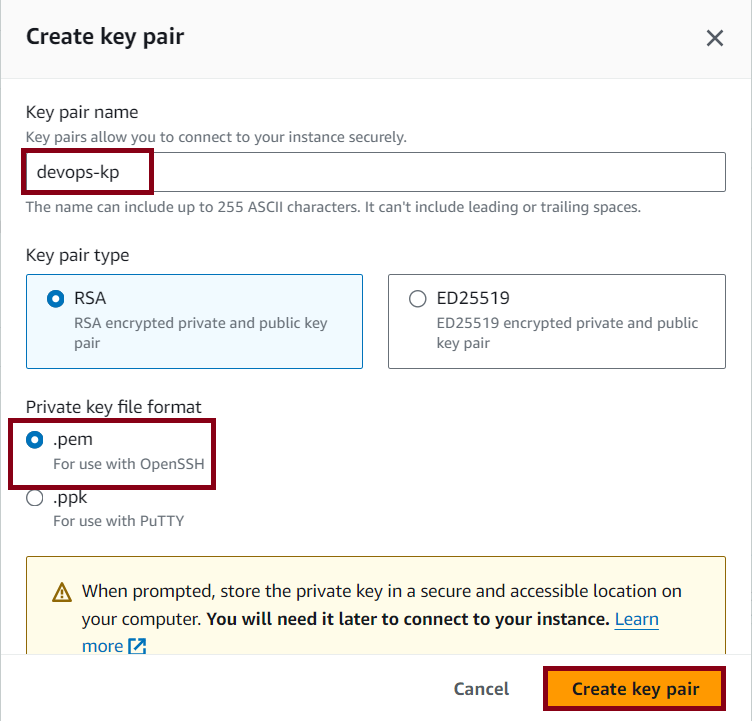
. Generate a new key pair or utilize an existing one under the key-pair section. In this instance, I will generate a new key pair.

Give a name to your key pair and click on Create key pair as shown below:
. Adjust the network settings and establish a new security group. Choose a fitting name and ensure that the “Auto-assign public IP” option is enabled.

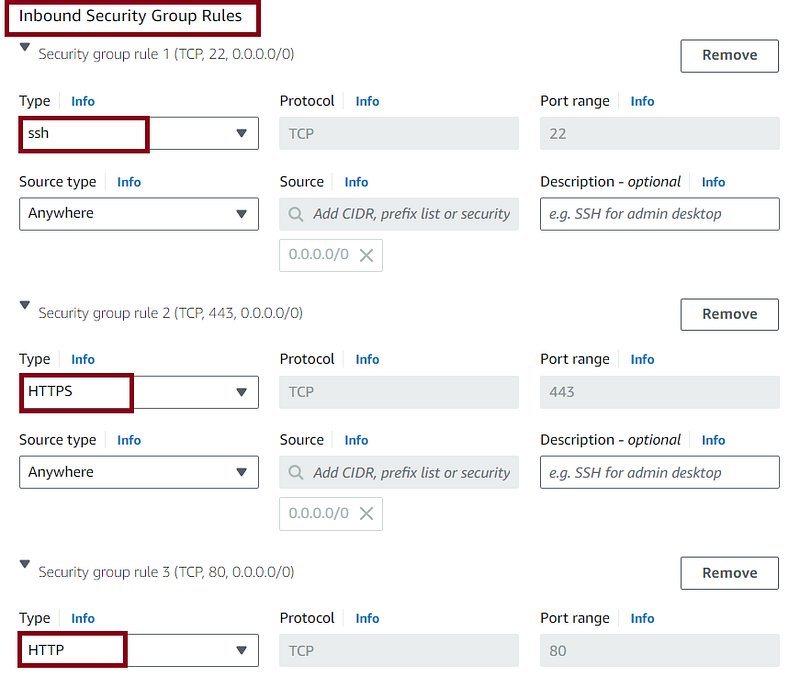
. Configure the inbound security group rules to permit SSH, HTTP, and HTTPS initially. Additional ports can be allowed later based on the application’s requirements.
. Maintain the default settings for the remaining configurations and proceed to launch the instance.

Step 2: Connecting to the EC2 Instance
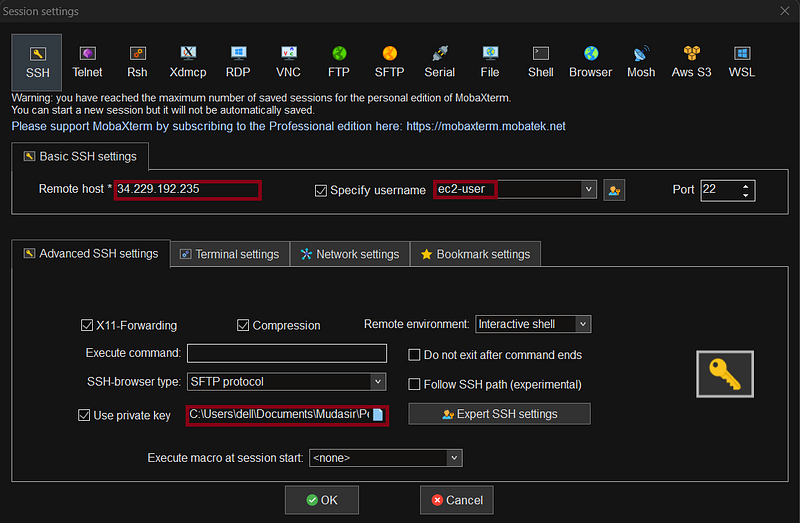
Utilize your preferred SSH terminal to connect to the EC2 instance. In my case, I will be using MobaXterm.
Update the package lists:
sudo yum update -yStep 3:Install Node and NPM using nvm
Install node version manager (nvm) by typing the following at the command line.
curl -o- https://raw.githubusercontent.com/nvm-sh/nvm/v0.39.5/install.sh | bash
We will use nvm to install Node.js because nvm can install multiple versions of Node.js and allow you to switch between them.
Activate nvm by typing the following at the command line.
. ~/.nvm/nvm.shUse nvm 16.0.0 which is a supported and stable version:
nvm install 16.0.0Installing Node.js also installs the Node Package Manager (npm), so you can install additional modules as needed.
Test that Node.js is installed and running correctly by typing the following at the command line.
node -e "console.log('Running Node.js ' + process.version)"Output:
[ec2-user@ip-172-31-41-167 ~]$ node -e "console.log('Running Node.js ' + process.version)"
Running Node.js v16.0.0
Step 4: Cloning ReactJS App to EC2
Before proceeding with the deployment, ensure you have Git installed on your EC2 instance. If not, install it using:
sudo yum install -y git
Clone the ReactJS app repository (replace the GitHub URL with your actual repository). Here we have taken the open source react app from the GitHub:
git clone https://github.com/raminr77/react-sample.git git clone https://github.com/raminr77/react-sample.git
Cloning into 'react-sample'...
remote: Enumerating objects: 809, done.
remote: Counting objects: 100% (90/90), done.
remote: Compressing objects: 100% (21/21), done.
remote: Total 809 (delta 77), reused 69 (delta 69), pack-reused 719
Receiving objects: 100% (809/809), 1.34 MiB | 25.90 MiB/s, done.
Resolving deltas: 100% (397/397), done.Move into the cloned directory:

This ensures you have the latest version of your ReactJS app on your EC2 instance. Now, proceed to build and deploy the app.
Step 5: Install all the required dependencies
To install the dependencies use the below command :
npm install
Output:
[ec2-user@ip-172-31-41-167 react-sample]$ npm install
npm WARN EBADENGINE Unsupported engine {
npm WARN EBADENGINE   package: '[email protected]',
npm WARN EBADENGINE   required: { node: '^14.15.0 || ^16.10.0 || >=18.0.0' },
npm WARN EBADENGINE   current: { node: 'v16.0.0', npm: '7.10.0' }
npm WARN EBADENGINE }
npm WARN EBADENGINE Unsupported engine {
npm WARN EBADENGINE   package: '[email protected]',
npm WARN EBADENGINE   required: { node: '^14.15.0 || ^16.10.0 || >=18.0.0' },
npm WARN EBADENGINE   current: { node: 'v16.0.0', npm: '7.10.0' }
npm WARN EBADENGINE }
npm WARN EBADENGINE Unsupported engine {
npm WARN EBADENGINE   package: '@jest/[email protected]',
npm WARN EBADENGINE   required: { node: '^14.15.0 || ^16.10.0 || >=18.0.0' },
npm WARN EBADENGINE   current: { node: 'v16.0.0', npm: '7.10.0' }
npm WARN EBADENGINE }
npm WARN EBADENGINE Unsupported engine {
npm WARN EBADENGINE   package: '[email protected]',
npm WARN EBADENGINE   required: { node: '^14.15.0 || ^16.10.0 || >=18.0.0' },
npm WARN EBADENGINE   current: { node: 'v16.0.0', npm: '7.10.0' }
npm WARN EBADENGINE }
npm WARN EBADENGINE Unsupported engine {
npm WARN EBADENGINE   package: '[email protected]',
npm WARN EBADENGINE   required: { node: '^14.15.0 || ^16.10.0 || >=18.0.0' },
npm WARN EBADENGINE   current: { node: 'v16.0.0', npm: '7.10.0' }
npm WARN EBADENGINE }
npm WARN EBADENGINE Unsupported engine {
npm WARN EBADENGINE   package: '[email protected]',
npm WARN EBADENGINE   required: { node: '^14.15.0 || ^16.10.0 || >=18.0.0' },
npm WARN EBADENGINE   current: { node: 'v16.0.0', npm: '7.10.0' }
npm WARN EBADENGINE }
npm WARN EBADENGINE Unsupported engine {
npm WARN EBADENGINE   package: '[email protected]',
npm WARN EBADENGINE   required: { node: '^14.15.0 || ^16.10.0 || >=18.0.0' },
npm WARN EBADENGINE   current: { node: 'v16.0.0', npm: '7.10.0' }
npm WARN EBADENGINE }
npm WARN EBADENGINE Unsupported engine {
npm WARN EBADENGINE   package: '[email protected]',
npm WARN EBADENGINE   required: { node: '^14.15.0 || ^16.10.0 || >=18.0.0' },
npm WARN EBADENGINE   current: { node: 'v16.0.0', npm: '7.10.0' }
npm WARN EBADENGINE }
npm WARN EBADENGINE Unsupported engine {
npm WARN EBADENGINE   package: '[email protected]',
npm WARN EBADENGINE   required: { node: '^14.15.0 || ^16.10.0 || >=18.0.0' },
npm WARN EBADENGINE   current: { node: 'v16.0.0', npm: '7.10.0' }
npm WARN EBADENGINE }
npm WARN EBADENGINE Unsupported engine {
npm WARN EBADENGINE   package: '[email protected]',
npm WARN EBADENGINE   required: { node: '^14.15.0 || ^16.10.0 || >=18.0.0' },
npm WARN EBADENGINE   current: { node: 'v16.0.0', npm: '7.10.0' }
npm WARN EBADENGINE }
npm WARN EBADENGINE Unsupported engine {
npm WARN EBADENGINE   package: '[email protected]',
npm WARN EBADENGINE   required: { node: '^14.15.0 || ^16.10.0 || >=18.0.0' },
npm WARN EBADENGINE   current: { node: 'v16.0.0', npm: '7.10.0' }
npm WARN EBADENGINE }
npm WARN EBADENGINE Unsupported engine {
npm WARN EBADENGINE   package: '@jest/[email protected]',
npm WARN EBADENGINE   required: { node: '^14.15.0 || ^16.10.0 || >=18.0.0' },
npm WARN EBADENGINE   current: { node: 'v16.0.0', npm: '7.10.0' }
npm WARN EBADENGINE }
npm WARN EBADENGINE Unsupported engine {
npm WARN EBADENGINE   package: '[email protected]',
npm WARN EBADENGINE   required: { node: '^14.15.0 || ^16.10.0 || >=18.0.0' },
npm WARN EBADENGINE   current: { node: 'v16.0.0', npm: '7.10.0' }
npm WARN EBADENGINE }
npm WARN EBADENGINE Unsupported engine {
npm WARN EBADENGINE   package: '@jest/[email protected]',
npm WARN EBADENGINE   required: { node: '^14.15.0 || ^16.10.0 || >=18.0.0' },
npm WARN EBADENGINE   current: { node: 'v16.0.0', npm: '7.10.0' }
npm WARN EBADENGINE }
npm WARN EBADENGINE Unsupported engine {
npm WARN EBADENGINE   package: '[email protected]',
npm WARN EBADENGINE   required: { node: '^12.13.0 || ^14.15.0 || ^16.10.0 || >=17.0.0' },
npm WARN EBADENGINE   current: { node: 'v16.0.0', npm: '7.10.0' }
npm WARN EBADENGINE }
npm WARN EBADENGINE Unsupported engine {
npm WARN EBADENGINE   package: '[email protected]',
npm WARN EBADENGINE   required: { node: '^12.13.0 || ^14.15.0 || ^16.10.0 || >=17.0.0' },
npm WARN EBADENGINE   current: { node: 'v16.0.0', npm: '7.10.0' }
npm WARN EBADENGINE }
npm WARN EBADENGINE Unsupported engine {
npm WARN EBADENGINE   package: '[email protected]',
npm WARN EBADENGINE   required: { node: '^12.13.0 || ^14.15.0 || ^16.10.0 || >=17.0.0' },
npm WARN EBADENGINE   current: { node: 'v16.0.0', npm: '7.10.0' }
npm WARN EBADENGINE }
npm WARN EBADENGINE Unsupported engine {
npm WARN EBADENGINE   package: '@jest/[email protected]',
npm WARN EBADENGINE   required: { node: '^12.13.0 || ^14.15.0 || ^16.10.0 || >=17.0.0' },
npm WARN EBADENGINE   current: { node: 'v16.0.0', npm: '7.10.0' }
npm WARN EBADENGINE }
npm WARN EBADENGINE Unsupported engine {
npm WARN EBADENGINE   package: '@jest/[email protected]',
npm WARN EBADENGINE   required: { node: '^12.13.0 || ^14.15.0 || ^16.10.0 || >=17.0.0' },
npm WARN EBADENGINE   current: { node: 'v16.0.0', npm: '7.10.0' }
npm WARN EBADENGINE }
npm WARN EBADENGINE Unsupported engine {
npm WARN EBADENGINE   package: '[email protected]',
npm WARN EBADENGINE   required: { node: '^12.13.0 || ^14.15.0 || ^16.10.0 || >=17.0.0' },
npm WARN EBADENGINE   current: { node: 'v16.0.0', npm: '7.10.0' }
npm WARN EBADENGINE }
npm WARN EBADENGINE Unsupported engine {
npm WARN EBADENGINE   package: '@jest/[email protected]',
npm WARN EBADENGINE   required: { node: '^12.13.0 || ^14.15.0 || ^16.10.0 || >=17.0.0' },
npm WARN EBADENGINE   current: { node: 'v16.0.0', npm: '7.10.0' }
npm WARN EBADENGINE }
npm WARN EBADENGINE Unsupported engine {
npm WARN EBADENGINE   package: '[email protected]',
npm WARN EBADENGINE   required: { node: '^12.13.0 || ^14.15.0 || ^16.10.0 || >=17.0.0' },
npm WARN EBADENGINE   current: { node: 'v16.0.0', npm: '7.10.0' }
npm WARN EBADENGINE }
npm WARN EBADENGINE Unsupported engine {
npm WARN EBADENGINE   package: '@jest/[email protected]',
npm WARN EBADENGINE   required: { node: '^12.13.0 || ^14.15.0 || ^16.10.0 || >=17.0.0' },
npm WARN EBADENGINE   current: { node: 'v16.0.0', npm: '7.10.0' }
npm WARN EBADENGINE }
npm WARN EBADENGINE Unsupported engine {
npm WARN EBADENGINE   package: '[email protected]',
npm WARN EBADENGINE   required: { node: '^12.13.0 || ^14.15.0 || ^16.10.0 || >=17.0.0' },
npm WARN EBADENGINE   current: { node: 'v16.0.0', npm: '7.10.0' }
npm WARN EBADENGINE }
npm WARN deprecated [email protected]: This package has been deprecated and is no longer maintained. Please use @rollup/plugin-terser
npm WARN deprecated [email protected]: Please use @jridgewell/sourcemap-codec instead
npm WARN deprecated [email protected]: https://github.com/lydell/resolve-url#deprecated
npm WARN deprecated [email protected]: Please see https://github.com/lydell/urix#deprecated
npm WARN deprecated [email protected]: See https://github.com/lydell/source-map-url#deprecated
npm WARN deprecated [email protected]: Modern JS already guarantees Array#sort() is a stable sort, so this library is deprecated. See the compatibility table on MDN: https://developer.mozilla.org/en-US/docs/Web/JavaScript/Reference/Global_Objects/Array/sort#browser_compatibility
npm WARN deprecated [email protected]: See https://github.com/lydell/source-map-resolve#deprecated
npm WARN deprecated [email protected]: Use your platform's native performance.now() and performance.timeOrigin.
npm WARN deprecated [email protected]: Use your platform's native atob() and btoa() methods instead
npm WARN deprecated [email protected]: Use your platform's native DOMException instead
npm WARN deprecated @babel/[email protected]: This proposal has been merged to the ECMAScript standard and thus this plugin is no longer maintained. Please use @babel/plugin-transform-unicode-property-regex instead.
npm WARN deprecated @babel/[email protected]: This proposal has been merged to the ECMAScript standard and thus this plugin is no longer maintained. Please use @babel/plugin-transform-private-property-in-object instead.
npm WARN deprecated @babel/[email protected]: This proposal has been merged to the ECMAScript standard and thus this plugin is no longer maintained. Please use @babel/plugin-transform-private-methods instead.
npm WARN deprecated @babel/[email protected]: This proposal has been merged to the ECMAScript standard and thus this plugin is no longer maintained. Please use @babel/plugin-transform-optional-chaining instead.
npm WARN deprecated @babel/[email protected]: This proposal has been merged to the ECMAScript standard and thus this plugin is no longer maintained. Please use @babel/plugin-transform-optional-catch-binding instead.
npm WARN deprecated @babel/[email protected]: This proposal has been merged to the ECMAScript standard and thus this plugin is no longer maintained. Please use @babel/plugin-transform-dynamic-import instead.
npm WARN deprecated @babel/[email protected]: This proposal has been merged to the ECMAScript standard and thus this plugin is no longer maintained. Please use @babel/plugin-transform-class-static-block instead.
npm WARN deprecated @babel/[email protected]: This proposal has been merged to the ECMAScript standard and thus this plugin is no longer maintained. Please use @babel/plugin-transform-async-generator-functions instead.
npm WARN deprecated @babel/[email protected]: This proposal has been merged to the ECMAScript standard and thus this plugin is no longer maintained. Please use @babel/plugin-transform-nullish-coalescing-operator instead.
npm WARN deprecated @babel/[email protected]: This proposal has been merged to the ECMAScript standard and thus this plugin is no longer maintained. Please use @babel/plugin-transform-class-properties instead.
npm WARN deprecated @babel/[email protected]: This proposal has been merged to the ECMAScript standard and thus this plugin is no longer maintained. Please use @babel/plugin-transform-numeric-separator instead.
npm WARN deprecated @babel/[email protected]: This proposal has been merged to the ECMAScript standard and thus this plugin is no longer maintained. Please use @babel/plugin-transform-logical-assignment-operators instead.
npm WARN deprecated @babel/[email protected]: This proposal has been merged to the ECMAScript standard and thus this plugin is no longer maintained. Please use @babel/plugin-transform-json-strings instead.
npm WARN deprecated @babel/[email protected]: This proposal has been merged to the ECMAScript standard and thus this plugin is no longer maintained. Please use @babel/plugin-transform-export-namespace-from instead.
npm WARN deprecated @babel/[email protected]: This proposal has been merged to the ECMAScript standard and thus this plugin is no longer maintained. Please use @babel/plugin-transform-object-rest-spread instead.
npm WARN deprecated @sinonjs/[email protected]: Breaks compatibility with ES5, use v1.8.5
npm WARN deprecated [email protected]: This SVGO version is no longer supported. Upgrade to v2.x.x.

added 1675 packages, and audited 1676 packages in 2m

260 packages are looking for funding
  run `npm fund` for details

27 vulnerabilities (14 moderate, 9 high, 4 critical)

To address issues that do not require attention, run:
  npm audit fix

To address all issues (including breaking changes), run:
  npm audit fix --force

Run `npm audit` for details.
npm notice
npm notice New major version of npm available! 7.10.0 -> 10.4.0
npm notice Changelog: https://github.com/npm/cli/releases/tag/v10.4.0
npm notice Run npm install -g [email protected] to update!
npm notice
From the above output, we’ve successfully installed the npm packages for your project. However, there are some warnings and vulnerabilities reported which we can ignore at the moment for this demo.
Step 6: Run the application
To run the application put the below command
npm start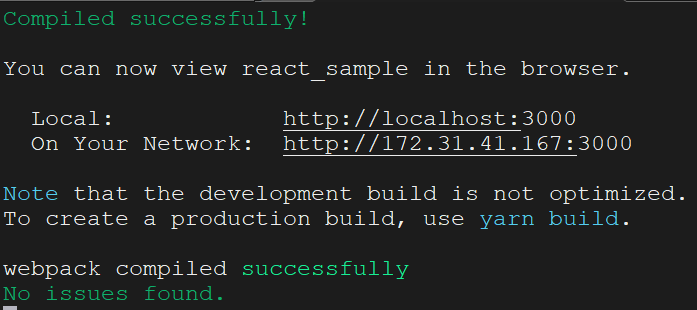
Step 7: Using PM2 to Run and Manage React Apps
Running a React app using pm2 offers several advantages, especially in a production environment. PM2 acts as a process manager for React.js applications, ensuring they run persistently, can be easily monitored, and automatically restart in case of failures. Here's a step-by-step guide on why and how to use PM2 with a React app:
Install PM2 Globally:
- Open a terminal and install PM2 globally using the following command:
npm install -g pm2
Output:
npm install -g pm2
[..................] / reify: timing arborist:ctor Completed in 1ms
npm WARN deprecated uuid@3.4.0: Please upgrade  to version 7 or higher.  Older versions may use Math.random() in certain circumstances, which is known to be problematic.  See https://v8.dev/blog/math-random for details.

added 157 packages, and audited 158 packages in 9s

13 packages are looking for funding
  run `npm fund` for details

found 0 vulnerabilities
Start Your React App with PM2:
- Use the following command to start your React app using PM2:
pm2 start npm --name "react-app" -- startOutput:
pm2 start npm --name "react-app" -- start

                        -------------

__/\\\\\\\\\\\\\____/\\\\____________/\\\\____/\\\\\\\\\_____
 _\/\\\/////////\\\_\/\\\\\\________/\\\\\\__/\\\///////\\\___
  _\/\\\_______\/\\\_\/\\\//\\\____/\\\//\\\_\///______\//\\\__
   _\/\\\\\\\\\\\\\/__\/\\\\///\\\/\\\/_\/\\\___________/\\\/___
    _\/\\\/////////____\/\\\__\///\\\/___\/\\\________/\\\//_____
     _\/\\\_____________\/\\\____\///_____\/\\\_____/\\\//________
      _\/\\\_____________\/\\\_____________\/\\\___/\\\/___________
       _\/\\\_____________\/\\\_____________\/\\\__/\\\\\\\\\\\\\\\_
        _\///______________\///______________\///__\///////////////__


                          Runtime Edition

        PM2 is a Production Process Manager for Node.js applications
                     with a built-in Load Balancer.

                Start and Daemonize any application:
                $ pm2 start app.js

                Load Balance 4 instances of api.js:
                $ pm2 start api.js -i 4

                Monitor in production:
                $ pm2 monitor

                Make pm2 auto-boot at server restart:
                $ pm2 startup

                To go further checkout:
                http://pm2.io/


                        -------------

[PM2] Spawning PM2 daemon with pm2_home=/home/ec2-user/.pm2
[PM2] PM2 Successfully daemonized
[PM2] Starting /home/ec2-user/.nvm/versions/node/v16.0.0/bin/npm in fork_mode (1 instance)
[PM2] Done.
┌────┬────────────────────┬──────────┬──────┬───────────┬──────────┬──────────┐
│ id │ name               │ mode     │ ↺    │ status    │ cpu      │ memory   │
├────┼────────────────────┼──────────┼──────┼───────────┼──────────┼──────────┤
│ 0  │ react-app          │ fork     │ 0    │ online    │ 0%       │ 26.2mb   │
└────┴────────────────────┴──────────┴──────┴───────────┴──────────┴──────────┘
View Process Status:
- Check the status of your running processes to ensure your React app is listed:
pm2 list

Step 8: Accessing Your React App from the Browser:
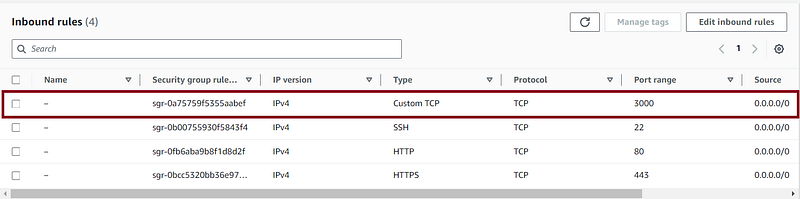
Before this, you need to make sure that in the Security group of your EC2 Instance, port 3000 is allowed in the inbound rules:
Access the App:
- Open your web browser and take the public IP of your EC2 Instance with port 3000:
http://34.229.192.235:3000/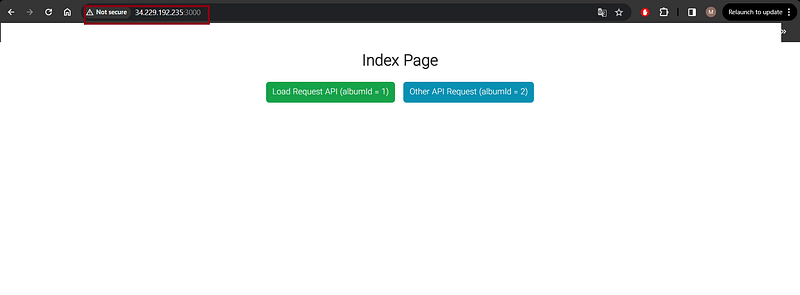
Additional PM2 Commands (Optional):
Stop the Process (if needed):
- If you need to stop your React app, you can use:
pm2 stop react-app. To manually restart your React app, use:
pm2 restart your-app-name
By following these steps, you ensure your React app runs persistently, benefits from automatic restarts, and is easily managed with PM2.
Conclusion
In this blog post, we’ve embarked on a journey through the world of React.js, exploring what React is and delving into the practical aspects of deploying a React app on an EC2 instance. React.js, developed and maintained by Facebook, is a powerful JavaScript library for building user interfaces. Its component-based architecture and virtual DOM make it a popular choice for creating dynamic and interactive web applications.
To bring our React app to life and make it accessible to the world, we opted for deploying it on an Amazon EC2 instance. This process involves setting up the necessary infrastructure, configuring security groups, and ensuring proper networking. We covered key steps such as creating a new key pair, editing network settings, and allowing inbound traffic through security group rules.
To make our deployment more robust and sustainable, we introduced PM2, a process manager for Node.js applications. PM2 not only ensures the persistent execution of our React app but also provides features like automatic restarts, logging, and monitoring. This is particularly valuable in production environments where continuous uptime is crucial.
By following the steps outlined in this blog post, you’ve learned not only how to create and deploy a React app but also how to manage its lifecycle effectively using tools like PM2. Armed with this knowledge, you are better equipped to navigate the landscape of React.js development and take your web applications to new heights.
Whether you are a seasoned developer or just starting your journey with React, the combination of React.js and AWS EC2, augmented by tools like PM2, offers a robust foundation for building scalable and performant web applications.
If you found this blog post helpful and insightful, I invite you to show your appreciation by giving it a clap! Your support fuels my motivation to continue sharing valuable content. Don’t forget to hit that follow button as well, so you can stay connected and receive updates on upcoming posts. Let’s embark on this journey together and explore even more exciting insights into the world of DevOps. Your engagement is greatly appreciated! 👏🔗


