avatarCharles Ross

Free AI web copilot to create summaries, insights and extended knowledge, download it at here

3211

Abstract

e been trained to understand natural language and to predict what a blog post is about.</p><p id="3f16">The system analyzes every new sentence you write and suggests similar articles, related topics, optimized anchor texts (so you can get the most search traffic), and more.</p><p id="dd89">All of this happens as you type so there are no awkward pauses or moments where Jasper interrupts your thoughts.</p><p id="801d">The benefits of using Jasper as your writer’s assistant are endless.</p><p id="d550">Check out the list below and see for yourself:</p><p id="62e6">1) Write blog posts faster by having all ideas at your fingertips</p><p id="2b49">2) Never worry about writer’s block again — you’ll have plenty of topics so you can publish new content every day</p><p id="e2c0">3) Save time by using recommendations, predictions, and suggestions instead of wasting time coming up with ideas from scratch</p><p id="11c2">4) Increase blog traffic and get more exposure thanks to optimized anchor texts (so you will rank better for specific keywords in search engines), related topics, titles, etc.</p><p id="4441">5) Get more shares because of new content that your readers will love</p><p id="885a">6) Save money by not having to hire a full-time writer</p><p id="abf7">7) Get ahead of your competitors and beat them in SEO (because you’ll have the latest and greatest content published first, so Google will recognize it as such.)</p><h1 id="67ca">Step by step guide to writing a blog in 10 minutes using Jarvis</h1><p id="6fc1">For this purpose, you will need to first <a href="https://www.youtube.com/watch?v=0-A5FzNy7_Y&amp;ab_channel=CharlesRoss">Claim your 10,000 words free trial of Jasper.ai.</a></p><p id="82fa">Once you are signed up, log in to Jasper and head to the templates section</p><figure id="ac48"><img src="https://cdn-images-1.readmedium.com/v2/resize:fit:800/1*vrfu8oSN3ITfiEMoZ_BFBA.png"><figcaption>Jarvis Long-form assistant</figcaption></figure><p id="1045">Click on the long-form assistant to start the blog generation process.</p><figure id="db68"><img src="https://cdn-images-1.readmedium.com/v2/resize:fit:800/1*i2S0FjIeOm170MjPDA14cA.png"><figcaption></figcaption></figure><p id="9eac">On the next screen, click on the “Start from scratch section” to create a new document</p><p id="3034">Jasper has tones of templates that different writers use for different purposes. For this demo, we will use these 4 templates.</p><figure id="15ee"><img src="https://cdn-images-1.readmedium.com/v2/resize:fit:800/1*c52dn7rUXD6MVSb6BVUyQg.png"><figcaption></figcaption></figure><p id="a4ee">Once you have created a new document, click on the “power mode” toggle.</p><p id="9413">This will split the screen into 2 and allow you to access the templates and export the output into the editor.</p><p id="8170">Next, Tap on the “Untitled document” section and save your document.</p><p id="facd">Once saved your progress is automatically backed up in the “Documents” section as you go on.</p><p id="2c77">Next, head to the blog post topic idea generation template on the left side and click on it.</p><figure id="f75c"><img src="https://cdn-images-1.readmedium.com/v2/resize:fit:800/1*XxE-Hj9IPJq8V

Options

JX--EBqJA.png"><figcaption></figcaption></figure><p id="5e0b">Fill in the fields appropriately to guide Jarvis generate the<a href="https://readmedium.com/how-to-get-blog-post-topic-ideas-using-jarvis-an-an-advanced-a-i-tool-bd12d54f2204"> perfect blog topic</a>.</p><p id="0ea7">You can even give it an example at the bottom field to streamline your line of thought.</p><p id="c40c">Once you are done, click on “Generate AI content”.</p><p id="bd33">You will get several outputs based on how many you have preset.</p><p id="1e97">If you don't get a desired blog post idea, hit generate again until you find the perfect blog post topic.</p><p id="0f45">Copy and paste into the editor on the right side.</p><figure id="0296"><img src="https://cdn-images-1.readmedium.com/v2/resize:fit:800/1*eK95A-CY_W4cOblW2-2MRg.png"><figcaption></figcaption></figure><p id="4fa1">Next, we click on the “Blog post outline” template as illustrated above.</p><p id="d8c6">Input your heading and set the tone of voice you wish Jasper to write your output with.</p><p id="398d">Again hit generate and several A. I output will be available for you to choose from.</p><p id="78a4">Once you are satisfied with the output copy and paste to the editor, these are going to be your H2s.</p><figure id="49f5"><img src="https://cdn-images-1.readmedium.com/v2/resize:fit:800/1*cyjzKpjwiH2ovKbWwrbneg.png"><figcaption></figcaption></figure><p id="ed79">Next, we’ll, head to the “Blog Post Intro Paragraph”. Input your blog post title chosen earlier, then the audience you wish to write for, and finally the tone of voice.</p><p id="ea8b"><b><i>You can even tell </i></b>Jasper<b><i> to use a celebrity tone of voice. <a href="https://help.jarvis.ai/article/158-what-should-i-put-for-tone-of-voice">Read more about the tone of voice here</a></i></b></p><p id="344a">Hit generate and you will get a list of sample intro paragraphs to choose from.</p><figure id="7d78"><img src="https://cdn-images-1.readmedium.com/v2/resize:fit:800/1*8fC80ICrnIrFx3iLpMGiHw.png"><figcaption></figcaption></figure><p id="ff05">Once you have the heading and the introduction paragraph, head to each of your H2s, and below them, just click the compose button at the bottom.</p><p id="e09a">Jasper will write plagiarism-free, well-researched content that will surely keep your audience captivated.</p><p id="8e36">If you don't like the output, hit the CTRL+Z shortcut on your keyboard to undo the output.</p><p id="c0f6">Click “Compose” again to generate fresh content.</p><p id="3d4c">Once you are done with the body click on the “Blog Post Conclusion Paragraph”</p><figure id="add1"><img src="https://cdn-images-1.readmedium.com/v2/resize:fit:800/1*UoOsGY9T7doBZ4KoNyWv0w.png"><figcaption></figcaption></figure><p id="17b9">Input your main points and the call to action then set the tone. Chose the best conclusion paragraph that best winds up your blog.</p><h1 id="1b86">Conclusion</h1><p id="5695">With Jasper by your side, you will be able to write blog posts faster than ever before.</p><p id="32d6">Just sit back, relax, leave everything up to this clever A. I writing assistant and watch the magic happen!</p><p id="48be">Till next time!</p></article></body>

Write Like a Pro Using AI in 2024

Let AI Help You Create a Blog Post in 10 Minutes or Less

PS All content written herein except this line was generated by Jasper A.I software. You can try it out here with free 10,000 words

For any inquiries reach us at [email protected]

Jarvis A. I Assistant

If you’re like most bloggers, writing new blog posts is a struggle.

It’s hard to get started and even harder to keep going when the words don’t come easily.

Blogging is a great way to grow your business, but it can be difficult to find the motivation and time required for creating quality content.

It’s also very easy to lose track of what you’ve already written or how many words you have left in a post.

You may even struggle with finding new topics to write about on your blog, stories, social media copy, books, Essays, and more!

All these problems slow down your productivity and kill your inspiration as a blogger.

Jasper will help you overcome all these issues.

It’s an A. I assistant that helps you create better content faster while saving time and increasing traffic on your site!

No more writer’s block, no more struggling with ideas for new articles — just sit back, relax, let Jarvis work his magic for you!

Your readers will love this tool too because they’ll get fresh content from their favorite bloggers every day without having to wait weeks or months between updates!

How does Jasper work?

Jasper is an A. I platform and it’s been developed with one goal in mind — to help bloggers save time and increase their productivity so they can focus on making great content.

It uses a set of machine-learning algorithms that have been trained to understand natural language and to predict what a blog post is about.

The system analyzes every new sentence you write and suggests similar articles, related topics, optimized anchor texts (so you can get the most search traffic), and more.

All of this happens as you type so there are no awkward pauses or moments where Jasper interrupts your thoughts.

The benefits of using Jasper as your writer’s assistant are endless.

Check out the list below and see for yourself:

1) Write blog posts faster by having all ideas at your fingertips

2) Never worry about writer’s block again — you’ll have plenty of topics so you can publish new content every day

3) Save time by using recommendations, predictions, and suggestions instead of wasting time coming up with ideas from scratch

4) Increase blog traffic and get more exposure thanks to optimized anchor texts (so you will rank better for specific keywords in search engines), related topics, titles, etc.

5) Get more shares because of new content that your readers will love

6) Save money by not having to hire a full-time writer

7) Get ahead of your competitors and beat them in SEO (because you’ll have the latest and greatest content published first, so Google will recognize it as such.)

Step by step guide to writing a blog in 10 minutes using Jarvis

For this purpose, you will need to first Claim your 10,000 words free trial of Jasper.ai.

Once you are signed up, log in to Jasper and head to the templates section
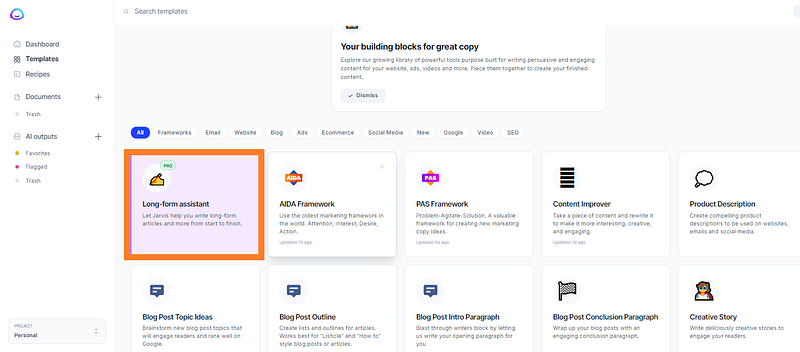
Jarvis Long-form assistant

Click on the long-form assistant to start the blog generation process.
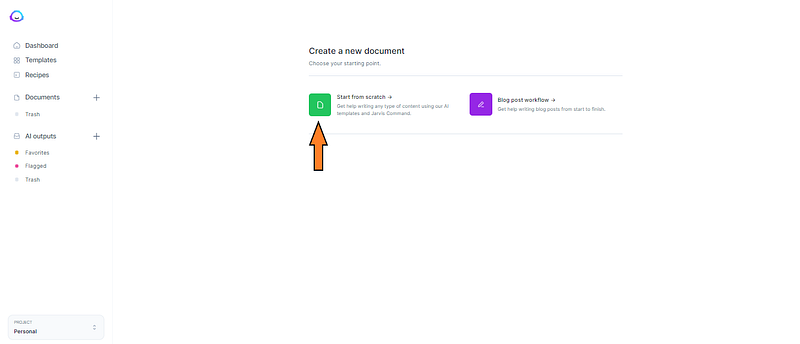
On the next screen, click on the “Start from scratch section” to create a new document

Jasper has tones of templates that different writers use for different purposes. For this demo, we will use these 4 templates.
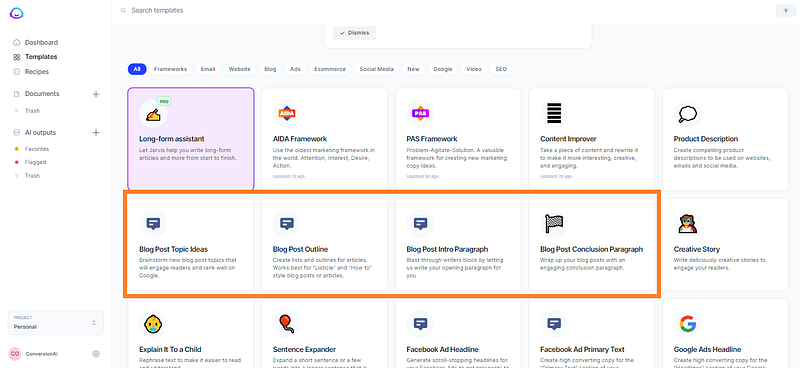
Once you have created a new document, click on the “power mode” toggle.

This will split the screen into 2 and allow you to access the templates and export the output into the editor.

Next, Tap on the “Untitled document” section and save your document.

Once saved your progress is automatically backed up in the “Documents” section as you go on.

Next, head to the blog post topic idea generation template on the left side and click on it.
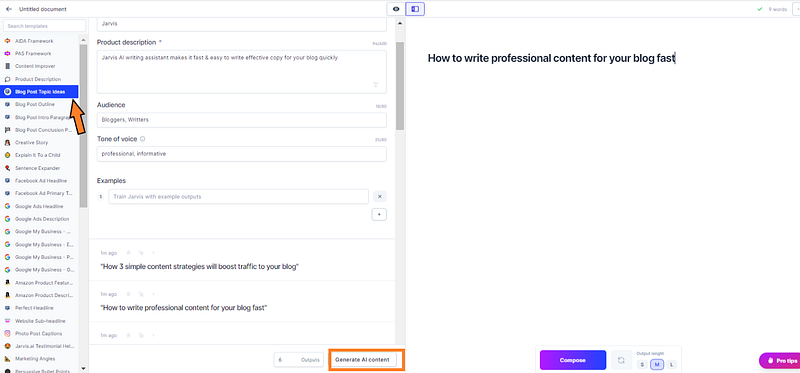
Fill in the fields appropriately to guide Jarvis generate the perfect blog topic.

You can even give it an example at the bottom field to streamline your line of thought.

Once you are done, click on “Generate AI content”.

You will get several outputs based on how many you have preset.

If you don't get a desired blog post idea, hit generate again until you find the perfect blog post topic.

Copy and paste into the editor on the right side.
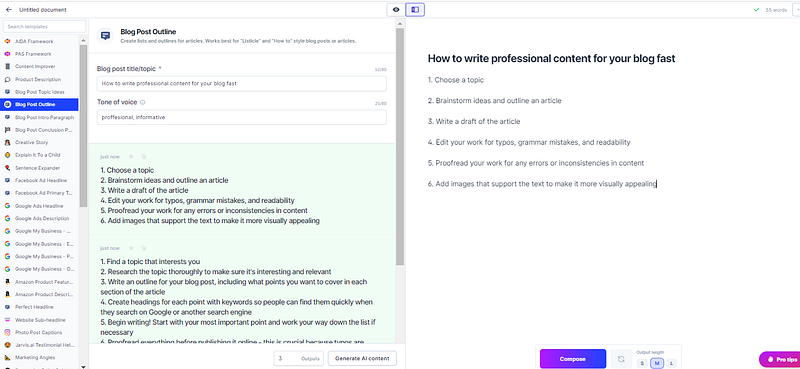
Next, we click on the “Blog post outline” template as illustrated above.

Input your heading and set the tone of voice you wish Jasper to write your output with.

Again hit generate and several A. I output will be available for you to choose from.

Once you are satisfied with the output copy and paste to the editor, these are going to be your H2s.
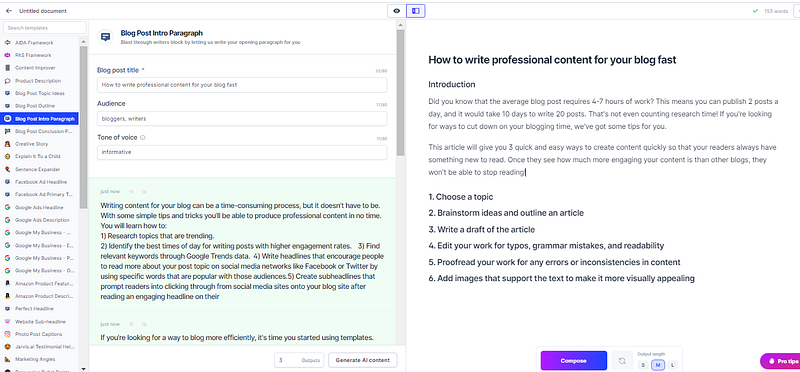
Next, we’ll, head to the “Blog Post Intro Paragraph”. Input your blog post title chosen earlier, then the audience you wish to write for, and finally the tone of voice.

You can even tell Jasper to use a celebrity tone of voice. Read more about the tone of voice here

Hit generate and you will get a list of sample intro paragraphs to choose from.
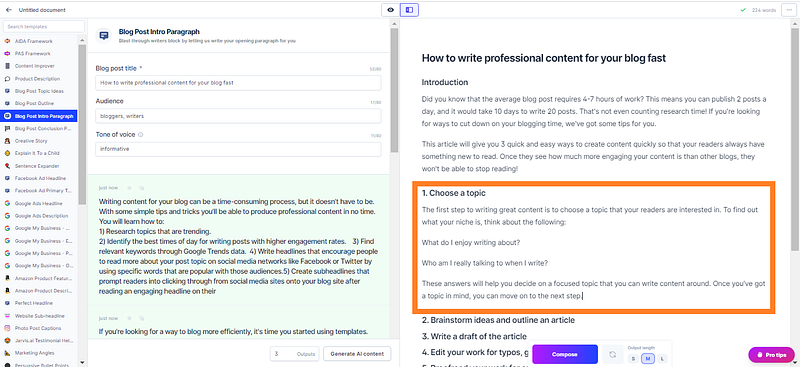
Once you have the heading and the introduction paragraph, head to each of your H2s, and below them, just click the compose button at the bottom.

Jasper will write plagiarism-free, well-researched content that will surely keep your audience captivated.

If you don't like the output, hit the CTRL+Z shortcut on your keyboard to undo the output.

Click “Compose” again to generate fresh content.

Once you are done with the body click on the “Blog Post Conclusion Paragraph”
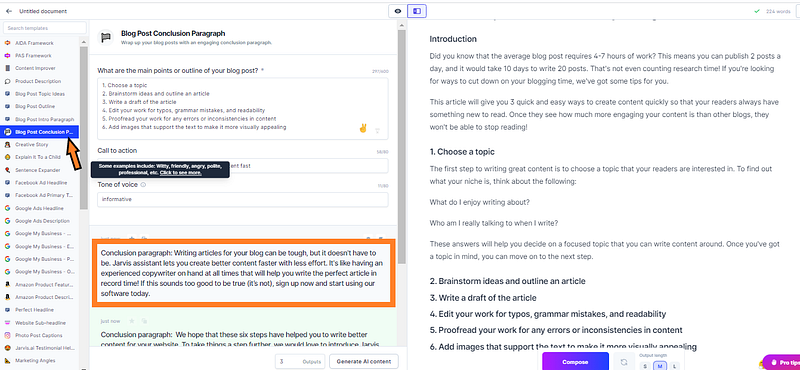
Input your main points and the call to action then set the tone. Chose the best conclusion paragraph that best winds up your blog.

Conclusion

With Jasper by your side, you will be able to write blog posts faster than ever before.

Just sit back, relax, leave everything up to this clever A. I writing assistant and watch the magic happen!

Till next time!

Blogg
Blogging
Blogger
Writers On Writing
Writer
Recommended from ReadMedium