
Step by Step: Building an Automated Trading System in Robinhood

In this post, I’m going to explore the use of integrating with the Robinhood API via Python code.
The idea is to use Robinhood for the trading platform. Robinhood API has very limited access to the market data. Not recommend using their API for data purposes.
What is Robinhood?
Robinhood provides a way to allow customers to buy and sell stocks and exchange-traded funds (ETFs) without paying a commission. It’s a trading platform and it doesn’t provide an official API yet.
Note from Towards Data Science’s editors: While we allow independent authors to publish articles in accordance with our rules and guidelines, we do not endorse each author’s contribution. You should not rely on an author’s works without seeking professional advice. See our Reader Terms for details.
Getting Start
If you search Robinhood API python, there are a lot of Github links or documents. But most of them don't support the latest API. And there're some projects not updated a long time ago, see sanko's Robinhood.
Here I use Robinhood(A python framework), which is originally from Jamonek’s Robinhood framework. Since Robinhood enforced mandatory MFA, I made some changes to make sure it works.
Find where you want to download in console, and simply run:
git clone https://github.com/LichAmnesia/Robinhood cd Robinhood sudo python3 setup.py install
Then you are good to go!
Login
The default way needs you to have your phone in hand to enter the authentication code.
This way you need to log in every 24 hours since your auth tokens will expire.
Use something like this to log in:
You can skip this part if you don’t want to enable 2FA. After you enable 2FA, you need to enter the authentication code every time you login Robinhood Web.
To enable 2FA, go to your Robinhood Web App. Go to settings, turn on 2FA, select “Authentication App”, click “Can’t Scan It?”, and copy the 16-character QR code.
Use something like this to log in:
Access Market Data
Data is the backbone of any strategy, but Robinhood API only returns very basic information of stock.
If you want history price data:
Currently, API only supports interval as 5minute|10minute|30minute|day|week. And date range as day|week|year|5year|all.
Trading From API
Robinhood needs you to have more than 25k to make day trading. Otherwise, you can only make four-day trades in 5 days. See pattern day trading in Robinhood.
Since Robinhood doesn’t have any paper account, all orders from executed from API are the same as executed in the App.
Here I use DWT for example, which is $5 per share.
Now I submit a market order:
Here GFD means good for the day, which will be canceled if not filled today. Also, you can set GTC which means good until cancel.
Screenshot for making market order:
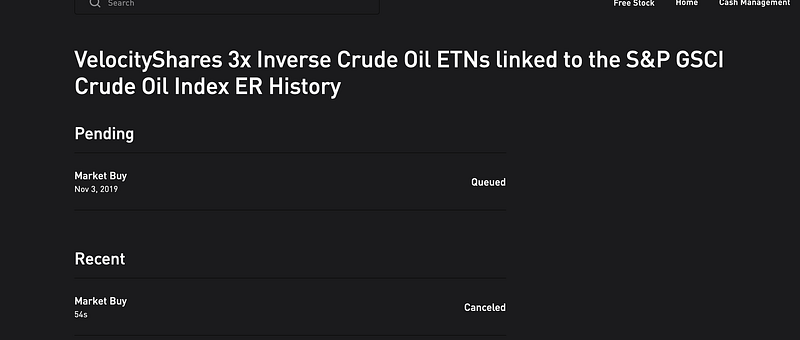
I can see one market buy order is queued, and one market sell order is missed.
Here I received 400 Client Error: Bad Request for url: https://api.robinhood.com/orders/. Because Robinhood doesn't allow you to make sell order if you don't actually have enough quantity of stock.
Remember to close your position of DWT.
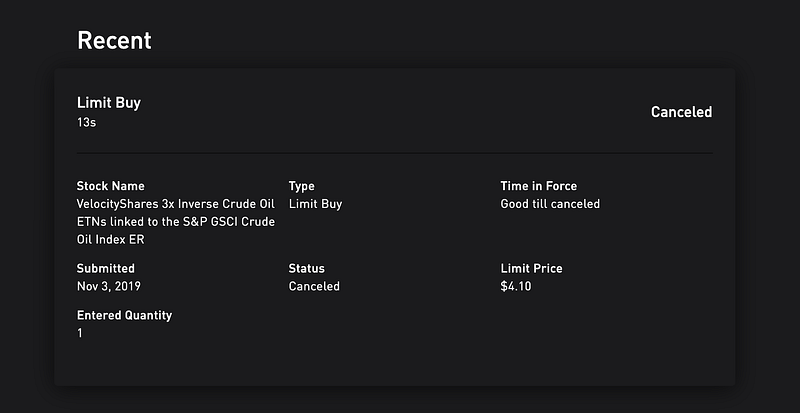
Now I try to make limit buy order and cancel it:
Screenshot for making limit order and cancel it:
All supported order function:
place_market_buy_order place_market_sell_order place_limit_buy_order place_limit_sell_order place_stop_loss_sell_order place_stop_limit_sell_order
Account Management
If you want to see your current positions and current market value:
Next
Learning and building an automated trading system is not easy. With the right tools, you can now start making your first trading algorithm. Next, I plan to talk about how to build a basic trading strategy in Robinhood. If you have any questions, please ask them below.


