Standardized Laravel API Responses
When building APIs with Laravel, maintaining a consistent response format is essential for clarity and ease of use. Whether your API returns successful responses or handles errors, presenting data in a standardized way improves the developer experience. In this guide, we’ll explore how to achieve a consistent response format using custom middleware in Laravel.
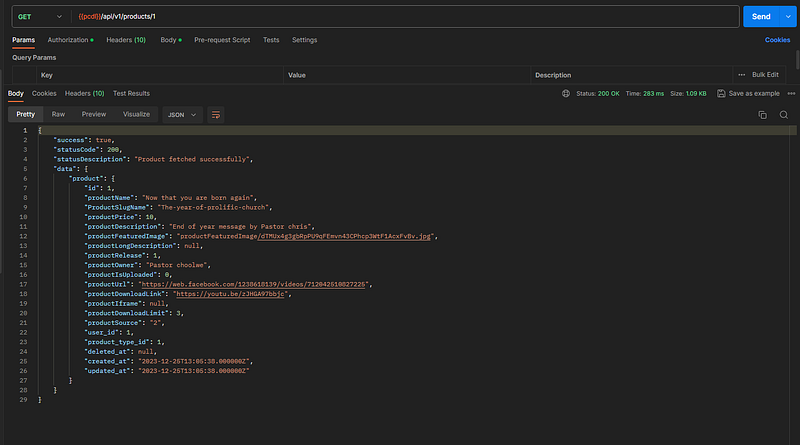
Step 1: Create the ApiResponseMiddleware
Let’s start by creating a custom middleware named ApiResponseMiddleware. Run the following command in your terminal
php artisan make:middleware ApiResponseMiddleware
This command generates a new middleware file in the app/Http/Middleware directory.
Step 2: Customize the Middleware
Open the newly created middleware file (ApiResponseMiddleware.php) and update the handle method to format API responses:
 <?php

namespace App\Http\Middleware;

use Closure;
use Illuminate\Http\JsonResponse;
use Illuminate\Http\RedirectResponse;
use Illuminate\Http\Request;
use Illuminate\Http\Response;
use Throwable;

class ApiResponseMiddleware
{
    /**
     * Handle an incoming request.
     *
     * @param Request $request
     * @param Closure(Request): (Response|RedirectResponse) $next
     * @return JsonResponse
     * @throws Throwable
     */
    public function handle(Request $request, Closure $next)
    {

        // Check if the request wants JSON
        if (!$request->wantsJson() && !$request->is('api/*')) {
            // Force JSON response for API requests
            return $next($request);
        }
        $request->headers->set('Accept', 'application/json');
        $response = $next($request);
        // If the response is a JsonResponse, format it
        if ($response instanceof JsonResponse) {
            $data = $response->getData(true);

            $isSuccessfulStatus = $response->status() >= 200 && $response->status() < 300;

            $formattedResponse = [
                'success' => array_key_exists("success", $data) ? $data['success'] : $isSuccessfulStatus,
                'statusCode' => array_key_exists("statusCode", $data) ? $data['statusCode'] : $data['statusCode'] ?? $response->status(),
                'statusDescription' => array_key_exists("statusDescription", $data) ? $data['statusDescription'] : $data['statusDescription'] ?? ($isSuccessfulStatus ? 'Successful' : ''),
                'data' => array_key_exists("data", $data) ? $data['data'] : $data['data'] ?? ($isSuccessfulStatus ? $data : null),
            ];
            return response()->json($formattedResponse, $response->status());
        }
        return $response;
    }
}
This middleware checks if the response is an instance of JsonResponse. If it is, it decodes the response content, creates a standardized response structure, and returns the formatted JSON response. For non-JsonResponse types, it returns the response as is.
Step 3: Register the Middleware
Next, register the ApiResponseMiddleware in the app/Http/Kernel.php file within the $middlewareGroups array. Add it to both the 'web' and 'api' middleware groups to apply it globally:
protected $middlewareGroups = [
   'web' => [        // Other middleware...    ],
   'api' => [
        // Other middleware...
        \App\Http\Middleware\ApiResponseMiddleware::class,
    ],
];
By including the middleware in the ‘api’ group, it will be applied to all API routes.
Step 4: Ensure Consistent Controller Responses
To benefit fully from the middleware, make sure your controllers return responses in a consistent format. For instance, when returning a successful response, structure it like this:
return response()->json([
    'success' => true,
    'statusCode' => 200,
    'statusDescription' => 'Successful',
    'data' => $yourData,
]);
Step 5: (Optional) Prevent return HTML page when using JWT token
To prevent returning an HTML page when a JWT token is invalid and instead returning a JSON response, you can customize Laravel’s exception handling. Laravel’s default exception handler provides a render method in the App\Exceptions\Handler class that you can override.
Here’s an example of how you can modify the exception handler to return a JSON response for invalid JWT tokens:
- Open the
App\Exceptions\Handlerclass. - Update the
rendermethod as follows:
<?php

namespace App\Exceptions;

use Illuminate\Foundation\Exceptions\Handler as ExceptionHandler;
use Illuminate\Http\JsonResponse;
use Illuminate\Http\Request;
use Illuminate\Support\Str;
use Throwable;
use Illuminate\Auth\AuthenticationException;


class Handler extends ExceptionHandler
{
    /**
     * A list of the exception types that are not reported.
     *
     * @var array
     */
    protected $dontReport = [
        //
    ];

    /**
     * A list of the inputs that are never flashed for validation exceptions.
     *
     * @var array
     */
    protected $dontFlash = [
        'password',
        'password_confirmation',
    ];

    /**
     * Report or log an exception.
     *
     * @param  \Throwable  $exception
     * @return void
     *
     * @throws \Exception
     */
    public function report(Throwable $exception)
    {
        parent::report($exception);
    }

    /**
     * Render an exception into an HTTP response.
     *
     * @param  \Illuminate\Http\Request  $request
     * @param  \Throwable  $e
     * @return \Symfony\Component\HttpFoundation\Response
     *
     * @throws \Throwable
     */
    public function render($request, Throwable $e)
    {
         //Check if the exception is an instance of AuthenticationException (JWT authentication)
        if ($e instanceof AuthenticationException) {
            return response()->json([
                'success' => false,
                'statusCode' => 401,
                'statusDescription' => 'Unauthorized: Invalid JWT Token',
                'data' => null,
            ], 401);
        }
         // you can add many exceptions based on your need

        if ($request->wantsJson() || $this->isApiRequest($request)) {
            return $this->formatApiResponse($e);
        }
        return parent::render($request, $e);
    }


    protected function isApiRequest(Request $request): bool
    {
        // Ensure your API starts with api or you can update based on your need
        return Str::startsWith($request->path(), 'api/') || $request->expectsJson();
    }

    protected function formatApiResponse(Throwable $exception): JsonResponse
    {
        return response()->json([
            'success' => false,
            'statusCode' => $this->getStatusCode($exception),
            'statusDescription' => $exception->getMessage(),
            'data' => null,
        ], $this->getStatusCode($exception));
    }

    protected function getStatusCode(Throwable $exception)
    {
        return method_exists($exception, 'getStatusCode') ? $exception->getStatusCode() : 500;
    }
}
Conclusion
Following these steps, you’ve implemented a custom middleware in Laravel to format API responses consistently. This approach enhances the readability and usability of your API, making it easier for developers to consume and understand the data. Adjust the middleware according to your needs and continue building robust and developer-friendly APIs with Laravel.
Stay tuned!!! I will be back with some more cool Laravel tutorials in the next article. I hope you liked the article. Don’t forget to follow me 😇 and give some claps 👏. And if you have any questions feel free to comment. Thank you.
Thanks a lot for reading till the end. Follow or contact me via: Email: [email protected] LinkedIn: https://www.linkedin.com/in/reuben-shumba-a72aaa157/ BuyMeCoffee: https://www.buymeacoffee.com/reubenshumba REUBEN SHUMBA


