avatarReiner Knapp

Free AI web copilot to create summaries, insights and extended knowledge, download it at here

4085

Abstract

k Settings, you’ll see a few networks that you can configure.</p><p id="5f89"><b><i>There isn’t a Binance network, so you’ll have to manually add it.</i></b></p><p id="6b9d">To do so, <b>click on the “Add Network” button </b>on the top navigation bar.</p><figure id="f0e7"><img src="https://cdn-images-1.readmedium.com/v2/resize:fit:800/0*yuUmrC7U99LAAV3b.jpeg"><figcaption></figcaption></figure><p id="bf8c"><b>Copy and paste the fields</b> according to this:</p><h1 id="d24f">Mainnet:</h1><p id="ffc0"><b>Network Name:</b> Smart Chain</p><p id="9b84"><b>New RPC URL:</b> <a href="https://bsc-dataseed.binance.org/">https://bsc-dataseed.binance.org/</a></p><p id="755d"><b>ChainID:</b> 56</p><p id="8c80"><b>Symbol:</b> BNB</p><p id="221e"><b>Block Explorer URL:</b> <a href="https://bscscan.com/">https://bscscan.com</a></p><p id="3834">After you’ve copied and pasted the fields according to the ones above, <b>click on “Save”.</b></p><p id="8809">This will add the Binance Smart Chain network to MetaMask.</p><figure id="bde6"><img src="https://cdn-images-1.readmedium.com/v2/resize:fit:800/0*MwCUzdRH8puI6M9H.jpeg"><figcaption></figcaption></figure><p id="42ff">Your Meta Mask Wallet is ready to use.</p><h1 id="df65">Step 2</h1><p id="4363">Adding money to your wallet:</p><p id="f634">I installed Trust Wallet on my Mobile. I bought some BNB Coins directly with my credit card. Takes just a few minutes. Then I exchanged it into Smart Chain BNB. (No fees)</p><figure id="84a9"><img src="https://cdn-images-1.readmedium.com/v2/resize:fit:800/0*LPn7SaZRzkF-fdsN.jpeg"><figcaption></figcaption></figure><p id="dd42">Now after you have some money in your wallet, we can do the final step, purchasing Adstaker Tokens.</p><p id="b283">Add the Adstaker Token (AdStkr) to your MetaMask Wallet in the Binance Smart Chain Network.</p><p id="ce11">Just scroll down and click where it says add Token, then click on Custom-Token and add the Contract address: <b>0x197470fad7a11085757535c5eecbe190fb2367aa</b></p><p id="cdc1">everything else will be filled automatically. Finally, click add Token.</p><h1 id="f771">Step 3</h1><p id="4ee8">Now you need to purchase Adstaker Tokens.</p><p id="671d">You can do that on Pancake Swap: <a href="https://pancakeswap.finance/">https://pancakeswap.finance/</a></p><p id="745e">You’ll need to have BNB in your wallet.</p><p id="d3ed">Connect the Pancake Swap with your wallet by clicking on the right top corner connect.</p><p id="3dbb">On the Menubar go to Trade — Swap.</p><p id="23a0">A popup opens. on the field where you want to swap to, you need to add the Token address:</p><figure id="7bf4"><img src="https://cdn-images-1.readmedium.com/v2/resize:fit:800/0*H2AivCm37KKyDQkX.png"><figcaption></figcaption></figure><p id="7bc3">This is the address: <b>0x197470fad7a11085757535c5eecbe190fb2367aa</b></p><p id="6bdf">Remember, you always need to keep some BNB for fees.</p><p id="b81a">After you have purchased AdStkr Token, it will show in your Adstaker back office.</p><p id="c6bf">Still didn’t signup?</p><p id="2c8b">Do it now here: >>><a href="https://app.adstaker.com/Account/Signup/0dta8XmgHZrmwNaAZwxRlcGpcreQ42ifnXEqtJBf"><b>click here!</b></a></p><h1 id="622c">Step 4</h1><p id="b137">Get your Staking! Your stakes will earn you 5% daily by clicking 10 ads.</p><figure id="c1b2"><img src="https://cdn-images-1.readmedium.com/v2/resize:fit:800/0*kyJr8gs2rHv51yof.png"><figcaption></figcaption></figure><p id="9caa">I did 50% in Stake and 50% in Add Views.</p><p id="f62e">Once you have added your Stake, now you can buy your add view.</p><figure id="35e6"><img src="https://cdn-images-1.readmedium.com/v2/resize:fit:800/0*J7lm2y9PlMWYo4bE.png"><figcaption></figcaption></figure><h1 id="a995">Step 5</h1><p id="a48f">View 10 ads to get rewards</p><figure id="e480"><img src="https://cdn-images-1.readmedium.com/v2/resize:fit:800/0*ZUZNK1CjbsU_vJcE.png"><figcaption></figcaption></figure><p id="a3b8">Each ad has a timer. When the timer is finished go to the next ad. Watch 10 ads.</p><h1 id="18af">Step 6</h1><p id="5c6f">Place your

Options

ad</p><p id="526a">After you have purchased your views, you need to wait a few minutes.</p><figure id="83ce"><img src="https://cdn-images-1.readmedium.com/v2/resize:fit:800/0*dmFwSdiAur_OQ16W.png"><figcaption></figcaption></figure><p id="4574">When you can click the icon Create New Ad, a popup opens:</p><figure id="bb82"><img src="https://cdn-images-1.readmedium.com/v2/resize:fit:800/0*Zakh4GepZNxddAkY.png"><figcaption></figcaption></figure><p id="da06">All you need is your link to promote and a Headline for your ad.</p><h1 id="e9f2">That’s it!</h1><p id="309b">If you still need some more help, there are good tutorials inside in the FAQ, or if you like videos more, then click the link below:</p><p id="00b5"><a href="https://www.vipfreedomplan.com/adstaker/?adsref=0dta8XmgHZrmwNaAZwxRlcGpcreQ42ifnXEqtJBf">>>>Click here for Video Instructions!</a></p><h1 id="159e">Happy Advertising and Earning!</h1><h1 id="56e8">More Recommended Passive Income Systems:</h1><p id="eb35"><a href="https://readmedium.com/compound-interest-is-the-eighth-wonder-of-the-world-f5f336787555"><b>Fundsz</b></a><b> is another passive income system that will be a retirement plan too. It grows by compounding. There is more info here: <a href="https://readmedium.com/compound-interest-is-the-eighth-wonder-of-the-world-f5f336787555">click here!</a></b></p><p id="1b8f"><a href="https://mabcredit.com/credit/register?refer=mab-437402"><b>Mabcredit</b></a><b> is earning 0.7 or 0.81% daily for 5 days a week. There is more info here: <a href="https://readmedium.com/mabcredit-the-top-passive-income-system-4a84c3b19f9d">click here!</a></b></p><p id="c732"><a href="https://palmalliance.com/register/?refer=385x8s"><b>Palm Alliance Management</b></a><b> is earning 0.9% daily for 5 days a week. There is more info here: <a href="https://readmedium.com/bdd987bb751a">click here!</a></b></p><p id="c14d"><a href="https://alya.finance/ref-rknapp"><b>Alya Finance</b></a><b> is an ecosystem where you can mine ALYA Tokens now, but in the future, there will be much more. There is more info here: <a href="https://readmedium.com/this-is-just-the-beginning-of-alya-finance-you-can-mine-crypto-9d18263704e5">click here!</a></b></p><p id="ce4f"><a href="https://app.trillant.com/signup/160-702-460"><b>Trillant</b></a><b> used to be Paraiba. When it was Paraiba, it was my best earner. Now as Trillant it still is my best earner and it is going to grow much more. There is more info here: <a href="https://readmedium.com/how-does-trillant-compensation-work-3c8130c378a5">click here!</a></b></p><p id="d116"><a href="https://my.eazybot.com/166741"><b>EasyBot</b></a> is trading for me on autopilot in my Binance and KuCoin accounts. Making me profits every day and I am in control of my money. 2 bots are free, but I purchased the advanced system where you can have 10 bots running very cheaply.</p><p id="b9a3"><b><i>If you are still not a member of Medium and want to support me and my family then join a <a href="https://medium.com/@reinknapp/membership">Medium Membership</a>. It cost $5 per month. I earn a small commission and no extra cost for you. You can share your story and earn too. Thank you so much!</i></b></p><p id="ec77"><b>FINAL NOTE: </b>Nothing in this article is intended to constitute investment advice. Neither the author nor the publication takes any responsibility or liability for any investments, profits, or losses you may incur as a result of this information. Readers are encouraged to perform their own due diligence and research or consult a licensed financial advisor or broker before making any and all investment decisions. This content is intended for general informational and educational purposes only. Though the author strives for accuracy, the data contained within the article cannot be relied upon. The author may own cryptocurrencies and tokens discussed in the article. The article may contain affiliate links. <b>DO YOUR OWN RESEARCH</b>. I am not a financial advisor, I am not your financial advisor. I’m just a guy sharing my journey.</p></article></body>

Stake, Click and Earn…with Adstaker…

Adstaker is the first-of-its-kind advertising platform. You stake, purchase advertising, watch 10 ads and earn rewards. It’s easy to advertise to buyers’ traffic…and earn 5% rewards daily (for a limited time). That is awesome!

Get access here: >>>click here!
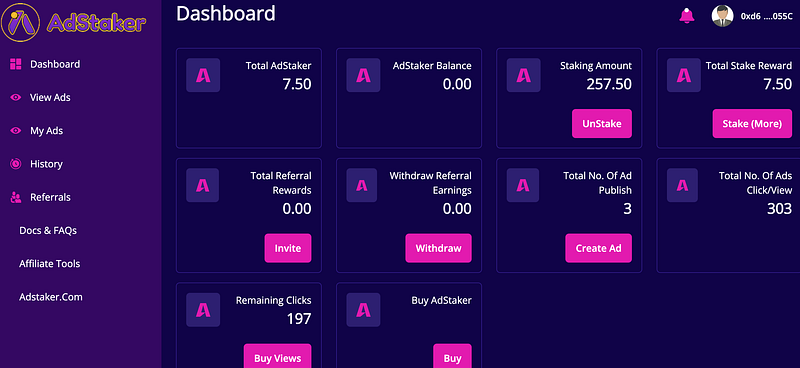
Adstaker is NEW…

it is a Traffic Exchange on the blockchain. The system has it’s own Token AdStkr on the Pancakeswap.
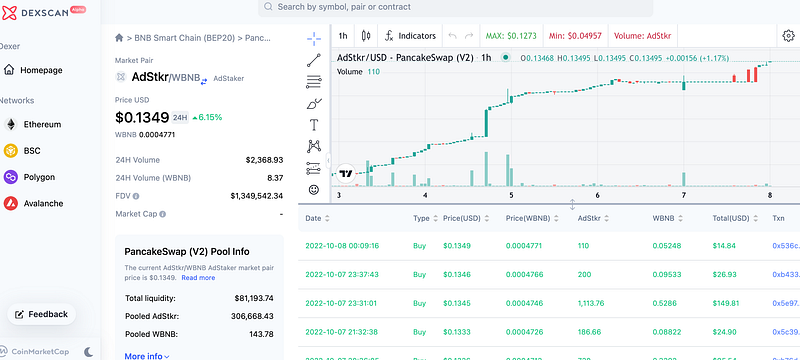
This Token has grown from $0,05 to 0.1349 in one week only. Your Stakes are NOT locked, you can withdraw any time you want.

When you stake your Tokens and click on 10 ads, watch each ad for 20 seconds, than you will earn 5% daily rewards .

The 5% earnings are for a limited time! You better hurry!

Purchase some clicks to advertise your business and you will receive high-quality traffic from buyers in Crypto, MLM, Affiliate Marketing…

I get Leads for my funnels every day from this advertising. And I am earning 5% rewards for watching 10 ads.

It is a very awesome system that I would recommend to everybody who wants to earn crypto and has a business to promote.

If you want to join, just follow the instructions below!

Here is how you do it!

Step 1

You will need a MetaMask wallet. If already have your wallet, you can skip step 1.

Here is how it’s done.

  1. To begin with, open Chrome and go to the MetaMask website.

Once you’re on the MetaMask website, click on the “Download now” button.

After you’ve clicked on the “Download now” button, you’ll land on the “Download” page.

On the “Download” page, click on “Install MetaMask on Chrome”.

If this is your first time using MetaMask, click on “Create a Wallet” to create a new wallet.

In the wallet creation process, you’ll be given a recovery phrase.

Make sure to copy and save the recovery phrase somewhere safe.

This is because you need the recovery phrase to access your MetaMask wallet in the future.

Lastly, you need to verify your recovery phrase to complete the wallet creation process.

Navigate to “Networks” & add a new network

After you’ve created a new wallet, you’ll land on the “Account 1” page.

Currently, your wallet is connected to the Ethereum network (this is by default).

Now, you’ll see the Ethereum icon followed by your Ethereum balance on the page.

To connect to the Binance Smart Chain (BSC) network, you need to manually add it to MetaMask.
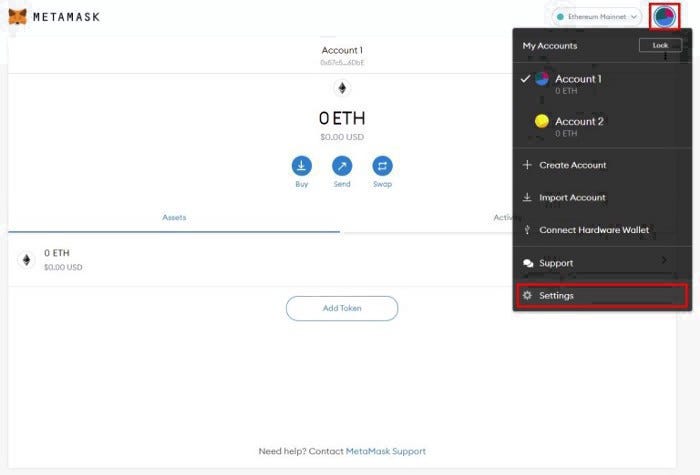
Click on your profile icon on the top-right corner of the page.

This will open the “My Accounts” navigation menu.

On the navigation menu, you’ll see several options including “Create Account”, “Import Account”, and more.

Click on the “Settings” option at the bottom of the menu. Then scroll down to Networks on the left side.
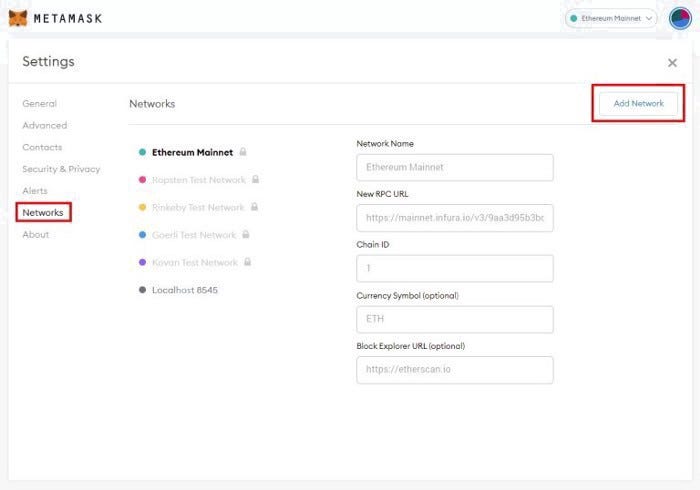
On your Network Settings, you’ll see a few networks that you can configure.

There isn’t a Binance network, so you’ll have to manually add it.

To do so, click on the “Add Network” button on the top navigation bar.
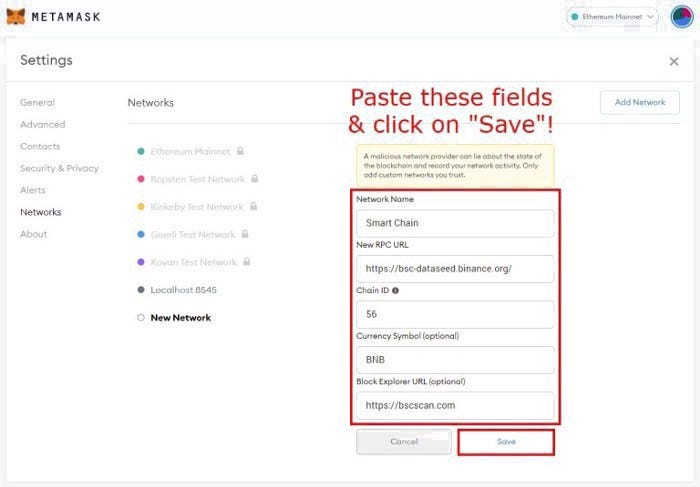
Copy and paste the fields according to this:

Mainnet:

Network Name: Smart Chain

New RPC URL: https://bsc-dataseed.binance.org/

ChainID: 56

Symbol: BNB

Block Explorer URL: https://bscscan.com

After you’ve copied and pasted the fields according to the ones above, click on “Save”.

This will add the Binance Smart Chain network to MetaMask.
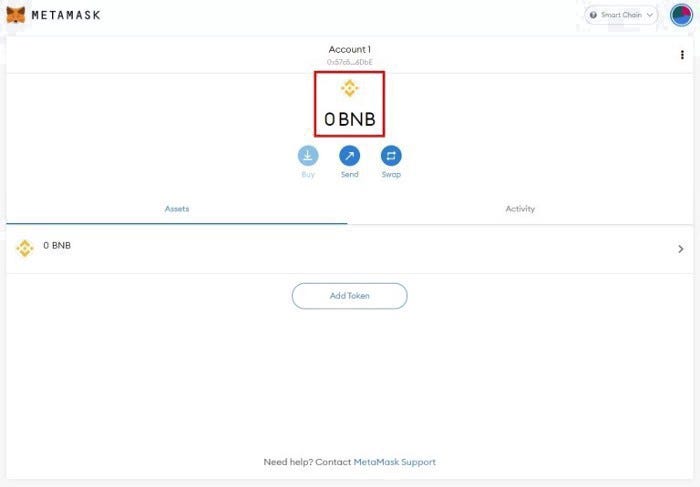
Your Meta Mask Wallet is ready to use.

Step 2

Adding money to your wallet:

I installed Trust Wallet on my Mobile. I bought some BNB Coins directly with my credit card. Takes just a few minutes. Then I exchanged it into Smart Chain BNB. (No fees)
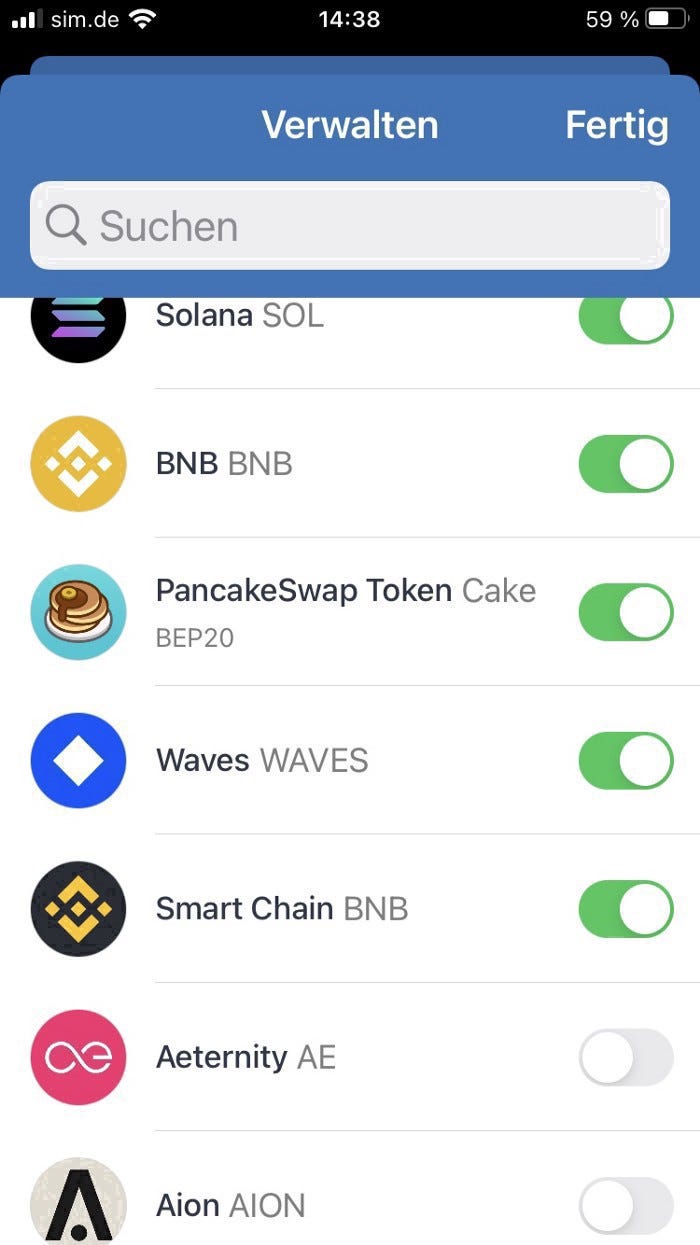
Now after you have some money in your wallet, we can do the final step, purchasing Adstaker Tokens.

Add the Adstaker Token (AdStkr) to your MetaMask Wallet in the Binance Smart Chain Network.

Just scroll down and click where it says add Token, then click on Custom-Token and add the Contract address: 0x197470fad7a11085757535c5eecbe190fb2367aa

everything else will be filled automatically. Finally, click add Token.

Step 3

Now you need to purchase Adstaker Tokens.

You can do that on Pancake Swap: https://pancakeswap.finance/

You’ll need to have BNB in your wallet.

Connect the Pancake Swap with your wallet by clicking on the right top corner connect.

On the Menubar go to Trade — Swap.

A popup opens. on the field where you want to swap to, you need to add the Token address:
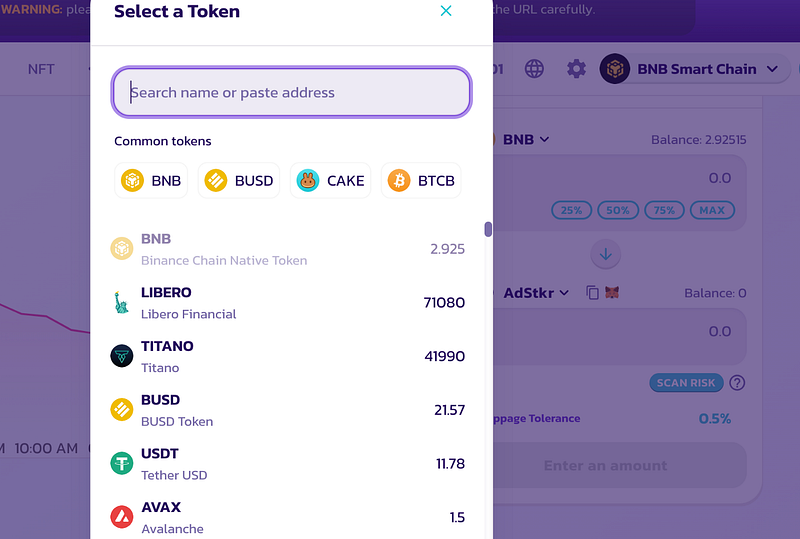
This is the address: 0x197470fad7a11085757535c5eecbe190fb2367aa

Remember, you always need to keep some BNB for fees.

After you have purchased AdStkr Token, it will show in your Adstaker back office.

Still didn’t signup?

Do it now here: >>>click here!

Step 4

Get your Staking! Your stakes will earn you 5% daily by clicking 10 ads.
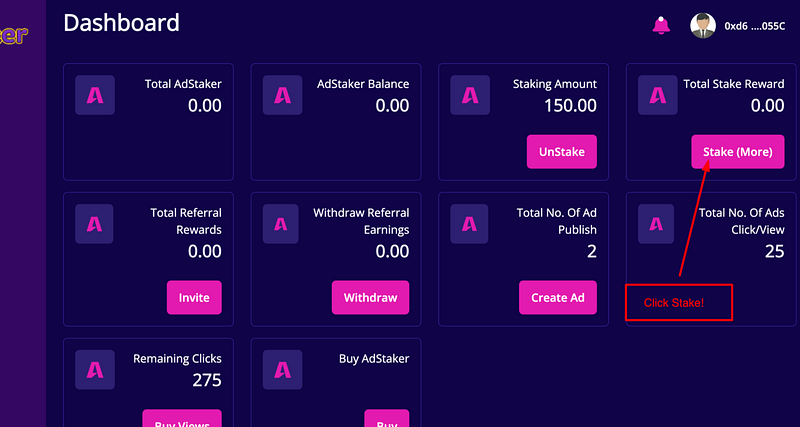
I did 50% in Stake and 50% in Add Views.

Once you have added your Stake, now you can buy your add view.
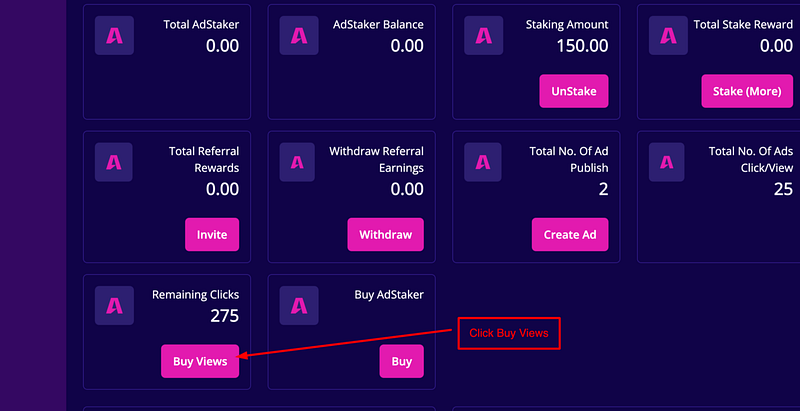
Step 5

View 10 ads to get rewards
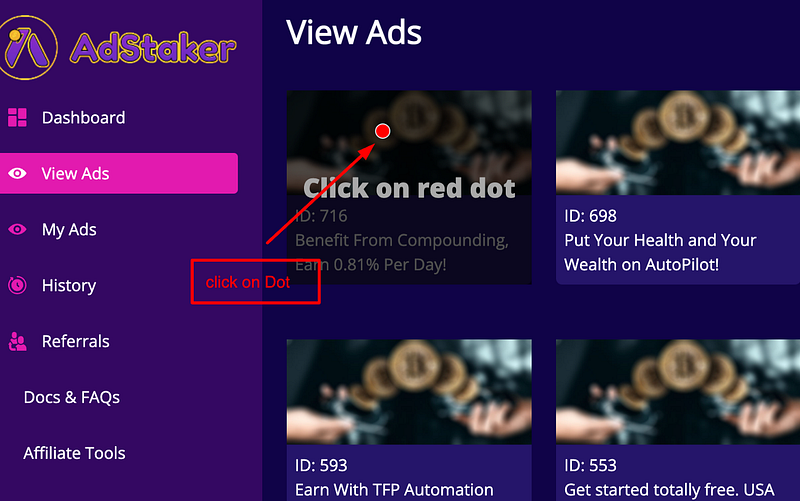
Each ad has a timer. When the timer is finished go to the next ad. Watch 10 ads.

Step 6

Place your ad

After you have purchased your views, you need to wait a few minutes.
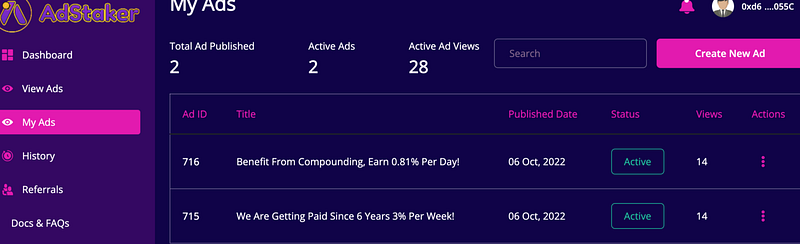
When you can click the icon Create New Ad, a popup opens:
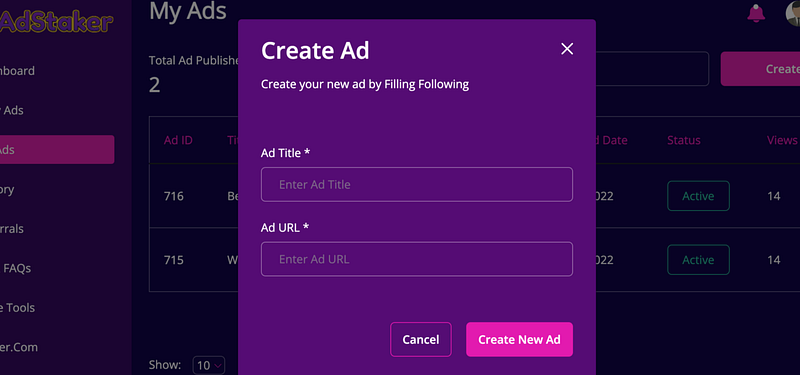
All you need is your link to promote and a Headline for your ad.

That’s it!

If you still need some more help, there are good tutorials inside in the FAQ, or if you like videos more, then click the link below:

>>>Click here for Video Instructions!

Happy Advertising and Earning!

More Recommended Passive Income Systems:

Fundsz is another passive income system that will be a retirement plan too. It grows by compounding. There is more info here: click here!

Mabcredit is earning 0.7 or 0.81% daily for 5 days a week. There is more info here: click here!

Palm Alliance Management is earning 0.9% daily for 5 days a week. There is more info here: click here!

Alya Finance is an ecosystem where you can mine ALYA Tokens now, but in the future, there will be much more. There is more info here: click here!

Trillant used to be Paraiba. When it was Paraiba, it was my best earner. Now as Trillant it still is my best earner and it is going to grow much more. There is more info here: click here!

EasyBot is trading for me on autopilot in my Binance and KuCoin accounts. Making me profits every day and I am in control of my money. 2 bots are free, but I purchased the advanced system where you can have 10 bots running very cheaply.

If you are still not a member of Medium and want to support me and my family then join a Medium Membership. It cost $5 per month. I earn a small commission and no extra cost for you. You can share your story and earn too. Thank you so much!

FINAL NOTE: Nothing in this article is intended to constitute investment advice. Neither the author nor the publication takes any responsibility or liability for any investments, profits, or losses you may incur as a result of this information. Readers are encouraged to perform their own due diligence and research or consult a licensed financial advisor or broker before making any and all investment decisions. This content is intended for general informational and educational purposes only. Though the author strives for accuracy, the data contained within the article cannot be relied upon. The author may own cryptocurrencies and tokens discussed in the article. The article may contain affiliate links. DO YOUR OWN RESEARCH. I am not a financial advisor, I am not your financial advisor. I’m just a guy sharing my journey.

Adstaker
Cryptocurrency Investment
Traffic Exchange
Advertising
Earn Crypto
Recommended from ReadMedium