
Stack vs. Queue — How To, When To, and Why To Use Them
Everything you need to know about using the stack and queue data structures

Linear data structures are essential to software engineering and provide the foundations required to build the many features we use every day — think news feeds and notifications systems. When given the task to build these features, many engineers simply turn to arrays without considering two very important data structures: stacks and queues.
This article is a deep dive into the stack and queue data structures, their use cases, trade-offs and implementations. By the end of this article, you’ll have a clear understanding of stacks and queues to be able to use them in your own engineering tasks.
Table of Contents
- Why Should You Care About Stacks and Queues?
- What is a Stack?
- What is a Queue?
- Stack vs Queue — Use Cases a) Stack use cases b) Queue use cases
- How to Implement a Stack and Queue a) How to build a stack b) How to build a queue
- Stack vs Queue Summary
Why Should You Care About Stacks and Queues?
Before diving into the rabbit hole, it’s best to understand the reasons why you might want to consider a stack or queue rather than an array. As mentioned earlier a stack, queue and array are all linear data structures — however, the most performant operations differ between these data structures.
Three different notations can be used when comparing the performance of operations — Big O, Omega and Theta. Big O is more commonly used as it represents the worse case scenario.
By using contiguous memory storage, arrays execute random element access the fastest out of the three data structures — random access has a time complexity of O(1). The downside of using an array is that you can only achieve O(n) when searching, inserting and deleting elements. Alternatively, you’ll only achieve O(n) when using a stack or queue for random access, but insertions and deletions will have a time complexity of O(1).
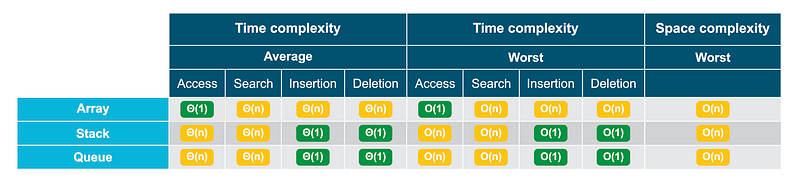
Ultimately, the data structure you should use depends on the most common operation(s) required given the use case.
Now that you know when to avoid using an array, let’s take a look at stack vs queue in detail.
What is a Stack?
The most tangible way to visualise a stack is to think of a stack of plates. When adding a plate to your stack, you wouldn’t want to try placing it somewhere in the middle; instead, you’ll add it to the top of the stack. Similarly, when removing plates from the stack you’d start from the top first and make your way down. This is exactly how a stack data structure behaves, in other words, it inserts and deletes elements in a LIFO manner (last-in-first-out).

To achieve a constant time complexity (O(1)) for insertions and deletions, stacks are built using linked lists. This is because elements change their location in memory when an insertion or deletion occurs on an array; hence it’s linear time complexity (O(n)). Whereas that behaviour does not occur in linked lists, but we’ll go into that more later in this article.
What is a Queue?
Just like stacks, queues also exist in the physical world — think of a queue of people lining up to a cash register. Just as the first person to line up would be the first served, the first element added to a queue will be the first element to be deleted — following the FIFO principle (first-in-first-out).

Queues also use linked lists under the hood to ensure a time complexity of O(1) when inserting and deleting elements.
Stack vs Queue — Use Cases
Since the most performant operations for both data structures are insertions and deletions, and the only differing factor is their LIFO or FIFO behaviour, the situations where you would use a stack over a queue and vice versa is purely dependent on whether or not the scenario calls for a LIFO or FIFO nature. Below is a list of applications for both a stack and queue.
Stack use cases
- A stack can be used to store operations that were triggered to implement the undo functionality.
- “Back” buttons for navigation (“Next” navigation also uses a stack).
- Chronological news feeds behave in a LIFO manner to ensure the latest item is at the top of the feed, hence a stack can be used for this.
Queue use cases
- Backend task management where operations are handled in a queue-like manner — such as API calls, database writes and pub/sub messaging systems.
- Alert and notification systems tend to have a FIFO behaviour, hence a queue can be used to build this.
It is worth noting that although a stack and queue both use a linked list under the hood, it is not ideal to just use a linked list over a stack and queue if the use cases you need the data structure for does not require all the functionality available to linked lists. The best implementation of a stack or queue is one that enforces the LIFO or FIFO behaviour, this is because it is self-documenting and safeguards your application from bugs.
How to Implement a Stack and Queue
As mentioned earlier, the most optimal way to build a stack and queue is to use a linked list. This is because linked lists allow you to achieve a time complexity of O(1) when inserting and deleting elements.
Linked lists consist of adjoining nodes containing data, connected together with pointers. There are three forms of linked lists: singly-linked, doubly-linked and circular-linked; we’ll use doubly-linked lists in our example.
A doubly-linked list has three main components: a head — which is the first element, a tail — which is the last element, and a node — which contains its data, a pointer to the next element and a pointer to the previous element.

A component that is consistent between a stack and queue are nodes, let’s take a look at how we can build a node in Python:
# Creating a node classclass Node:
def __init__(self, data):
self.data = data
self.next = None
self.prev = NoneAs you can see, our node contains data and two pointers, one to the previous node and one to the next node.
Once you have this written out, you can now move on to building your stack or queue.
The primary methods of a stack and queue are concerned with the insertion and deletion of elements. However, the stack abstract data type and queue abstract data type also include three other methods — we will be building them into our stack and queue classes:
peek()— returns the top item from the stack or first item from the front of the queue, but does not remove it. It needs no parameters and it does not modify the stack or queue.isEmpty()— tests to see whether the stack or queue is empty. It needs no parameters and returns a boolean value.size()returns the number of items on the stack or queue. It needs no parameters and returns an integer.
How to build a stack
Although a doubly-linked list contains both a head and a tail, a stack is only concerned about its head, which is referred to as the top of the stack. Let’s start off by creating an instance variable for the top of the stack, as well as a size instance variable:
# Creating a stack classclass Stack:
def __init__(self):
self.top = None
self.size = 0Size method
Next up is the size method, which simply returns the size of the stack:
def getSize(self):
  return self.size
isEmpty method
Next, we can implement the isEmpty method — all that’s needed is to test whether the stack is empty and return a boolean:
def isEmpty(self):
  return self.size == 0
Peek method
Next up, we can implement the peek method, there are two things we need to do:
- Sanitary check to see if the stack is empty and raise an exception if it is.
- Return the data from the top item of the stack.
def peek(self):
  if self.isEmpty(): #1
    raise Exception("Peeking from an empty stack")
  return self.top.data #2
Now we can move on to our main operations: push elements to the top of the stack and pop elements from the top of the stack.
Push method Starting off with the push operation, there are four steps required:
- Create a Node instance and set its
nextpointer to the stack’s originaltopnode. - If there is an existing
topto the stack, set itsprevvariable to the new node. - Update the
topinstance variable to the new node. - Increase the
sizeof the stack by one.
def push(self, new_el):
  new_node = Node(new_el) #1 - create node
  new_node.next = self.top #1 - set next pointer
if self.top != None:
self.top.prev = new_node #2self.top = new_node #3
self.size += 1 #4Pop method And finally is the pop operation which requires six steps:
- Retrieve the first node from the stack’s
topinstance variable. - Set the second node’s
prevpointer toNone. - Update the
topinstance variable to the second node. - Set the
nextpointer toNoneon the node you are deleting. - Decrease the
sizeof the stack by one. - Return the data for the node you are deleting.
def pop(self):
  if self.top == None:
    print("Stack is empty")
  else:
    del_node = self.top #1
    del_node.next.prev = None #2
    self.top = del_node.next #3
    del_node.next = None #4
    self.size -= 1 #5
return del_node.data #6Once your stack has been built, you can use it like so:
stack = Stack() # create a stack instancestack.isEmpty() # logs 'True'stack.push('c')
stack.push('b')
stack.push('a')stack.top.data # logs 'a'
stack.getSize() # logs '3'stack.peek() # logs 'a'
stack.pop() # logs 'a'
stack.top.data # logs 'b'
stack.getSize() # logs '2'
stack.isEmpty() # logs 'False'How to build a queue
Unlike a stack, queues are concerned with both the head and tail component of a doubly-linked list as deletions and insertions occur on opposite ends of a queue, referred to as the front (right side of the queue) and rear (left side of the queue). In that case, an instance variable is required for the front and rear of a queue, as well as a size instance variable.
# Creating a queue classclass Queue:
def __init__(self):
self.front = None
self.rear = None
self.size = 0Size method
Next up is the size method, which simply returns the size of the queue:
def getSize(self):
  return self.size
isEmpty method
Next, we can implement the isEmpty method — all that’s needed is to test whether the queue is empty and return a boolean:
def isEmpty(self):
  return self.size == 0
Peek method
Next up, we can implement the peek method, there are two things we need to do:
- Sanitary check to see if the queue is empty and raise an exception if it is.
- Return the data from the
frontelement of the stack.
def peek(self):
  if self.isEmpty(): #1
    raise Exception("Peeking from an empty queue")
  return self.top.data #2
Now we can move on to our main operations: insert elements to the rear of the queue and delete elements from the front of the queue.
Enqueue method Starting off with the enqueue method which contains five steps:
- Create a Node instance and set its
nextpointer to the queue’s originalrearnode. - If there is an existing
rearnode to the queue, set itsprevvariable to the new node. - If there was not an existing
rearnode to the queue (i.e. the queue was empty), set thefrontinstance variable to the new node. - Update the
rearinstance variable to the new node. - Increase the
sizeof the queue by one.
def enqueue(self, new_el):
  new_node = Node(new_el) #1 - create node
  new_node.next = self.rear #1 - set next pointer
if self.rear != None:
self.rear.prev = new_node #2
else:
self.front = new_node #3self.rear = new_node #4
self.size += 1 #5Dequeue method The final step is to build the dequeue method which involves six steps:
- Retrieve the front node from the queue’s
frontinstance variable. - Get the previous node from the front and set it’s
nextpointer toNone. - Update the
frontinstance variable to the node mentioned in step 2. - Set the
prevpointer toNoneon the node you are deleting. - Decrease the size of the
queueby one. - Return the data for the node you are deleting.
def dequeue(self):
  if self.front == None:
    print("Queue is empty")
  else:
    del_node = self.front #1
    del_node.prev.next = None #2
    self.front = del_node.prev #3
    del_node.prev = None #4
    self.size -= 1 #5
return del_node.data #6And finally, you can use your queue like so:
queue = Queue() # create a queue instancequeue.isEmpty() # logs 'True'queue.enqueue('c')
queue.enqueue('b')
queue.enqueue('a')queue.front.data # logs 'c'
queue.rear.data # logs 'a'
queue.getSize() # logs 3queue.peek() # logs 'c'
queue.dequeue() # logs 'c'
queue.top.data # logs 'b'
queue.rear.data # logs 'a'
queue.getSize() # logs '2'
queue.isEmpty() # logs 'False'Stack vs Queue: Summary
While both stacks and queues are non-primitive, linear data structures that are best implemented using a linked-list the key difference is their LIFO vs FIFO nature.
Given the differences in how elements are inserted and deleted from a stack and queue, the applications in which the data structures are used are entirely different.
Equipping yourself with an in-depth understanding of every data structure available to you will help you build performant and efficient applications given every use case under the sun, I hope this article has helped you build that set of knowledge!


