
SQL HackerRank Solutions
A complete solution for SQL problems on HackerRank.

Structured Query Language is one of the most important languages used in the industry. It’s one of the most sought languages desired by the employers as the volume of data is increasing, in order to access the humongous data from respective databases, it is important to know this skill which would help you retrieve, update and manipulate data.
In this post, we will be covering all the solutions to SQL on the HackerRank platform. HackerRank is a platform for competitive coding. It is very important that you all first give it a try & brainstorm yourselves before having a look at the solutions. Let us code and find answers to our given problems.
I. Revising the Select Query 1
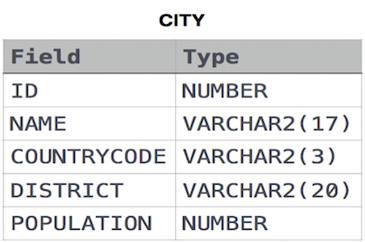
Query all columns for all American cities in CITY with populations larger than 100000. The CountryCode for America is USA.
Input Format
The CITY table is described as follows:
SELECT * FROM CITY WHERE COUNTRYCODE = ‘USA’ AND POPULATION > 100000;II. Revising the Select Query 2
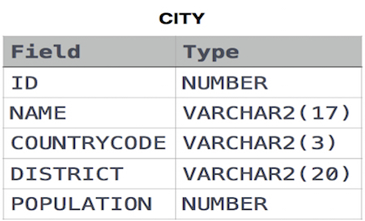
Query the names of all American cities in CITY with populations larger than 120000. The CountryCode for America is USA.
Input Format
The CITY table is described as follows:
SELECT NAME FROM CITY WHERE COUNTRYCODE = ‘USA’ AND POPULATION > 120000;III. Select All
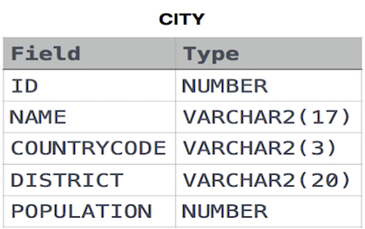
Query all columns (attributes) for every row in the CITY table.
Input Format
SELECT * FROM CITY;IV. Select By ID
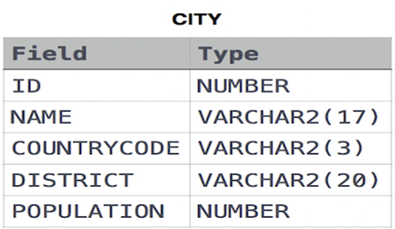
Query all columns for a city in CITY with the ID 1661.
Input Format
SELECT * FROM CITY WHERE ID = 1661;V. Japanese Cities’ Attributes
Query all attributes of every Japanese city in the CITY table. The COUNTRYCODE for Japan is JPN.
Input Format
SELECT * FROM CITY WHERE COUNTRYCODE = ‘JPN’;VI. Japanese Cities’ Names
Query the names of all the Japanese cities in the CITY table. The COUNTRYCODE for Japan is JPN.
Input Format
SELECT NAME FROM CITY WHERE COUNTRYCODE = ‘JPN’;VII. Weather Observation Station 1
Query a list of CITY and STATE from the STATION table.
Input Format
The STATION table is described as follows:
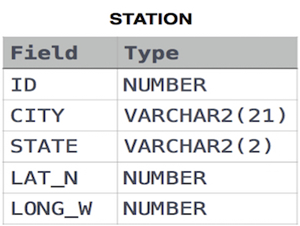
where LAT_N is the northern latitude and LONG_W is the western longitude.
SELECT CITY, STATE FROM STATION;VIII. Weather Observation Station 3
Query a list of CITY names from STATION with even ID numbers only. You may print the results in any order but must exclude duplicates from your answer.
Input Format
The STATION table is described as follows:
where LAT_N is the northern latitude and LONG_W is the western longitude.
SELECT DISTINCT CITY FROM STATION WHERE MOD(ID, 2) = 0;IX. Weather Observation Station 4
Let N be the number of CITY entries in STATION, and let N’ be the number of distinct CITY names in STATION; query the value of N-N’ from STATION. In other words, find the difference between the total number of CITY entries in the table and the number of distinct CITY entries in the table.
Input Format
The STATION table is described as follows:
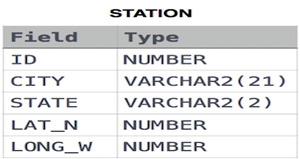
where LAT_N is the northern latitude and LONG_W is the western longitude.
SELECT COUNT(CITY) — COUNT(DISTINCT CITY) FROM STATION ;X. Weather Observation Station 5
Query the two cities in STATION with the shortest and longest CITY names, as well as their respective lengths (i.e.: number of characters in the name). If there is more than one smallest or largest city, choose the one that comes first when ordered alphabetically.
Input Format
The STATION table is described as follows:
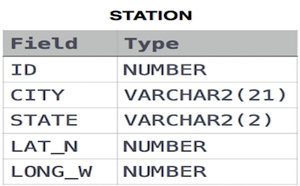
where LAT_N is the northern latitude and LONG_W is the western longitude.
SELECT * FROM (SELECT DISTINCT city, LENGTH(city) FROM station ORDER BY LENGTH(city) ASC, city ASC) WHERE ROWNUM = 1 UNIONSELECT * FROM (SELECT DISTINCT city, LENGTH(city) FROM station ORDER BY LENGTH(city) DESC, city ASC) WHERE ROWNUM = 1;XI. Weather Observation Station 6
Query the list of CITY names starting with vowels (i.e., a, e, i, o, or u) from STATION. Your result cannot contain duplicates.
Input Format
The STATION table is described as follows:
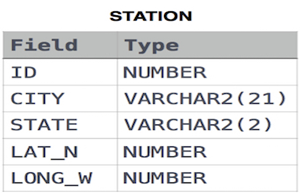
where LAT_N is the northern latitude and LONG_W is the western longitude.
SELECT DISTINCT city FROM station WHERE city LIKE ‘A%’ OR city LIKE ‘E%’ OR city LIKE ‘I%’ OR city LIKE ‘O%’ OR city LIKE ‘U%’;XII. Weather Observation Station 7
Query the list of CITY names ending with vowels (a, e, i, o, u) from STATION. Your result cannot contain duplicates.
Input Format
The STATION table is described as follows:
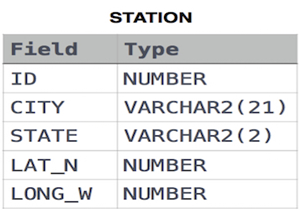
where LAT_N is the northern latitude and LONG_W is the western longitude.
SELECT DISTINCT city FROM station WHERE city LIKE ‘%a’ OR city LIKE ‘%e’ OR city LIKE ‘%i’ OR city LIKE ‘%o’ OR city LIKE ‘%u’;XIII. Weather Observation Station 8
Query the list of CITY names from STATION which have vowels (i.e., a, e, i, o, and u) as both their first and last characters. Your result cannot contain duplicates.
Input Format
The STATION table is described as follows:
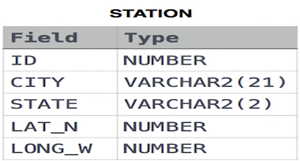
where LAT_N is the northern latitude and LONG_W is the western longitude.
SELECT DISTINCT city FROM (SELECT DISTINCT city FROM station WHERE city LIKE ‘A%’ OR city LIKE ‘E%’ OR city LIKE ‘I%’ OR city LIKE ‘O%’ OR city LIKE ‘U%’) WHERE city LIKE ‘%a’ OR city LIKE ‘%e’ OR city LIKE ‘%i’ OR city LIKE ‘%o’ OR city LIKE ‘%u’;XIV. Weather Observation Station 9
Query the list of CITY names from STATION that does not start with vowels. Your result cannot contain duplicates.
Input Format
The STATION table is described as follows:
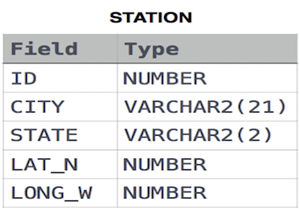
where LAT_N is the northern latitude and LONG_W is the western longitude.
SELECT DISTINCT city FROM station WHERE NOT (city LIKE ‘A%’ OR city LIKE ‘E%’ OR city LIKE ‘I%’ OR city LIKE ‘O%’ OR city LIKE ‘U%’);XV. Weather Observation Station 10
Query the list of CITY names from STATION that do not end with vowels. Your result cannot contain duplicates.
Input Format
The STATION table is described as follows:
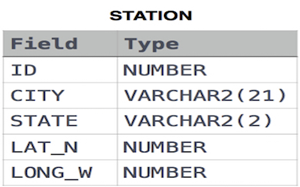
where LAT_N is the northern latitude and LONG_W is the western longitude.
SELECT DISTINCT city FROM station WHERE NOT (city LIKE ‘%a’ OR city LIKE ‘%e’ OR city LIKE ‘%i’ OR city LIKE ‘%o’ OR city LIKE ‘%u’);XVI. Weather Observation Station 11
Query the list of CITY names from STATION that either do not start with vowels or do not end with vowels. Your result cannot contain duplicates.
Input Format
The STATION table is described as follows:
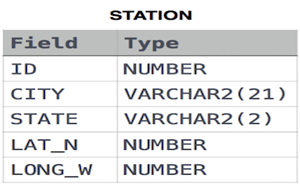
where LAT_N is the northern latitude and LONG_W is the western longitude.
SELECT DISTINCT city FROM station WHERE(NOT (city LIKE ‘A%’ OR city LIKE ‘E%’ OR city LIKE ‘I%’ OR city LIKE ‘O%’ OR city LIKE ‘U%’)
OR NOT(city LIKE ‘%a’ OR city LIKE ‘%e’ OR city LIKE ‘%i’ OR city LIKE ‘%o’ OR city LIKE ‘%u’));XVII. Weather Observation Station 12
Query the list of CITY names from STATION that do not start with vowels and do not end with vowels. Your result cannot contain duplicates.
Input Format
The STATION table is described as follows:
where LAT_N is the northern latitude and LONG_W is the western longitude.
SELECT DISTINCT city FROM station WHERE NOT((city LIKE ‘A%’ OR city LIKE ‘E%’ OR city LIKE ‘I%’ OR city LIKE ‘O%’ OR city LIKE ‘U%’)
OR (city LIKE ‘%a’ OR city LIKE ‘%e’ OR city LIKE ‘%i’ OR city LIKE ‘%o’ OR city LIKE ‘%u’));XVIII. Higher Than 75 Marks
Query the Name of any student in STUDENTS who scored higher than Marks. Order your output by the last three characters of each name. If two or more students both have names ending in the same last three characters (i.e.: Bobby, Robby, etc.), secondary sort them by ascending ID.
Input Format
The STUDENTS table is described as follows:
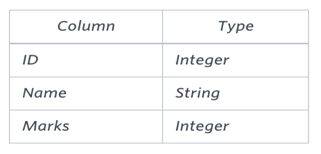
The Name column only contains uppercase (A-Z) and lowercase (a-z) letters.
SELECT name FROM students WHERE marks > 75 ORDER BY SUBSTR(name, LENGTH(name)-2, 3), id;XIX. Employee Names
Write a query that prints a list of employee names (i.e.: the name attribute) from the Employee table in alphabetical order.
Input Format
The Employee table containing employee data for a company is described as follows:
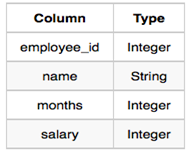
where employee_id is an employee’s ID number, the name is their name, months is the total number of months they’ve been working for the company, and salary is their monthly salary.
SELECT name FROM employee ORDER BY name;XX. Employee Attributes
Write a query that prints a list of employee names (i.e.: the name attribute) for employees in Employee having a salary greater than per month who have been employees for less than months. Sort your result by ascending employee_id.
Input Format
The Employee table containing employee data for a company is described as follows:
where employee_id is an employee’s ID number, the name is their name, months is the total number of months they’ve been working for the company, and salary is their monthly salary.
SELECT name FROM employee WHERE salary > 2000 AND months < 10 ORDER BY employee_id;XXI. Types of Triangles
Write a query identifying the type of each record in the TRIANGLES table using its three side lengths. Output one of the following statements for each record in the table:
Equilateral: It’s a triangle with 3 sides of equal length.
Isosceles: It’s a triangle with 2 sides of equal length.
Scalene: It’s a triangle with 3 sides of differing lengths.
Not A Triangle: The given values of A, B, and C don’t form a triangle.
Input Format
The TRIANGLES table is described as follows:
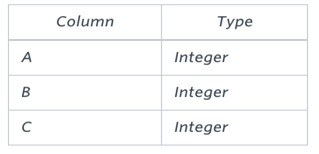
Each row in the table denotes the lengths of each of a triangle’s three sides.
select if(A+B<=C or B+C<=A or A+C<=B,’Not A Triangle’,if(A=B and B=C,’Equilateral’,if(A=B or B=C or A=C,’Isosceles’,’Scalene’)))from TRIANGLES as T;VII. The PADS
XXII. The PADS
Generate the following two result sets:
Query an alphabetically ordered list of all names in OCCUPATIONS, immediately followed by the first letter of each profession as a parenthetical (i.e.: enclosed in parentheses). For example: AnActorName(A), ADoctorName(D), AProfessorName(P), and ASingerName(S).
Query the number of occurrences of each occupation in OCCUPATIONS. Sort the occurrences in ascending order, and output them in the following format:
There are a total of [occupation_count] [occupation]s.
where [occupation_count] is the number of occurrences of occupation in OCCUPATIONS and [occupation] is the lowercase occupation name. If more than one Occupation has the same [occupation_count], they should be ordered alphabetically.
Note: There will be at least two entries in the table for each type of occupation.
Input Format
The OCCUPATIONS table is described as follows:
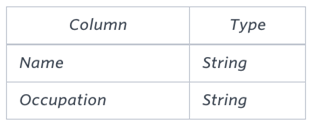
The occupation will only contain one of the following values: Doctor, Professor, Singer, or Actor.
SELECT concat(NAME,concat(“(“,concat(substr(OCCUPATION,1,1),”)”))) FROM OCCUPATIONS ORDER BY NAME ASC;SELECT “There are a total of “, count(OCCUPATION), concat(lower(occupation),”s.”) FROM OCCUPATIONS GROUP BY OCCUPATION ORDER BY count(OCCUPATION), OCCUPATION ASCXXIII. Occupations
Pivot the Occupation column in OCCUPATIONS so that each Name is sorted alphabetically and displayed underneath its corresponding Occupation. The output column headers should be Doctor, Professor, Singer, and Actor, respectively.
Note: Print NULL when there are no more names corresponding to an occupation.
Input Format
The OCCUPATIONS table is described as follows:
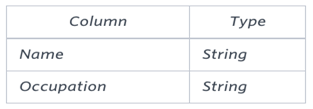
The occupation will only contain one of the following values: Doctor, Professor, Singer, or Actor.
set @r1=0, @r2=0, @r3=0, @r4=0;select min(Doctor), min(Professor), min(Singer), min(Actor)from(select case when Occupation=’Doctor’ then (@r1:=@r1+1) when Occupation=’Professor’ then (@r2:=@r2+1) when Occupation=’Singer’ then (@r3:=@r3+1) when Occupation=’Actor’ then (@r4:=@r4+1) end as RowNumber,case when Occupation=’Doctor’ then Name end as Doctor,case when Occupation=’Professor’ then Name end as Professor,case when Occupation=’Singer’ then Name end as Singer,case when Occupation=’Actor’ then Name end as Acto from OCCUPATIONS order by Name) Temp group by RowNumber;XXIV. Binary Tree Nodes
You are given a table, BST, containing two columns: N and P, where N represents the value of a node in Binary Tree, and P is the parent of N.
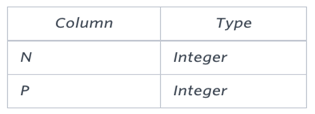
Write a query to find the node type of Binary Tree ordered by the value of the node. Output one of the following for each node:
Root: If node is root node.
Leaf: If node is leaf node.
Inner: If node is neither root nor leaf node.
SELECT N, IF(P IS NULL,’Root’,IF((SELECT COUNT(*) FROM BST WHERE P=B.N)>0,’Inner’,’Leaf’)) FROM BST AS B ORDER BY N;XXV. New Companies
Amber’s conglomerate corporation just acquired some new companies. Each of the companies follows this hierarchy:
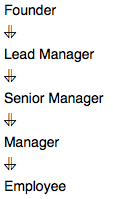
Given the table schemas below, write a query to print the company_code, founder name, total number of lead managers, total number of senior managers, total number of managers, and total number of employees. Order your output by ascending company_code.
Note:
The tables may contain duplicate records.
The company_code is string, so the sorting should not be numeric. For example, if the company_codes are C_1, C_2, and C_10, then the ascending company_codes will be C_1, C_10, and C_2.
Input Format
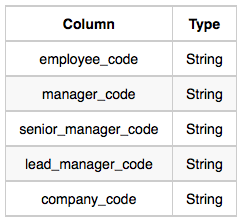
The following tables contain company data:
Company: The company_code is the code of the company and founder is the founder of the company.
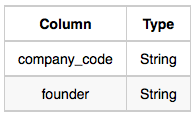
Lead_Manager: The lead_manager_code is the code of the lead manager, and the company_code is the code of the working company.
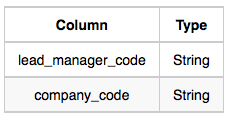
Senior_Manager: The senior_manager_code is the code of the senior manager, the lead_manager_code is the code of its lead manager, and the company_code is the code of the working company.
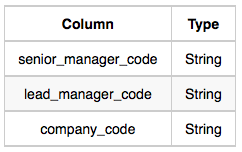
Manager: The manager_code is the code of the manager, the senior_manager_code is the code of its senior manager, the lead_manager_code is the code of its lead manager, and the company_code is the code of the working company.
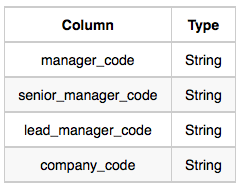
Employee: The employee_code is the code of the employee, the manager_code is the code of its manager, the senior_manager_code is the code of its senior manager, the lead_manager_code is the code of its lead manager, and the company_code is the code of the working company.
select c.company_code, c.founder, count(distinct lm.lead_manager_code), count(distinct sm.senior_manager_code), count(distinct m.manager_code), count(distinct e.employee_code) from Company c, Lead_Manager lm, Senior_Manager sm, Manager m, Employee ewhere c.company_code = lm.company_code and lm.lead_manager_code = sm.lead_manager_code and sm.senior_manager_code = m.senior_manager_code and m.manager_code = e.manager_code group by c.company_code, c.founderorder by c.company_codeXXVI. Draw The Triangle 2
P(R) represents a pattern drawn by Julia in R rows. The following pattern represents P(5):
*
* *
* * *
* * * *
* * * * *
Write a query to print the pattern P(20).
set @row := 0;select repeat(‘* ‘, @row := @row + 1) from information_schema.tables where @row < 20


