
SQL Fundamentals: Logical Query Processing
SQL is a declarative English-like language. This means you specify the result set you want returned and it’s up to the SQL query engine to figure out how best to retrieve the result set from the database. This is opposed to a imperative language which also defines the steps to achieve what you want.
Originally SQL was called SEQUEL which stood for “structured English query Language” but had to be renamed to SQL because of a trademark dispute with an airline. Still, the point is that you provide your instructions in an English-like manner. For example, consider the instruction, “Bring me all the cake from the cupboard”. Observe that in the instruction in English, the object comes before the location. A similar query in SQL would take the form of:
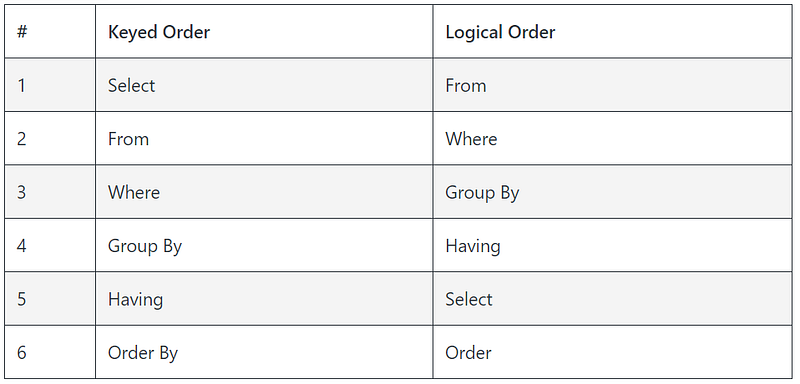
Select chocolate from Kitchen.cupboardNow if you wanted to relay this request to a three year old (promise I don’t do this 😉) or a robot, you would need to define logical order in which to execute the steps. It makes sense that the instructions would be something like “Go into the Kitchen; go to the cupboard, open the door, get the chocolate and bring it to me”. Similarly with SQL, in order for the logical query processor to know where to retrieve the data points, it must first know which table(s) to pull them from. So contrary to the keyed order of the query above, the logical processing order is as follows:
From Kitchen.cupboard Select chocolateLogical Query Processing Order
If you know the concept of logical query processing well, you will understand many things about the way the language behaves.
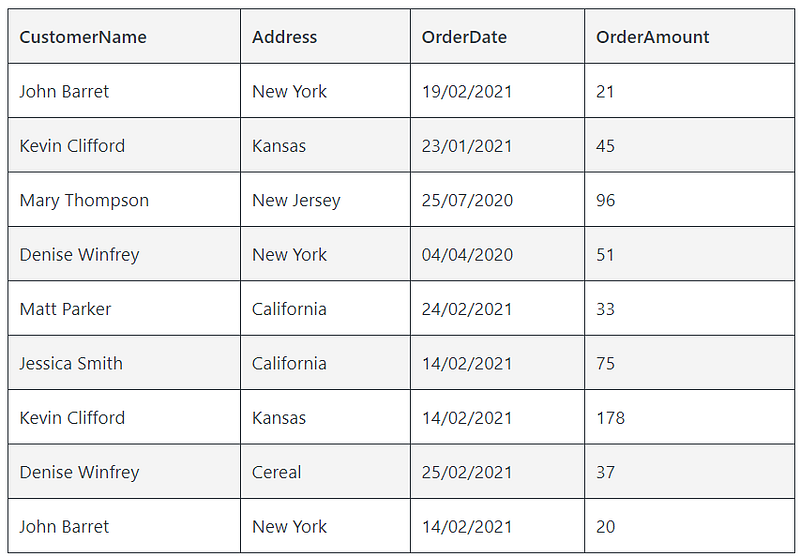
Each logical processing step receives a table as an input and produces a table as an output. Let’s illustrate each step with using the below Customer Order table and query:
Select CustomerName, sum(OrderAmount) as TotalSpend
From Customer
Where OrderDate > "01/01/2021"
Group By CustomerName
Having sum(OrderAmount) > 50
Order By TotalSpend
1. From Clause
The first step evaluates the FROM clause. In this case it’s “FROM Customer”. The input table and output table will be the Customer Order table above.
2. Where Clause
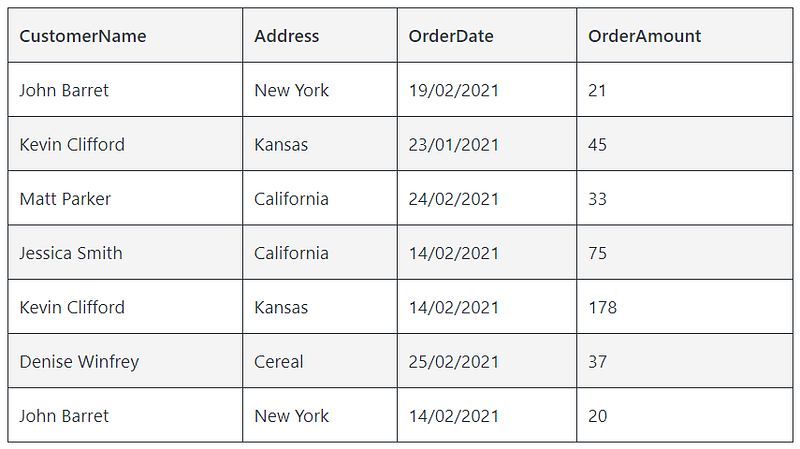
The second step is the WHERE clause and it takes the Customer Order table output by the FROM clause and applies the filter “OrderDate > 01/01/2021” to it to generate the following output table:
3. Group By Clause
This step takes the filter table from the WHERE Clause and groups the table by customer. Within the 7 rows produced in the output table from the WHERE clause, the GROUP BY clause identifies 5 customer groups:
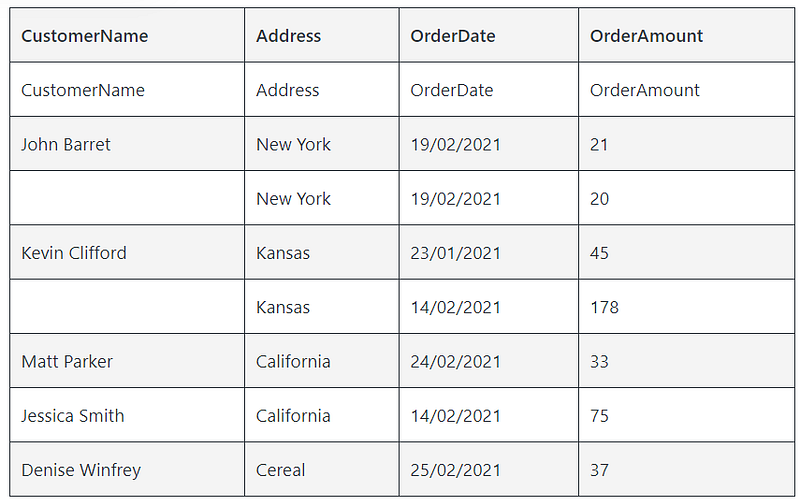
Since we have included a GROUP BY, the final result of the query will have 1 row representing each group. Therefore, expressions in all phases that take place after the current grouping phase are somewhat limited and must guarantee a single value per group.
4. Having Clause
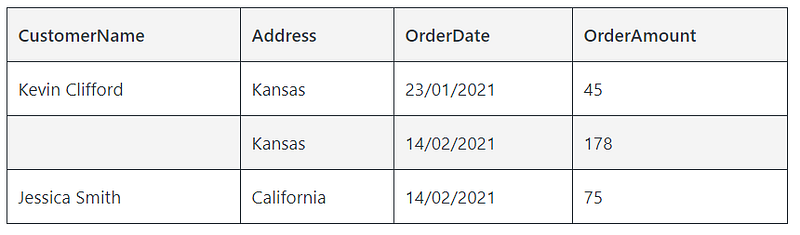
The HAVING clause takes each group as a whole and applies the defined predicate ( sum(OrderAmount) > 50) to each group. This produces the resulting table:
5. SELECT Clause
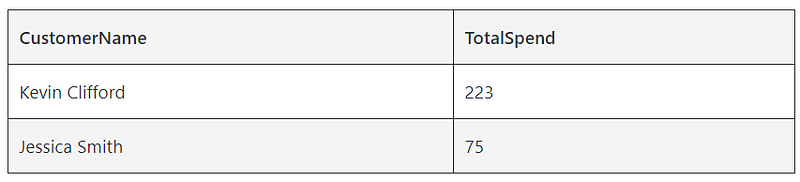
Now that we the result set we want, the SELECT clause gets executed to return only the data points or columns required. As mentioned above, since we included the GROUP BY clause any expressions in the SELECT clause must guarantee 1 row per customer group. We can’t therefore include OrderAmount in the SELECT clause as it would produce 2 rows for Kevin Clifford. We can however sum across the order amounts for Kevin and get his total spend: The SELECT clause sum(OrderAmount) as TotalSpend produces the resulting table:
6. Order By
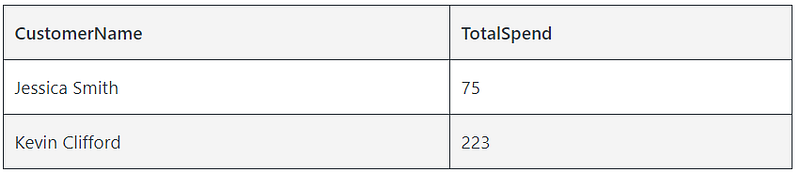
The sixth and final step takes the table above and orders it according to the expression in the ORDER BY clause, in this case TotalSpend. It should be noted that the ORDER BY clause is the only clause that can refer to the column alias defined in the SELECT clause. That’s because it is the only clause to be executed after the SELECT clause where the alias is created.
If you were already thinking of becoming a medium member and this story has helped you in some way, please sign up using our referral link below. Your membership fee will directly support The Data Engineering Academy and others create more helpful articles: https://dataengineeringacademy.medium.com/membership
Originally published at https://www.dataengineeringacademy.com on April 3, 2021.


