
Spring Cloud Gateway + Spring Boot 3.0 + Load balancing
Spring Cloud Gateway offers a powerful and flexible solution for building API gateways in Spring Boot applications. With its rich set of features, it can handle routing, rate limiting, security, and failure management.
In the era of microservices architecture, building robust and scalable systems is essential. With the evolution of Spring Boot and Spring Cloud, developers now have powerful tools at their disposal to create resilient microservice-based applications. In this blog post, we’ll delve into using Spring Cloud Gateway alongside Spring Boot 3.0, demonstrating how to create a modern microservices architecture without relying on the old Netflix Zuul.
As Spring Boot continues to evolve, it’s essential to adapt to newer technologies and best practices. With Spring Boot 3.0, the focus shifts towards modern solutions for building microservices. One such solution is Spring Cloud Gateway, a powerful API gateway built on top of Spring WebFlux, providing features like routing, filtering, and load balancing.
Before starting we need proper architecture to demonstrate an gateway .
- Eureka Server : A service registry and discovery server to manage microservices . create an spring boot project with eureka server .
- Payment MS : Its my custom Microservice to test rest endpoint . its simple ms which has web , eureka client dependencies & setup.
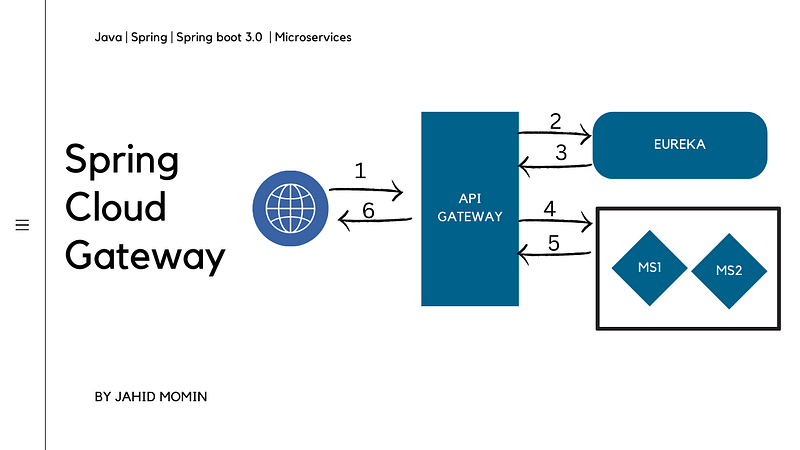
- Spring Cloud Gateway: Our API gateway responsible for routing requests to appropriate microservices .
1. Create Eureka Server Application
- Create a Spring Boot application with below dependencies. Eureka will used as the service discovery server
<dependency>
    <groupId>org.springframework.cloud</groupId>
    <artifactId>spring-cloud-starter-netflix-eureka-server</artifactId>
</dependency>- Enable Eureka server by annotating the main class with @EnableEurekaServer annotation
@SpringBootApplication
@EnableEurekaServer
public class MyEurekaServerApplication {
public static void main(String[] args) {
SpringApplication.run(MyEurekaServerApplication.class, args);
}}And My application.properties//application.properties
eureka.client.fetch-registry=false
eureka.client.register-with-eureka=false
server.port=8761
spring.application.name=MY-EUREKA-SERVERCreate An Payment Micro Service to test load balancing .
- Create a Spring Boot application with below dependencies
<dependency>
   <groupId>org.springframework.boot</groupId>
   <artifactId>spring-boot-starter-web</artifactId>
  </dependency>
  <dependency>
   <groupId>org.springframework.cloud</groupId>
   <artifactId>spring-cloud-starter-netflix-eureka-client</artifactId>
</dependency> <dependency>
<groupId>org.springframework.boot</groupId>
<artifactId>spring-boot-starter-test</artifactId>
<scope>test</scope>
</dependency>- Write a REST API to print out the server port . It will help us to identify which instance of the service is called during our testing [ load balancing]
@RestController
@RequestMapping("/payment")
public class PayController {
 @Value("${server.port}")
 private String serverPort;
    @GetMapping("/say")
    public String getMethodName() {
        return new String("HII I am from Payment MS "+serverPort);
    }
}
- And Dont forget to add your eureka server details and annotation in main class to enable eureka client (@EnableDiscoveryClient)
@SpringBootApplication
@EnableDiscoveryClient
public class PaymentMsApplication {

 public static void main(String[] args) {
  SpringApplication.run(PaymentMsApplication.class, args);
 }
}
- And My Application Properties for MS
spring.application.name=PAYMENT-SERVICE
eureka.client.service-url.defaultZone=http://localhost:8761/eureka
server.port=9811 (i am using diff ports before running app)
eureka.instance.ip-address=localhost
How to setup an API Gateway ?
<dependency>
   <groupId>org.springframework.cloud</groupId>
   <artifactId>spring-cloud-starter-netflix-eureka-client</artifactId>
  </dependency>
<!--
https://mvnrepository.com/artifact/org.springframework.cloud/spring-cloud-starter-gateway -->
<dependency>
<groupId>org.springframework.cloud</groupId>
<artifactId>spring-cloud-starter-gateway</artifactId>
<version>4.1.2</version>
</dependency>So lets create an spring boot project with latest version (in my case 3.2.4v) , add above dependencies .
- Add routing configuration in application.yml file. Note that we use the lb://<service-name> protocol to instruct api gateway to lookup service via Eureka server . because we have two instance of payment-service and it should be dynamically handle in case of load .
spring:
  application:
    name: gateway
  cloud:
    gateway:
      routes:
        - id: payment-service
          uri: lb://payment-service
          predicates:
- Path=/payment/**- don’t forget api-gateway also called as microservice and it should be register over eureka server so add @ Enablediscoveryclient over main class
@SpringBootApplication
@EnableDiscoveryClient
public class ApiGtApplication {
public static void main(String[] args) {
SpringApplication.run(ApiGtApplication.class, args);
}
}Test it now !
Steps :
- Run Eureka Server
- Run Payment-Service At Port 9810 & 9811
- Run Api Gateway Service

Now Go to browser and hit the endpoint of gateway (http://localhost:8080/payment/say)
/payment is predicate pattern — when ever it trigger then api-gateway routes the request to payment-service and in payment service we have controller /payment and GET method /say . it will be execute and return response to gateway . eureka is just to send instance info to api-gateway not for intra communication .
thanks for reading , share and like if helpful.


