
Spring Cache with Apache Ignite
Every now and then, we have all been bogged down by the challenges of dealing with slow services. Reasons such as high load due to multiple users, having a complicated business logic or interaction with a remote database may cause the services to slow down.
Among other performance improvement techniques, caching is one such option by which we can improve the service performance. The Spring Framework provides support for transparently adding caching to an existing Spring application. At its core, the abstraction applies caching to methods, thus reducing the number of executions based on the information available in the cache. The caching logic is applied transparently, without any interference to the invoker.
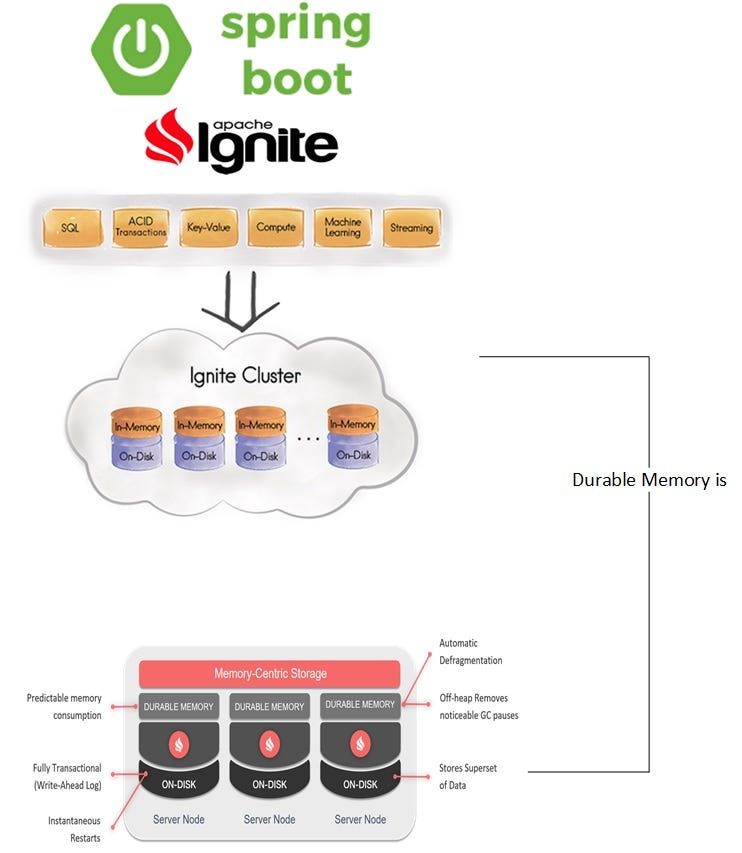
Apache Ignite is a memory-centric distributed database, caching, and processing platform for transactional, analytical, and streaming workloads delivering in-memory speeds at the petabyte scale.
Ignite provides an in-memory data store where each node in an Ignite cluster by default stores data in RAM. The data is kept in off-heap storage to ensure low latency and consistent access times. The system is multi-model, with the ability to support structured, semi-structured and unstructured data.
In this tutorial, we will learn to configure Apache Ignite as a Spring Cache provider.
Configuring Apache Ignite as a Spring Cache Provider
We will use Spring Cache Abstraction to interact with the Ignite cache. Similar to transaction support, the caching abstraction allows consistent use of various caching solutions with minimal impact on the code. As from Spring 4.1, the cache abstraction has been significantly extended with the support of JSR-107 annotations and more customization options.
We will use the following steps to integrate Apache Ignite with Spring Cache:
- Integrating Apache Ignite Server Node With Spring Boot
- Enabling Caching
- Using Caching Annotation
- Enabling Ignite Rest API
- Spring Boot Caching Example
Prerequisites
For this tutorial, we are using JDK 1.8 and Spring Boot 2.2.3.RELEASE project with following dependencies:
spring-boot-starter-actuator
spring-boot-starter-validation
spring-boot-starter-web
springfox-swagger2
springfox-swagger-ui
1. Integrating Apache Ignite Server Node With Spring Boot
The Apache Ignite server nodes act as containers for data and computations. Once interconnected, the server nodes will represent a distributed database (or data grid) that stores the data, participates in queries processing, compute execution, stream processing, and so on.
Spring provides a CacheManager interface that defines methods for managing a collection of Cache instances. A Cache instance is a wrapper around the underlying cache, and it provides methods for interacting with the underlying cache.
Apache Ignite is shipped with SpringCacheManager - implementation of Spring Cache Abstraction. It provides an annotation-based way to enable caching for Java methods so that the result of a method execution is stored in the Ignite cache. Later, if the same method is called with the same set of parameter values, the result will be retrieved from the cache instead of actually executing the method.
We will need the following Maven dependencies in our Spring Boot app to enable Ignite based caching.
2. Enabling Caching
Only two simple steps are required to plug in Ignite’s cache into our Spring-based application:
- Start an Ignite node with proper configuration in embedded mode, that is, in the same JVM where the application is running. It can already have predefined caches, but it’s not required — caches will be created automatically on first access if needed.
- Configure
SpringCacheManageras the cache manager in the Spring application context.
The embedded node can be started by SpringCacheManager itself. In this case, we will need to provide a path to either the Ignite configuration XML file or IgniteConfiguration bean via configurationPath or configuration properties respectively. Let’s enable SpringCacheManager using IgniteConfiguration bean option.
Here, we are using simple In-memory caching. And we have configured two cache named “employee” and “student”. We are not using any WriteThough or WriteBehind features.
3. Using Caching Annotation
Once we have added SpringCacheManager to our Spring application context, we can enable caching for any Java method by simply attaching an annotation to it.
Usually, we would use caching for heavy operations, like database access which takes time or cache methods that are called frequently. To simulate the caching behavior we will cache a method with some Sleep value. We can use @Cacheable annotation to enable caching for this method:
@Cacheable annotation has some more options. For instance, we can specify the key of the cache from the request of the method. If nothing is specified, Spring uses all the class fields and uses those as cache key (mostly HashCode) to maintain caching. However, we can override this behavior by providing key information.
For different @Cacheable options please check Spring-Cache.
@CachePut annotation can be used to update the cache.
Similarly, @CacheEvict annotation can be used to delete the cache.
Below are the Caching Annotations available in Spring:
@Cacheable: Triggers cache population@CachePut: Updates the cache, without interfering with the method execution@CacheEvict: Triggers cache eviction[removing items from cache]@Caching: Regroups multiple cache operations to be applied on a method@CacheConfig: Shares some common cache-related settings at class-level@EnableCaching: Configuration level annotation, enables Caching
4. Enabling Ignite Rest API
Ignite provides an out-of-the-box HTTP REST client that gives us the ability to communicate with the grid over HTTP and HTTPS protocols using the REST approach. REST APIs can be used to perform different operations like reading/writing from/to cache, execute tasks, get various metrics and more.
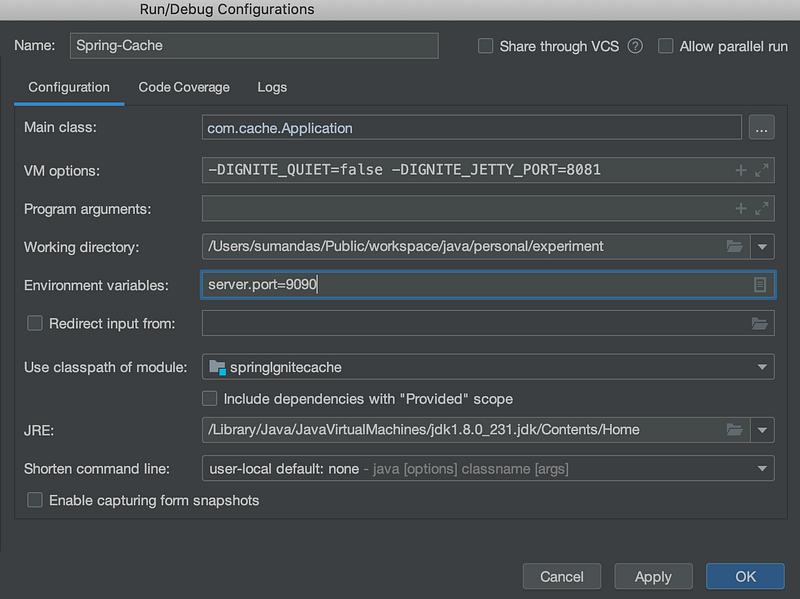
To enable HTTP connectivity, we have addedignite-rest-http as a Maven dependency in our application. Explicit configuration is not required; the connector starts up automatically and listens on port 8080. We can also change the port by specifying -DIGNITE_JETTY_PORT=8081 as VM arguments.
We can check whether the rest API is working by using the below curl command.
curl 'http://localhost:8081/ignite?cmd=version'Following is a sample GET REST API which we can be used to procure the data from the Cache using the CacheName and key.
http://localhost:8081/ignite?cmd=get&cacheName=student&key=1For all other Rest API options check Ignite Rest-API
5. Spring Boot Caching Example
Let’s create a sample Rest API to test our Caching Application.
5.1 Service
Let’s start with a service that can be used to procure the data, update the data and delete the data. Our main target is to cache the response of the method in the service layer, so we will introduce an intentional delay to simulate the actual backend service call to get the result. In the first hit, the response will be delayed as we will have some simulated delay in the application, but in the subsequent calls, we will get a much faster response. Also, when we update the data then our data in cache will also be updated. Similarly, when we delete the data then it is removed from the cache.
Note: The service layer method is annotated with Spring Caching annotations as explained above.
5.2 Entity
Let’s use a sample Entity called Employee to store the data.
5.3 RestController
We will create some sample Rest endpoint to test our Caching application.
5.4 Demo
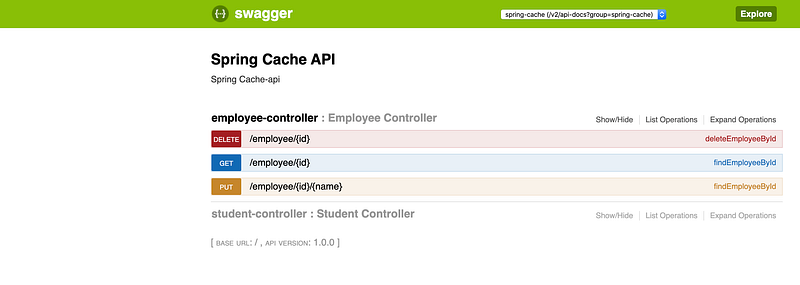
We can now use the Swagger URL to test the Spring Cache application.
If you would like to refer to the full code, do check:
https://github.com/sumanentc/spring-boot-ignite


