Spring Boot Azure AD (Entra ID) OAuth 2.0 Authentication Example
In one of the previous OAuth 2 tutorial we had seen the different types of OAuth 2.0 flows. In this tutorial we will be creating a Spring Boot 3 application that uses OAuth 2.0 Authorization Code Grant flow with Azure Active Directory (Azure AD) as the identity provider. The Authorization code grant flow will be as follows-

In the above example we have 4 actors-
- Resource Owner — This is the user who wants to access the exposed REST API.
- Client Application — The Spring Boot application that requests access to the REST API on behalf of the authenticated user.
- Resource Server — The REST API hosted by the Spring Boot application.
- Authorization Server — The Azure AD (Entra ID) service that authenticates the user and issues access tokens.
Video
This tutorial is explained in the below Youtube Video.
Implementation
We will first be configuring the setup in the azure portal as follows. This setup allows our Spring Boot application to authenticate users against Azure AD and grant them access to the REST API based on the permissions or access levels defined by the assigned role.

Create a new User


Create a registered application
Next we will be creating a registered application named javainuseapp Go to Entra Id.

Go to Microsoft Entra Id -> App Registrations -> Create a new Registration Specify the name of the app as javainuseapp and click on Register button. Also specify the redirect URI as — http://localhost:8080/login/oauth2/code/

A new app named javainuseapp gets created. If we notice we get the client id and tenant id.

Learn more
Learn more
Let us now create a secret. For this go to Certificates & secrets and click on New client secret

A secret named clientsecret gets created.

For the registered app we will be creating a new role named admin as follows -


Enterprise application — Assign role to user
Next we will be assigning the admin role created for javainuseapp to the test user. For this go to Entra Id. In Entra Id -> Enterprise Application -> Select the javainapp.
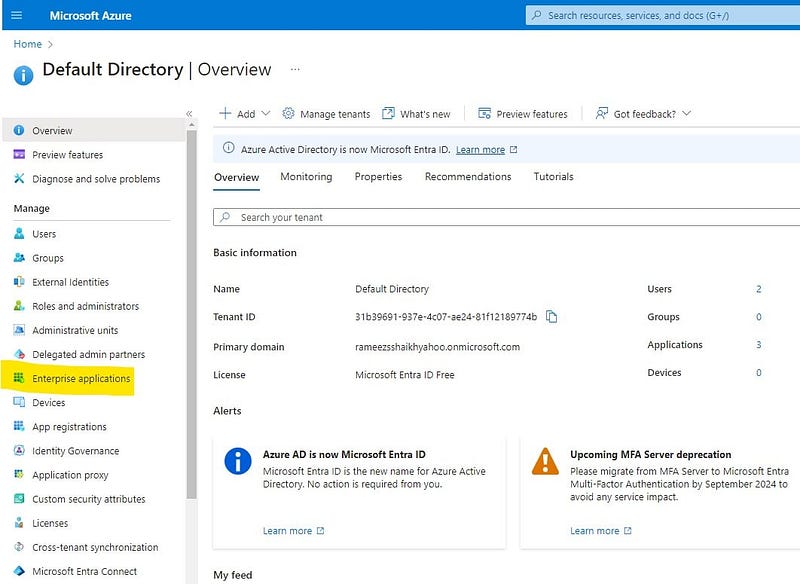

Next in user groups select the user and the role and save it.

Spring Boot Application
Using Spring Initializr we will be creating a spring boot application with the following dependencies.

The pom.xml will be as follows-
<?xml version="1.0" encoding="UTF-8"?>
<project xmlns="http://maven.apache.org/POM/4.0.0" xmlns:xsi="http://www.w3.org/2001/XMLSchema-instance" xsi:schemaLocation="http://maven.apache.org/POM/4.0.0 https://maven.apache.org/xsd/maven-4.0.0.xsd">
	<modelVersion>4.0.0</modelVersion>
	<parent>
		<groupId>org.springframework.boot</groupId>
		<artifactId>spring-boot-starter-parent</artifactId>
		<version>3.2.6</version>
		<relativePath /> <!-- lookup parent from repository -->
	</parent>
	<groupId>com.javainuse</groupId>
	<artifactId>boot-azure-ad</artifactId>
	<version>0.0.1-SNAPSHOT</version>
	<name>boot-azure-ad</name>
	<description>Demo project for Spring Boot</description>
	<properties>
		<java.version>17</java.version>
		<spring-cloud-azure.version>5.13.0</spring-cloud-azure.version>
	</properties>
	<dependencies>
		<dependency>
			<groupId>org.springframework.boot</groupId>
			<artifactId>spring-boot-starter-oauth2-client</artifactId>
		</dependency>
		<dependency>
			<groupId>org.springframework.boot</groupId>
			<artifactId>spring-boot-starter-web</artifactId>
		</dependency>
		<dependency>
			<groupId>com.azure.spring</groupId>
			<artifactId>spring-cloud-azure-starter-active-directory</artifactId>
		</dependency>

		<dependency>
			<groupId>org.springframework.boot</groupId>
			<artifactId>spring-boot-starter-test</artifactId>
			<scope>test</scope>
		</dependency>
	</dependencies>
	<dependencyManagement>
		<dependencies>
			<dependency>
				<groupId>com.azure.spring</groupId>
				<artifactId>spring-cloud-azure-dependencies</artifactId>
				<version>0</version>
				<type>pom</type>
				<scope>import</scope>
			</dependency>
		</dependencies>
	</dependencyManagement>

	<build>
		<plugins>
			<plugin>
				<groupId>org.springframework.boot</groupId>
				<artifactId>spring-boot-maven-plugin</artifactId>
			</plugin>
		</plugins>
	</build>

</project>
In application.properties configuration specify the properties as follows-
spring.application.name=ad
spring.cloud.azure.active-directory.enabled=true
spring.cloud.azure.active-directory.profile.tenant-id=31b39691-999e-4c07-ae99-81f12189774b
spring.cloud.azure.active-directory.credential.client-id=af6ca19c-1e95-4e90-b459-eb32d9e9daa2
spring.cloud.azure.active-directory.credential.client-secret=Mrp8Q~ULtPjhjhZf5gbqz0mhtd5o~jq5zUdlebvY
Create a contoller class named HelloController with a @ResponseBody method and a @PreAuthorize annotation to demonstrate role-based access control. The @PreAuthorize annotation is a part of the Spring Security framework and is used to enforce authorization based on roles or permissions. The expression hasAuthority(‘APPROLE_Admin’) checks if the current user has the authority APPROLE_Admin assigned. If the user does not have this authority, access will be denied.
package com.javainuse.ad;

import org.springframework.web.bind.annotation.GetMapping;
import org.springframework.web.bind.annotation.ResponseBody;
import org.springframework.web.bind.annotation.RestController;
import org.springframework.security.access.prepost.PreAuthorize;

@RestController
public class HelloController {
	@GetMapping("employee")
	@ResponseBody
	@PreAuthorize("hasAuthority('APPROLE_Admin')")
	public String Admin() {
		return "Employee Details";
	}
}
If we now start the application and try to access the url localhost:8080/employee. We get the microsoft login page as follows -

If we now go to the user named test we created previously. We can see the url. Also select reset password, which will give us a temporary password. Use these credentials.
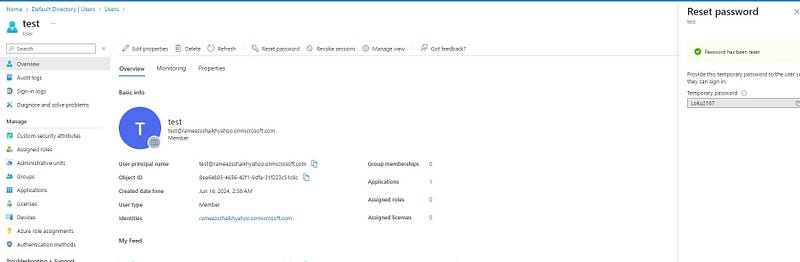
If we enter the credentials we can access the /employee url correctly.


