
Spring Boot Apps for Movie Indexing/Search with AWS OpenSearch, S3 and Secrets Manager
Spring Boot + AWS + OpenSearch + S3 + Secrets Manager + LocalStack
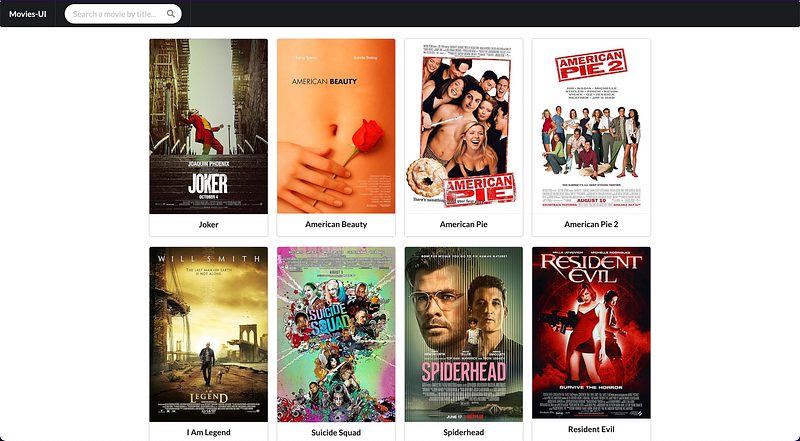
In this article, we’ll guide you through the process of implementing two Spring Boot applications. One, called movie-api, is used by administrators to add movies. The other application, movie-ui, is designed for customers to find movies by their titles. Movie information, such as IMDb rating, title, genre, etc., will be indexed in OpenSearch. This information can be easily obtained using the OMDb API website, which requires an apiKey. To securely store the apiKey, we will utilize Secrets Manager. Finally, we will use S3 to store the movie posters.
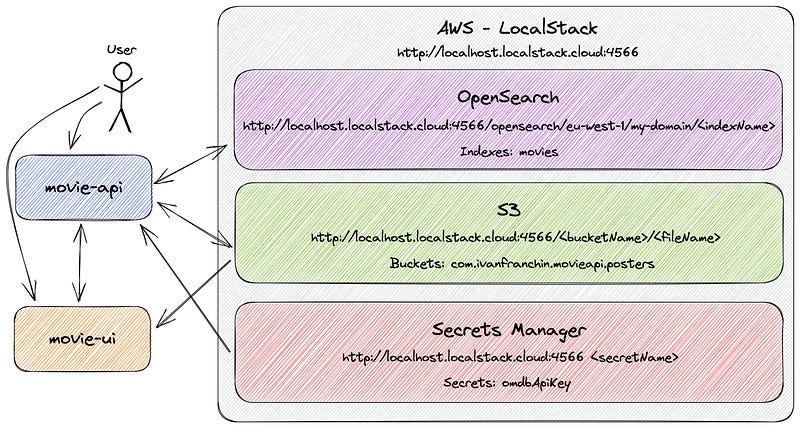
Before we dive into the technical details, let’s take a quick look at the architecture of the project:
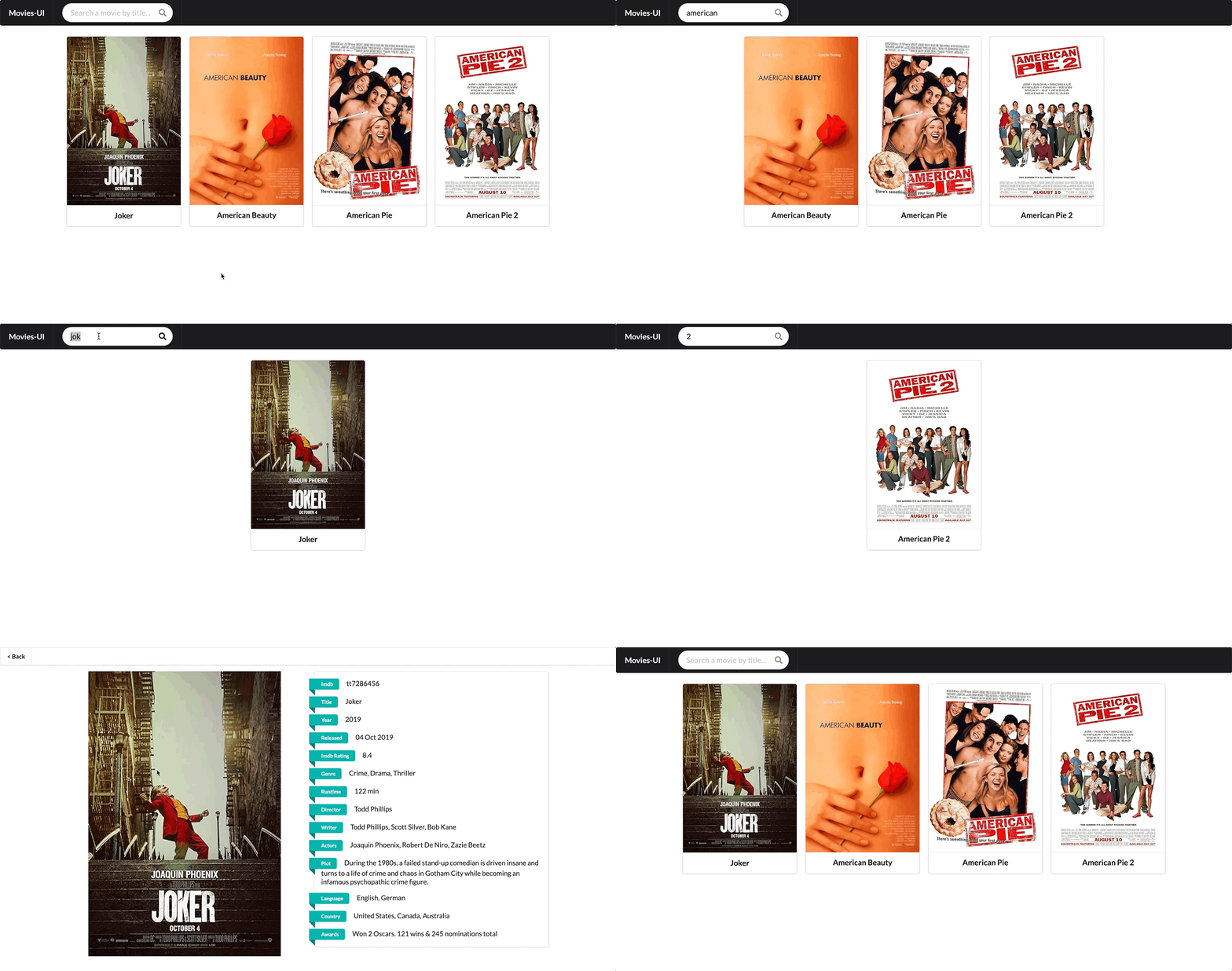
Below, we can find two GIFs that demonstrate the application's functionalities.
The first GIF demonstrates using the movie-api to add the movie “American Pie 2”.

The second GIF shows using the movie-ui to search for movies.
So, let’s get started!
Applications
movie-api
movie-api is a Spring Boot Java Web application that exposes a REST API and provides a UI for indexing movies. It has the following endpoints:
 GET /api/movies/{imdb}
POST /api/movies {"imdb":"...", "title":"...", "posterUrl":"...", "year":"...", "released":"...", "imdbRating":"...", "genre":"...", "runtime":"...", "director":"...", "writer":"...", "actors":"...", "plot":"...", "language":"...", "country":"...", "awards":"..."}
POST /api/movies/{imdb}/uploadPoster
The information of the movies, such as IMDb rating, title, year, etc., are stored in OpenSearch. The movie’s poster is stored in a S3 bucket.
The movie-api has access to OMDb API website to search and add easily new movies. In order to make request to OMDb API, an apiKey is needed. This key is stored as a secret in Secrets Manager.
movie-ui
movie-ui is a Spring Boot Java web application with a user interface designed for searching movies indexed in movie-api. To populate its UI with movie data, movie-ui communicates with movie-api by making requests to its endpoints. The movie’s poster is retrieved from the S3 bucket.
Docker Compose File
In order to start and run LocalStack locally, we will use the following docker-compose.yml file:
version: "3.8"

services:

  localstack:
    container_name: localstack
    image: localstack/localstack:3.2.0
    ports:
      - "127.0.0.1:4510-4559:4510-4559"  # external service port range
      - "127.0.0.1:4566:4566"            # LocalStack Gateway
    environment:
      - OPENSEARCH_ENDPOINT_STRATEGY=path
      - LOCALSTACK_HOSTNAME=localhost.localstack.cloud  # set this env var to expose localstack to other containers
      - AWS_ACCESS_KEY_ID=key
      - AWS_SECRET_ACCESS_KEY=secret
      - AWS_DEFAULT_REGION=eu-west-1
      - SERVICES=opensearch,s3,secretsmanager
      # ---
      - DEBUG=${DEBUG-}
      - LAMBDA_EXECUTOR=${LAMBDA_EXECUTOR-}
    volumes:
      - "$PWD/tmp/localstack:/var/lib/localstack"
      - "/var/run/docker.sock:/var/run/docker.sock"
    networks:
      default:
        aliases:
          - localhost.localstack.cloud   # set this network aliases to expose localstack to other containers
The docker-compose.yml file is derived from the LocalStack official documentation. As you may have observed, we’ve configured the SERVICES environment variable to include opensearch, s3 and secretsmanager.
Initialize LocalStack Script
In order to make it easy to initialize LocalStack and all the configuration among the AWS Cloud services we will run, we have prepared the
In some of the commands, we used AWS CLI. Let’s discuss them a bit:
Create OpenSearch domain
We use the
OPENSEARCH_DOMAIN_NAME=my-domain
...
docker exec -t localstack aws --endpoint-url=http://localhost:4566 opensearch create-domain --domain-name $OPENSEARCH_DOMAIN_NAME
Delete OpenSearch existing index and create a new index:
We use
...
AWS_LOCALSTACK_URL="http://localhost.localstack.cloud:4566"
AWS_LOCALSTACK_OPENSEARCH_URL="${AWS_LOCALSTACK_URL}/opensearch/${AWS_REGION}/${OPENSEARCH_DOMAIN_NAME}"
...
curl -X DELETE $AWS_LOCALSTACK_OPENSEARCH_URL/movies
...
curl -X PUT $AWS_LOCALSTACK_OPENSEARCH_URL/movies -H "Content-Type: application/json" -d @opensearch/movies-settings.json
Create an S3 bucket
We use the
docker exec -t localstack aws --endpoint-url=http://localhost:4566 s3 mb s3://com.ivanfranchin.movieapi.postersCreate secrets in Secrets Manager
We use the apiKey.
OMDB_API_KEY=$1
...
docker exec -t localstack aws --endpoint-url=http://localhost:4566 secretsmanager create-secret --name /secrets/omdbApi --secret-string "{\"apiKey\": \"$OMDB_API_KEY\"}"
How it all works
First, we access the movie-api website and enter the name of the movie we want to add, such as “I am Legend”.
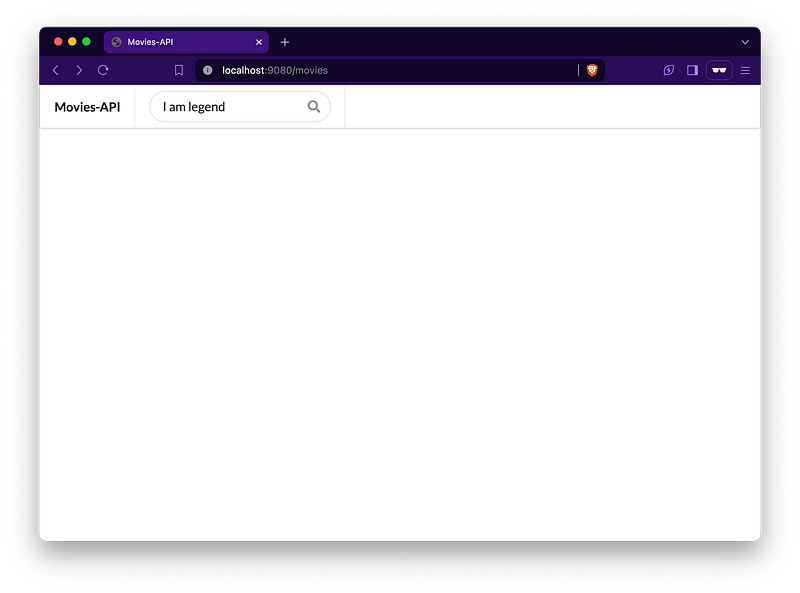
When we press Enter, the movie-api app calls the OMDb API, providing its apiKey and the movie title. This call is handled in the MoviesUiController class.
...
@RequiredArgsConstructor
@Controller
public class MoviesUiController {

    ...
    private final OmdbApiClient omdbApiClient;
    ...

    @PostMapping("/movies/search")
    public String searchMovies(@ModelAttribute SearchRequest searchRequest,
                               Model model,
                               RedirectAttributes redirectAttributes) {
        if (!StringUtils.hasText(searchRequest.getText())) {
            return "redirect:/movies";
        }
        OmdbResponse omdbResponse;
        try {
            omdbResponse = omdbApiClient.getMovieByTitle(omdbApiProperties.getApiKey(), searchRequest.getText());
        } catch (Exception e) {
            redirectAttributes.addFlashAttribute("error",
                    String.format("An error occurred while searching for title containing '%s' in OMDb API! Error message: %s",
                            searchRequest.getText(), e.getMessage()));
            return "redirect:/movies";
        }
        if ("False".equals(omdbResponse.getResponse())) {
            redirectAttributes.addFlashAttribute("error",
                    String.format("No movies with title containing '%s' were found!", searchRequest.getText()));
            return "redirect:/movies";
        }
        model.addAttribute("omdbResponse", omdbResponse);
        model.addAttribute("addOmdbResponse", omdbResponse);
        return "movies";
    }
    ...
}
To implement the OmdbApiClient, we utilize an HTTP Interface. Here’s where we define the interface:
package com.ivanfranchin.movieapi.client;

import org.springframework.web.bind.annotation.RequestParam;
import org.springframework.web.service.annotation.GetExchange;
import org.springframework.web.service.annotation.HttpExchange;

@HttpExchange
public interface OmdbApiClient {

    @GetExchange
    OmdbResponse getMovieByTitle(@RequestParam String apiKey, @RequestParam(name = "t") String title);
}
In the OmdbApiClientConfig class, we define the OmdbApiClient bean:
package com.ivanfranchin.movieapi.client;

import org.springframework.beans.factory.annotation.Value;
import org.springframework.context.annotation.Bean;
import org.springframework.context.annotation.Configuration;
import org.springframework.web.client.RestTemplate;
import org.springframework.web.client.support.RestTemplateAdapter;
import org.springframework.web.service.invoker.HttpServiceProxyFactory;
import org.springframework.web.util.DefaultUriBuilderFactory;

@Configuration
public class OmdbApiClientConfig {

    @Value("${omdbapi.url}")
    private String omdbApiUrl;

    @Bean
    public OmdbApiClient omdbApiClient() {
        RestTemplate restTemplate = new RestTemplate();
        restTemplate.setUriTemplateHandler(new DefaultUriBuilderFactory(omdbApiUrl));
        RestTemplateAdapter adapter = RestTemplateAdapter.create(restTemplate);
        HttpServiceProxyFactory factory = HttpServiceProxyFactory.builderFor(adapter).build();
        return factory.createClient(OmdbApiClient.class);
    }
}
Once movie-api receives a response from the OMDb API, it updates its UI with all the movie information, and the administrator can add the movie.
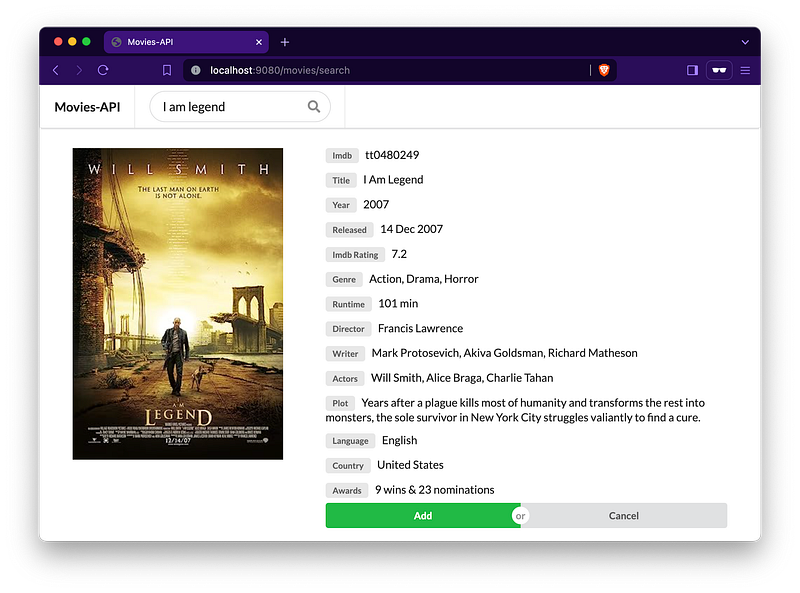
When the “Add” button is pressed, the OpenSearchServiceImpl class takes charge. First, it handles the movie poster by downloading the image and uploading it to S3 using the handlePoster method. Then, the movie is saved in OpenSearch.
...
@RequiredArgsConstructor
@Service
public class OpenSearchServiceImpl implements OpenSearchService {

    ...
    private final PosterService posterService;
    ...

    @Override
    public Map<String, Object> saveMovie(Map<String, Object> movieMap) {
        try {
            handlePoster(movieMap);
            IndexRequest indexRequest = new IndexRequest(awsProperties.getOpensearch().getIndexes())
                    .source(movieMap, XContentType.JSON)
                    .id(String.valueOf(movieMap.get("imdb")));
            IndexResponse indexResponse = restHighLevelClient.index(indexRequest, RequestOptions.DEFAULT);
            log.info("Document for '{}' {} successfully in ES!", movieMap, indexResponse.getResult());
            return movieMap;
        } catch (Exception e) {
            String errorMessage = String.format("An exception occurred while indexing '%s'. %s", movieMap, e.getMessage());
            throw new OpenSearchServiceException(errorMessage, e);
        }
    }

    private void handlePoster(Map<String, Object> movieMap) {
        String poster = posterService.getPosterNotAvailableUrl();
        if (movieMap.containsKey("poster") && movieMap.get("poster") != null) {
            poster = String.valueOf(movieMap.get("poster"));
        } else if (movieMap.containsKey("posterUrl")) {
            Object posterUrlObj = movieMap.get("posterUrl");
            if ((posterUrlObj instanceof URL || posterUrlObj instanceof String)) {
                URL posterUrl = posterUrlObj instanceof URL ?
                        (URL) posterUrlObj : validateAndGetUrl((String) posterUrlObj);
                if (posterUrl != null) {
                    String imdb = String.valueOf(movieMap.get("imdb"));
                    Optional<String> filePathOptional = posterService.downloadFile(posterUrl, imdb);
                    poster = filePathOptional.isPresent() ?
                            posterService.uploadFile(new File(filePathOptional.get())) : posterService.getPosterNotAvailableUrl();
                    movieMap.remove("posterUrl");
                }
            }
        }
        movieMap.put("poster", poster);
    }
    ...
}
The PosterServiceImpl class manages the downloading of the movie poster image and its upload to S3. For the upload process, it utilizes an instance of S3Template:
...
@RequiredArgsConstructor
@Service
public class PosterServiceImpl implements PosterService {

    private final S3Template s3Template;
    ...

    @Override
    public Optional<String> downloadFile(URL fileUrl, String fileName) {
        try {
            Files.createDirectories(Paths.get(TMP_FOLDER));
            String filePath = String.format("%s/%s.jpg", TMP_FOLDER, fileName);
            try (ReadableByteChannel readableByteChannel = Channels.newChannel(fileUrl.openStream());
                 FileOutputStream fileOutputStream = new FileOutputStream(filePath);
                 FileChannel fileChannel = fileOutputStream.getChannel()) {
                fileChannel.transferFrom(readableByteChannel, 0, Long.MAX_VALUE);
                return Optional.of(filePath);
            }
        } catch (IOException e) {
            log.error("Unable to download file from URL '{}'. Error message: {}", fileUrl, e.getMessage());
            return Optional.empty();
        }
    }

    @Override
    public String uploadFile(MultipartFile file) {
        try {
            return uploadFile(file.getOriginalFilename(), file.getInputStream());
        } catch (IOException e) {
            String message = String.format("Unable to upload MultipartFile %s", file.getOriginalFilename());
            throw new PosterUploaderException(message, e);
        }
    }

    @Override
    public String uploadFile(File file) {
        try {
            return uploadFile(file.getName(), new FileInputStream(file));
        } catch (IOException e) {
            String message = String.format("Unable to upload File %s", file.getName());
            throw new PosterUploaderException(message, e);
        }
    }

    private String uploadFile(String key, InputStream inputStream) throws IOException {
        String bucketName = awsProperties.getS3().getBucketName();
        s3Template.upload(bucketName, key, inputStream);
        String s3FileUrl = String.format("%s/%s/%s", awsProperties.getEndpoint(), bucketName, key);
        log.info("File '{}' uploaded successfully in S3! URL: {}", key, s3FileUrl);
        return s3FileUrl;
    }
    ...
}
Once the movie is added, we can view it in the UI.
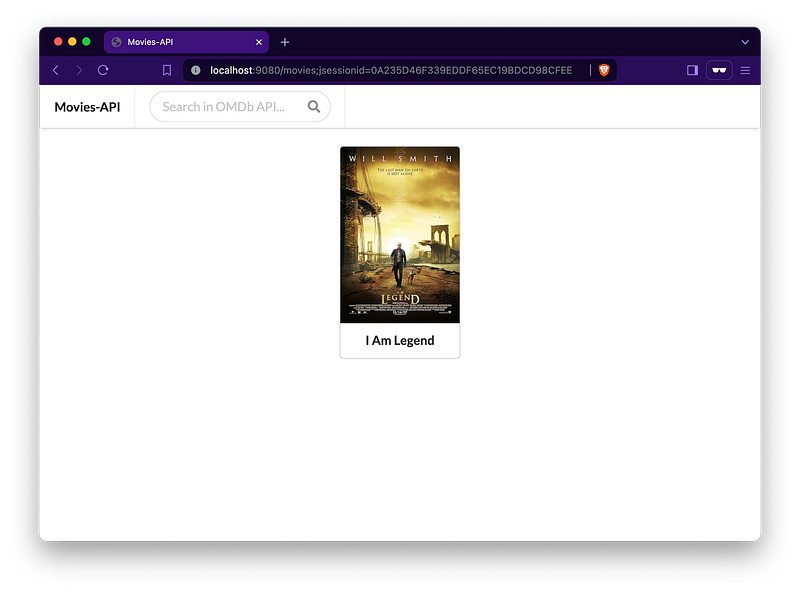
Now, we can use the movie-ui to search for movies. movie-ui relies on the movie-api to list movies and retrieve their information.
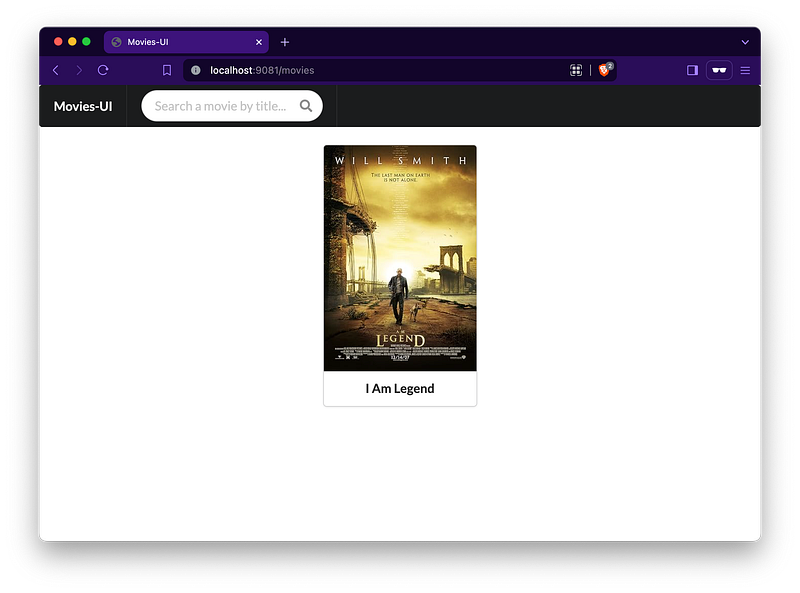
movie-ui communicates with the movie-api using an HTTP Interface. Here’s the MovieApiClient interface:
package com.ivanfranchin.movieui.client;

import com.ivanfranchin.movieui.controller.SearchResponse;
import com.ivanfranchin.movieui.model.Movie;
import org.springframework.web.bind.annotation.PathVariable;
import org.springframework.web.bind.annotation.RequestParam;
import org.springframework.web.service.annotation.GetExchange;
import org.springframework.web.service.annotation.HttpExchange;

@HttpExchange("/api/movies")
public interface MovieApiClient {

    @GetExchange("/{imdb}")
    Movie getMovie(@PathVariable String imdb);

    @GetExchange
    SearchResponse searchMovies(@RequestParam(required = false) String title);
}
And here’s the MovieApiClientConfig class where the MovieApiClient bean is defined:
package com.ivanfranchin.movieui.client;

import org.springframework.beans.factory.annotation.Value;
import org.springframework.context.annotation.Bean;
import org.springframework.context.annotation.Configuration;
import org.springframework.web.client.RestTemplate;
import org.springframework.web.client.support.RestTemplateAdapter;
import org.springframework.web.service.invoker.HttpServiceProxyFactory;
import org.springframework.web.util.DefaultUriBuilderFactory;

@Configuration
public class MovieApiClientConfig {

    @Value("${movie-api.url}")
    private String movieApiUrl;

    @Bean
    public MovieApiClient movieApiClient() {
        RestTemplate restTemplate = new RestTemplate();
        restTemplate.setUriTemplateHandler(new DefaultUriBuilderFactory(movieApiUrl));
        RestTemplateAdapter adapter = RestTemplateAdapter.create(restTemplate);
        HttpServiceProxyFactory factory = HttpServiceProxyFactory.builderFor(adapter).build();
        return factory.createClient(MovieApiClient.class);
    }
}
Source code
The full source code is available here. If you find it helpful or like it, please take a moment to give it a star! Your support means a lot and helps us improve the project for everyone.
Additional Readings
Support and Engagement
If you enjoyed this article and would like to show your support, please consider taking the following actions:
- 👏 Engage by clapping, highlighting, and replying to my story. I’ll be happy to answer any of your questions;
- 🌐 Share my story on Social Media;
- 🔔 Follow me on: Medium | LinkedIn | Twitter | GitHub;
- ✉️ Subscribe to my newsletter, so you don’t miss out on my latest posts.


