
Speed up your Vue 3 application with SCSS and external style files

One of the most misunderstanding things in Vue if you ask me is when you are using the
- You split your code up Yes, it can be very used full to split your code up in multi-files, but it's not nice when you split it up inside .vue files because its needed other developers need to understand the component you develop before there can touch it to not remove some unused code.
- Harder to debug and fix style bugs When you place it into your Vue files it required you to use a scope or you build everything in a structured way, and that's not the case in real-world applications, that's why to place it inside a Vue template file is a very bad practice.
- Cache your application with Varnish or CDN it's near impossible I know nothing in the world is impossible it's just a question about time, but when you use the inside style to produce CSS code then the browser client render the CSS code because Vue did not extract the code into 1 file there allowed to be cache this way, you can extract all Vue style blocks into external files but then you will do a lot of requests and will slow down your application, every request from the client to server have an HTTPS overhead on 3–40ms for each, so you can just count your request with the overhead.
How to support SASS/SCSS with Vue 3
First, we need to install a sass-loader and fibers, why we install fibers its allow us to use Dart it's a faster way to compile your SASS code into a single CSS file so our Vue3 application can use this CSS file from our public folder there hold our static files like fonts, logo images and so on.
When you have installed the packages into your application we need to enable it and use our main.scss file to be compiled into our public folder.
First, we can add a single line into our main.js file to confirm our sass-loader is working successfully as we want.
When you have confirmed its working then its time to enable rebuilding our CSS code, the only thing you need to do now is run npm run build and wait until its finished.
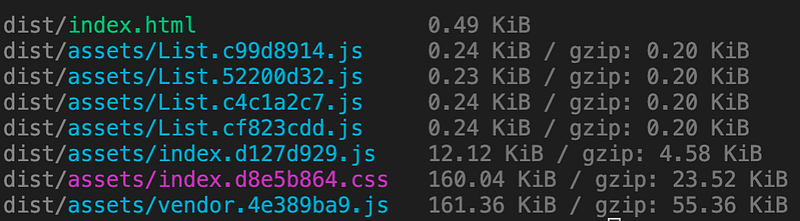
You should have a folder called dist now, go inside and you can see you have only 1 single CSS file, and now this file can be cached into a CDN or Varnish much easier.


