avatarElye - A One Eye Developer

Free AI web copilot to create summaries, insights and extended knowledge, download it at here

2636

Abstract

n> }

    <span class="hljs-variable"><span class="hljs-class">result</span></span> /= <span class="hljs-variable">REPEAT</span>
    <span class="hljs-function"><span class="hljs-title">println</span>(<span class="hljs-string">"Result $result"</span>)</span>
}
<span class="hljs-function"><span class="hljs-title">println</span>(<span class="hljs-string">"Time Used sequential with $REPEAT : $time"</span>)</span>

}</pre></div><div id="e951"><pre><span class="hljs-function"><span class="hljs-keyword">fun</span> <span class="hljs-title">accumulate</span><span class="hljs-params">()</span></span>: <span class="hljs-built_in">Double</span> { <span class="hljs-keyword">var</span> x = <span class="hljs-number">0.0</span> repeat(REPEAT) { x += (<span class="hljs-number">1.</span>.REPEAT).random()/REPEAT.toDouble() } <span class="hljs-keyword">return</span> x / REPEAT }</pre></div><p id="7e6f">133 seconds is quite long. What if I parallelize it using Kotlin Channels… how much time I save?</p><h1 id="600c">Using Kotlin Channel Fan-Out and Fan-In</h1><p id="c600">In reference to <a href="https://kotlinlang.org/docs/reference/coroutines/channels.html#fan-out">Kotlin Channel’s documentation</a>, we can fan-out to multiple channels, and fan-in to collect the result from all the fan-outs.</p><p id="0e3d">To improve performance, I fan-outs to different threads and fan-in to another thread as below.</p><figure id="71ca"><img src="https://cdn-images-1.readmedium.com/v2/resize:fit:800/1*hBL1j8Mm3lEOO_httqbF-Q.png"><figcaption></figcaption></figure><p id="f043">Here you can see that I fan-out and fan-in the processes with channels, using different thread.</p><p id="84d7">I only do a REPEAT loop within the fan-out channels, and generate REPEAT channels to parallel processing them (instead of looping through them again REPEAT time)</p><div id="a3c0"><pre><span class="hljs-function"><span class="hljs-keyword">fun</span> <span class="hljs-title">parallel</span><span class="hljs-params">()</span></span> = runBlocking<<span class="hljs-built_in">Unit</span>> { <span class="hljs-keyword">val</span> time = measureTimeMillis { <span class="hljs-keyword">val</span> consumer = Channel<<span class="hljs-built_in">Double</span>>() repeat(REPEAT) { accumulateProducer(consumer) } <span class="hljs-comment">// FAN-OUT </span> accumulateConsumer(consumer).join() <span class="hljs-comment">// FAN-IN</span> } println(<span class="hljs-string">"Time Used parallel with <span class="hljs-variable">$REPEAT</span> : <span class

Options

="hljs-variable">$time</span>"</span>) }</pre></div><p id="ba49">The FAN-OUT Channels code</p><div id="e396"><pre><span class="hljs-function"><span class="hljs-keyword">fun</span> CoroutineScope.<span class="hljs-title">accumulateProducer</span><span class="hljs-params">(consumer: <span class="hljs-type">Channel</span><<span class="hljs-type">Double</span>>)</span></span> = produce<<span class="hljs-built_in">Double</span>>(Dispatchers.Default) { <span class="hljs-keyword">var</span> x = <span class="hljs-number">0.0</span> repeat(REPEAT) { x += (<span class="hljs-number">1.</span>.REPEAT).random()/REPEAT.toDouble() } consumer.send(x / REPEAT) }</pre></div><p id="acce">The FAN-IN Channel Code</p><div id="ced3"><pre><span class="hljs-function"><span class="hljs-keyword">fun</span> CoroutineScope.<span class="hljs-title">accumulateConsumer</span><span class="hljs-params">(consumer: <span class="hljs-type">Channel</span><<span class="hljs-type">Double</span>>)</span></span> = launch(Dispatchers.Default) { <span class="hljs-keyword">var</span> x = <span class="hljs-number">0.0</span> repeat(REPEAT) { x += consumer.receive() } consumer.close()

    <span class="hljs-keyword">val</span> result = x / REPEAT
    println(<span class="hljs-string">"Result <span class="hljs-variable">$result</span>"</span>)
}</pre></div><p id="2a76">I also experiment this with REPEAT = 5,000 till REPEAT = 100,000 times.</p><p id="e8d7">For REPEAT = 5,000, I get the value of 0.500175, and for the REPEAT = 100,000 times, I get the value of 0.500006. <i>You can see the more iteration the closer it gets to 0.5.</i></p><p id="a581">In term of time used, I got between 0.2 seconds till 17.9 seconds for them respectively.</p><p id="563f">Below is the graph result comparison between Sequential and Parallel (using Kotlin Channel), where for REPEAT = 100,000 iteration, I get 133 seconds for sequential process, and 17.9 seconds for parallel process. A total of about 7.5x faster!</p><figure id="ad57"><img src="https://cdn-images-1.readmedium.com/v2/resize:fit:800/1*T76MV5lP-fdZzNtXwooLBw.png"><figcaption></figcaption></figure><figure id="dd34"><img src="https://cdn-images-1.readmedium.com/v2/resize:fit:800/1*SIZHUk6vuYg5hNqTiQUY_w.png"><figcaption>The raw data collected</figcaption></figure><p id="70ac">In short, if we know how to parallelize some of the computational process, we can get pretty decent speed up for our execution, by just parallelize the similar processes one execute.</p></article></body>

Learning Kotlin Programming

Speed up algorithm using Kotlin Channel Parallelize Computation

Get up to 7.5X speed up when compare to single thread processing

Photo by Nikola Đuza on Unsplash

Here, I’m experimenting with Channel Fan-Out and Fan-In, parallelize the process to see what improvement gain I can get.

The simple computation algorithm I use

In order to experiment with the speed up, I execute a simple algorithm to ensure a set of randomly generated numbers are evenly distributed.

This can be achieved by I average out the random numbers generated for a random value between 0 and 1. If it generated 0.5, then the randomized value is evenly distributed.

The more iteration I get, the final result should be closer to 0.5.

The normal sequential process

For this I’m doing is accumulating many random numbers between 0 and 1, and average them out, to ensure the result is 0.5.
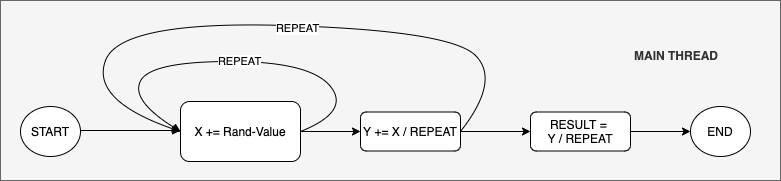
I repeat them REPEAT x REPEAT times as shown in the diagram above in a single process, with REPEAT = 5,000 till REPEAT = 100,000 times.

For REPEAT = 5,000, I get the value of 0.500150, and for the REPEAT = 100,000 times, I get the value of 0.500004. You can see the more iteration the closer it gets to 0.5.

In term of time used, I got between 0.4 seconds till 133 seconds for them respectively.

fun main() {
    val time = measureTimeMillis {
        var result = 0.0
        repeat(REPEAT) {
            result += accumulate()
        }

        result /= REPEAT
        println("Result $result")
    }
    println("Time Used sequential with $REPEAT : $time")
}
fun accumulate(): Double {
    var x = 0.0
    repeat(REPEAT) {
        x += (1..REPEAT).random()/REPEAT.toDouble()
    }
    return x / REPEAT
}

133 seconds is quite long. What if I parallelize it using Kotlin Channels… how much time I save?

Using Kotlin Channel Fan-Out and Fan-In

In reference to Kotlin Channel’s documentation, we can fan-out to multiple channels, and fan-in to collect the result from all the fan-outs.

To improve performance, I fan-outs to different threads and fan-in to another thread as below.
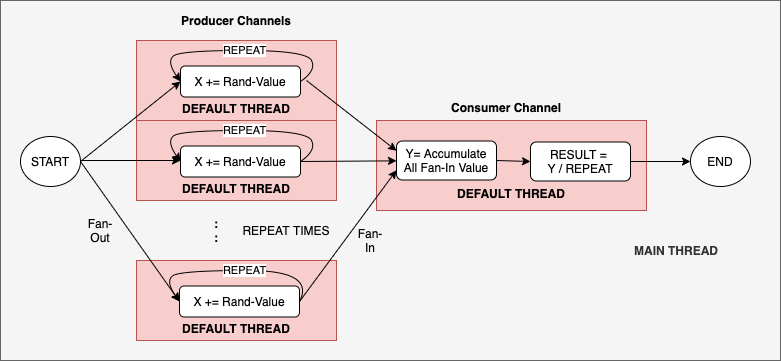
Here you can see that I fan-out and fan-in the processes with channels, using different thread.

I only do a REPEAT loop within the fan-out channels, and generate REPEAT channels to parallel processing them (instead of looping through them again REPEAT time)

fun parallel() = runBlocking<Unit> {
    val time = measureTimeMillis {
        val consumer = Channel<Double>()
        repeat(REPEAT) { accumulateProducer(consumer) } // FAN-OUT  
        accumulateConsumer(consumer).join()             // FAN-IN
    }
    println("Time Used parallel with $REPEAT : $time")
}

The FAN-OUT Channels code

fun CoroutineScope.accumulateProducer(consumer: Channel<Double>) =
    produce<Double>(Dispatchers.Default) {
        var x = 0.0
        repeat(REPEAT) {
            x += (1..REPEAT).random()/REPEAT.toDouble()
        }
        consumer.send(x / REPEAT)
    }

The FAN-IN Channel Code

fun CoroutineScope.accumulateConsumer(consumer: Channel<Double>) =
    launch(Dispatchers.Default) {
        var x = 0.0
        repeat(REPEAT) {
            x += consumer.receive()
        }
        consumer.close()

        val result = x / REPEAT
        println("Result $result")
    }

I also experiment this with REPEAT = 5,000 till REPEAT = 100,000 times.

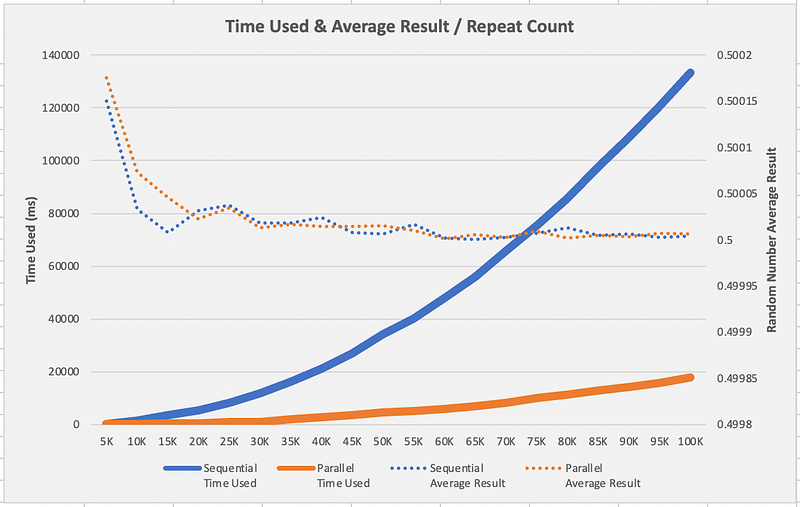
For REPEAT = 5,000, I get the value of 0.500175, and for the REPEAT = 100,000 times, I get the value of 0.500006. You can see the more iteration the closer it gets to 0.5.

In term of time used, I got between 0.2 seconds till 17.9 seconds for them respectively.

Below is the graph result comparison between Sequential and Parallel (using Kotlin Channel), where for REPEAT = 100,000 iteration, I get 133 seconds for sequential process, and 17.9 seconds for parallel process. A total of about 7.5x faster!
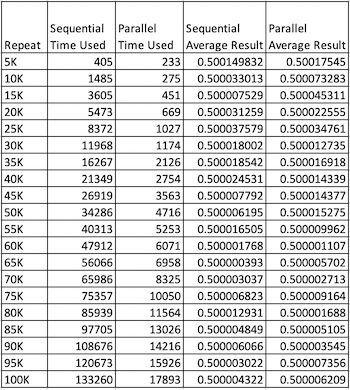
The raw data collected

In short, if we know how to parallelize some of the computational process, we can get pretty decent speed up for our execution, by just parallelize the similar processes one execute.

Kotlin
Programming
Android App Development
AndroidDev
Mobile App Development
Recommended from ReadMedium