avatarAman Ranjan Verma

Summary

The website content provides instructions for setting up the Spark UI within a JupyterHub environment deployed on Kubernetes, specifically AWS EKS, to enhance monitoring capabilities for PySpark jobs.

Abstract

The article outlines the process of enabling Apache Spark's web user interfaces (UIs) for a JupyterHub instance that is running on AWS EKS (Elastic Kubernetes Service). It explains that while JupyterHub facilitates running PySpark jobs, the Spark UI, which is crucial for monitoring cluster performance, is not available by default. The author describes their use case, where they deployed JupyterHub using a Docker image specified in a helm_config.yaml file. To set up the Spark UI, the author suggests adding specific lines to the Dockerfile to install jupyter-server-proxy, rebuilding the Docker image, and updating the helm_config.yaml file accordingly. The article also provides an alternative method for those without access to the Dockerfile, involving the creation of a new Dockerfile based on the existing Spark image. After upgrading the JupyterHub deployment with the new image, users can run PySpark code and access the Spark UI through a proxy URL, which is customized based on the user's domain and username. The article concludes with links to further reading and a recommendation for an AI service.

Opinions

  • The author implies that the default setup of JupyterHub on cloud platforms with Docker images lacks essential monitoring tools like the Spark UI.
  • The author suggests that the installation of jupyter-server-proxy is a straightforward solution to enable access to the Spark UI within JupyterHub.
  • There is an underlying assumption that readers are familiar with Docker, Kubernetes, and Helm, as the instructions involve modifying Dockerfiles and Helm configurations.
  • The author emphasizes the importance of the Spark UI for monitoring Spark jobs, indicating its value in a data scientist or engineer's workflow.
  • By providing a cost-effective AI service recommendation, the author expresses a belief in the importance of accessible technology solutions.

Spark UI for JupyterHub

Setup Spark UI for Jupyterhub installed on Kubernetes

Apache Spark provides a suite of web user interfaces (UIs) that you can use to monitor the status and resource consumption of your Spark cluster. However, this is not enabled by default when we setup JupyterHub on any Cloud with a Docker image.
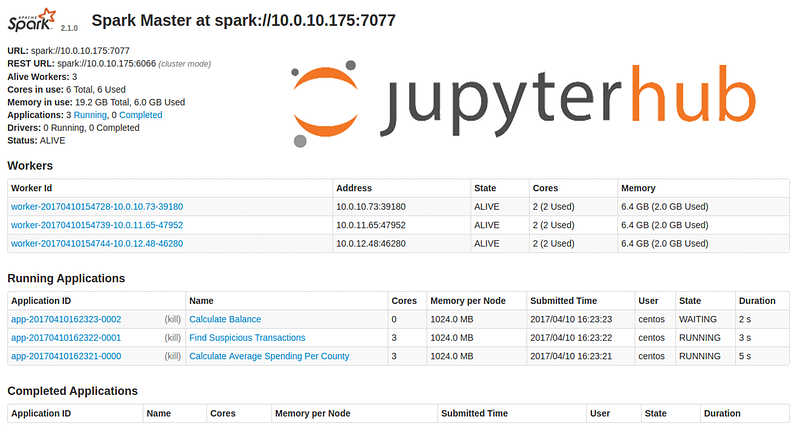
In my use case, I had deployed JH(JupyterHub) on AWS EKS using helm. The docker image was mentioned in one of the profile lists in the helm_config.yaml file.

- display_name: "Advanced PySpark Profile"
      description: "conda 4.8.2,imp. lib installed, pyspark2.4.5"
      profile_name: 'pyspark-prof'
      kubespawner_override:
        image: <spark_image_name:tag_old>

With this setup, I was able to run the Pyspark job in my Jupyter notebook but I was not able to view the spark UI.

Setting up Spark UI

  • Add these lines to the existing Spark image Dockerfile
# Install jupyter-server-proxy
RUN pip3 install jupyter-server-proxy && jupyter serverextension enable --sys-prefix jupyter_server_proxy
  • Rebuild the image and use the new image name and tag in the helm_config.yaml file.
  • If you don’t have the Dockerfile of the image, another quick way to do it is to make a new Dockerfile on top of the old image with these lines of code:
from <existing_spark_image>:<tag>
RUN pip3 install jupyter-server-proxy && jupyter serverextension enable — sys-prefix jupyter_server_proxy
  • Helm upgrade the JH deployment.
  • Run any Pyspark code in the JH
from pyspark import SparkConf
from pyspark import SparkContext

conf = SparkConf()
conf.setAppName('spark-basic')
sc = SparkContext(conf=conf)

def mod(x):
    import numpy as np
    return (x, np.mod(x, 2))

rdd = sc.parallelize(range(1000)).map(mod).take(10)
print rdd
  • Check the Spark UI at:

http://< jhub-domain-name>/user//proxy/4040/jobs/

  • Your jupyerhub-domain-name can be an actual domain or a load balancer URL.

Note: if you try to access the SparkUI before running any spark job, it might through some error. If you are getting a 404 error, means you missed after in the SparkUI URL.

You may be interested in reading this:

For more info on the same look into this reference doc: https://oak-tree.tech/blog/jupyterhub-sparkui-access https://docs.anaconda.com/anaconda-scale/howto/spark-basic/

Spark Ui
Jupyterhub
Pyspark
Aws Eks
Jupyter Notebook
Recommended from ReadMedium