avatarKalpan Shah

Free AI web copilot to create summaries, insights and extended knowledge, download it at here

4627

Abstract

r">csvdf</span> = spark.read.format(<span class="hljs-string">"csv"</span>).option(<span class="hljs-string">"header"</span>,<span class="hljs-string">"true"</span>).option(<span class="hljs-string">"inferSchema"</span>,<span class="hljs-string">"true"</span>).load(<span class="hljs-string">"nyc_taxi_zone.csv"</span>)</pre></div><p id="1068">In format we are specifying that we have CSV file and header is true as we have first row as header in data.</p><p id="f36d">This will load data into dataframe. Once data loaded into dataframe. We can print schema and can also check data loaded or not.</p><div id="34fe"><pre><span class="hljs-comment">#Checking dataframe schema</span> csvdf.printSchema()</pre></div><div id="bdce"><pre>csvdf.show(<span class="hljs-attribute">n</span>=10)</pre></div><p id="4fc4"><b>Read JSON file and write into dataframe</b></p><p id="8221">We have the same nyc taxi data in JSON format and now we want to load data into dataframe.</p><figure id="1c8e"><img src="https://cdn-images-1.readmedium.com/v2/resize:fit:800/0*n4r3mcZAtVkiQwYf"><figcaption></figcaption></figure><p id="979d">We will use same code as we used for CSV but this time we will specify JSON format.</p><div id="ca29"><pre><span class="hljs-comment">#Load Json file into DataFrame</span> <span class="hljs-attr">jsondf</span> = spark.read.format(<span class="hljs-string">"json"</span>).option(<span class="hljs-string">"multiline"</span>,<span class="hljs-string">"true"</span>).load(<span class="hljs-string">"nyc_taxi_zone.json"</span>)</pre></div><p id="5a7c">Here, it is important that we specify multiline true otherwise it will not understand JSON data. (As this is multiline json. when it is not multiline json it is not need to specify this one)</p><p id="2475">We will print schema and also check data.</p><div id="379c"><pre>jsondf<span class="hljs-selector-class">.printSchema</span>() jsondf<span class="hljs-selector-class">.show</span>(n=<span class="hljs-number">10</span>)</pre></div><figure id="73d7"><img src="https://cdn-images-1.readmedium.com/v2/resize:fit:800/0*np2Qp-gfPCfesQiD"><figcaption></figcaption></figure><p id="88b5"><b>Read Parquet file and write into dataframe</b></p><p id="dba0">Please take sample file from below location and out on same folder. (File size is more than 25 MB so could not able to put on GitHub) -></p><p id="2de2"><a href="https://d37ci6vzurychx.cloudfront.net/trip-data/yellow_tripdata_2022-01.parquet">https://d37ci6vzurychx.cloudfront.net/trip-data/yellow_tripdata_2022-01.parquet</a></p><p id="70fc">Use any of the parquet viewer to have look on file</p><figure id="d784"><img src="https://cdn-images-1.readmedium.com/v2/resize:fit:800/0*a3fxLavE_-ZNctHL"><figcaption></figcaption></figure><p id="a2db">We will use the same code for reading data from parquet file by specifying format as parquet.</p><div id="0fb9"><pre>parquetdf = spark.<span class="hljs-built_in">read</span>.<span class="hljs-built_in">format</span>(<span class="hljs-string">"parquet"</span>).<span class="hljs-built_in">load</span>(<span class="hljs-string">"yellow_tripdata_2022-01.parquet"</span>)</pre></div><p id="814b">This file size is more than 25 MB and has 2.4 M rows but it is loaded in dataframe very fast. The reason behind that is parquet store data into column store format.</p><p id="407d">We will check schema and print row count.</p><div id="9fe2"><pre>parquetdf<span class="hljs-selector-class">.printSchema</span>() parquetdf<span class="hljs-selector-class">.count</span>()</pre></div><figure id="ec93"><img src="https://cdn-images-1.readmedium.com/v2/resize:fit:800/0*qt1kT24bGNya_4lv"><figcaption></figcaption></figure><p id="552f"><b>Read text file and write into dataframe</b></p><p id="e662">We have one sample text file and now loading text file into dataframe as below.</p><figure id="24c5"><img src="https://cdn-images-1.readmedium.com/v2/resize:fit:800/0*CmJxyrL9jx93kryB"><figcaption></figcaption></figure><p id="3a3d">Code for the same</p><div id="f19d"><pre>txtdf = spark.read.text(<span class="hljs-string">"sample.txt"</span>)</pre></div><figure id="db16"><img src="https://cdn-images-1.readmedium.com/v2/resize:fit:800/0*_8Y9QalTtCDXl0zP"><figcaption></figcaption></figure><p id="147f">we can specify what a line separator is. for example, if we say line separator is ‘,’</p><figure id="1421"><img src="https://cdn-images-1.readmedium.com/v2/resize:fit:800/0*mRxm6iUPiLWaFXo2"><figcaption></figcaption></figure><p id="995c"><b>Create temp table for all</b></p><p id="ede4">We have all the data into dataframe. Now we will create table table/view. So that we ca

Options

n write spark SQL queries.</p><div id="d672"><pre>csvdf.createOrReplaceTempView(<span class="hljs-string">"tempCSV"</span>) jsondf.createOrReplaceTempView(<span class="hljs-string">"tempJSON"</span>) parquetdf.createOrReplaceTempView(<span class="hljs-string">"tempParquet"</span>) txtdf.createOrReplaceTempView(<span class="hljs-string">"tempTXT"</span>)</pre></div><figure id="5468"><img src="https://cdn-images-1.readmedium.com/v2/resize:fit:800/0*9RtKTPLDfCEERUyr"><figcaption></figcaption></figure><p id="6ed1"><b>Create JSON file from CSV dataframe</b></p><p id="529e">We have data in CSV which we want to convert into JSON format. Data is already loaded in dataframe so we can directly use spark write and specify format as JSON, it will create JSON files.</p><div id="a50e"><pre>csvdf.write.<span class="hljs-built_in">format</span>(<span class="hljs-string">"json"</span>).save(<span class="hljs-string">"jsondata"</span>,mode=<span class="hljs-string">'append'</span>)</pre></div><p id="f2c8">format -> format of file in which we want to write</p><p id="bbc7">mode -> There are three modes. append which appends data into existing location (folder). overwrite which overwrite existing file with new file. And ignore which will ignore if there is file on that location.</p><p id="9312">We have specified destination as “jsondata”, so it created folder with that name and put files in JSON format</p><figure id="c68f"><img src="https://cdn-images-1.readmedium.com/v2/resize:fit:800/0*CzCpBza12femRgC3"><figcaption></figcaption></figure><figure id="2d71"><img src="https://cdn-images-1.readmedium.com/v2/resize:fit:800/0*UN10CdDcTraacZ7C"><figcaption></figcaption></figure><p id="0ba9"><b>Create CSV file from Parquet dataframe</b></p><p id="7d8b">Same way we will use below code for creating CSV files from parquet source.</p><div id="ab51"><pre>parquetdf.<span class="hljs-built_in">write</span>.<span class="hljs-built_in">format</span>(<span class="hljs-string">"csv"</span>).option(<span class="hljs-string">"header"</span>,<span class="hljs-string">"true"</span>).save(<span class="hljs-string">"csvdata"</span>,mode=<span class="hljs-string">'append'</span>)</pre></div><figure id="5359"><img src="https://cdn-images-1.readmedium.com/v2/resize:fit:800/0*BxQEOkAmPF455M_d"><figcaption></figcaption></figure><p id="713d"><b>Create parquet file from JSON dataframe</b></p><p id="8ff0">We will use the same code for creating parquet file from JSON source.</p><div id="fafa"><pre>jsondf.<span class="hljs-built_in">write</span>.<span class="hljs-built_in">format</span>(<span class="hljs-string">"parquet"</span>).option(<span class="hljs-string">"compression"</span>,<span class="hljs-string">"snappy"</span>).save(<span class="hljs-string">"parquetdata"</span>,mode=<span class="hljs-string">'append'</span>)</pre></div><p id="df98">We can also compress parquet files. If you see in our code, we have passed compression type snappy which will compress file.</p><figure id="116b"><img src="https://cdn-images-1.readmedium.com/v2/resize:fit:800/0*lzjE4FZiouF5Rs97"><figcaption></figcaption></figure><p id="62db"><b>Create orc file from JSON dataframe</b></p><p id="62a6">Same way to create orc files from JSON source, we will use below code.</p><div id="9efe"><pre>jsondf.<span class="hljs-built_in">write</span>.<span class="hljs-built_in">format</span>(<span class="hljs-string">"orc"</span>).save(<span class="hljs-string">"orcdata"</span>,mode=<span class="hljs-string">'append'</span>)</pre></div><figure id="eb29"><img src="https://cdn-images-1.readmedium.com/v2/resize:fit:800/0*sqgeAPmSYeHWwm2N"><figcaption></figcaption></figure><h1 id="1dc4">Conclusion:</h1><p id="9ed1">spark. Read -> Using file read we can read file by specifying file format. (CSV, JSON, text, parquet, orc or avro)</p><p id="ac76">spark. Write -> Using this we can write to file by specifying file format in which we need data. (Format -> CSV, JSON, text, parquet, orc or avro)</p><h1 id="778e">Video explanation:</h1> <figure id="7424"> <div> <div> <img class="ratio" src="http://placehold.it/16x9"> <iframe class="" src="https://cdn.embedly.com/widgets/media.html?src=https%3A%2F%2Fwww.youtube.com%2Fembed%2FfL_DpgyU040&amp;display_name=YouTube&amp;url=https%3A%2F%2Fwww.youtube.com%2Fwatch%3Fv%3DfL_DpgyU040&amp;key=a19fcc184b9711e1b4764040d3dc5c07&amp;type=text%2Fhtml&amp;schema=google" allowfullscreen="" frameborder="0" height="480" width="854"> </div> </div> </figure></iframe></div></div></figure></article></body>

Spark ETL Chapter 0 with files (CSV | JSON | Parquet | ORC)

Previous blog/Context:

Please see the previous blog, where we have designed a plan for Spark ETL pipelines. In the coming days we will be doing spark ETL using all of the data sources mentioned. Please find the blog for more details.

Introduction:

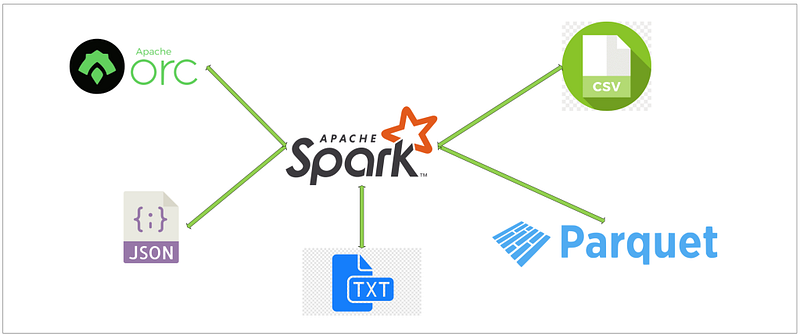
In this blog, we will be discussing Spark ETL with files. We will be considering CSV, JSON and Parquet files. These are the most commonly used files.

Most of the people heard about CSV and JOSN files but not Parquet files. Parquet files are files which store data in column stores and that’s why it uses less space and is very efficient while reading from parquet files.

Today, we will be doing the task below in Spark.
  1. Read CSV file and write into dataframe
  2. Read JSON file and write into dataframe
  3. Read Parquet file and write into dataframe
  4. Read text file and write into dataframe
  5. Create temp table for all
  6. Create JSON file from CSV dataframe
  7. Create CSV file from Parquet dataframe
  8. Create parquet file from JSON dataframe
  9. Create orc file from JSON dataframe

First clone below GitHub repo, where we have all the required sample files and solution.

If you don’t have setup for Spark follow earlier blog for setting up Data Engineering tools in your system.

For all of the above Spark data pipelines, we will be using open (public) data.

Spark ETL with files

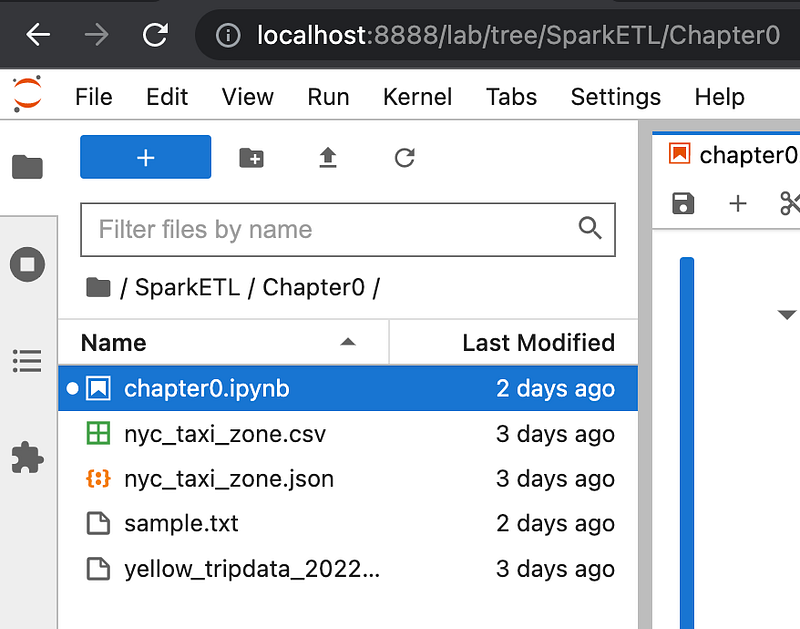
First of all, open Jupyter lab and upload all the files from GitHub chapter 0 to there.
Open notebook and start Spark session
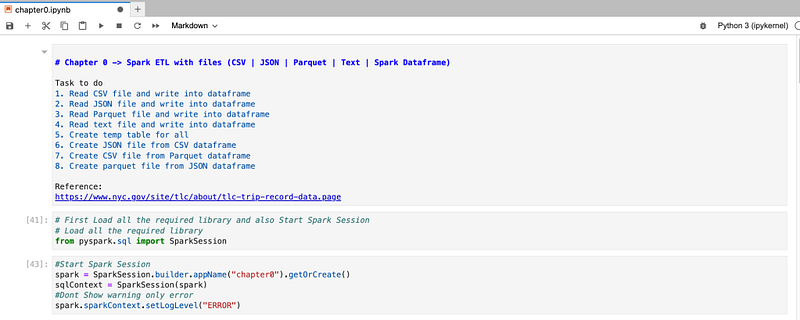
Our spark session is started now with application name “chapter0”. Now we can start with all ETL.

Read CSV file and write into dataframe

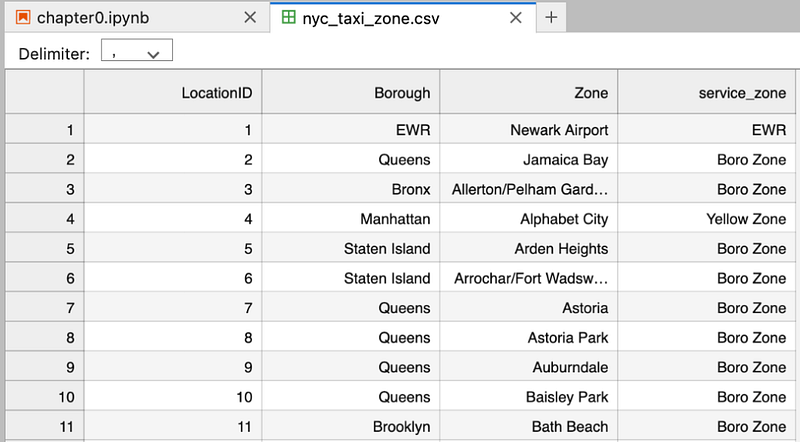
We have nyc taxi data in CSV format in below format and we want to load that data into dataframe.
For that, we will use below code

#Load CSV file into DataFrame
csvdf = spark.read.format("csv").option("header","true").option("inferSchema","true").load("nyc_taxi_zone.csv")

In format we are specifying that we have CSV file and header is true as we have first row as header in data.

This will load data into dataframe. Once data loaded into dataframe. We can print schema and can also check data loaded or not.

#Checking dataframe schema
csvdf.printSchema()
csvdf.show(n=10)

Read JSON file and write into dataframe

We have the same nyc taxi data in JSON format and now we want to load data into dataframe.
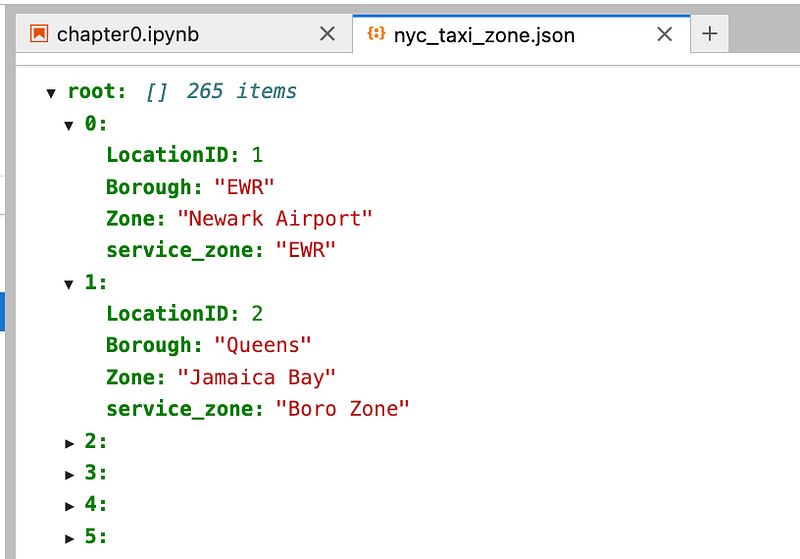
We will use same code as we used for CSV but this time we will specify JSON format.

#Load Json file into DataFrame
jsondf = spark.read.format("json").option("multiline","true").load("nyc_taxi_zone.json")

Here, it is important that we specify multiline true otherwise it will not understand JSON data. (As this is multiline json. when it is not multiline json it is not need to specify this one)

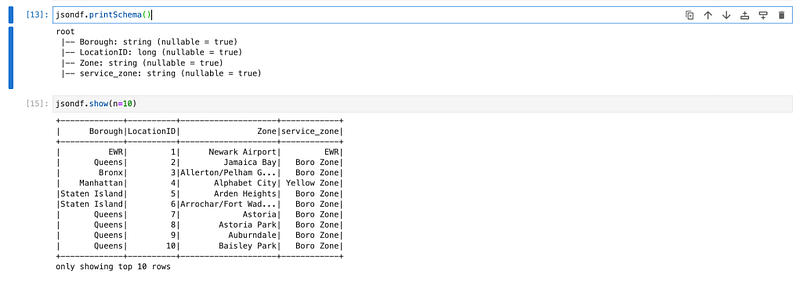
We will print schema and also check data.

jsondf.printSchema()
jsondf.show(n=10)
Read Parquet file and write into dataframe

Please take sample file from below location and out on same folder. (File size is more than 25 MB so could not able to put on GitHub) ->

https://d37ci6vzurychx.cloudfront.net/trip-data/yellow_tripdata_2022-01.parquet

Use any of the parquet viewer to have look on file
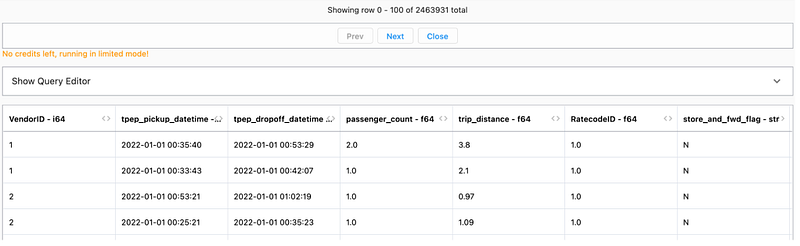
We will use the same code for reading data from parquet file by specifying format as parquet.

parquetdf = spark.read.format("parquet").load("yellow_tripdata_2022-01.parquet")

This file size is more than 25 MB and has 2.4 M rows but it is loaded in dataframe very fast. The reason behind that is parquet store data into column store format.

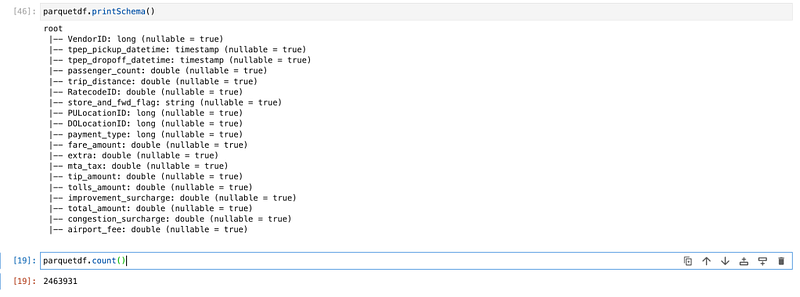
We will check schema and print row count.

parquetdf.printSchema()
parquetdf.count()
Read text file and write into dataframe

We have one sample text file and now loading text file into dataframe as below.
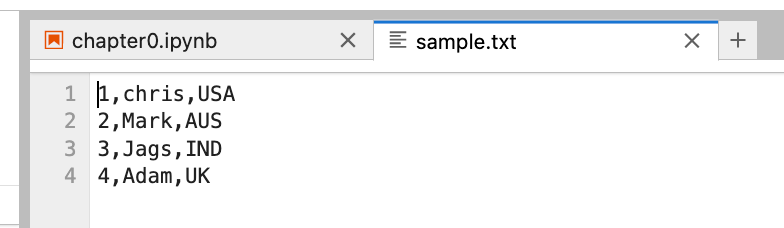
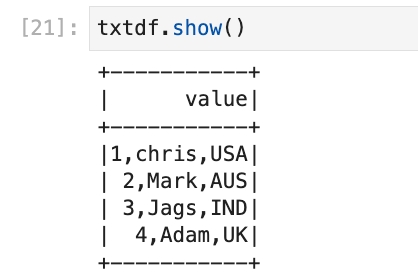
Code for the same

txtdf = spark.read.text("sample.txt")
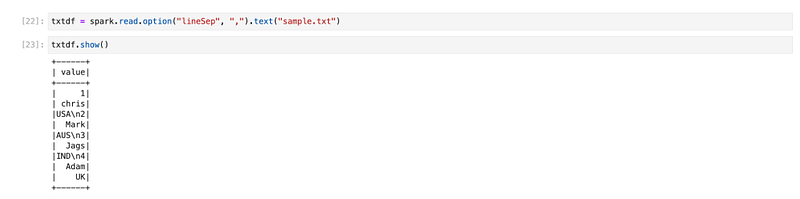
we can specify what a line separator is. for example, if we say line separator is ‘,’
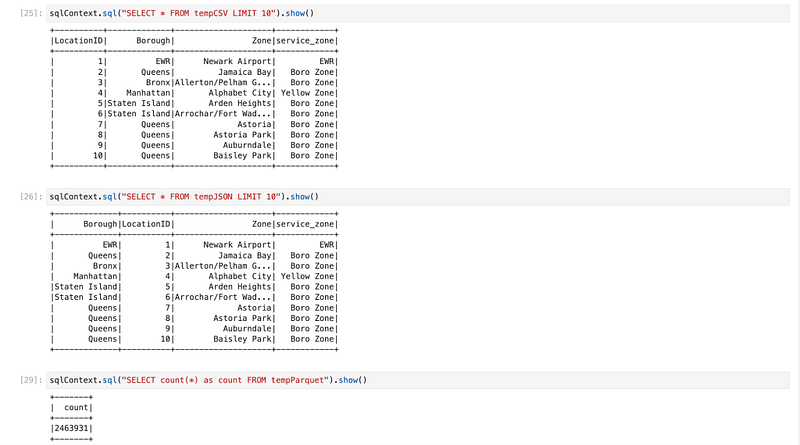
Create temp table for all

We have all the data into dataframe. Now we will create table table/view. So that we can write spark SQL queries.

csvdf.createOrReplaceTempView("tempCSV")
jsondf.createOrReplaceTempView("tempJSON")
parquetdf.createOrReplaceTempView("tempParquet")
txtdf.createOrReplaceTempView("tempTXT")
Create JSON file from CSV dataframe

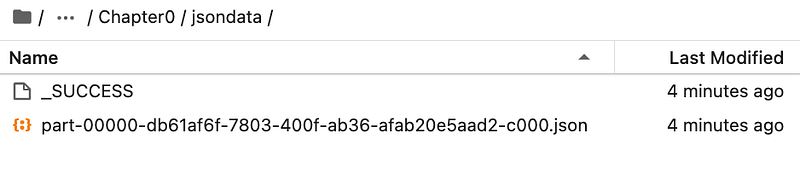
We have data in CSV which we want to convert into JSON format. Data is already loaded in dataframe so we can directly use spark write and specify format as JSON, it will create JSON files.

csvdf.write.format("json").save("jsondata",mode='append')

format -> format of file in which we want to write

mode -> There are three modes. append which appends data into existing location (folder). overwrite which overwrite existing file with new file. And ignore which will ignore if there is file on that location.

We have specified destination as “jsondata”, so it created folder with that name and put files in JSON format

Create CSV file from Parquet dataframe

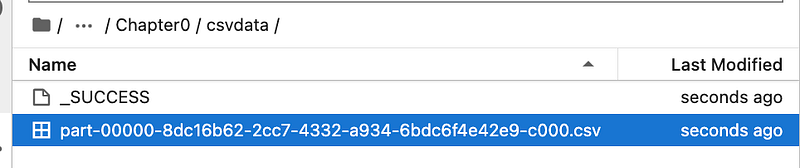
Same way we will use below code for creating CSV files from parquet source.

parquetdf.write.format("csv").option("header","true").save("csvdata",mode='append')
Create parquet file from JSON dataframe

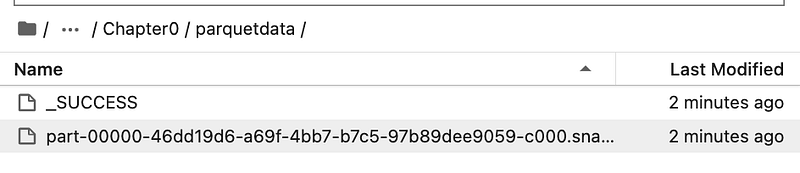
We will use the same code for creating parquet file from JSON source.

jsondf.write.format("parquet").option("compression","snappy").save("parquetdata",mode='append')

We can also compress parquet files. If you see in our code, we have passed compression type snappy which will compress file.
Create orc file from JSON dataframe

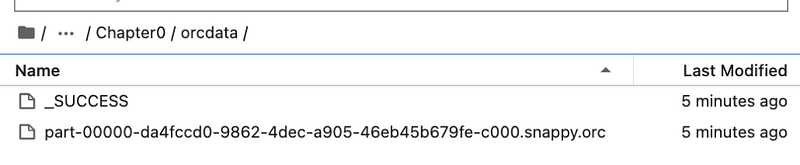
Same way to create orc files from JSON source, we will use below code.

jsondf.write.format("orc").save("orcdata",mode='append')
Conclusion:

spark. Read -> Using file read we can read file by specifying file format. (CSV, JSON, text, parquet, orc or avro)

spark. Write -> Using this we can write to file by specifying file format in which we need data. (Format -> CSV, JSON, text, parquet, orc or avro)

Video explanation:

Spark
Databricks
Pyspark
Etl
Spark Sql
Recommended from ReadMedium