avatarRavishankar Nair

Free AI web copilot to create summaries, insights and extended knowledge, download it at here

3987

Abstract

gle. With gRPC, the client application can directly call methods from a server application located on a different computer as if it was a local object. This makes it easier to create distributed services and applications.</p><p id="3cae">By default, gRPC uses <a href="https://protobuf.dev/overview">Protocol Buffers</a>, Google’s mature open source mechanism for serializing structured data (although it can be used with other data formats such as JSON).</p><h1 id="244a">What Spark lacks without an API Connect ?</h1><p id="9a4a"><a href="https://www.linkedin.com/in/mgrund/?originalSubdomain=de">Martin Grund</a>, who is leading the project and defined its initial design, explains in the <a href="https://issues.apache.org/jira/browse/SPARK-39375">SPARK-39375</a> pull request:</p><ul><li><b>Stability</b>: A simple <i>OutofMemory</i> from one user can bring down a shared cluster</li><li><b>Maintenance</b>: dependencies in the classpath introduce some challenges, like Scala versions, Spark versions, Jar file conflicts etc.</li><li><b>Developer Productivity</b>: Just like an IDE can connect to a database, we want our local environment to connect to a remote Spark cluster</li><li><b>Native Support</b>: As mentioned earlier, required 3rd party tools like Apache Livy.</li></ul><figure id="b0b1"><img src="https://cdn-images-1.readmedium.com/v2/resize:fit:800/1*_4ToaDHQGucS1rYf-Gw4_g.png"><figcaption>Issues with Spark before Spark Connect</figcaption></figure><p id="b349">The way to overcome the situation is to segregate the client and server by an interface or API.</p><p id="821b">The client API is architected to be thin, so that it can be installed and executed from everywhere: in application servers, IDEs, notebooks, and programming languages. The Spark Connect API builds on Spark’s famous DataFrame API using unresolved logical plans as a language-agnostic protocol between the client and the Spark driver. This is illustrated below</p><figure id="6151"><img src="https://cdn-images-1.readmedium.com/v2/resize:fit:800/1*zPkzwbgKN9pSHOplvHK3dw.png"><figcaption>Spark Connect provides a Client API for Spark (Courtesy: <a href="https://www.databricks.com/blog/2022/07/07/introducing-spark-connect-the-power-of-apache-spark-everywhere.html">Databricks</a>)</figcaption></figure><p id="f133">The Spark Connect client converts DataFrame operations into unresolved logical query plans which are encoded using protocol buffers. These are sent to the server using the gRPC framework.</p><p id="899e">The Spark Connect endpoint embedded on the Spark Server receives and converts unresolved logical plans into Spark’s logical plan operators. After building an initial parse plan, the standard Spark execution process kicks in. Results are streamed back to the client through gRPC as <a href="https://arrow.apache.org/">Apache Arrow</a>-encoded row batches. I am not going to talk about Arrow in this article, but if you want to know the amazing power of Arrow format, please refer my other article here:</p><div id="20ab" class="link-block"> <a href="https://medium.com/@ravishankar.nair/turbocharging-panoiq-data-fabric-with-apache-arrow-f729220b35f0"> <div> <div> <h2>Turbocharging PanoIQ Data Fabric with Apache Arrow</h2> <div><h3>Co-written with Chris Wolfl, Director, Technology at Crowley Maritime Corporation, United States</h3></div> <div><p>medium.com</p></div> </div> <div> <div style="background-image: url(https://miro.readmedium.com/v2/resize:fit:320/1*b_TNLa88kceZ2pPILjVuHQ.png)"></div> </div> </div> </a> </div><p id="c31d">Martin Grund had given a powerful example in <a href="https://www.linkedin.com/video/live/urn:li:ugcPost:7067167937702346754/">one of his presentations</a>, which exemplifies the power of this decoupled architecture using Spark connect:</p><figure id="c493"><img

Options

src="https://cdn-images-1.readmedium.com/v2/resize:fit:800/1*xD1G45Iw1afzDOMuf6Nlpw.png"><figcaption>Spark Connect’s Advantage</figcaption></figure><h1 id="7665">How does Spark Connect Work?</h1><p id="47fc">Undoubtedly, one of the most powerful features of Spark is Dataframe API. The operations on a dataframe clearly demonstrates the intent of it. For example, if you look at below code, we are reading a table, selecting some columns and sorting it by date followed by choosing 10 rows. We understand the intent completely. Dataframe operations in Spark mostly are <i>“eager”, which means they are evaluated immediately when you invoke them.</i> While using SparkConnect, we are trying to make the same “<i>lazy</i>”, which means that rather than creating the physical plan and immediately executing it (which was the case before SparkConnect), we create an intermediary logical plan, just which specifies the intent of the operation in a language agnostic way. Its like saying “We want to read a table. We don’t care how the table is represented in parquet or ORC for that matter” — think like one layer higher abstraction tan the actual execution plan. Once this protobuf representation is sent over wire through gRPC to the actual Spark cluster, then the correct full logical plan is created by the catalyst optimizer and is executed exactly the same way. how we execute a dataframe operation without SparkConnect. Looks cool and this is depicted below, courtesy to SparkConnect documentation.</p><figure id="8270"><img src="https://cdn-images-1.readmedium.com/v2/resize:fit:800/1*8IZsdEB9EHpK6NtidlAwdA.png"><figcaption>Mechanism behind SparkConnect based execution</figcaption></figure><h1 id="74a8">Let’s Get Into Action</h1><p id="7e91">Now it’s time to see things in snippets of code.</p><p id="1821">Step 1: Install latest version of Spark ( ≥ 3.4.0). Start the Spark Connect Server as follows</p><figure id="b532"><img src="https://cdn-images-1.readmedium.com/v2/resize:fit:800/1*cG4g9roU01FIiuajhGwCuQ.png"><figcaption>Start your Spark Connect Server</figcaption></figure><p id="c7b3">Step 2: Initiate a new session ( We have used PySpark) which is connecting to the Spark Connect Server. Note that this is different from earlier approaches where entire Spark library is to be imported.</p><figure id="045f"><img src="https://cdn-images-1.readmedium.com/v2/resize:fit:800/1*HGAhS-9A9JOGrae9TqEmRA.png"><figcaption>Initiate a Connect Session</figcaption></figure><p id="fe87">Observe the pyspark command. We are connecting to a server remotely.</p><p id="165a">Step 3: Execute your code:</p><figure id="e3aa"><img src="https://cdn-images-1.readmedium.com/v2/resize:fit:800/1*VVBMXl7WjVNy2qStzguMyw.png"><figcaption>PySpark with SparkConnect in Action</figcaption></figure><p id="8634">Same steps can be followed for Scala too. You may now write the same code in a Jupyter notebook with PySpark import. The client is now tin, lightweight and is decoupled from server unlike before.</p><p id="f5fa">Note that APIs such as <a href="https://spark.apache.org/docs/latest/api/scala/org/apache/spark/SparkContext.html">SparkContext</a> and <a href="https://spark.apache.org/docs/latest/api/scala/org/apache/spark/rdd/RDD.html">RDD</a> are deprecated in all Spark Connect versions.</p><h1 id="d216">Summary</h1><p id="84c9">If you want to go into more granular details, please refer to<a href="https://github.com/apache/spark/tree/master/connector/connect"> here and walk through the code</a>. Obviously, this feature is a very essential and necessary one, and let’s embrace it for our future developments.</p><p id="8b96">If you need more details , connect with me <a href="https://www.linkedin.com/in/ravi-shankar-7785788/">here</a> or write to me at ravishankarDOTnairATgmailDOTcom</p><p id="6a1e">To my team at PassionBytes, now we don’t to hard code all dependent libraries to trigger a job from Airflow scheduler :)</p><p id="496d">Thank you for reading…</p></article></body>

Spark Connect: Thin Client in Any Language Can Now Trigger a Spark Cluster Job

Democratizing Distributed Cluster Computing From Local

Introduction

Interface programming is fun, one which fascinated me since the initial days of Java language release in 1995. If you define a method in an interface (usually an abstraction) , then different manifestations (basically the classes in an Object Oriented Language) can implement this interface by providing the concrete definition of the abstraction. Now the interface becomes a type you can use on left hand side and any implementation of that interface can come on right hand side. A function which takes interface as parameter can take the relevant implementations as well. A superb way of Liskov Substitution Principle in action. This happens within the same system in context. What if, if two different software elements or systems in different languages want to communicate? What if we need to get the credit score before issuing a credit card, from multiple credit unions ? What is we want to get current location from Google Maps ? The answer is Application Programming Interface or API in short. A monolithic architecture can be made scalable and flexible by the proper use of API. Spark was monolithic, in a sense that when we submit a task, we need to be with the Spark driver and include the Spark libraries (Unless you use Spark’s JDBC or Apache Livy which is currently in incubation phase). This articles examines and illustrates the use of Spark Connect, a method where code in any language can trigger a Spark job without having the heavy dependencies.

API Explained with an Example
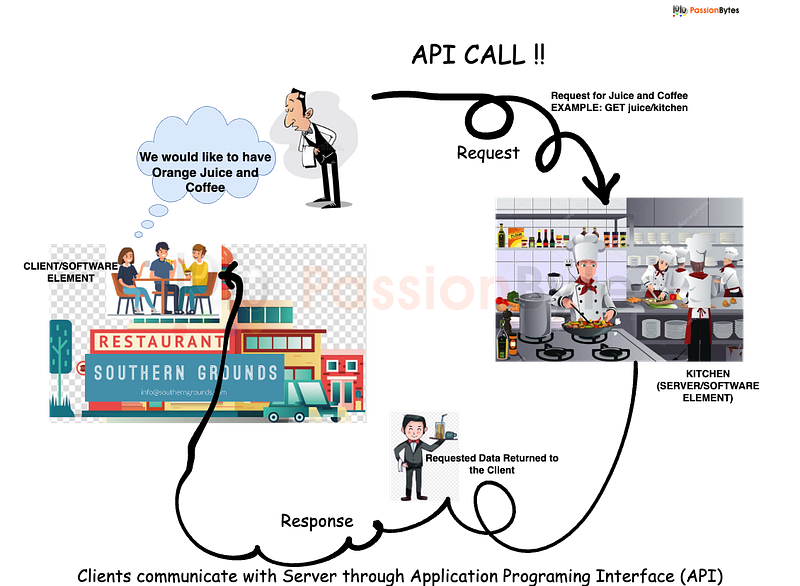
Trivial Example to Explain APIs

My visit to a local restaurant & coffee shop Southern Grounds triggered me an idea to put context to my topic. To understand exactly how an API works, consider this trivial example. When you go to a restaurant (Disclaimer : A great coffee shop belonging to my incredible mentor and friend) , a waiter will take your order (or you go to the kiosk or you wait in the queue to order) and report it to the kitchen. The kitchen makes your food, and the waiter brings it back to your table.

In this example, one program is you (the person ordering food or the delicious coffee), and one program is the kitchen. The waiter represents the API that is used to receive requests and return something. In this case, the waiter returns your order, but an actual API would return data or other functionality.

API specifications/protocols

The waiter who took order from you in our previous example can communicate the required order items to kitchen in many ways. Traditional method is to write in a peace of paper and deliver it to kitchen staff, or modern approach may be to use a tablet which will automatically broadcast the order items to a TV screen in kitchen. For APIs also, we have different protocols : RPC, SOAP, REST, GraphQL, gRPC etc are some of the prominantly used protocols in our context. Lets look at gRPC, because thats the one used for Spark Connect API.

gRPC is an open-source universal API framework that is also classified under RPC. gRPC is latest in this categories and was released publicly in 2015 by Google. With gRPC, the client application can directly call methods from a server application located on a different computer as if it was a local object. This makes it easier to create distributed services and applications.

By default, gRPC uses Protocol Buffers, Google’s mature open source mechanism for serializing structured data (although it can be used with other data formats such as JSON).

What Spark lacks without an API Connect ?

Martin Grund, who is leading the project and defined its initial design, explains in the SPARK-39375 pull request:

  • Stability: A simple OutofMemory from one user can bring down a shared cluster
  • Maintenance: dependencies in the classpath introduce some challenges, like Scala versions, Spark versions, Jar file conflicts etc.
  • Developer Productivity: Just like an IDE can connect to a database, we want our local environment to connect to a remote Spark cluster
  • Native Support: As mentioned earlier, required 3rd party tools like Apache Livy.
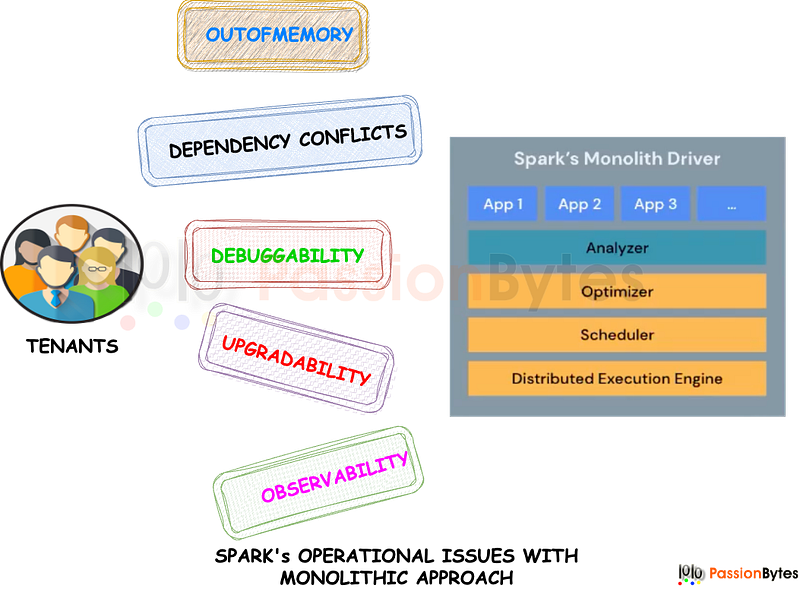
Issues with Spark before Spark Connect

The way to overcome the situation is to segregate the client and server by an interface or API.

The client API is architected to be thin, so that it can be installed and executed from everywhere: in application servers, IDEs, notebooks, and programming languages. The Spark Connect API builds on Spark’s famous DataFrame API using unresolved logical plans as a language-agnostic protocol between the client and the Spark driver. This is illustrated below
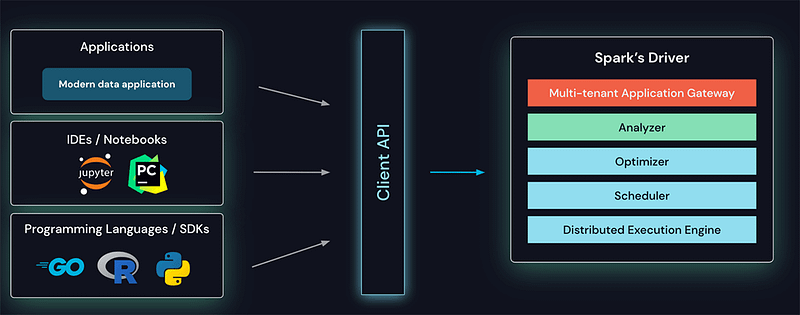
Spark Connect provides a Client API for Spark (Courtesy: Databricks)

The Spark Connect client converts DataFrame operations into unresolved logical query plans which are encoded using protocol buffers. These are sent to the server using the gRPC framework.

The Spark Connect endpoint embedded on the Spark Server receives and converts unresolved logical plans into Spark’s logical plan operators. After building an initial parse plan, the standard Spark execution process kicks in. Results are streamed back to the client through gRPC as Apache Arrow-encoded row batches. I am not going to talk about Arrow in this article, but if you want to know the amazing power of Arrow format, please refer my other article here:

Martin Grund had given a powerful example in one of his presentations, which exemplifies the power of this decoupled architecture using Spark connect:
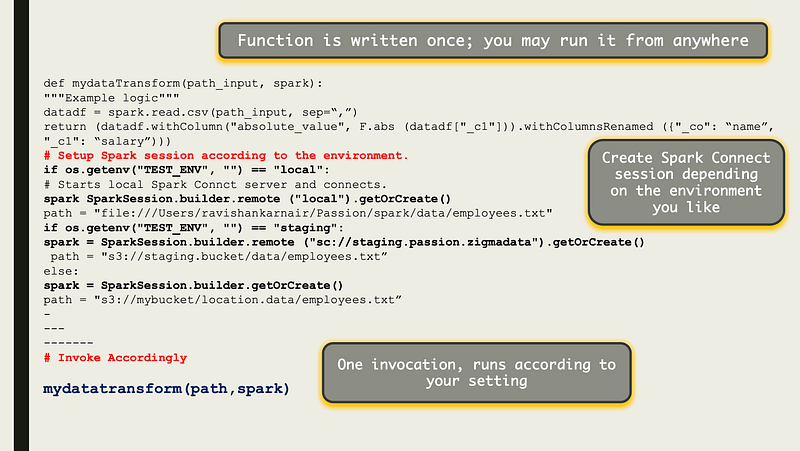
Spark Connect’s Advantage

How does Spark Connect Work?

Undoubtedly, one of the most powerful features of Spark is Dataframe API. The operations on a dataframe clearly demonstrates the intent of it. For example, if you look at below code, we are reading a table, selecting some columns and sorting it by date followed by choosing 10 rows. We understand the intent completely. Dataframe operations in Spark mostly are “eager”, which means they are evaluated immediately when you invoke them. While using SparkConnect, we are trying to make the same “lazy”, which means that rather than creating the physical plan and immediately executing it (which was the case before SparkConnect), we create an intermediary logical plan, just which specifies the intent of the operation in a language agnostic way. Its like saying “We want to read a table. We don’t care how the table is represented in parquet or ORC for that matter” — think like one layer higher abstraction tan the actual execution plan. Once this protobuf representation is sent over wire through gRPC to the actual Spark cluster, then the correct full logical plan is created by the catalyst optimizer and is executed exactly the same way. how we execute a dataframe operation without SparkConnect. Looks cool and this is depicted below, courtesy to SparkConnect documentation.
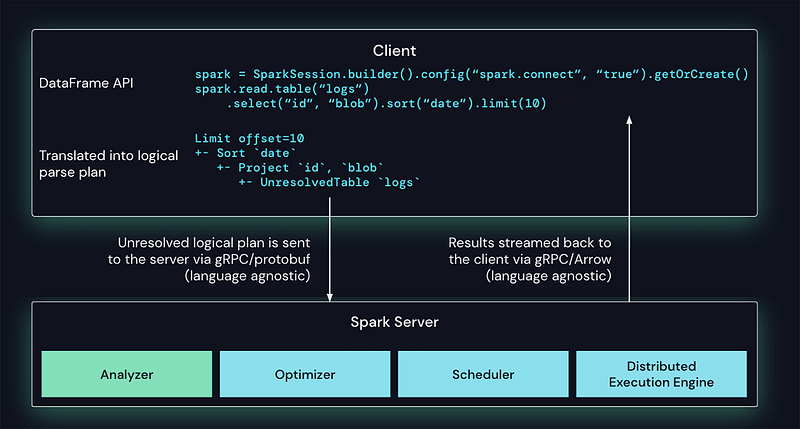
Mechanism behind SparkConnect based execution

Let’s Get Into Action

Now it’s time to see things in snippets of code.

Step 1: Install latest version of Spark ( ≥ 3.4.0). Start the Spark Connect Server as follows
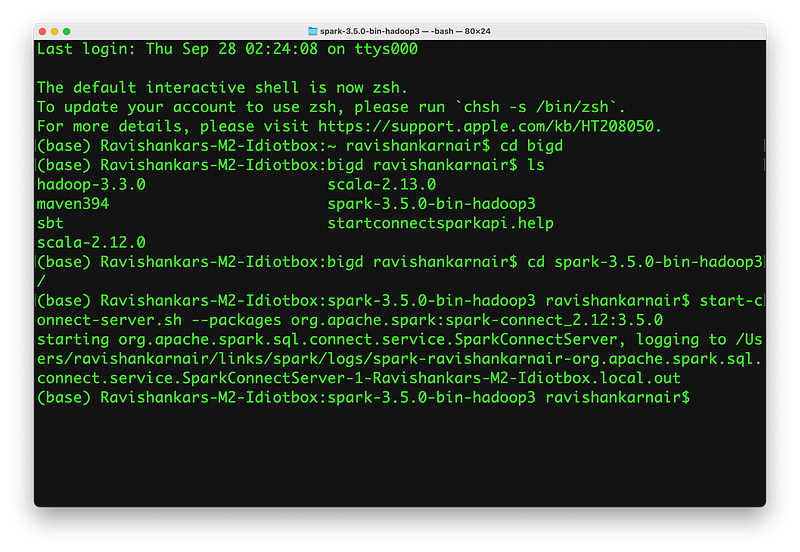
Start your Spark Connect Server

Step 2: Initiate a new session ( We have used PySpark) which is connecting to the Spark Connect Server. Note that this is different from earlier approaches where entire Spark library is to be imported.
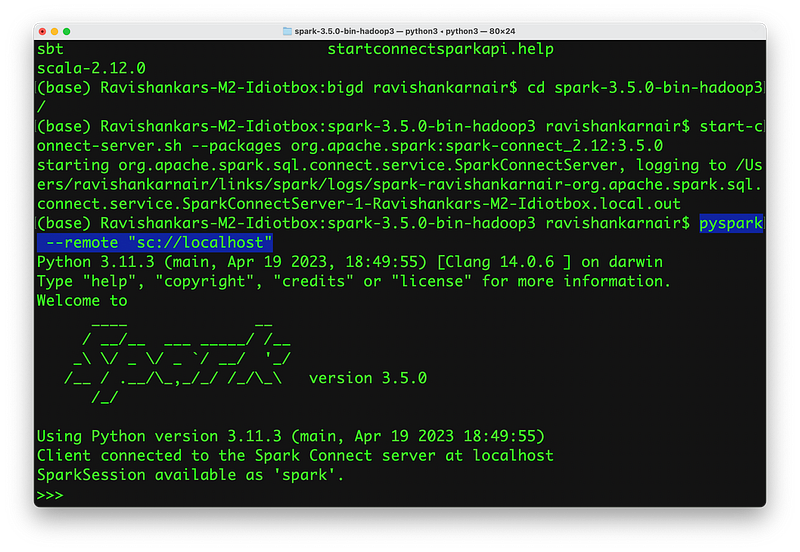
Initiate a Connect Session

Observe the pyspark command. We are connecting to a server remotely.

Step 3: Execute your code:
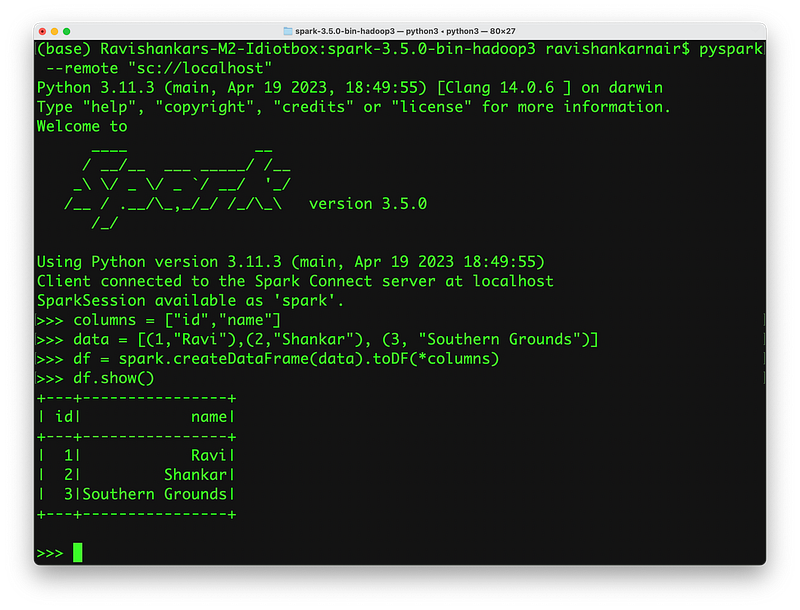
PySpark with SparkConnect in Action

Same steps can be followed for Scala too. You may now write the same code in a Jupyter notebook with PySpark import. The client is now tin, lightweight and is decoupled from server unlike before.

Note that APIs such as SparkContext and RDD are deprecated in all Spark Connect versions.

Summary

If you want to go into more granular details, please refer to here and walk through the code. Obviously, this feature is a very essential and necessary one, and let’s embrace it for our future developments.

If you need more details , connect with me here or write to me at ravishankarDOTnairATgmailDOTcom

To my team at PassionBytes, now we don’t to hard code all dependent libraries to trigger a job from Airflow scheduler :)

Thank you for reading…

Spark Connect
Thin Client Spark
Spark Connect Api
Cluster Computing Local
Spark
Recommended from ReadMedium