Solidity Tutorial – All About Events

In today’s article, we will look at Solidity event also known as logs when talking about more generically Ethereum and EVM. We will see how to use them, their definition and how logs are filtered using the event topic hash and signature, as well as some best practices regarding when these should be used.
We will also cover the check-event-interaction pattern, the famous pattern applied traditionally to re-entrancy for state variables, but we will see why such patterns should be also applied to emitting events and the potential risks and security vulnerabilities involved.
Table of Contents
- How to define an event in Solidity?
- Emitting events in functions
- Event Signature
- Event Topic Hash
- Event parameters & Indexed parameters
- Anonymous Events
- Emitting events in assembly with the LOG opcode
- The Check-Event-Interaction Pattern
- When should you emit events?
How to define an event in Solidity?
Events can be defined in Solidity using the event keyword as follow.
event RegisteredSuccessfully(address user)When using dynamic types and multi value types like bytes , string or arrays of type as T[] , data location does not need to be specified for the parameters in the event definition.
Solidity events can only be defined inside contracts, libraries or interfaces. However since v0.8.22, events can also be defined at the file level.
You can also access events defined in a contract from an other contract. Fully qualified access to events from other contracts is available since Solidity v0.8.15.
Consider the following file
interface ILight {
    event SwitchedON();

    event SwitchedOFF();

    event BulbReplaced();
}
You can access the event from an other contract using the fully qualified access contract name, followed by . and the event name as below:
import {ILight} from "ILight.sol";

contract LightHouse {

    function lightTowardsDirections(uint256 latitude, uint256 longitude) public {
      // code logic

      emit ILight.SwitchedON();
    }

}
Emitting events in functions
You can emit an event within a function using the keyword emit
If a function emits an event, it cannot be defined as view or pure . This is because emitting an event writes data to the blockchain (into the logs).
Show example from popular code projectEvent Signature
The signature of an event in Solidity is formed in the same way as a function signature.
It simply corresponds to the event name + the parameter types separated by commas , , all surrounded with parentheses.
Using our previous example:
event RegisteredSuccessfully(address user)The event signature will be:
RegisteredSuccessfully(address)Event Topic Hash
When listening to the events of a contract, these events are filtered using the event topic hash.
The event topic hash corresponds to the keccak256 hash of the event signature.
Using our previous example:
event RegisteredSuccessfully(address user)The event topic hash will be:
keccak256("RegisteredSuccessfully(address)")

= 0x2a5fc519cb1ec56867d94a911a7ba739c06c6772c4841545feb12cea840ab90c
The event topic hash can be accessed in Solidity using the following syntax below. This will return you the 32 bytes selector topic. The type returned will be indeed bytes32.
bytes32 topicHash = RegisteredSuccessfully.selector;Note that the .selector member for events is a feature available only since Solidity v0.8.15.
If you look at any blockchain logs emitted, the first entry at index 0 for the topics of this log corresponds to the event topic hash. Since topics are what enabled to search through logs, we can deduct therefore that it is the event topic hash that enables to filter:
- for a specific event inside a smart contract at a certain address.
- for a specific event across all the contracts on the Blockchain.
We will see further down below that
anonymousevents are exception to this rule. Theanonymouskeyword making them non searchable, therefor the term “anonymous” used.
Based on this fact, we can also deduct that the most minimal event defined in Solidity with no parameter — like the event `BulbReplaced` or SwitchedON defined above — will use the LOG1 opcode under the hood, to emit a topic in the log, since the event itself is searchable.
More topics can be added and the other topics will use LOG2 , LOG3 , LOG4 and LOG5 as long as these parameters are marked as indexed. Let’s look at indexed parameters in the next section.
Event parameters & Indexed parameters
Events can take parameters of any type, including value types (uintN, bytesN, bool, address...), struct , enum and user defined value type.
The only type not allowed as far as the research of this article goes is the internal function type. External function type are allowed but not internal function type. To illustrate, the code below will not compile.
// This is ok and valid
event SomeEvent(function () external callableFunction);

// This will not compile
event AnotherEvent(function () internal someInternalParameter);
The parameters of Solidity events can be specified as indexed . In this case, it enables to narrow down filtering an event based on a specific value emitted in this event.
Standard Solidity event can contain up to 3 x indexed parameters.
Events defined as anonymous can contain up to 4 x indexed parameters.
On an extra note, any complex type used as event parameter like struct , enum or user defined value type will convert the parameter to the associated value type in the ABI. For instance:
struct: as tuples of types specified in the struct.enum: asuint8- user defined value type: the underlying type.
Emitting events with named parameters
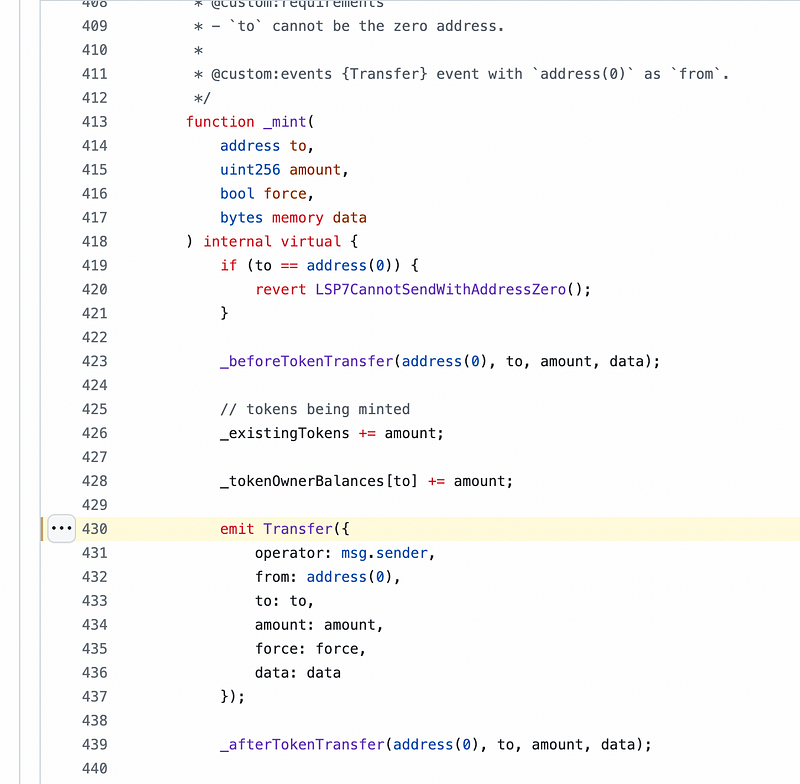
Like named function arguments, it is possible to emit events with named arguments using the object {} syntax. This can help in cases for readability.
Take the following example from the LSP7DigitalAsset implementation on the LUKSO LSP smart contracts. The screenshot below shows a portion of the code inside the internal _mint function that emphasize which parameters are passed to which arguments of the Transfer event.
This provides better readability and clarity.
Anonymous Events
Events can be marked as anonymous. Anonymous events are special in Solidity and the EVM in the sense that they cannot be filtered by their name and therefore not listened to directly.
The Solidity states it as follow:
“…This means that it is not possible to filter for specific anonymous events by name”
Meaning it is not possible to filter for specific anonymous events by name, you can only filter by the contract address.
For instance, you can listen to all the events a smart contract emits. These anonymous events will appear in the listener, but they cannot be subscribed to exclusively using the event name compared to the other events.
You can define an event as anonymous in Solidity by placing the anonymous keyword just after the event definition (after the closing parentheses) and before the semi-colon ;
// SPDX-License-Identifier: UNLICENSED
pragma solidity ^0.8.0;

contract AnonymousEvents {

    event SecretPasswordHashUpdated(bytes32 secretPasswordHash) anonymous;

}
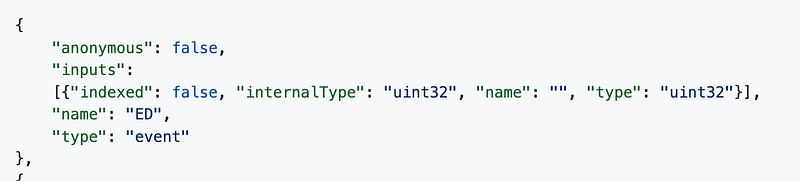
If an event is declared as anonymous , in the contract ABI, the "anonymous" field for the event will be marked as true.
One of the advantages of anonymous events is that they make your contract cheaper to deploy, and they are also cheaper to emit in terms of gas.
A good use case of anonymous events is for a contract that has a single event. It makes sense to listen for all events in the contract since only this event will appear in the event logs. Subscribing to its name is irrelevant since only one single event is defined to be emitted by the contract. Therefore, you can define the event as anonymous and subscribe to all the events logs from the contract and be sure that they will all be the same event.
Let’s look at an example of where anonymous events are used in a popular codebase. An example of the use of an anonymous event is in the DS-Note contract from DappHub.
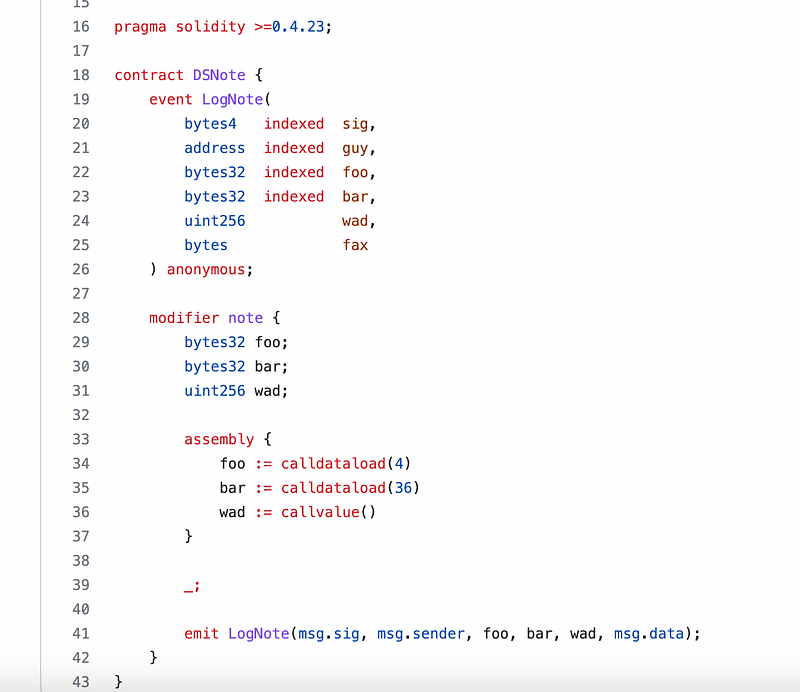
We can see in the code snippet above that since the event is declared as anonymous, this enabled the definition of a 4th “indexed“ parameter.
Note that since anonymous event do not have a bytes32 topic hash, the .selector member is not available for anonymous events.
Emitting events in assembly with LOG opcode
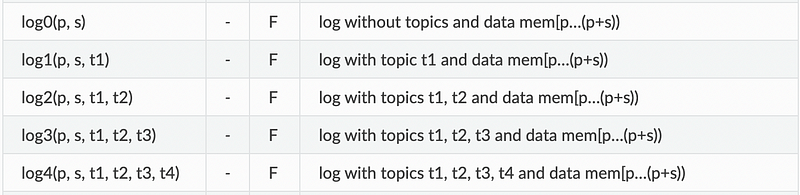
Emitting events in assembly is possible using the logN instruction, which corresponds to the opcode from the EVM instruction set.
To emit events in assembly, you must store all the data to be emitted by the event in memory at a specific location.
Once you have stored this data to be emitted by the event in memory, you can then specify the following parameters to the logN instruction:
- p = the location in memory to start grabbing the data from. This is basically a memory pointer, or an «offset» or «memory index» depending on how you call it.
- s = the number of bytes you want to emit in the event, starting from p.
- All the other parameters
t1,t2,t3andt4are the event arguments you want to be indexable. Note 2 important things here: 1) these should be the same arguments defined in your event definition, in the same order, and 2) these arguments should be put in the data to grab in memory.
The code snippet below shows how this can be done in assembly.
    event ExampleEventAsm(bytes32 tokenId);

    function _emitEventAssembly(bytes32 tokenId) internal{
        bytes32 topicHash = ExampleEventAsm.selector;

        assembly {
            let freeMemoryPointer := mload(0x40)
            mstore(freeMemoryPointer, topicHash)
            mstore(add(freeMemoryPointer, 32), tokenId)

            // emit the `ExampleEventAsm` event with 2 topics
            log2(
                freeMemoryPointer, // `p` = starting offset in memory
                64, // `s` = number of bytes in memory from `p` to include in the event data
                topicHash, // topic for filtering the event itself
                tokenId // 1st indexed parameter
            )
        }
    }
Gas cost with events

All the logging opcodes (LOG0, LOG1, LOG2, LOG3, LOG4) are costly in gas. The more arguments (topics) they have, the more gas they will consume.
Additionally, other factors like indexed value or data size will lead event emissions to increase gas consumption even more.
The Check-Event-Interaction pattern
The Check-Effect-Interaction pattern also apply to events.
One way to detect those is by using the Remix static analyzer tool.
Such pattern is also detected by Slither. When running slither against a contract that emits events after external calls, you will get a finding stating “Reentrancy event”.
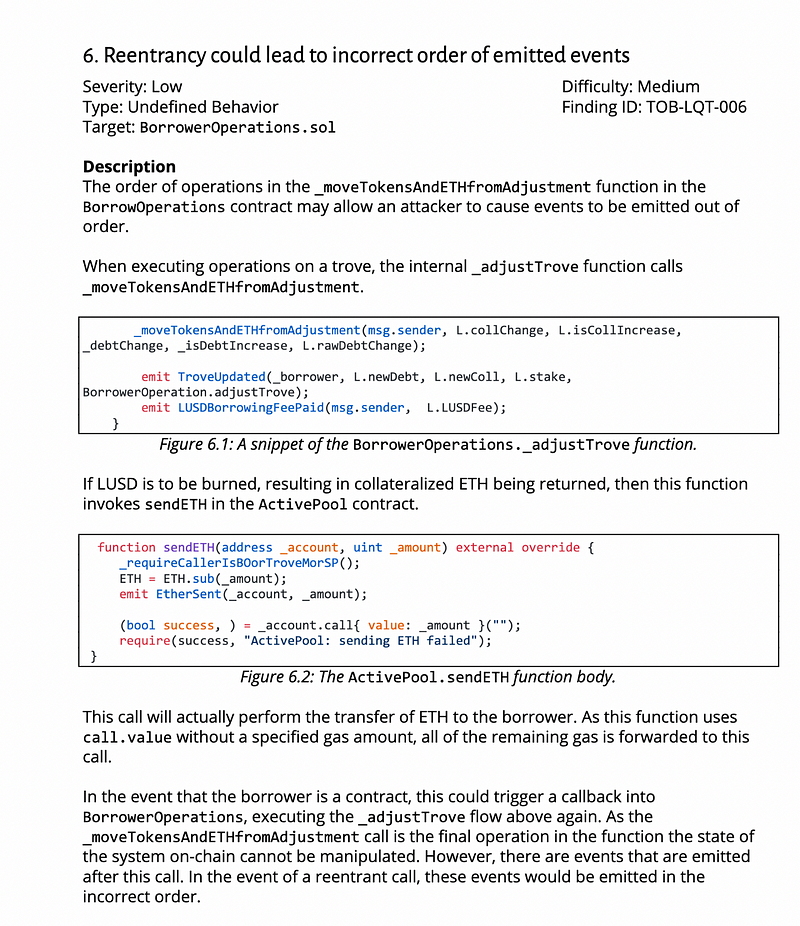
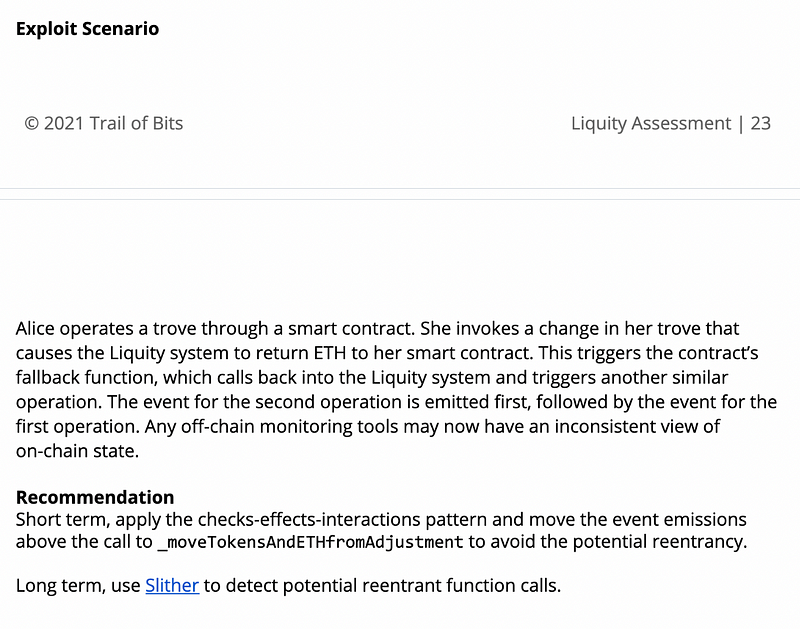
The order is therefore important for dApps so you can have a correct view of which event was emitted first, next and last. This is especially relevant in the case of recursive or reentrant calls. If an event is emitted after an external call is made, and this external call leads to a reentrant call, then:
- the 1st event that will be emitted will be the one after the second reentrant call completed.
- the 2nd event emitted will be the one from the initial transaction made (before the first external call lead to a reentrant call).
This enables to provide a clear audit trail off-chain for monitoring. You can then see which functions were called first and last and the order that each routine ran during the execution of the transaction.
Such potential vulnerability was also discovered and reported by Trail of Bits in an audit for the smart contracts of Liquity.
When should you emit events?
There might be several occasions where emitting events in your contract might be important and useful.
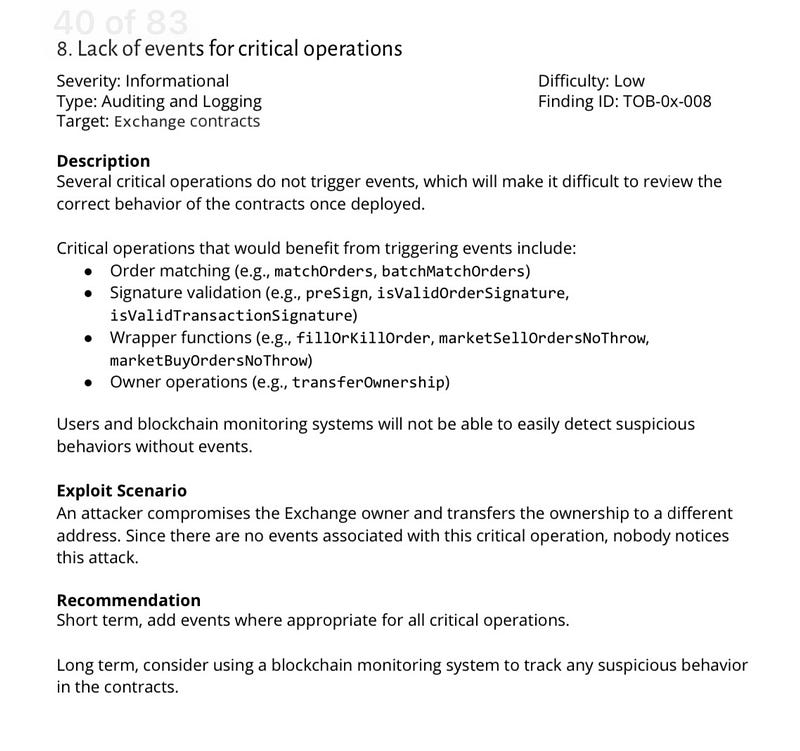
- When some actions by restricted users and addresses are performed (e.g: the owner or the contract admin). This includes, for instance, the popular `transfer ownership (address)` function, which can only be called by the owner to change the contract’s owner.
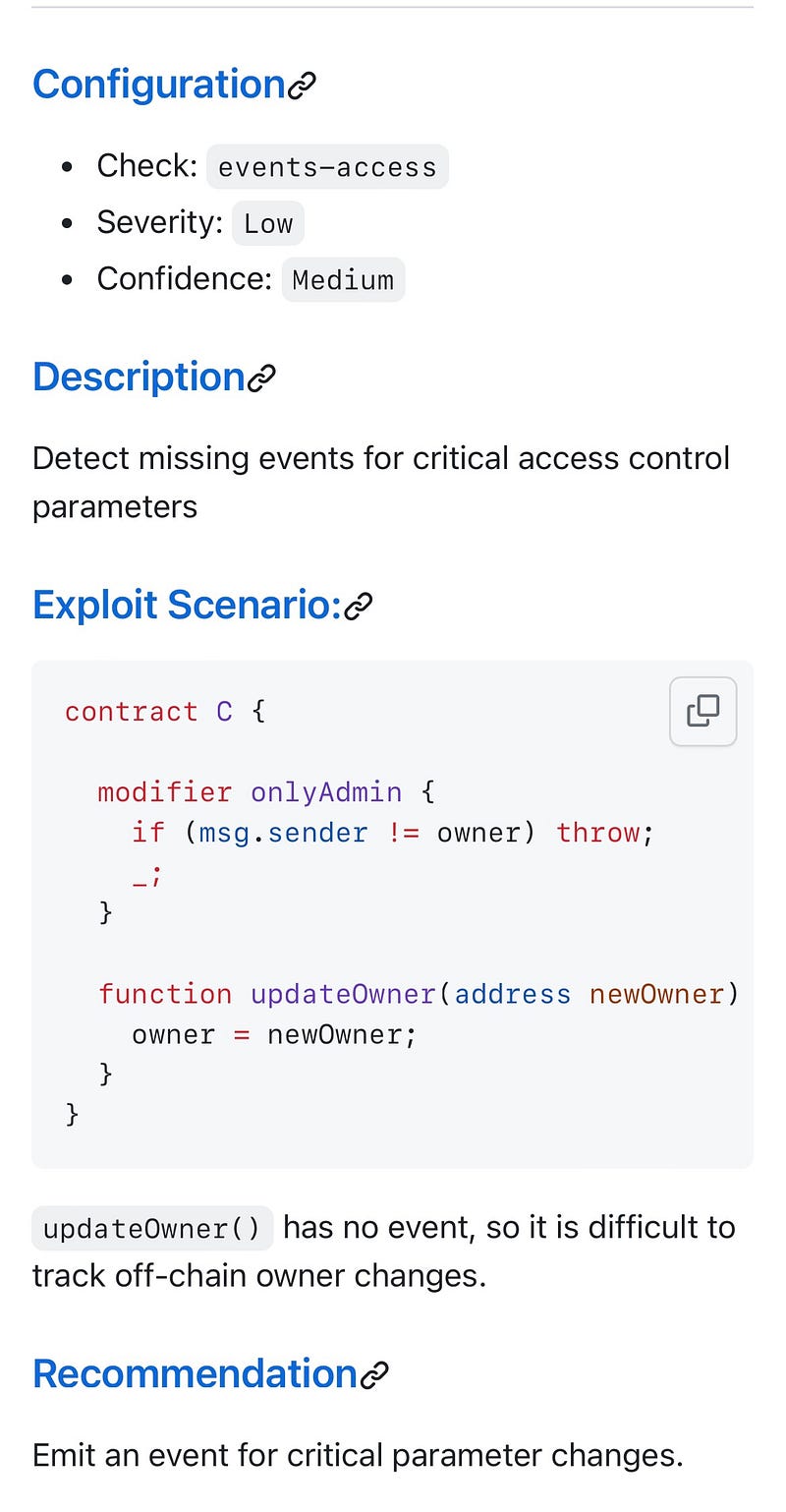
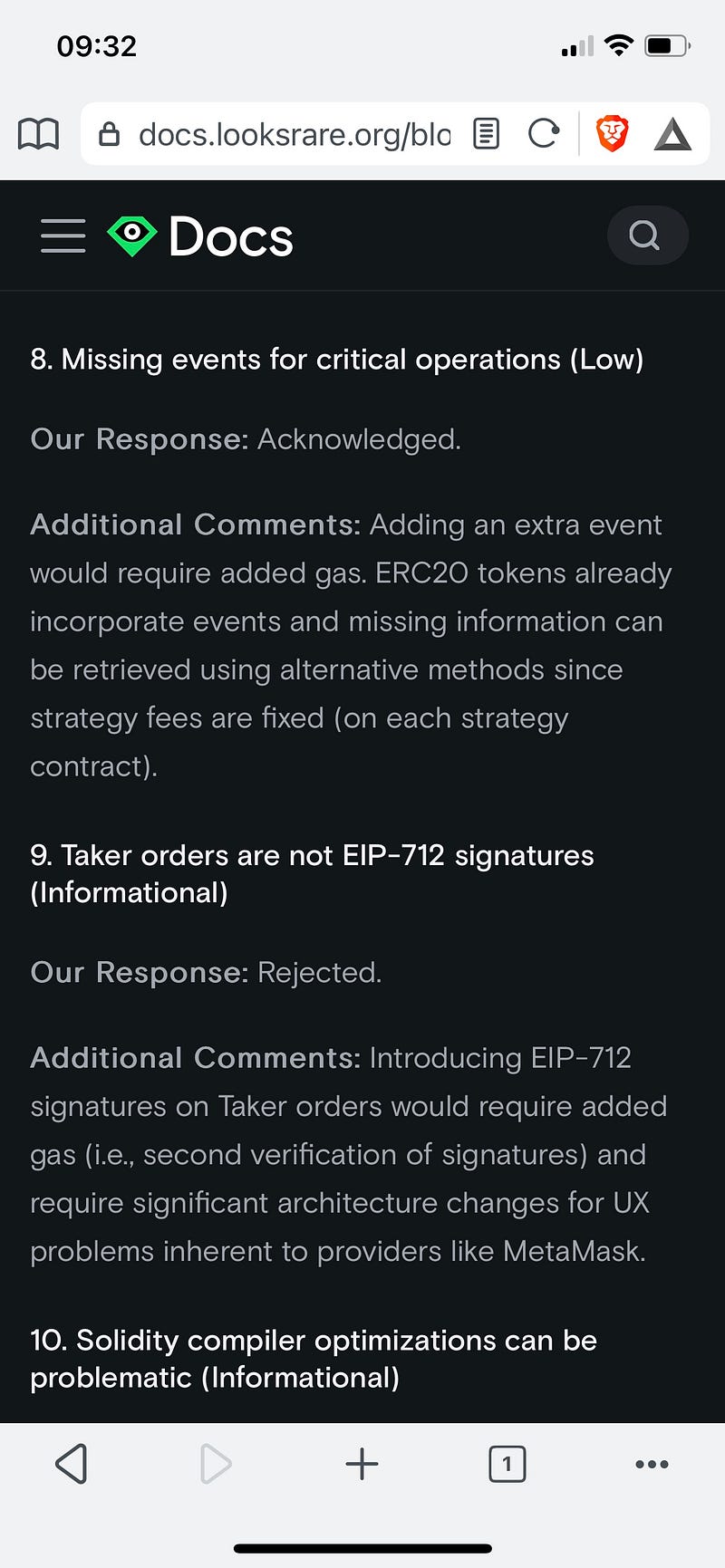
- Changing some critical variable or arithmetic parameters is responsible for the contract's core logic. This is especially relevant in the context of Defi protocols.
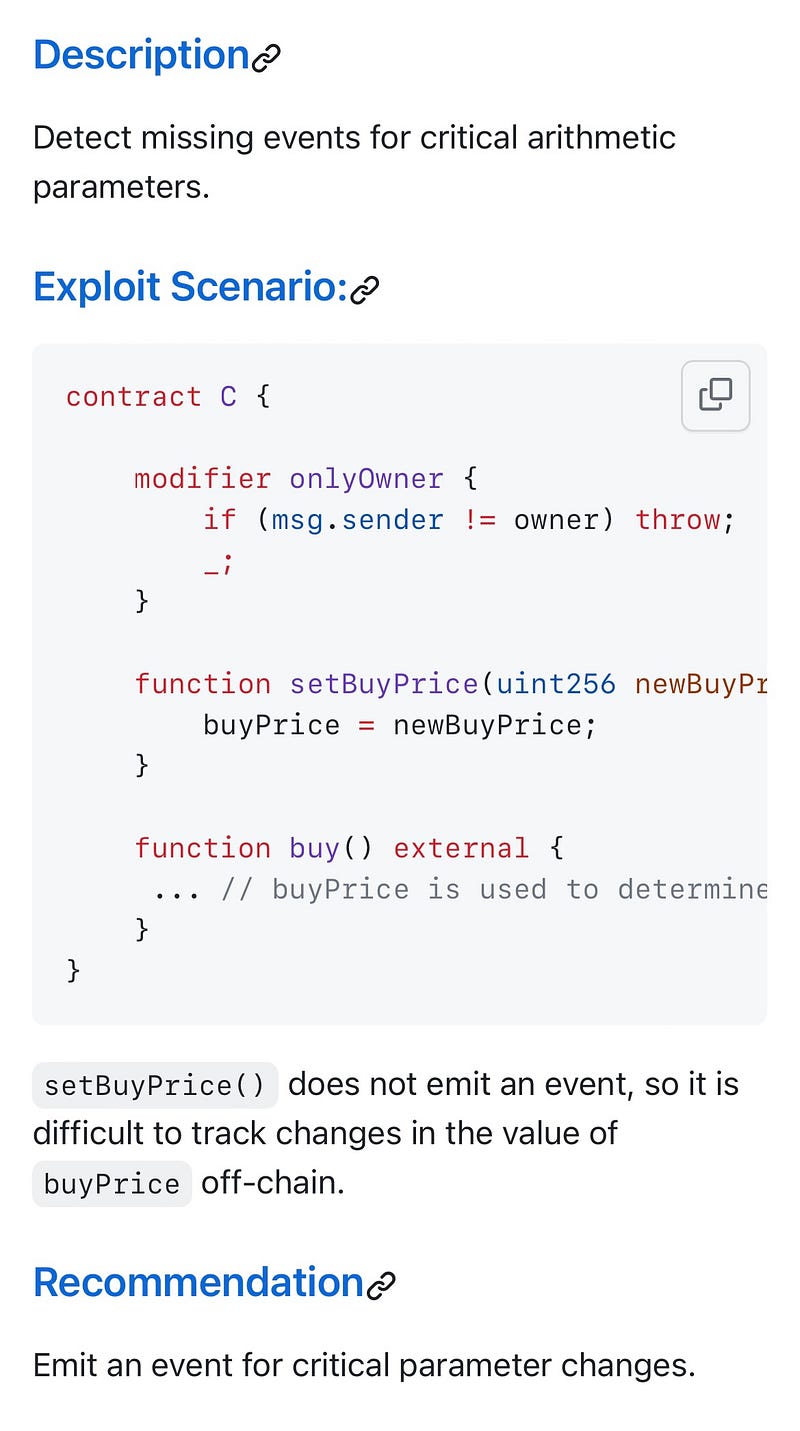
Such cases are described in the Slither detector documentation for more infos.
This was also described in one of Trail audits report for LooksRare
- Monitoring your contracts deployed in production to detect anomalies.