
Software Integration Series: DynamoDB Integration with Spring Boot
A simple guide to integrating Serverless NoSQL database with a Spring Boot application.

DynamoDB is a serverless, NoSQL database offered by AWS. It is a fully managed database and offers reliable performance at any scale. It scales up or down automatically to adjust for capacity and maintain performance.
In this article, we will learn how to easily integrate DynamoDB with a Spring Boot application.
Prerequisites
- Apache Maven
- Docker Desktop
- IDE
- AWS CLI
In this tutorial, we will use docker version of DynamoDB for local integration and testing. Download and Install docker desktop.
Follow the AWS documentation to install AWS CLI.
Maven Dependencies
Let’s create a sample Spring Boot application and include the following dependencies in pom.xml.
<dependencies>
  <dependency>
   <groupId>org.springframework.boot</groupId>
   <artifactId>spring-boot-starter-web</artifactId>
  </dependency>

  <dependency>
   <groupId>com.amazonaws</groupId>
   <artifactId>aws-java-sdk-dynamodb</artifactId>
   <version>1.12.459</version>
  </dependency>

  <dependency>
   <groupId>javax.validation</groupId>
   <artifactId>validation-api</artifactId>
   <version>2.0.1.Final</version>
  </dependency>

  <dependency>
   <groupId>org.projectlombok</groupId>
   <artifactId>lombok</artifactId>
   <version>1.18.26</version>
   <scope>provided</scope>
  </dependency>

 </dependencies>
Spring Boot Starter Web dependency is used for building web or RESTful applications using Spring MVC. AWS SDK for DynamoDB provides APIs to work with DynamoDB. Lombok is used for generating boilerplate code such as getters, setters, and so on. JavaBeans Validation (validation-api) can add constraints to the beans with annotations placed on fields, methods, or classes.
There are various ways to install DynamoDB for local testing. Checkout the official documentation. We will install the docker version for this tutorial. Create a docker-compose.yml to install DynamoDB.
version: '3.8'
services:
  dynamodb-local:
    command: "-jar DynamoDBLocal.jar -sharedDb -dbPath ./data"
    image: "amazon/dynamodb-local:latest"
    container_name: dynamodb-local
    ports:
      - "8000:8000"
    volumes:
      - "./docker/dynamodb:/home/dynamodblocal/data"
    working_dir: /home/dynamodblocal
Let’s define some AWS properties in application.yml file to configure access key and secret.
amazon:
  aws:
    accesskey: fakeAccesKey
    region: eu-central-1
    secretkey: fakeSecret
  dynamodb:
    endpoint: 'http://localhost:8000/'
The properties for access and secret keys can have random values for your local configuration but they are not necessary to authenticate for local installation. We are adding plain text credentials in our code for demo purposes only.
Let’s define a Spring config for DynamoDB which will read config values from application.yml file and establishes connectivity with DynamoDB.
package org.swathisprasad.dynamodbdemo.config;

import com.amazonaws.auth.AWSCredentialsProvider;
import com.amazonaws.auth.AWSStaticCredentialsProvider;
import com.amazonaws.auth.BasicAWSCredentials;
import com.amazonaws.client.builder.AwsClientBuilder;
import com.amazonaws.services.dynamodbv2.AmazonDynamoDB;
import com.amazonaws.services.dynamodbv2.AmazonDynamoDBClientBuilder;
import com.amazonaws.services.dynamodbv2.datamodeling.DynamoDBMapper;
import org.springframework.beans.factory.annotation.Value;
import org.springframework.context.annotation.Bean;
import org.springframework.context.annotation.Configuration;

@Configuration
public class DynamoDBConfig {

    @Value("${amazon.dynamodb.endpoint}")
    String endpoint;
    @Value("${amazon.aws.accesskey}")
    String accesskey;
    @Value("${amazon.aws.secretkey}")
    String secretkey;
    @Value("${amazon.aws.region}")
    String region;

    @Bean
    public DynamoDBMapper dynamoDBMapper() {
        return new DynamoDBMapper(amazonDynamoDB());
    }

    @Bean
    public AmazonDynamoDB amazonDynamoDB() {
        return AmazonDynamoDBClientBuilder
                .standard()
                .withEndpointConfiguration(endpointConfiguration())
                .withCredentials(awsCredentialsProvider())
                .build();
    }

    public AwsClientBuilder.EndpointConfiguration endpointConfiguration() {
        return new AwsClientBuilder.EndpointConfiguration(endpoint, region);
    }

    public AWSCredentialsProvider awsCredentialsProvider() {
        return new AWSStaticCredentialsProvider(new BasicAWSCredentials(accesskey, secretkey));
    }
}
DynamoDBMapper class is the entry point to Amazon DynamoDB and allows to map client-side classes to Amazon DynamoDB tables. It enables us to access our data in various tables.
Let’s define an Entity class for DynamoDB table:
package org.swathisprasad.dynamodbdemo.model;

import com.amazonaws.services.dynamodbv2.datamodeling.*;
import lombok.AllArgsConstructor;
import lombok.Data;
import lombok.NoArgsConstructor;

import java.io.Serializable;

@Data
@NoArgsConstructor
@AllArgsConstructor
@DynamoDBTable(tableName = "LibraryCatalog")
public class LibraryCatalog implements Serializable {

    @DynamoDBHashKey
    @DynamoDBAutoGeneratedKey
    private String author;

    @DynamoDBRangeKey
    private String topic;

    @DynamoDBAttribute
    private String title;

    @DynamoDBAttribute
    private int year;

}
Here, we have defined a DynamoDB table name “LibraryCatalog” using @DynamoDBTable annotation.
An item in DyanmoDB table is comparable to a row in a relational database or a document in NoSQL database. Each item in the table is uniquely identifiable by a primary key that is set on a table level. An item consists of attributes, which are bits of data in the item.
In the class LibraryCatalog, there are four attributes: author, topic, title and year. Author is annotated with DynamoDBHashKey, which is also known as a partition key. The primary key in DynamoDB table can be composed of a Hash and Range Key, or just a Hash key.
In our table, we have defined both Hash and Range keys which constitute a primary key. A Range key is also known as sort key in DynamoDB.
Let’s define a Service class and a simple REST controller to test interaction with DynamoDB.
package org.swathisprasad.dynamodbdemo.service;

import lombok.AllArgsConstructor;
import org.springframework.stereotype.Service;
import org.swathisprasad.dynamodbdemo.model.LibraryCatalog;
import org.swathisprasad.dynamodbdemo.repository.LibraryCatalogRepository;

@AllArgsConstructor
@Service
public class LibraryCatalogService {

    private final LibraryCatalogRepository libraryCatalogRepository;

    public void save(final LibraryCatalog libraryCatalog) {
        libraryCatalogRepository.saveLibraryCatalog(libraryCatalog);
    }

    public LibraryCatalog getLibraryCatalog(final String author, final String topic) {
        return libraryCatalogRepository.getLibraryCatalog(author, topic);
    }

    public void delete(final String author, final String topic) {
        libraryCatalogRepository.deleteLibraryCatalog(author, topic);
    }
}
package org.swathisprasad.dynamodbdemo.controller;
import lombok.AllArgsConstructor;
import org.springframework.http.HttpStatus;
import org.springframework.http.ResponseEntity;
import org.springframework.web.bind.annotation.*;
import org.swathisprasad.dynamodbdemo.model.LibraryCatalog;
import org.swathisprasad.dynamodbdemo.service.LibraryCatalogService;
@AllArgsConstructor
@RequestMapping("library-catalog")
@RestController
public class LibraryCatalogController {
private final LibraryCatalogService libraryCatalogService;
@PostMapping("/")
public ResponseEntity<Void> saveLibraryCatalog(@RequestBody LibraryCatalog libraryCatalog) {
libraryCatalogService.save(libraryCatalog);
return ResponseEntity.ok().build();
}
@GetMapping("/")
public LibraryCatalog getLibraryCatalog(@RequestParam("author") String author, @RequestParam(value = "topic") String topic) {
return libraryCatalogService.getLibraryCatalog(author, topic);
}
@ResponseStatus(value = HttpStatus.NO_CONTENT)
@DeleteMapping("/")
public void deleteLibraryCatalog(@RequestParam("author") String author, @RequestParam(value = "topic") String topic) {
libraryCatalogService.delete(author, topic);
}
}Testing Spring Boot Application
Before we test our application, let’s run docker-compose file using the following command via a terminal or command prompt.
docker-compose up
Once the docker container for DynamoDB is successfully started, let’s create DynamoDB table using AWS CLI.
aws dynamodb create-table \
 - table-name LibraryCatalog \
 - attribute-definitions \
 AttributeName=author,AttributeType=S \
 AttributeName=topic,AttributeType=S \
 - key-schema \
 AttributeName=author,KeyType=HASH \
 AttributeName=topic,KeyType=RANGE \
 - provisioned-throughput \
 ReadCapacityUnits=5,WriteCapacityUnits=5 \
 - endpoint-url http://localhost:8000
Here, we have specified attributes for a Hash key (mandatory) and Range key (optional) in the attribute definition.
All other attributes can be specified when inserting data into the table.
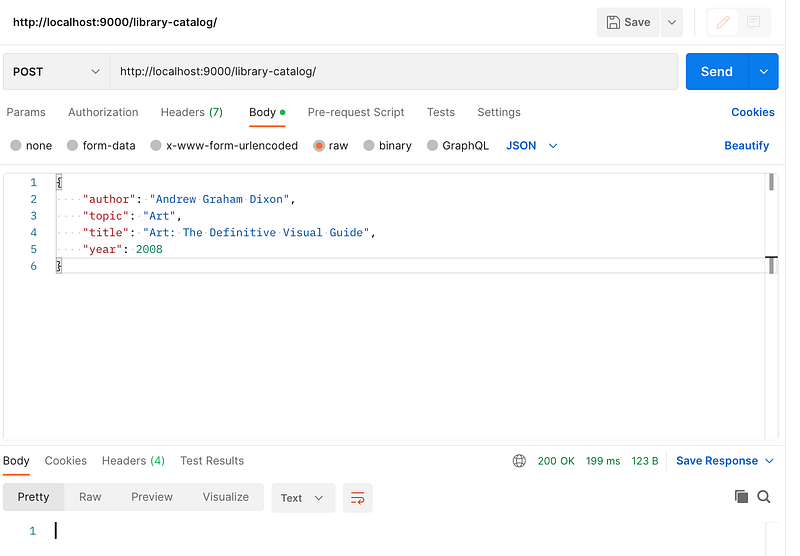
Let’s start Spring Boot application and make a sample POST request using Postman.
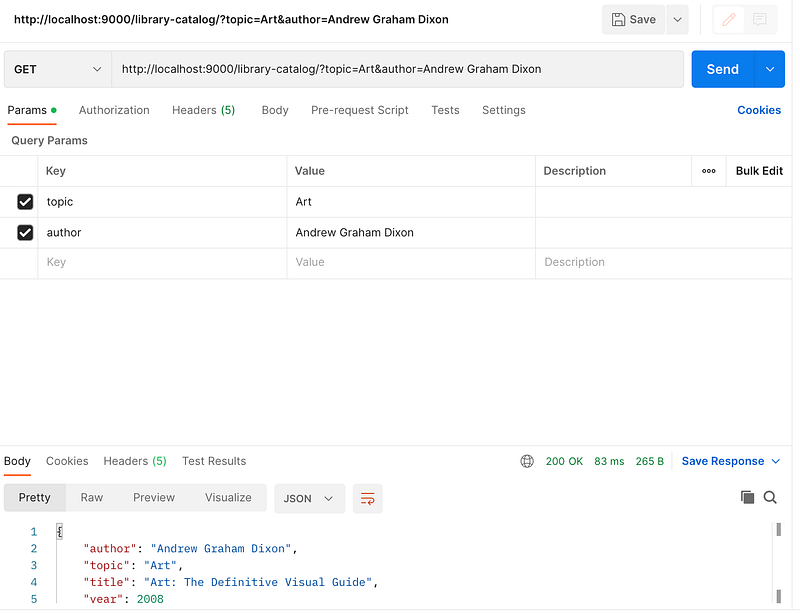
Let’s make a sample GET request.
Conclusion
We integrated DynamoDB with a Spring Boot application successfully using AWS SDK for Java. After we complete testing locally, we should be able to use a production instance of DynamoDB on AWS and run the deployed code with some minor changes to configuration.
I hope this article provided a basic understanding on DynamoDB and its integration with Spring Boot.
The entire code for this article and IaC template can be found in my GitHub repo.