
So You Want to Start A Podcast
An overview of what you need to know before you hit record
Currently, there are over 1 million podcasts in existence right now. I happen to have two of them and have been podcasting for over three years. One million may seem like a lot but it’s not. When you consider there are over 1.5 Billion blogs in the world what is one million of anything? Consider this. Out of the one million or so podcasts, it is estimated that only 350,000 or so are currently active and out of those, roughly 75% will stop being active within a year. So the odds are in your favor that someone will listen to what you have to say in a podcast, providing you keep it current and active.
However, before you record the first episode of your first podcast, there are several steps to consider. Forget about the “Four things to start a podcast” type of web articles that you’ve no doubt read. Trust me, it’s more than four steps to get your podcast up and running. After setting up my podcasts, as well as podcasts of others, I wanted to share the steps I’ve taken to bring these podcasts to life.
Figure out WHY you want to podcast.
First of all, why do you want to podcast? Is it to have a hobby? Are you bored and want to try something new? Are you wanting to have your voice heard? Do you want to promote something you believe in? Do you want to podcast to try and make money?
Figuring out why you want to podcast is the first step. This will determine your effort as well as determine your initial cost of starting up your podcast. More on start-up costs in other steps below.
Do your research.
Your category.
So you have a category in mind for your podcast. Maybe you want to podcast about health and fitness, or business, or being an entrepreneur. Maybe your category is as niche as walking for exercise or growing aloe vera in your home.
No matter what your category is, do your research into the category on the various podcast platforms. Look at Apple Podcast, Google Podcast, Spotify, SiriusXM, Stitcher, TuneIn, and other podcast platforms, and search for your category. How many other podcasts are there for your category? How popular are these podcasts? Which ones stand out to you? Pick a few out and start listening to them. The best way to learn to podcast is by listening to other podcasts and picking up on best practices of those who are successful podcasters.
Your podcast name.
With your category picked out and researched, you should have a name in mind for your podcast. Naming your podcast is one of the most critical aspects of planning your podcast. If you start recording and publishing your podcast under one name and then have to change the name of your show later, it is agonizingly painful to do so. Research is vital to avoid this.
Is the name you want in use by another podcast? Search Google or Bing for the name you want to use and see if it shows up. Search for that name on the major podcast platforms and search for that name on social media.
Does someone own the domain associated with that name? Check on GoDaddy or another domain registry site and see if that name is available. Is that name trademarked? Head over to the United States Trademark website and search the name you want.
If any of these cases are true and you find the name in use, then you need another name. If you do need another name, do the same research with that name until you find one that is not being used.
Buy the domain for your podcast.
Now that you have the name for your podcast, my recommendation is to purchase the dot com domain for it. If your podcast should take off and become popular, you will want to have the domain for your podcast already in hand. If not, you risk the chance of someone else having already purchased it.
At that point you would need to purchase the domain you need from the current owner and if the current owner does not want to sell you will have to be creative in the domain you do choose for your podcast. If the current owner does decide to sell, then you will be spending more money than you would have by purchasing it in the first place.
This advice comes from experience as I have had to negotiate with domain squatters to purchase domains that were wanted by a company I worked for in the past. The price paid by the companies I worked for was 30 times more than the original purchase price of the domain. You can normally purchase the domain you want from GoDaddy or another domain registrar for a fairly reasonable amount for one, two, or three years. After that, you would renew the domain to keep it.
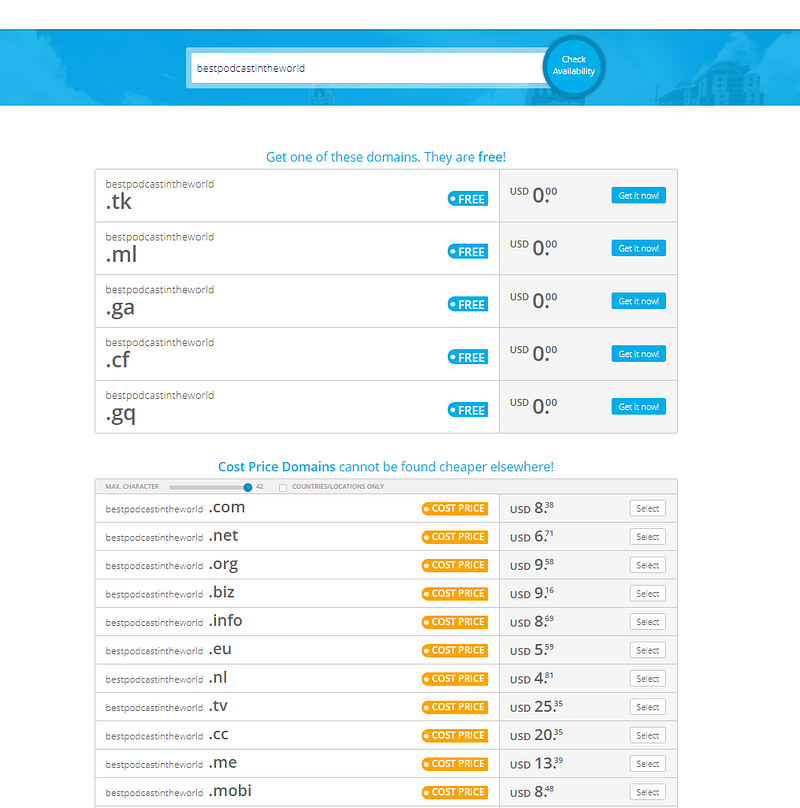
There is an alternative way to grab a domain for your name that is free and that is through freenom.com which is a company based out of Amsterdam, Netherlands. You would go to their website, enter the name you wish to use, and see what domains are available. If money is an issue then this may be the best route for you. Below is an example.
Set up an email address for your podcast.
You will need an email address for your podcast and in some cases more than one. This will be one of those steps in which we’ll discuss a potential startup cost for your podcast.
Now, you can simply go to Gmail.com, or Outlook.com or another free email site and get something like [email protected] or [email protected] and be satisfied with that providing the email addresses are available. There is no cost doing it this way. However, if you want to treat your podcast as a business, or if you want to try and make money off of your podcast, then you will want an email address or addresses that come from your podcast’s domain. This would be one reason to purchase the domain first.
So instead of [email protected], you would have [email protected]. Depending on where you bought your domain registration, you may have already been given an email account. GoDaddy had at one time an email account given with each domain purchased through their workspace email system.
Another route you can do is to use the base Office365 license from Microsoft, available through GoDaddy and other retailers, and pay a monthly or yearly fee for licensing. You can set up email aliases this way to have multiple email addresses go to a single account. This is how I manage my email for my podcasts and websites. Licensing will normally start at $60.00 (USD) per year when purchased yearly.
Write out your podcast description.
The next step I would suggest is to sit down and write our your podcast description. The podcast description is going to be a brief message about your podcast that will be shown by podcast platforms such as the below example from Apple Podcasts.
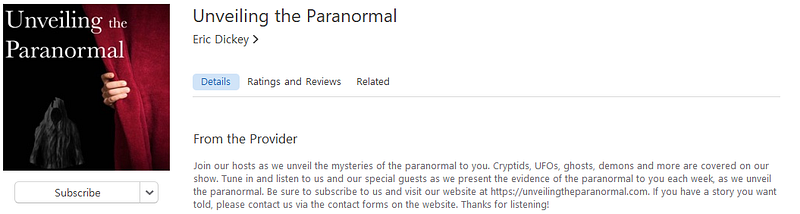
Think of this as the hook you use to reel in listeners when listeners are searching for a podcast to listen to. Some information you may want to provide is a way for listeners to contact you, your website address, and who the podcast host(s) will be. The most important information would be a brief blurb about what your podcast is all about.
Setup artwork for your podcast
After you work out your podcast description, the next step will be to take care of the artwork for your podcast. When it comes to podcast artwork, the standards for sizing will come from Apple. Those standards are Minimum Size: 1400 x 1400 pixels, Maximum size: 3000 x 3000 pixels, 72 dpi, JPEG or PNG format, and RGB colorspace.
If you find yourself to be the artistic type, then you are on your way. Open up the program of your choice and create your artwork. For those of us who are not, you have a few options.
One is to do it yourself. There is a very good website I use for this purpose, Canva.com. I would suggest using the 30 day trial (with a credit card) and creating to your heart’s content with the site and then if do not wish to continue, cancel the trial right before it ends. There is no charge this way. Canva will even send you an email letting you know the trial is almost up, so if you forget, you will be able to cancel when they email you.
If you prefer someone else to do the artwork several websites will allow you to ask for bids to create what you want and pay the winning bidder for their work. A couple of sites you can use are fiverr.com and 99designs.com.
An example of podcast artwork is below.

Setup your social media accounts for your podcast.
You have podcast art. You have a podcast description and you may have even purchased your domain. This step is straight forward. You should now set up your social media accounts for your show.
You may think, “but wait, I already have social media accounts! Why do I need another set?”.
In my opinion, you want to keep your social media away from your podcast. It is the same in business. Keep everything separate. If you have pictures or posts in social media that might be considered risque or controversial, you do not want to alienate possible listeners from listening to your show if you only use your social media accounts to advertise. Keep it separate and use the show accounts for the show only.

At a minimum, you’re going to want a Facebook page, Twitter, Instagram, and Pinterest accounts specifically for your show. You will be able to set up business accounts with your podcast which will help you later on with analytics to determine what works best for your show when advertising on these platforms.
Setup a WordPress website (or the website platform of your choice).
This is another step in which you will need to decide to either use the free option or spend money on hosting for a website. If you want a website that is. Some podcasters forgo a website and simply use the page created by their podcast hosting company. I built websites for my podcasts and have them professionally hosted.
The quickest and easiest way to build a website is to use WordPress. WordPress.com will allow you to build your website on their hosting platform for free, but it will be a subdomain of the main WordPress.com site. So your URL (web address) would be WordPress.YourWebsite.com instead of yourdomain.com. This is one free way to do it.
There is another free way to host your website I discovered by accident while writing this article and I haven’t tried it yet, but it looks promising. That site is infinityfree.net. They promise free hosting with unlimited space but will have advertising in the control panel you use to maintain your site on their server. They also promise NO adds on your website. Free is always a good thing, but usually, there are catches to it being free. If money is tight or you are doing your podcast for fun or as a hobby, try either of these two options.
If you do not want ads anywhere and you are intending to use your podcast as a business or to try and make money, then I suggest a web hosting company to host your website. There are several web hosting companies that will offer you a discount for the first year to use their services, but again, be wary and read the terms and conditions.
One word of advice. If you use a web hosting company in another country pay special attention to setting up WordPress if you choose to use that platform for your website. WordPress will recognize the host country and adjust the language settings for the site and plug-ins used automatically.
Figure out your podcasting host options.
The next most important step you need to take care of is to determine where you will host your podcast.
This is different from where you host your website in that a podcast hosting platform will normally help you do the heavy lifting of adding and deploying your podcast to the main podcast listening platforms (I.e. Apple, Google, etc.).
The podcast hosting platform can either be a paid service or free depending on who you choose. I use Anchor.FM which is owned by Spotify and is a free service. Other services that have a free option include Buzzsprout, Podbean, Podomatic, and Soundcloud. Be aware that although free, there are limitations on certain platforms for their free option. If you are podcasting as a hobby or just to try it out, this will be the best option for you.
For the paid options there are several companies you can use including Buzzsprout, Blubrry, and Libsyn. Using a paid plan will give you more hosting space, better analytics, and other features you will want if you wish to grow your podcast. However, if money is an issue at startup, or you are not sure about maintaining your podcast, then the paid option for hosting is something you might consider later on.
Whichever way you choose, I recommend having a podcast host instead of attempting to self-host on your website, if you chose to build and utilize a website.
Figure out how your podcast format.
You have more than likely already figured out what type of podcast you will be doing, but if not, now is the time to determine your format.
There are several formats to choose from, each with its own set of nuances. Choose the one that is right for your podcast. Here are the main formats in use today.
- One on one Interview
- Solo Commentary
- Group Discussion / Panel
- Fictional Storytelling
- Non-Fictional Storytelling
- Repurposed Content (either yours or another’s)
- Mixed Format
Determining your format will also help you determine the equipment you will need as well as how you will record your podcast. For example, if you have more than one person speaking, such as in the panel or interview formats, you will need more than one microphone and a way to record from those microphones. If you do a storytelling type of format you may need an entire studio to record.
The easiest format is solo commentary as it is just you talking. However, this can become monotonous and at times, boring to your listeners. The hardest, in my opinion, is the fictional storytelling. You may have to write your own stories as well as act one or more parts, assuming you do not need other actors and sound clips to add to the story during recording.
Once you choose your format, it’s time to move to the next step.
How do you want to record your podcast?
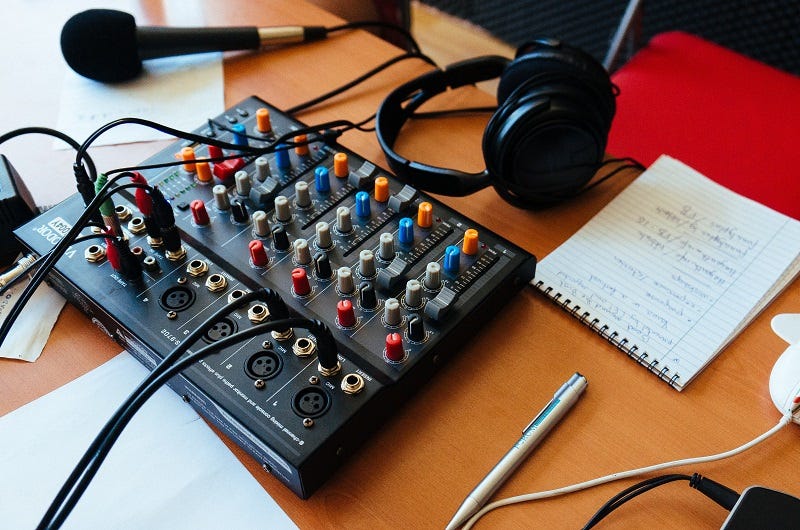
After you have the format, you need to determine how you want to record your podcast. How you want to record will then determine the equipment you may need.
There are many ways to record your podcast. I have converted a walk-in closet into an office with sound panels on the walls and record in there with the door shut. Others have recorded in a closet full of clothes, using the clothes to muffle sounds as well as any echos.
You may find a space in your home where you can sit and record and some have even used their smartphone to record their podcast anywhere they happen to be while recording! There are several options available to you.
If you are doing one on one interviews, solo commentary or even repurposed content, a closet, or a space in your home may be the best option for you. If you are doing a group discussion, again your home may be a good option, but you will need space to sit the members of the panel unless you are using a tool such as Zoom, Skype, or Free Conference Call to record remotely. Otherwise, space and equipment would be the key here.
For fictional or non-fictional storytelling, your best bet might be a home built or professional studio to record in, to keep ambient noises and echos out.
Building a home studio can be as simple as repurposing a room in your home, adding equipment and audio panels on the walls or heavy curtains to as complicated as building a studio in your backyard or adding an addition to your home for this specific purpose.
There is also the option to rent a studio local to you. Most major cities have one or more professional studios available.
Equipment.
Physical Equipment
Physical equipment for your podcast can be extremely simple, or overly complicated. As we discuss physical equipment I am assuming you own a computer with USB ports. If you do not, then I would advise buying a computer.
For the solo format, you’ll need at a minimum your computer and a microphone. I would recommend adding to that a boom arm or stand to hold the microphone, a pop filter to place between you and the microphone, foam audio panels, and an audio interface such as the Focusrite Scarlett 2i2.
For multiple persons, such as panel discussions, one on one interviews and storytelling, add at a minimum, one microphone for each person, whether handheld or placed in a stand or boom arm if everyone is recording at the same location. If you are recording everyone remotely, everyone should still have a microphone that would plug into each person’s computer or phone and then for the host of the conference call, recording software to record everyone’s audio.
Other equipment to consider includes good headphones, microphone cabling, Velcro ties for the cables, an external hard disk drive to store your files, and possibly a large case to carry equipment in should you travel with your equipment.
Audio Software
One of the things you will want to learn is to edit your recordings unless you wish to hire someone to edit them for you. There are four software packages I will mention here.
The first is free if you own a MacBook and that is GarageBand. I’ve used it in the past and if you are an Apple person, this would be your first goto.
The second is also free and is software that I used when I first started podcasting and that is Audacity. The software works on a Mac, Windows, or Linux setup. It is fairly easy to learn and has several plugins available to use that are also free.
The next software is not free, but it is one of the best in the business in my opinion and the one that I now use for editing. That software is Adobe Audition. Adobe Audition has a monthly fee for licensing to use.
The last software is also not free, and that software is Final Cut Pro. I have not used this software but speaking with others who have they consider it the best in the business.
Again, if the price is an issue, I would recommend Audacity to start with.
Do you want music with that?

Most people want music for their podcast.
However, you simply cannot use your favorite band’s music without permission, nor, can you simply pull music from your audio collection and use that due to copyright law.
Nothing is more frustrating than when you have grown your podcast, watch it become very popular, and have tens of thousands of downloads a month only to have it taken down because you decided to use someone’s music without permission. Neither is the lawsuit and fine that will follow the takedown.
There are a few ways to get music into your podcast, both free and paid.
Free Music
Even though the music may be labeled “Free”, it is still good practice to attribute the music to the artist, even if the music is no longer copyrighted and is under the fair use license. A couple of places to get free music are the Internet Archive at archive.org and soundcloud.com. With Soundcloud, you will need to attribute the artist to the music you are using.
One thing to consider is that other podcasters will be doing the same thing, going to the same sites, and at times using the same music you are. If you want something that others may not be using, then there is a paid site I will recommend.
Paid Music
There is a website used by many podcasters called audiojungle.net which has thousands of music clips for sale. Each clip sold includes licensing and you do not have to attribute that music in your podcast or your show notes should you choose not to.
Some of the packages you purchase will have more than one clip with the clips in the package having varying lengths. If you wish to use music with your intro or outros, this is one way to use licensed music at a reasonable rate.
Search the web.
There are many other sites out there, both free and paid that are too many to list here. A search using Google or Bing will be what you will want to do if none of the above suggestions work for you.
Write out and record your intro and outro.
Intro
Almost every podcast has an intro and an outro.
The intro is going to introduce your podcast, sometimes giving the host’s name and if the intro is customized for each episode, a brief overview of the episode being listened to.
Other times the intro will be generic so that it can be used for each episode and recorded only once. An intro can be spoken word only or spoken word with music. You don’t have to have an intro, but it is good practice. Normally an intro will be anywhere from 30 seconds to one minute long.
Outro
The outro will be very similar to the intro and should contain both spoken word and music.
In the outro, you will have a call to action for your listeners to do such as leave a rating and review of your podcast on their favorite listening app, reach out to you directly from your website’s contact form, or email you directly at your podcast’s email address.
The outro is where you should let your listeners know what is coming up in the next episode, and this is where you will ask your listeners to tune in to your podcast to listen to the next episode.
An outro will normally be 45 seconds to a minute and a half long and whereas the intro normally can be more generic, an outro will normally be more specific and recorded with each episode.
Plan out your first four episodes.
At this point, you are almost ready to record your first episode, but you will want to plan out and record the first four episodes instead of just the one.
Why four?
Some people actually suggest you do the first ten episodes, but four is a good number and if you release one episode a week, then you have your first month’s worth of episodes ready to go.
Doing the first four will give you breathing room in case life happens and you find yourself unable to plan and record other episodes in the coming weeks.
Planning the episodes.
At the minimum do an outline of each show. Outlining your talking points will help you stay on track during the recording of the episode. If you feel it necessary, you can script the entire show by writing a script and following the script.
Some podcasts will simply wing it, but those that do and are good are few and far between. Depending on the format of your show, you may need to adjust the planning stage for the first shows.
Record your episodes and upload them.
Record.
Now we hit the record button and start recording the podcast.
Make sure when recording you have that quiet space you setup to limit ambient noises and echo. Nothing sounds worse than hearing the air conditioner or lawnmower in the background when you are discussing something you feel is important in your recording.
Do a couple of test recordings before recording your episodes. Ensure that everything is working and your recording is happening. Don’t find out at the end of the show you just recorded your voice didn’t record due to a bad wire or port on your computer and you have to do your show all over again.
Post Production.
After recording your episodes, you will need to do post-production. It is in post-production that you will clean up your audio using the audio software chosen earlier. Once everything is cleaned up and merged, you will export the recording as an MP4 file to upload.
Upload.
When you upload your episodes, be sure to upload show notes for each episode. This can be your outline or script of the show, links to your website and social media, or any other items you spoke about in the episode. If you interviewed a guest, be sure to include the appropriate links to the guest’s social media, website and other materials agreed upon beforehand.
When you upload your first four episodes, be sure to only publish the first episode. Use your hosting platform’s tools to schedule out the remaining three, or keep them in a draft mode so they are not accidentally released too soon.
Once you publish the first episode, your hosting platform will send the episode to the podcast platforms such as Apple, Google, Spotify, and any others that have approved your podcast. Even if some platforms haven’t approved you yet, go ahead and publish to those that have. Get your voice and show out there!
Shout from the rooftops!
Once your first episode has been uploaded to the platforms you’re publishing to, use your podcast’s social media accounts to blast this message out. If you haven’t already, join up with podcasting groups on Facebook and Reddit and share a link to your episode where appropriate. Get the message out!
If you have a website built, put your episode thereby either embedding it into a blog post or link to your podcast host’s episode page for your episode. Use your social media to share your podcast.
Be sure to have friends, family and others listen to your show and leave positive reviews on their podcast listening app. Have them subscribe to your podcast. With each new release, do the same with social media and the groups you belong to.
Don’t forget about LinkedIn if you have an account. It’s okay to self advertise on LinkedIn by providing links to your podcast in your feed. You might even want to add the title Podcast Host to your profile.
Be proud of what you’ve done and let the world know it’s there!
Moving forward.
Keep recording and uploading.
After you’ve published your first and subsequent episodes, you need to keep your podcast fresh and current to be successful. Most podcasts fail simply because the podcast host will slow down and eventually stop putting out new material. The podcast begins to podfade and listeners will move to a podcast that continues to publish new material.
So keep uploading your new recordings for your listeners to listen to.
Start looking at your data.
Depending on your podcast host, you should soon start seeing data and you need to start paying attention to just who is listening to your show. Look at the demographics of your listeners and start thinking about targeting these demographics for reasonably priced ads on social media.
Start thinking about SEO.
Search Engine Optimization is something you will need to start thinking about and planning. SEO is outside the scope of this article and will be discussed in a future article for podcasting and SEO.
Trademark your show’s name.
If you intend to grow your show and turn it into a business venture to try and make money, you need to think about filing for a trademark of your show’s name. Just because you may own the domain and use the name in social media and your podcast, you may lose the name if someone else files for and owns the trademark. This happened with the Amazon name and currently is showing in a battle with the group Lady A (formally known as Lady Antebellum) and the gospel/blues singer from Seattle Lady A.
The person who owns the trademark will usually win any lawsuit over a name.
File as a business.
If you become successful enough to start treating your podcast as a business, especially if you start selling services or items based on your podcast, you need to file with your local governments as a legitimate business to protect your assets. As in SEO above, this topic is outside the scope of this article and will be discussed in a future article.
Sponsorships.
One of the ways to make money from your podcast is to gain sponsorships of category-related businesses. Sponsorships can be gained by registering your podcast with the website Podcorn.com. Another way to gain sponsorships is through your podcasting hosting service. Certain hosting services will offer sponsorships after your podcast has reached a certain threshold or either subscribers or downloads.
Conclusion
In conclusion, running a podcast can be a fulfilling endeavor, knowing that your voice is out there being heard, your message reaching an audience. A podcast can be frustrating as well. All the planning you’ve done, uploading episodes and then seeing data that shows only 10 people have listened to your show.
Don’t give up too soon if you get discouraged when you only see a few listeners downloading and listening to your show. If your message is important enough, then even one person listening is a success.
If you want to treat your podcast as a business, again, be patient, and look at the data. As with any business, advertising and a great product are keys to success. Take a look at what you are producing and make sure it fits with the category you chose for your podcast. Maybe you need to change categories. Look at the data and ensure you are targeting the right demographics.
The saying goes, Rome wasn’t built in a day, and neither is a successful podcast.
Good luck.


