
Snowflake SWAP WITH: The Common Misconception
Snowflake supports swapping two tables using the ALTER TABLE … SWAP WITH command. It is however very easy to make assumptions that are completely different from what it actually does. In this article, we are going to take a closer look into this command and uncover possible issues that may arise.
Use Case
One of the best uses of this command is for making some changes on an extremely large table without putting it in maintenance mode.
ie.
USE SCHEMA db_a.public;CREATE TABLE big_table_v2 CLONE big_table;<apply changes in big_table_v2 here...>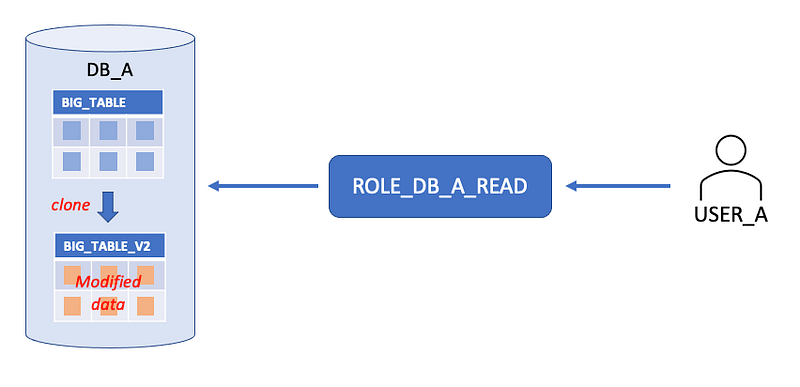
ALTER TABLE big_table SWAP WITH big_table_v2;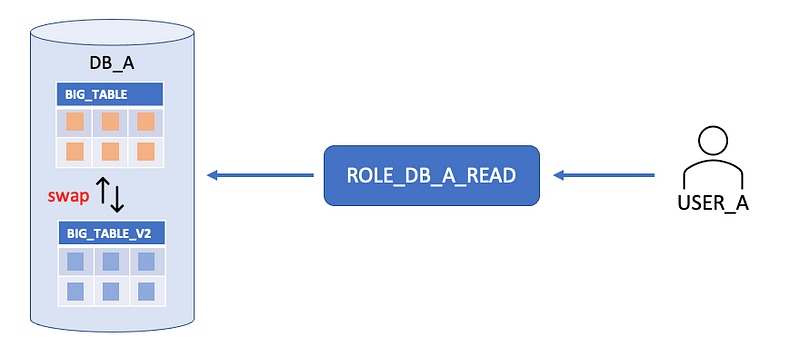
DROP TABLE big_table_v2;In the above example, you take advantage of the CLONE command which doesn’t require additional space from the system and you applied the changes offline hence there is no need to interrupt other jobs that are using the same object. The target table (BIG_TABLE) was live the entire time.
Taking a closer look
From what happened in the above example, it is easy to assume that the SWAP WITH made the big_table and big_table_v2 switch places. Well, they did but not really.
To make it more clear, let’s redo the above scenario with a little more complexity.
- The table will be cloned to a different database
- Different users can access only 1 database and not the other
CREATE TABLE db_b..big_table_v2 CLONE db_a..big_table;<modifications in big_table_v2 here...>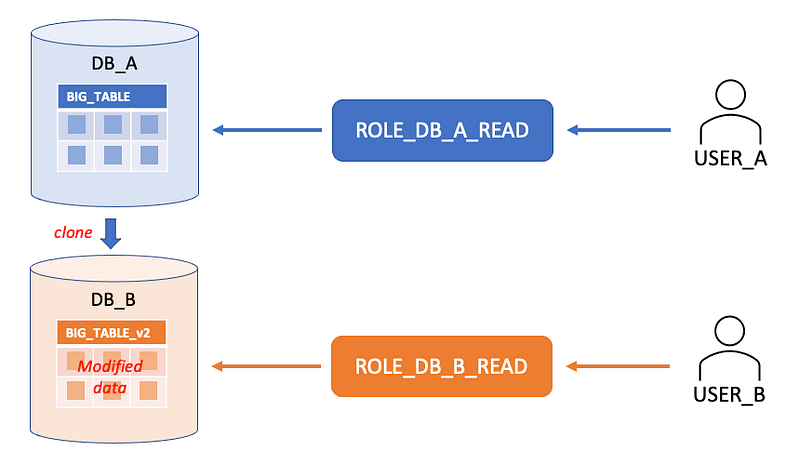
ALTER TABLE db_a..big_table SWAP WITH db_b..big_table_v2;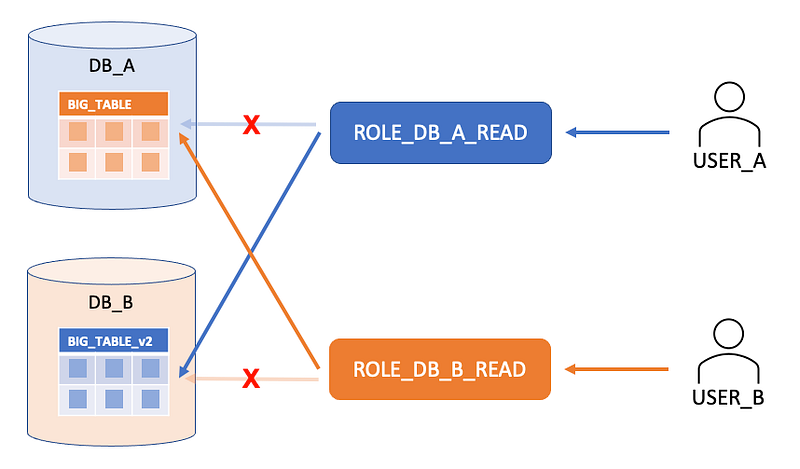
Note: The arrows are pointing to the Tables to show which table ROLE_DB_A_READ can and cannot access as a result of SWAP, it still have access to all other objects in DB_A.
Looking at the above image, it is clear that we have the ff. issues:
- USER_A has lost access to DB_A..BIG_TABLE.
- The Roles are now messed up. The purpose of ROLE_DB_A_READ is to allow read access to every data object in DB_A and DB_A alone. After swapping the tables, ROLE_DB_A_READ has lost access to a DB_A object and can now access an object from another database. Same goes for ROLE_DB_B_READ.
Here’s what happened
We have to go back to the definition of the SWAP WITH command:
The two tables are essentially renamed in a single transaction.
Therefore what really happened when we swap the tables from two different databases was:
ALTER TABLE db_a..big_table RENAME TO db_b..big_table_v2;
ALTER TABLE db_b..big_table_v2 RENAME TO db_a..big_table;
--in one transaction
Which resulted in DB_A..BIG_TABLE to bring everything including the access control privileges, time-travel, etc. to DB_B.BIG_TABLE_v2 because it is still the same table but with a different name and location (DB) in this case.
Final thoughts
The SWAP WITH keyword might be a little confusing. SWAP NAMES WITH would have been clearer and more precise.
It would be a good practice to avoid swapping objects from different databases. You may argue that this won’t be an issue if all Users have access to both Databases. True, but it could still break the role structure if you have a similar RBAC design as shown in this article.


