
Sklearn Pipelines for the Modern ML Engineer: 9 Techniques You Can’t Ignore
There are so many ways you can build them…

Motivation
Today, this is what I am selling:
awesome_pipeline.fit(X, y)awesome_pipeline may look just like another variable, but here is what it does to poor X and y under the hood:
- Automatically isolates numerical and categorical features of
X. - Imputes missing values in numeric features.
- Log-transforms skewed features while normalizing the rest.
- Imputes missing values in categorical features and one-hot encodes them.
- Normalizes the target array
yfor good measure.
Apart from collapsing almost 100 lines worth of unreadable code into a single line, awesome_pipeline can now be inserted into cross-validators or hyperparameter tuners, guarding your code from data leakage and making everything reproducible, modular, and headache-free.
Let’s see how to build the thing.
0. Estimators vs transformers
First, let’s get the terminology out of the way.
A transformer in Sklearn is any class or function that accepts features of a dataset, applies transformations, and returns them. It has fit_transform and transform methods.
An example is the QuantileTransformer, which takes numeric input(s) and makes them normally distributed. It is especially useful for features with outliers.
Transformers inherit from the TransformerMixin base class.
from sklearn.base import TransformerMixin
from sklearn.preprocessing import QuantileTransformer

isinstance(QuantileTransformer(), TransformerMixin)TrueOn the other hand, an estimator is any class that usually generates predictions on a dataset. Estimators often have names ending with words like Regressor or Classifier.
Estimators inherit from the BaseEstimator class.
Estimators inherit from the BaseEstimator classTrue1. Vanilla pipeline
A vanilla pipeline in Sklearn always consists of one or more transformers of the same type and one final estimator. It chains the transformers to perform a series of operations on the feature array (X), eliminating the need to call fit_transform for each transformer and feed the final output to the estimator. All of this is done in a single line of code.
from sklearn.impute import SimpleImputer
from sklearn.linear_model import LinearRegression
from sklearn.preprocessing import StandardScaler

from sklearn.pipeline import make_pipeline


# Define the numeric pipeline
numeric_pipeline = make_pipeline(
    StandardScaler(), SimpleImputer(), LinearRegression()
)

numeric_pipeline.fit(only_numeric_X, y)
To build a vanilla pipeline, you can use the make_pipeline function and pass the transformers and the estimator. The order of the transformers matters.
The above example showcases a numeric pipeline, which can only be fitted to a dataset with numeric features. There is also a categorical pipeline, designed for datasets with only categorical features:
from sklearn.linear_model import LogisticRegression
from sklearn.preprocessing import OneHotEncoder

# Define the categorical pipeline
categorical_pipeline = make_pipeline(
    SimpleImputer(strategy="most_frequent"),
    StandardScaler(),
    LogisticRegression(),
)
Each item passed into make_pipeline is referred to as a step in the pipeline, as depicted in the output below:
numeric_pipeline
Pipeline(steps=[('standardscaler', StandardScaler()),
                ('simpleimputer', SimpleImputer()),
                ('linearregression', LinearRegression())])
The make_pipeline function automatically assigns names to each step in the pipeline, but these names can be lengthy and explicit.
If you want to provide custom step names, you need to use the Pipeline class directly:
from sklearn.pipeline import Pipeline

numeric_pipeline = Pipeline(
    steps=[
        ("scale", StandardScaler()),
        ("impute", SimpleImputer()),
        ("lr", LinearRegression()),
    ]
)
The steps argument accepts a list of tuples with two items:
- Step name as a string.
- The transformer or the estimator for that step.
The significance of properly naming steps will become evident in the upcoming sections.
2. A milkshake of transformers
In practice, you will rarely use vanilla transformers on their own because real-world datasets often consist of a mixture of numeric and categorical features.
Therefore, you need a way to combine different categories of transformers into a single object while also specifying which transformer should be applied to which columns in the dataset X.
This functionality is elegantly implemented in the ColumnTransformer class.
In step 0, you need to define the numeric and categorical features separately:
nums = ["numeric_1", "numeric_2", "numeric_3"]
cats = ["categorical_1", "categorical_2", "categorical_3"]
In step 1, define two transformer-only pipelines for both numeric and categorical features:
numeric_pipe = make_pipeline(SimpleImputer(), QuantileTransformer())
categorical_pipe = make_pipeline(
    SimpleImputer(strategy="most_frequent"), OrdinalEncoder()
)
Then, you can create an instance of a ColumnTransformer class:
from sklearn.compose import ColumnTransformer

transformers = ColumnTransformer(
    transformers=[
        ("numeric", numeric_pipeline, nums),
        ("categorical", categorical_pipeline, cats),
    ]
)
The transformers argument of ColumnTransformer accepts a list of three-item tuples:
- The name of the step.
- The transformer or a pipeline of transformers.
- The name of the columns to which the transformers should be applied.
When you use the transformers object, it will apply two types of operations on both numeric and categorical features independently and then combine the results to return a single matrix.
Therefore, a ColumnTransformer represents a more complex pipeline that does not include a final estimator. To complete the pipeline, let's add one.
3. A milkshake with a watermelon on top
Right now, our semi-pipeline only transforms the dataset X:
X_transformed = transformers.fit_transform(X)The only thing missing from it is an estimator. This is easily fixable:
full_pipeline_reg = make_pipeline(transformers, LinearRegression())

# You can also use `Pipeline` class for named steps
full_pipeline_clf = Pipeline(
    steps=[
        ("preprocess", transformers),
        ("clf", LogisticRegression()),
    ]
)
Depending on the machine learning task, you need to chain either a Regressor or a Classifier estimator as the final step in the pipeline. The resulting pipeline will have both a fit and a predict method, depending on the task at hand.
# y is a classification label
full_pipeline_clf.fit(X, y)

# y is a numeric label
full_pipeline_reg.fit(X, y)
4. Choosing columns with style
While defining the ColumnTransformer, we specified the numeric and categorical features manually, one by one. Like a caveman.
But fear not! Sklearn provides a cool way of doing it more efficiently.
import numpy as np
from sklearn.compose import make_column_selector

numeric_cols = make_column_selector(dtype_include=np.number)
categoricals = make_column_selector(dtype_exclude=np.number)
make_column_selector is a handy function that allows you to automatically isolate columns from dataframes in various ways. In the example above, we used it to filter columns based on their data type. However, you can also utilize the pattern parameter to specify a regular expression (RegEx) pattern for filtering column names.
Here is an example:
pattern = "^(word1|word2)"
filtered_columns = make_column_selector(pattern)
The provided example captures columns that start with either word1 or word2.
This function is particularly useful when constructing ColumnTransformer objects. It eliminates the need to manually list down each and every column name, which can become challenging, if not impossible, when dealing with datasets containing numerous columns.
from sklearn.compose import make_column_transformer

# Automatically capture cols based on dtype
nums = make_column_selector(dtype_include=np.number)
cats = make_column_selector(dtype_exclude=np.number)

# Build the pipelines
numeric_pipe = make_pipeline(...)
categorical_pipe = make_pipeline(...)

transformers = make_column_transformer(
    (nums, numeric_pipe), (cats, categorical_pipe)
)
The make_column_transformer function is a shorthand function, similar to make_pipeline, that allows you to build ColumnTransformer objects without explicitly specifying step names. By combining it with make_column_selector, you can significantly shorten your code.
5. Visual pipelines
When you print a complex pipeline, such as full_pipeline_clf, the output can become an unreadable mess in your Jupyter notebook.
To address this issue, you can set the display option to diagram using the set_config function:
from sklearn import set_config

set_config(display="diagram")
Now, when you print or return the pipeline, an HTML diagram will be displayed, providing a visual representation of the pipeline:
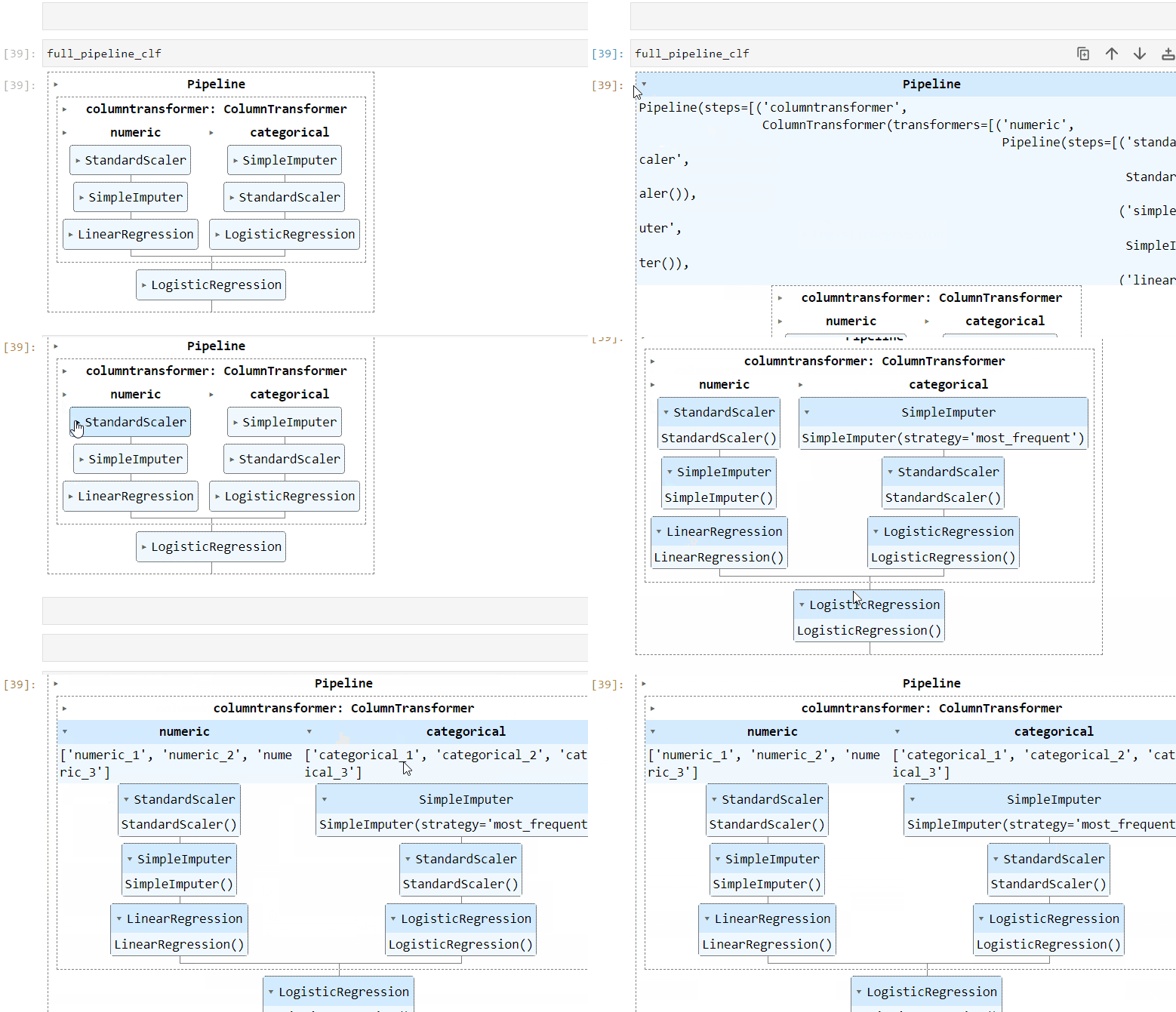
This visual representation is extremely helpful for debugging and diagnostics.
Please note that the HTML representation is the default in the latest versions of Sklearn (1.0.0 onwards).
6. Pipeline cache
Once your pipeline is ready, you’ll likely want to run it 24/7. However, since the pipeline includes multiple transformers that manipulate the data, rerunning the same operations can be time-consuming.
To address this issue, Sklearn provides a memory argument that allows you to cache the output of transformers within the pipeline. This caching mechanism helps avoid unnecessary recomputation of transformer outputs. Here's how you can use it:
from shutil import rmtree
from tempfile import mkdtemp

from sklearn.decomposition import PCA

# Make a temporary directory
cache_dir = mkdtemp()

estimators = [("reduce_dim", PCA()), ("clf", LogisticRegression())]
my_pipe = Pipeline(estimators, memory=cache_dir)

# Run the pipeline
...

# Remove the cache directory at the end of your script
rmtree(cache_dir)
To enable caching, you need to create a temporary directory using the mkdtemp function. Then, you can pass this directory path to the memory argument of the Pipeline object.
Finally, make sure to include rmtree(cache_dir) at the end of your script or notebook to remove the cache directory and its contents.
However, there are some caveats to using the cache (although nothing serious). You can read more about them here.
7. Inside other objects
Even though a pipeline contains a variety of transformers, at the end of the day, it is an estimator:
isinstance(my_pipe, BaseEstimator)TrueThis means it can be used anywhere a typical stand-alone estimator could be used. For example, pipelines are often inserted into cross-validators to guard the machine learning model from data leakage:
from sklearn.model_selection import cross_validate

results = cross_validate(
    estimator=full_pipeline_clf,
    X,
    y,
    cv=5,
    n_jobs=-1,
    scoring=["accuracy", "logloss"],
)
Or into hyperparameter tuners such as HalvingGridSearch (for the same reasons):
from sklearn.model_selection import HalvingGridSearchCV
from sklearn.preprocessing import OneHotEncoder, StandardScaler
from sklearn.svm import SVC

# Define the pipeline with ColumnTransformer
preprocessor = ColumnTransformer(
    transformers=[
        ("numeric", num_pipe, num_cols),
        ("categorical", cat_pipe, cat_cols),
    ]
)

pipe = Pipeline(
    [("preprocessor", preprocessor), ("classifier", SVC())]
)

param_grid = {
    "preprocessor__numeric__with_mean": [True, False],
    "preprocessor__categorical__min_frequency": [2, 4, 6],
    "classifier__C": [0.1, 1, 10],
    "classifier__kernel": ["linear", "rbf"],
}

search = HalvingGridSearchCV(
    pipe, param_grid, cv=5, factor=2, random_state=42
)
At this point, I want to draw your attention to the definition of the parameter grid. Take a look at how it is defined:
param_grid = {
    "preprocessor__numeric__with_mean": [True, False],
    "preprocessor__categorical__min_frequency": [2, 4, 6],
    "classifier__C": [0.1, 1, 10],
    "classifier__kernel": ["linear", "rbf"],
}
The first parameter, with_mean, of StandardScaler serves as an example of a nested parameter. It is preceded by two specifiers: preprocessor and numeric, separated by double underscores.
Nested parameters follow the <step_name>__<parameter> syntax. In this case, with_mean is a parameter of a transformer that is two levels deep. The inner pipeline's name is numeric, and the outer one's name is preprocessor, resulting in preprocessor__numeric__with_mean.
By writing nested parameters in this syntax, you can optimize not only for the parameters of the model but also for the parameters of the inner transformers themselves.
8. Custom transformers
What if you want to perform a custom transformation on the data that is not implemented in the sklearn.preprocessing module? Do you have to abandon Sklearn pipelines and all the benefits they bring?
Absolutely not! With the FunctionTransformer class, you can transform any Python function into a transformer that can be integrated into pipelines. For instance, consider the following function that adds a column representing the number of missing values in each row of a DataFrame:
def num_missing_row(X: pd.DataFrame, y=None):
    # Calculate some metrics across rows
    num_missing = X.isnull().sum(axis=1)

    # Add the above series as a new feature to the df
    X["num_missing"] = num_missing

    return X
To convert it into a transformer, you just have to wrap it with FunctionTransformer and pass it into pipelines:
from sklearn.preprocessing import FunctionTransformer

# Create a custom transformer
custom_transformer = FunctionTransformer(func=num_missing_row)

# Pass it into a pipeline
numeric_pipe = make_pipeline(
    StandardScaler(), customer_transformer, LinearRegression()
)
There may also be cases where simple functions are not sufficient to create custom transformations. In such cases, you can create your own classes that inherit from the TransformerMixin class. I won't go into the details here, but I recommend checking out a comprehensive article I wrote on the topic last year:
9. Target transformations with a pipeline
For the most part, the transformers in your pipeline focus on the feature array X. However, there are cases where the target array y requires some preprocessing as well.
A common scenario in regression is to make the target normally distributed to improve the fit of linear models. If you perform the normalization outside a pipeline, there is a chance you might introduce data leakage to your training set.
To address this issue and simplify the process, Sklearn provides the TransformedTargetRegressor class. With this class, you can include target array transformations directly in your pipeline, ensuring data integrity and reducing boilerplate code.
from sklearn.compose import TransformedTargetRegressor
from sklearn.preprocessing import QuantileTransformer

# Define the pipeline for X
transformers = ColumnTransformer(...)
full_pipeline = make_pipeline(transformers, LinearRegression())

# Define the transformer for y
qt = QuantileTransformer(output_distribution="normal")

# Define the final regressor
tt = TransformedTargetRegressor(
    regressor=full_pipeline, transformer=qt
)

tt.fit(X, y)
After defining the pipeline that ends with a regression model like LinearRegression, you can pass it into the regressor argument of the TransformedTargetRegressor class. Additionally, you need to specify the transformer for the target array y using the transformer argument.
For more information about this class and its usage, you can refer to the Sklearn documentation.
Conclusion
I believe this article is one of my most detailed yet on Sklearn, unless you count maybe these two:
Anyway, Sklearn pipelines are one of the primary reasons why I keep coming back to this favorite library of mine. They bring harmony to the chaotic world of machine learning workflows, turning raw data into gold with elegance and efficiency.
With pipelines, you can orchestrate a symphony of transformers, estimators, and column transformers, effortlessly taming even the wildest datasets.
Thank you for reading!
Loved this article and, let’s face it, its bizarre writing style? Imagine having access to dozens more just like it, all written by a brilliant, charming, witty author (that’s me, by the way :).
For only 4.99$ membership, you will get access to not just my stories, but a treasure trove of knowledge from the best and brightest minds on Medium. And if you use my referral link, you will earn my supernova of gratitude and a virtual high-five for supporting my work.


